They say timing is everything.
Timing seems to be working against VMware's August 6th release
of its Fusion
virtualization software for Mac. Fusion's release might have gotten
more attention - except that the next day Steve Jobs brought the
press in to show off new versions of Apple's iMac computer and iLife and
iWork software.
And if Fusion had been released, say, a year earlier, it would
have been before Parallels
Desktop had a chance to become synonymous with virtualization
in most Mac users' minds.
VMware has a long history of developing virtualization products;
the company has a strong product line of Windows and Linux software
aimed at software developers and network managers. Fusion is both
the company's first Mac product and its first product aimed at
consumers. (US$79, before a US$20 rebate until the end of the year
for US customers only.)
In many ways, they've done a good job with it. Fusion offers a
native Mac interface with a user-customizable toolbar similar to
Apple's Safari browser.

After a straightforward installation, users get walked through
the process of creating a virtual machine. Fusion supports a wide
range of PC operating systems including most versions of Windows,
many Linux distributions, Novell Netware, Sun Solaris, Free BSD,
and "other". Unlike Parallels, it supports 64-bit OS versions as
well as the more familiar 32-bit versions.

Knowing that most users will want to install Windows, you get an
option for Windows Easy Install... if that's your choice. Choosing
this, you enter your user name and the Windows installer serial
number, insert your installation CD, and Fusion does the rest - go
have a cup of coffee, come back in 30 minutes or so, and Windows
should be up and running.
Fusion has done all the pressing F8, Enter, and clicking default
dialogue box options for you. It's much less tedious than
installing Windows on a Windows computer!

Settings including hard drive size, amount of RAM and video RAM
assigned to the virtual system, and more can be set in the process
of creating the virtual machine or after the fact. You can choose
single processor or multiprocessor support - at least if you have a
Core Duo or multiprocessor Mac.
Competitor Parallels only offers single processor support
regardless of what's physically on your Mac. Benchmark testing
recently conducted by
CNet Labs reported better performance by Fusion compared to
Parallels in a variety of tests, perhaps as a result of Fusion's
multiprocessor support.

As with other virtualization (and older emulation) products,
once your virtual system is up and running, you really want to
install what each of these programs calls Tools - in this case,
VMware Tools. These provide the virtual machine with better than
default video and network drivers, integrate the Mac and Windows
(or whatever) cursors, add drag and drop between the Mac and
Windows desktops, and more. And as with the other similar programs,
this is done in a similar way: choosing a menu option sets a file
as a virtual CD-ROM drive so that the installer can be run. One
restart, and you're in business.
While Parallels and VMware's Windows Tools are pretty similar,
VMware's Linux Tools provide better integration with the Mac than
Parallels' equivalent.

If you've got Windows XP or Vista installed using Apple's Boot
Camp beta, both Parallels and Fusion are able to use it, allowing
you to access that Windows installation in a virtual system in a
window (or full-screen) without having to reboot your Mac. You can
load the appropriate Tools version into that Boot Camp installation
and get full functionality without needing to devote double the
drive space (and setup time) to get your choice of booting directly
to Windows or running it in a virtual session.
(Installing Windows twice, once for Boot Camp and secondly for a
virtualization program, would also require two Windows licenses. In
fact, I'm unclear how both Parallels and Fusion manage to run a
Boot Camp installation of Windows XP or Vista without triggering
Windows Activation - the virtual sessions have different amounts of
RAM and different network, sound, and video adapters than the
native Boot Camp session, which ought to make Windows think it's
been installed onto a second physical machine. If anyone knows how
they manage to get around this, let me know!)
Parallels Desktop's recent versions have offered a feature they
call Coherence Mode; choosing it makes the Windows desktop
disappear, leaving open applications floating as windows on the Mac
desktop.
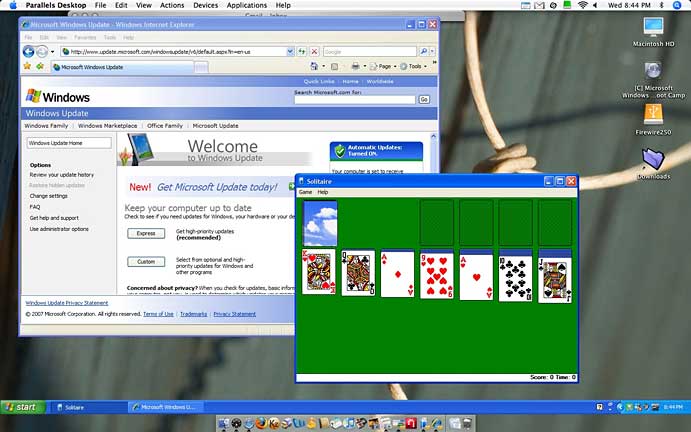
Fusion has a similar feature VMware calls Unity. As with
Coherence, clicking on the Unity button or menu item vanishes the
Windows desktop, leaving applications floating.
There are a few differences, though. You may notice in the
Coherence image that Parallels leaves the Windows taskbar floating
in space . . . there's no taskbar in Unity. And in
Parallels' implementation, all the open Windows applications are on
what Photoshop users might think of as a single layer. Using
Exposé, for instance, when using Coherence, if you choose
one Windows window, you've got 'em all. With Fusion's Coherence,
each application is available separately, the same way OS X
works.

You can open additional Windows applications using Fusion's
Applications menu - it mirrors the otherwise inaccessible Windows
start menu.

Both Parallels and Fusion allow Mac users to choose to share
their Mac home folders with their virtual sessions - and, in both
cases, this option may seem a bit obscure to users. Once enabled, a
Windows user needs to then find the shared folder and set it up as
a Network Place; they can then choose to set it with a mapped drive
letter - actions that typical Windows users are unfamiliar
with.

If you figure out how to do it, you can then access the contents
of your Mac's home folder - Documents, Pictures, Music, and more -
right on your virtual session's desktop, something that can't be
easily done if you boot directly to Boot Camp. (This feature works
pretty much identically in both Parallels and Fusion, and not at
all in the current Mac version of the free VirtualBox).

When printing in Fusion, you'll need to make sure the printer
connected to your Mac is enabled - it's easy to click the row of
USB icons along the bottom of the Fusion window, and click to make
it accessible to the Fusion session when you see your printer's
name. (Alternatively, enable it in the virtual session's settings.)
Then, you may need to install Windows drivers for it.

Parallels does a better job of this - it installs a default
virtual postscript printer; printing to it directs the output to
your Mac's default printer.
Both Parallels and VMware are working to improve support for
Windows 3D graphics; both currently offer support for Direct X 8.1,
but both current lack support for the newer Direct X 9.0 or 10
standards. As a result, neither will run many games and neither
will support Windows Vista's Aero graphics effects.
Parallels includes OpenGL support; as a result, it was able to
run Quake 4 in the CNet Labs benchmarks, though with much lower
frames per second than running it either natively in Mac OS X
or by booting to Boot Camp. Fusion was unable to run that game at
all.
Neither are currently a good option for Mac users wanting to run
most Windows games, though both are working to add that support to
future versions. Best bet for gamers: Install Boot Camp and boot
directly to Windows.
Not a Resource Hog
While typing this article, I've got Microsoft Word 2004,
Preview, and Safari running. I opened Parallels, loading my Boot
Camp installation. After closing it, I opened the same Boot Camp
installation in Fusion. While Windows XP was starting up, I
continued working in Word. While Windows-in-Parallels was loading,
Word became noticeably more sluggish than doing the same thing in
Fusion. From this unscientific test, I would conclude that Fusion
is less of a resource hog, at least while starting up Windows.
VMware offers a large library of "virtual appliances" -
operating system images preinstalled for VMware's virtual hardware
that are in some cases optimized for specific tasks; most are free.
In most cases, these are built on top of free operating systems
including various Linux distributions. Because of licensing issues,
you won't find Windows versions here, but some of these may be of
interest to some Fusion users; these and other VMware virtual
computers can be used with Windows and Linux VMware products,
including the Server and Player products that are free for Windows
and Linux (but not Mac).
Fusion or Parallels or VirtualBox?
The release of VMware Fusion may create a dilemma for Mac owners
needing to access Windows applications. Should you buy a copy of
Fusion or Parallels Desktop? Each costs the same US$79 - at least
after VMware's rebate for US buyers expires. Or should you go for
the free open source VirtualBox?
VirtualBox is free, but the Mac version is still in beta and
lacks some important features - it's somewhere difficult to move
data between your Mac and a VirtualBox session, something you can
do simply with drag and drop in Parallels or Fusion. And with
minimal USB support, devices ranging from memory keys to printers
won't work with VirtualBox. For now at least, it will work for Mac
owners who need to use Internet Explorer to access a critical Web
page (too many banks require Windows Internet Explorer, for
instance), but it won't help if you need to print out that page.
It's coming along, but it's not yet a serious contender.
For many Mac users, it would be hard to go wrong choosing either
Parallels Desktop 3.0 or the new VMware Fusion. Fusion offers
64-bit and multiprocessor support along with better performance at
some multimedia tasks, but you'll get better multimedia performance
doing those same tasks on your Mac. Both offer time-limited trial
versions; try 'em both. 



