Manuel Mejia Jr
- 2000.08.16
I am back!
Those of you who review the LEM Help Desk periodically will note
that I was touring Russia for a month. Having returned and put some
immediate needs in order, I can get back to answering
questions.
Although this column is geared to those working on getting the
most value out of their classic Macs, the observations that I made
about the use of computers in Russia were interesting enough that I
felt that you would want to know what I encountered.
Those of you who watch CNN will get a good bombardment of
commercials touting Internet services to the business community.
The regular use of email, the Web, word processors, 3D graphics,
and other computer tools have permeated American society.
Allegedly, there is a big market out there for all things Internet
and Internet related - or so we think.
In Russia, the American visitor is presented with a country that
is living in the 19th, 20th, and 21st centuries, all at one time.
While there I stayed at a lodge as a guest of the Bolshoi Theater.
The kitchen was a sight to see. The ovens were 19th century
monstrosities powered by coal that had to be shoveled into a
furnace every 3-6 hours. The chief of the operations was a "new
Russian" who drove to the lodge using an early 1970s vintage
Corvette (20th Century) and kept communications with his family
using a Nokia cell phone (21st Century).
New Russians are the ones most likely to own a computer. They
make up only a small portion of the Russian population. The rest
live on more meager incomes and often lack conveniences like
telephones and private cars. Electricity is not always available
due to periodic blackouts.
Many of these people make a living as merchants. When they are
processing a sale, they will use pre-computer age tools like
mechanical cash registers, paper ledger books, and abacuses. For an
old Mac user like myself, seeing these people in action was quite a
refreshing culture shock.
There are some computers available for use. Many require
clearances or other permissions or high use fees. There are two
inexpensive terminals that the public can use in the Moscow
Telegraph/Post Office. This was about all there was in terms of
computer access for nonbusiness tycoons like myself. Even if you do
get access to a computer, using the phone lines can be difficult,
since one can only connect half of the time to the entity that you
wish to contact. Once a connection is made, be patient when loading
a web page, since the 75 MHz barrier has yet to be breached at most
sites. Since the Russians are strapped for funds, older Wintel/DOS
machines dominate. One could probably find a Mac somewhere if you
looked hard enough.
The one computer item that is easy to find in Russia is
software. Russia is not acquainted with U.S. copyright law. Every
software and music title that one can think of is available in
pirated form at a number of kiosks throughout Moscow. Although
Microsoft has been suing in Russian civil court to put a stop to
the sales of pirated copies of Windows 98 and 2000, there is no
enforcement of judgments there. Russia is the Internet version of
the Wild West.
My break from the computer age also had some value in terms of
troubleshooting my PowerBook 100.
When we last visited that machine, I
had managed to overcome the lead acid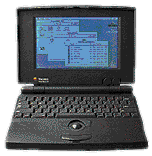 battery problem with a wooden adapter. However, I did not take into
account the importance of the three "Type 2430" lithium button
cells that maintain the parameter settings and the "soft power"
turn-on function.
battery problem with a wooden adapter. However, I did not take into
account the importance of the three "Type 2430" lithium button
cells that maintain the parameter settings and the "soft power"
turn-on function.
A stock PowerBook 100 with a lead acid battery will usually draw
power for the parameter settings and soft power startup from either
the AC power supply or the lead acid batteries themselves. The
button cells are only used by the Mac in the few moments of time
when both the lead acid battery and the AC power supply are
disconnected.
In a PowerBook 100 that has been modified with a wood adapter,
there is no lead acid battery, so the NiCad battery that is used
has to be charged using a separate power supply. As a result, only
the button cells are left to run the parameters and soft power
startup function. Those cells only last 45 days or so when used
continuously by the PB 100. Once those cells are discharged, the
parameters are lost and soft power startup is not an option unless
AC power supply is used. Not even the NiCad battery pack help on
startup.
Fortunately for the PowerBook 100 user, the Type 2430 button
cells are easily accessible and can be changed monthly for a low
cost. This seems the best way to deal with this issue.
One other task of importance to all laptop users is the movement
of said device from one place to another without smashing it to
bits. I have been looking for a proper carrying case for my laptops
for a few years now. I finally found one in an odd location.
American Eagle Outfitters is
selling a small book bag that can be used as a briefcase, shoulder
bag, or as a backpack. The book bag come with a separate hand-carry
bag that is heavily padded. The separate bag is designed for a
notebook computer. The bag protect the computer from other objects
inside the book bag as well as from outside threats.
When the computer is not needed, you can leave it inside the
hand carry bag at home while using the rest of the book bag. The
book bag itself has special pockets for disks, expands to 6 inches
in width, and has two solid nylon rain shields that are sewn to the
ends of the bag. The shields can be tuck away or clipped together
for use on wet days.
There is even a place to stow both the shoulder strap and the
backpack straps so that one could stroll into a Wall Street law
firm or brokerage house without getting as much as a second glance.
The backpack and should strap can be saved for more informal
occasions or for excursions to college.
I got mine for less than US$42 - a bargain considering the how
versatile the bag is. I have paid more for bags without the
features and for bags that scream to robbers, "Steal me, I'm a
laptop!"
Manuel Mejia Jr is familiar with Mac IIs, LCs, and older PowerBooks. He
uses his Mac LC, PowerBook 145B, and PB 100 with System 7.1 on a
regular basis and recently added a Mac Plus running System 6 to his
collection. He's quite familiar with both System 6 and System 7. He
also owns the Pina books on repairing compact Macs from 128k through
the SE. You can read more about Manuel's computers in Manuel Mejia Jr's Four Old Macs.



