Mac Daniel's Advice
The Best Used PowerBook,
PowerBook Upgrade Options
Dan Knight - 1998.12.30
- Upgrade or Replace My PowerBook 520c?
- Upgrade my PB 190, Performa 6200, or ...?
- What's the Best Used PowerBook?
Upgrade or Replace My PowerBook 520c?
CW writes: I have a PowerBook 520c that won't start up. Should I bother having it fixed? Is there anything I can do to fix it, I suspect it's a PRAM battery problem. Once it starts up what should I do about the 12 MB of RAM, 160 MB HD, and lack of OS 8? Should I try to get a 603 processor for it?
Mac Daniel responds: Your 520c is worth around $500 in working condition (maybe more - those PowerBooks really hold value). At least get an estimate on the repair. Better to fix and sell it than take a complete loss on it.
At this point, I'd recommend against a 603 upgrade, especially with the limited RAM and hard drive. Total cost of making it a workhorse is prohibitive.
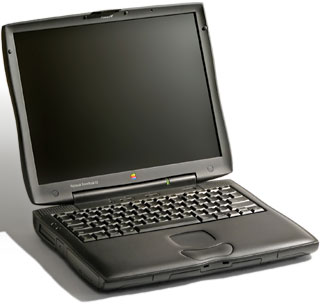
I'd look into selling the 520c and then getting a close-out PB 1400/133. With a 133 MHz 603 processor, 128 KB cache, 800 x 600 color screen, and large hard drive, it's a lot more computer than you'd get by upgrading your 520c. With the 1400/133 selling in the $1,100 range (when you can find them), it looks like a much better long term solution than upgrading your older PowerBook.
Upgrade my PB 190, Performa 6200, or ...?
AR writes: I have a PowerBook 190 8/500 with the 68040 chip and a Performa 6200 CD. They are both slow and out date. I am considering upgrading one of them.
I really don't need to get a G3 because I am a college student. I found out that I can bump up my Performa from 66 MHz to 180 MHz for around $300-$400. I know that my PowerBook, which I got for a mere $600 new, can be upgraded to a 120 MHz PPC and color screen. It should feel and run like 5300c. I need the computer to do some net surfing, word processing, PowerPoint, and to run Mathematica. For the long run should I instead go for a used Power Mac of some sort?
I am trying to spend over $700. Another option would be to get rid of them both, which after a few tears I could do.
Mac Daniel responds: I'd lean toward a PowerPC laptop, such as the PowerBook 1400. I really like the idea of portability. Something you can use for notes in the classroom, research in the library, and anywhere else is very attractive.
I haven't followed the used and close-out PowerBook market closely, but have heard there are deals on the PB 1400 at around $1,000-1,300. Avoid the 117 MHz model, since it has no cache. Both the 133 MHz and 166 MHz are very competent performers - and each 1400 can be upgraded with a G3 processor.
The 800 x 600 screen is a real improvement over the 640 x 480 on your PB 190. Best of all, the 1400/133 or 1400/166 would offer over twice the performance of your 6200.
Used PowerBooks hold their value quite well. You could probably sell your 190 for at least $500, keeping any PC Cards you may have for use in the 1400. If you sold both your PowerBook and your Performa, you should easily cover most of the cost of the new PowerBook.
What's the Best Used PowerBook?
JJ writes: Along the same lines as the current discussion about the best desktop Mac to have, what is the best used PowerBook when it comes to upgradability? I'm just finishing college and would love a brand new G3 but I'm still on a budget.
Mac Daniel responds: Now that's a question I've been waiting for. The best PowerBook ever is the PowerBook G3 Series with that amazing 1024 x 768 14.1" screen - and I can hardly wait to see what Apple does for an encore.
I have heard a lot of good things about the PowerBook 3400, but have no experience with it. With a 603e processor running at 180-240 MHz, it was plenty fast. It had large hard drives, an 800 x 600 active matrix screen, and plenty of expansion options.
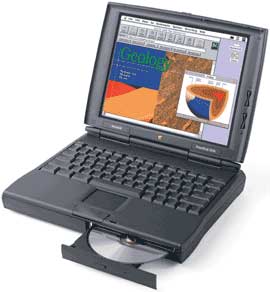
The only discontinued PowerPC PowerBook I've worked with is the 1400, which I immediately fell for. I'd pass on the 117 MHz version, since it lacks a level 2 cache. Both the 133 MHz and 166 MHz models are excellent all around computers. Best of all, they're currently selling in the $1,000-1,500 range, just a bit more than we paid for my wife's PowerBook 150 4/120 some years back.
Below that price range, I'd look at a PowerBook 540c (33 MHz 68LC040) or Duo 280c (also 33 MHz 68LC040).
But if I had $2,500, there's no question that I'd go for the PowerBook G3 Series. To see that screen is to love it.
Reader Feedback
VB writes: The best used PowerBooks? Let's not forget the PowerBook 2400c. If you want the portability it's a really fast machine at 180 megahertz 603e. And it only weighs 4.4 lbs., yet is has all the peripheral ports in the back, including support for virtually any external monitor.
Join us on Facebook!, follow us on Twitter, use our Google+ page, or read our RSS news feed
Not sure if you should upgrade your old Mac or replace it? Check the Mac Daniel index to see if we've already addressed your problem.
Recent Mac Daniel columns
- OWC Legacy SSD Tested in Mystic Power Mac G4, Dan Knight, 2011.07.15. G4 Power Macs don't have built-in SATA support, and most SSDs are SATA devices. OWC's legacy SSDs work on the older Mac's IDE bus.
- OWC Mercury Extreme Pro SSD Legacy Edition Tested in Blue & White Power Mac G3, Dan Knight, 2011.06.24. The Blue & White G3 has a slow ATA/33 data bus. Will OWC's Legacy SSD outperform a fast hard drive with that bottleneck?
- OWC's Legacy SSD Tested in Mirrored Drive Door Power Mac G4, Dan Knight, 2011.05.18. G4 Power Macs don't have built-in SATA support, and most SSDs are SATA devices. OWC's legacy SSDs work on the older Mac's IDE bus.
- More in the Mac Daniel index.
Links for the Day
- Mac of the Day: Lisa, introduced 1983.01.19. The ancestor of the Macintosh had a mouse, a graphical interface, and a $10,000 price tag.
- May 21 in LEM history: 99: Not censorship - 01: USB and FireWire drives - 02: Hooked by a PowerBook - Printer sharing for Mac OS X - 04: Less frequent OS X uprades: Good or bad? - 07: I won't get an iPhone this year - Can 262,144 colors be considered 'millions'? - Most durable 'Book - 3 GB in a Mac mini? - 08: Quadra a great server for vintage Mac network
- Support Low End Mac
Recent Content on Low End Mac
- Flashback Removal Update for OS X 10.5 Leopard, Dropbox Pick of the Cloud Litter, and More, Mac News Review, 2012.05.18. Also Kodak Hero supports wireless printing from anywhere, WinOnX lets you run Windows apps on Macs, and free Mac Malware Remover.
- The MacBook Legacy: 2006 to 2011, Dan Knight, Mac Musings, 2012.05.16. Apple's original consumer Intel-based notebook, the MacBook filled an important niche until it was phased out in 2011.
- 17" MacBook Pro on the Way Out or Changing with the Times?, Dan Bashur, Apple, Tech, and Gaming, 2012.05.15. No other MacBook rivals its expansion options, but is that enough reason for Apple to keep the largest MacBook Pro around?
- More links in our archive.
Recent Deals
- Best Classic Mac OS Deals
- Best iBook G4 Deals
- Best 15" MacBook Pro Deals
- Best Mac Pro Deals
- Best 15" PowerBook G4 Deals
- Best 17" PowerBook G4 Deals
- Best MacBook Deals
- Best iPod shuffle Deals
- More deals in our archive.
About LEM Support Usage Privacy Contact
Follow
Low End Mac on Twitter
Join Low End Mac
on Facebook
Low End Mac Reader Specials
Macsales Add 2nd Hard Drive or SSD to Mac mini, MacBook or MacBook Pro. 1TB of Hard Drive or SSD Capacity from $64.99! Video Guides Make it easy - OWC DataDoubler - Macsales.com
Don't install Parallels to play poker online! Macpokeronline.com will show you how to download and play Poker on a Mac natively on your Mac in just minutes.
Favorite Sites
MacSurfer
Cult of Mac
Shrine of Apple
MacInTouch
MyAppleMenu
InfoMac
The Mac Observer
Accelerate Your Mac
RetroMacCast
PB Central
MacWindows
The Vintage Mac Museum
Deal Brothers
DealMac
Mac2Sell
Mac Driver Museum
JAG's House
System 6 Heaven
System 7 Today
the pickle's Low-End Mac FAQ
Affiliates
Amazon.com
The iTunes Store
PC Connection Express
Parallels Desktop for Mac
eBay