By the time you read this column, I'll be gone. I'll have crossed
over to the Windows platform for nearly 90% of my computing for the
next month. It's not something I really look forward to, but a
requirement of my job. Each year an annual case review conference must
be held for each special education student to plan for the next
academic school year.  Some school corporations spread these conferences throughout the
year, while others such as mine, clump them together near the end of
the school year.
Some school corporations spread these conferences throughout the
year, while others such as mine, clump them together near the end of
the school year.
While creating nearly forty 20-30 page documents called
Individualized Educational Plans is a pain, the conferences really are
a necessary and productive part of the special education process.
Sending one to two letters home with the kids and then filling out at
least three pages in triplicate to attempt to schedule each
conference are part of the federally and state mandated paperwork
blizzard that is all a part of special ed. It's all designed to protect
the rights of the kids . . . or someone's behind. I'm fortunate that
many of my parents are frequently in the building anyway. They just
drop by my classroom and point at the Claris Organizer graphic display
of my schedule and say, "I want to come here!" (Yes, Claris Organizer
2.0v2 still works fine, thank you, with System 9.0!)
A few years ago at a time when my caseload was going stratospheric,
our special education cooperative bought into an IEP creation program
to ease the chore of creating some of the mandated paperwork. I bought
into the thing big time, as there was no way I could complete the tasks
required and still remain even a faint acquaintance to my students, let
alone my family. The selected software was a Microsoft Access driven
database. Since Access doesn't exist for the Macintosh (was the deal,
"Kill Emailer in favor of Outlook and Explorer, then we'll produce
Office without Access and leave FileMaker alone?"), the program is a
Windows only application. I've already done one column on the subject
of "Access for the
Macintosh," so I'll leave it alone at that.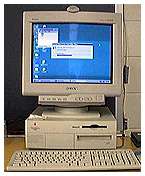
When I first started using the IEP database program, I actually did
all of the IEPs on our Acer Aspire at home and then hauled the machine
to school for conferences. We jokingly called it my 80 pound laptop
until some of the staff overheard and started asking, "You have a
laptop?"
The original IEP database program was pretty primitive and didn't
include a goals and objectives database. I made my own using
ClarisWorks for Windows, which I kept running in the background.
With a change in school administration, our school system was
finally graced with a principal and superintendent who believed special
education teachers should have the tools they need to do the job,
rather than using the castoffs of the regular classrooms. The previous
administration probably would expect a carpenter to hammer nails with
his head, rather than buying him or her a hammer! Among other things,
this change meant our classroom received textbooks and workbooks
suitable to the needs of our students. It also meant an Orange Micro PC
card for my Mac-at-school to handle the IEP program!
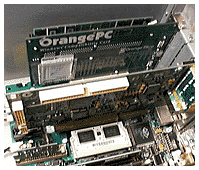 About the same time, I switched from using a Performa 575 at home to my current G3 minitower, which is also
equipped with an Orange Micro PC card. Windows emulators, such as
Virtual PC and SoftWindows, were still rather slow at this point and
weren't a viable solution to the problem. For educators (and others)
facing a similar need for cross-platform computing, the improvements in
Windows emulators along with the speed kick from the G3 and G4 series
Macs makes them worth consideration.
About the same time, I switched from using a Performa 575 at home to my current G3 minitower, which is also
equipped with an Orange Micro PC card. Windows emulators, such as
Virtual PC and SoftWindows, were still rather slow at this point and
weren't a viable solution to the problem. For educators (and others)
facing a similar need for cross-platform computing, the improvements in
Windows emulators along with the speed kick from the G3 and G4 series
Macs makes them worth consideration.
The annual switch to computing in Windows is probably a good
experience for me. My Windows experience is usually limited to
"porting" the Mac version of my sharewares to Windows downloadables,
tech support for users of the sharewares, and a bit of tech support for
the other special education teachers at school when they have problems
with the IEP program. This year, we discovered that the IEP program
wouldn't install on Windows 98 unless you did it from floppies in Safe
Mode! Being required to work almost totally in Windows for a specified
period tends to keep me a little better informed as to what's happening
in the Windows world. It also tends to moderate any criticisms I might
have for that platform.
Several of my faithful readers have already volunteered to slap me
around a bit at the end of April and get me back to my Mac senses.
Odd Thoughts While Shaving Between Paragraphs:
I gave the folks at Adobe a bit of a hard time in my column last
week, Adobe Isn't Making Many Friends. My
point was that Adobe had consistently not followed through with their
promise to automatically distribute to registered users the updated
Acrobat 4 CD without charge. In response to my call (and possibly the
column), Adobe got both the Macintosh and Windows Acrobat 4.0.5 updates
to me in a week instead of the "four to six weeks" they had suggested.
To registered users of Acrobat who want but have not received the
Acrobat 4.0.5 update CD, I'd suggest calling Adobe at 1-800-272-3623
and insisting you receive the free update CD as promised by
Adobe.
In response to my comments about the removal of the "Create
Thumbnails" menu command in Acrobat 4, Will Reiher supplied this
solution:
- I was reading your story and remember this seemingly missing
function. I did, however, find an alternative. In the thumbnails window
do a control click (contextual menu) and you will find the create
thumbnails command.
While I began this column with the line, "By the time you read this
column, I'll be gone," I could have begun it, "By the time you read
this column, I'll be a grandfather!" I'm on my way to the Putnum
County Hospital in response to a call from Michele and
Scott that Caleb Steven Wood would be coming into the world very
soon. Gee, do I sound like a proud Grandpa already?
Low End Mac is an independent publication and has not been authorized,
sponsored, or otherwise approved by Apple Inc. Opinions expressed are
those of their authors and may not reflect the opinion of Cobweb
Publishing. Advice is presented in good faith, but what works for one
may not work for all.
unless otherwise noted. All
rights reserved. Low End Mac, LowEndMac, and lowendmac.com are
trademarks of Cobweb Publishing Inc. Apple, the Apple logo, Macintosh,
iPad, iPhone, iMac, iPod, MacBook, Mac Pro, and AirPort are
Additional company and product names may be trademarks or
registered trademarks and are hereby acknowledged.
: We allow and encourage links to
any public page as long as the linked page does not appear within a
frame that prevents bookmarking it.
Email may be published at our discretion unless marked "not for
publication"; email addresses will not be published without permission,
and we will encrypt them in hopes of avoiding spammers. Letters may be
edited for length, context, and to match house style.
: We don't collect personal
information unless you explicitly provide it, and we don't share the
information we have with others. For more details, see our



