Going Wintel, Week 2
- April 3, 2000
 If you stopped
by the Low End Mac site over the weekend, you were treated to webmaster
Dan Knight's Low End Win April fools site.
While Dan & company are surely chortling over their humorous
efforts, I'm unfortunately living the tale of Wintel.
If you stopped
by the Low End Mac site over the weekend, you were treated to webmaster
Dan Knight's Low End Win April fools site.
While Dan & company are surely chortling over their humorous
efforts, I'm unfortunately living the tale of Wintel.
As I mentioned last week, as part of my
job I end up having to do most of my computing on Windows compatible
computers for about one month a year. It only helps a little that the
computers I'm using are Macintoshes with Orange Micro PC cards in them. Both of
our current Orange cards are equipped with 200 MHz chips. The Orange 624 card came with a
200 MHz WinChip, which seems to do pretty well. The older Orange card,
a 530,
came with a Cyrix chip, which I removed in favor of an AMD K-6. Both cards seem to function
considerably better with the chip fan upgraded to a ball bearing
12-volt fan, rather than the 6-volt stock models.
I've often wondered if a Mac might benefit from a CPU cooling fan,
but I have never tried it. Our school's "Evil NT techie" and I often
laugh and say that someday computers will come with a radiator!
Actually, some supercomputers have cooling systems. Keeping the chip
cooler can improve performance. On a Windows machine, a CPU fan failure
almost always precedes a fried CPU!
The setup I use
for our annual case reviews is really pretty neat. While a laptop,
especially a Pismo with
Virtual PC, would save me a bit
of straining from moving my equipment to the conference room, it's also
nice to do my IEPs on a full size screen.
 I use a
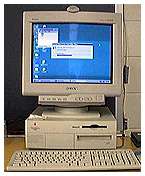
Power Mac 7500 with a
NewPowr G3/250 MHz upgrade card. I'm currently running 192 MB of RAM
and have a 4.5 gig 7200 RPM drive as the main drive. A slower 4500 RPM
2.1 gig drive houses all of the Orange Micro stuff, including the "C"
drive. This machine uses my Orange 530 card because that card has the
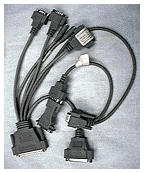
octopus cabling out the back that enables a true parallel port
connection to the printer. The 624 card, which is actually the school's
card, is at home in my G3 minitower. The 624 prints through the Mac
serial port--but not with every printer! I'm currently using a Sony
200ES 17" monitor. It's probably as good a monitor as I've ever
used.
I use a
Power Mac 7500 with a
NewPowr G3/250 MHz upgrade card. I'm currently running 192 MB of RAM
and have a 4.5 gig 7200 RPM drive as the main drive. A slower 4500 RPM
2.1 gig drive houses all of the Orange Micro stuff, including the "C"
drive. This machine uses my Orange 530 card because that card has the
octopus cabling out the back that enables a true parallel port
connection to the printer. The 624 card, which is actually the school's
card, is at home in my G3 minitower. The 624 prints through the Mac
serial port--but not with every printer! I'm currently using a Sony
200ES 17" monitor. It's probably as good a monitor as I've ever
used.
A quick look at the cabling probably tells why Orange Micro changed
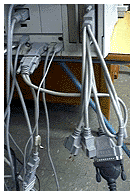
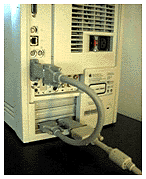
to the loopback cable. The old octopus cable puts an awful lot of
strain on the monitor port and especially on the 530 card. Still, I
prefer the versatility of the older cable. It's also a lot easier to
configure a parallel port printer with the old cable than with the new
one.
Of course, my Epson 850 printer died two weeks before all of this
stuff started. A quick call brought an $85 Epson 740 as a replacement,
but it's quite a bit slower than its big brother. When I installed the
740, Windows asked if I'd added new hardware on startup. I was
delighted that plug-n-play was going to work. Little did I know
then....
Since Windows was going to configure my printer for me, I merrily
inserted the Epson driver CD when so requested, but Windows (and I)
couldn't find the required "Setup.exe" file. It turned out that Epson
named the file "Epson.exe." After going around the block on that one, I
thought I had it made when Windows told me to reboot before using the
printer.
I rebooted and was informed that the Epson installer had replaced a
number of system files with older versions that would not work with my
current setup. After clicking away a zillion warning dialogs, I
persevered and tried using my IEP program. Everything seemed to work
fine until I tried to save to a floppy disk. Whammo! I now knew at
least one of the items the installer had knocked out. On restart,
Windows wanted to drop into safe mode, but settled for just running
ScanDisk and sorting out a bunch of mangled file chains. After clicking
away another zillion warning dialogs, I complied with Windows
recommendation that I use my Windows setup disk.
On an Orange Micro setup, the Windows setup floppy is actually a disk
image that is part of the Orange Micro file on the hard drive. That was
fortunate as I wasn't sure where my Windows 95 CD was. A quick install
of the 4 Orange setup disks resulted in restored floppy drive
capability.
In the end, the Mac with the Windows chip inside was ready to go (to
conference) on time.
Odd Thoughts While Shaving Between Paragraphs:
I ended last week's column thusly:
- Several of my faithful readers have already volunteered to slap me
around a bit at the end of April and get me back to my Mac senses.
Thanks to all my other web friends who wrote and offered to help
out! :-)
Recent Content on Low End Mac
- World Book Encyclopedia 2012 DVD, Tommy Thomas, Reviews, 2013.03.05.
"You may be asking yourself, in an age of Wikipedia and instant information, is World Book still relevant?"
- Vintage Computer Festival SouthEast, April 20-21, 2013, Simon Royal, Mac Spectrum, 2013.02.25.
Old Apple gear and old PCs.
Latest Deals on Low End Mac
View From the Classroom
columns copyright 1999-2000 by Steve Wood.
Low End Mac is an independent publication and has not been authorized,
sponsored, or otherwise approved by Apple Inc. Opinions expressed are
those of their authors and may not reflect the opinion of Cobweb
Publishing. Advice is presented in good faith, but what works for one
may not work for all.
Entire Low End Mac website copyright ©1997-2016 by
Cobweb Publishing, Inc. unless otherwise noted. All
rights reserved. Low End Mac, LowEndMac, and lowendmac.com are
trademarks of Cobweb Publishing Inc. Apple, the Apple logo, Macintosh,
iPad, iPhone, iMac, iPod, MacBook, Mac Pro, and AirPort are
registered trademarks of Apple
Inc. Additional company and product names may be trademarks or
registered trademarks and are hereby acknowledged.
Please report errors to
.
LINKS: We allow and encourage links to
any public page as long as the linked page does not appear within a
frame that prevents bookmarking it.
Email may be published at our discretion unless marked "not for
publication"; email addresses will not be published without permission,
and we will encrypt them in hopes of avoiding spammers. Letters may be
edited for length, context, and to match house style.
PRIVACY: We don't collect personal
information unless you explicitly provide it, and we don't share the
information we have with others. For more details, see our
Terms of Use.