
Apple’s new aluminum keyboards have received mixed reviews, and some of our readers share their opinions of the new style keyboard. Also the reliability of Dual USB iBooks and adding USB to the Beige Power Mac G3.
- Road Apple Nomination: Both New Apple Keyboards
- New Wireless Keyboard Layout
- No Wireless Extended Keyboard?
- iBook (Dual USB) a Road Apple
- 2007 iMac Value Equation
- More Virtual Keyboard Info
- Beige G3 and USB
- Beige Rev. 1 and USB
- Preparing Hard Drives for Sale or Trade-in
Road Apple Nomination: Both New Apple Keyboards
Justin D. Morgan writes:
Dan,
I’d like to nominate both new Apple Keyboards for the Road Apple designation. Here’s why:
- Apple Keyboard (USB 2.0): Yes, I know that this keyboard is now USB 2.0, but Road Apples don’t have to be all bad. It appears to have all of the keys, or does it? I can’t tell from the picture. It also seems as if Apple has decided to downsize some of the keys, and the function keys are half-height. Doesn’t Apple remember the original USB keyboard? Besides this, the keyboard requires Mac OS X 10.4.10, so forget this keyboard as a replacement for an older USB system. [And not that this really qualifies the keyboard for Road Apple status – or does it? – but the keyboard is now $20 more than its predecessor. Less for more.]
- Apple Wireless Keyboard (Thin): Apple forgets every reason why people didn’t like the original Apple USB keyboard [which itself got a Road AppleDesignation] and then some. Not only did they get rid of the numeric keypad and some other keys – right control, help, home, page up, page down, end, delete, and F13-F16 – they shrunk the other function keys to about half the size of the rest of the keys, shrunk the space bar, and combined the special function keys with the function keys. I don’t know about other users, but personally I like the Wireless Keyboard as a full-size replacement to the smaller keyboard on my PowerBook G4, as I don’t have to mess with cables to get everything working.
And for both keyboards: I don’t know about anyone else, but I tried typing on a MacBook keyboard at my local Apple Store. I found it much inferior to my PowerBook’s keyboard. Perhaps it is my typing style, but I don’t think I could get used to either new keyboard. And neither keyboard looks particularly ergonomic, so I’m likely not going to order one to try it out.
Regards,
Justin
Justin,
Let’s give them a little time in the field before we award them the Road Apple label. Realistically, there’s no reason the F1-12 keys need to be full sized keys, as they’re not used for typing like the other five rows of keys. I like to see a bit of space between them and the typing keys, but I’ve become used to half-sized keys right against the typing keys since I bought my PowerBook G4 in January 2001.
Notebook keyboards seem to be driving the design of both of these keyboards. The short throw isn’t hard to get used to, and the feel is fairly good. Of course, that’s said after typing on one while standing in front of the new iMac at the local Apple Store. There’s really no test like putting it on your desk. At $49, that’s not likely to happen.
I have a general disdain for Apple keyboards. All of the USB keyboards have been significantly inferior to the ancient Extended Keyboard and the Extended II, and I’ve been using better quality Logitech keyboards for years. My Mac keyboards just get put on the shelf.
I don’t know what Apple was thinking with the Wireless Keyboard. Not that it’s a bad design – it’s exactly what notebook users are used to. Problem is, there’s no extended wireless keyboard. Maybe its part of Jobs’ latest fantasy that desktop Macs should be more like laptops.
Dan
New Wireless Keyboard Layout
Hi Dan,
“The wireless keyboard seems to exactly match the layout of the MacBook keyboard.”
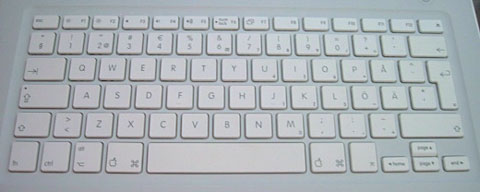
It doesn’t. The Left shift is longer, a couple of keys have been moved over to the top of the return key, which itself is short and wide rather than tall and thin as on the MacBooks, the second key to the right of the space bar is an option rather than an enter, and the ±§ key has been lost altogether.
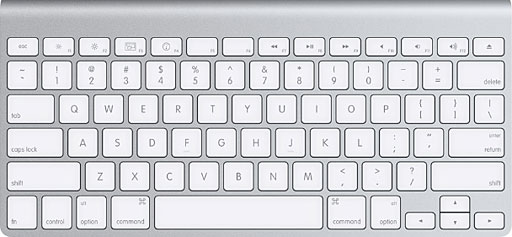
Which, for my money, is a shame. I love my MacBook’s keyboard, and a Bluetooth version would be great for lap-typing.
All the best and keep up a great site,
Chris
Chris,
Thanks for writing. I’ve compared the layout of the new wireless keyboard to both the MacBook and the MacBook Pro, and it’s identical. Is it possible you’re comparing an international keyboard?
Dan
Dan,
That could well explain it. My MacBook is a UK bought one, hence it’s English (UK). I have to admit to feeling a bit silly. I guess, therefore, that the English (UK) Bluetooth keyboard will be a clone of the MacBook (UK) keyboard.
I guess I should do my research better next time…
All the best,
Chris
Chris,
I have to admit that I never thought of it until I did a Google image search to find a photo of the MacBook’s keyboard. That’s where I saw that Apple makes MacBooks with different keyboards for other markets.
Dan
No Wireless Extended Keyboard?
Isaac Smith follows up on Apple’s New Keyboards:
Compact is nice, but why isn’t there also a wireless extended keyboard?
I watched the “special event” that’s now on Apple’s website, and Steve Jobs did give an explanation for this. He says that people want to put wireless keyboards on their lap. I can understand having a compact wireless keyboard for that purpose, but I’d prefer that if there is a compact wireless keyboard, that an extended wireless keyboard be offered, too.
The new USB 2.0 keyboard looks to have the same layout we’ve known for years, but it’s only 1/3″ thick. I’m glad to see USB 2.0 in an Apple keyboard.
Me too. However, with the placement of those ports, it looks to me like some larger flash drives and such won’t fit onto the keyboard nicely. And that 1/3″ thick seems sleek, cool-looking, but I’m not sure how it will be in ergonomics. I’m eager to go to my “local” Apple Store and check it out.
Maybe we’ll see a wireless USB keyboard with USB ports in the future – but it kind of defeats the point of a wireless keyboard to plug wires into it.
Well, I’m just thinking about plugging in USB flash drives. That’s all I ever plugged in to my other keyboard, because my computer has no easy-access USB ports. Maybe digital cameras. But only temporary stuff. I just liked having USB ports that were easy to access.
– Isaac Smith
Isaac,
I have to agree with you. Apple should give its users more choices, not less. They’ve offered wireless extended keyboards for year, and now they don’t. I’ll grant that I rarely use my wireless Logitech keyboard anywhere but on the keyboard shelf, but I like not having a USB cable catching when I move the tray in and out. No dangling cable is a plus.
Maybe next generation we’ll see Apple adopt wireless USB, which will provide the kind of speed you’d need to get the most out of a flash drive.
Dan
iBook (Dual USB) a Road Apple
Ian Campbell says:
Dan,
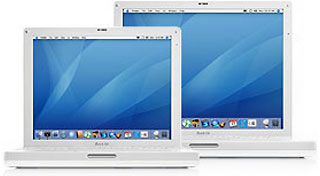 Having worked as an ACDT/ACPT, I can say that without question the dual USB form factor iBooks (including G4s) are among the least durable machines that Apple has ever made. Now, if the machine never left a desk (in the case of Charles W. Moore) – reliability and longevity were second to none. But as soon as the machine was used in an environment where it had the display being opened and closed, got moved around, and had the occasional bump or drop – problems are guaranteed.
I would say that if you take a full picture look at the people who have problems with the iBooks and people who don’t – the people who use the iBook as a portable computer have problems, while those who use it as a glorified desktop don’t have as many (if any at all).
The problem with the iBooks comes from it’s construction – the internal arrangement is something of a sandwich – you have the magnesium frame in the middle, with the logic board screwed to the bottom, the hard drive, optical drive, heat sink, etc. screwed into the top, and then you have the hinges screwed into the middle of the top of the frame (with little to no support running down the middle of the chassis). Because of this – the frame flexes – screws and nuts back out, make contact with other components and short – or the board gives out due to the effects of flexing on the GPU, various chips, or the traces on the board.
All tolled – the iBooks are not machines I recommend to anybody intending to use it as anything other than a compact desktop. I don’t even recommend the 13″ MacBook (which rectified the internal construction issues) because of some other reliability issues it has encountered.
I think that the aluminum PowerBooks and MacBook Pro’s are the way to go for reliable, long lived machines. Because the aluminum casing can dent easily – it makes a person tend to treat the device with more care due to the fact that it seems more fragile.
– Ian R. Campbell
Ian,
Thanks for sharing your experience as someone who has had to work with a lot of these machines. Based on what you’ve written, the white iBooks suffer from a design flaw that allows screws to work loose, boards to flex too much, and puts too much stress on the magnesium frame.
It’s not the same kind of “let’s cripple this” thinking that seems to have been behind most Road Apples, but it’s as much a design flaw as the Apple Adjustable Keyboard. Now I’m leaning toward giving it the Road Apple label again….
Dan
Dan,
Anytime, I’m always happy to share my experiences. I also consider the titanium PowerBook G4 to be the “Falling Water” of laptops. Beautifully designed – but not exactly durable enough for a long productive life in the setting it was meant for.
The only products that have really received the “let’s cripple this” school of thought as of late have been the mac minis. Those machines, thanks to the added cost of display, keyboard, mouse, etc. have helped to sell more iMacs than any other effort on Apple’s part. If I’m going to buy a non upgradeable piece of Apple hardware – I’d like to at least have a nice display to go with it.
– Ian R. Campbell
2007 iMac Value Equation
David J Chilstrom says:
Something you should factor into the value of the new iMacs is that they come with iLife 08, an additional $79 value. Also, the old iMacs have greater value for those who abhor the new glossy screen. While refurbs of the old models are competitive with new machines in some instances, we can expect refurbs of the new machines to trickle in over time, which typically means $300 or so knocked off the list price. Today’s hot refurb deal may be lukewarm in a month or two.
I expect some number of returns based on glossy shock alone, something which I, as a glossy CRT user don’t find such a big deal, though I prefer the matte finish of the old models. Also, old refurbs, if they are still kicking around when the new models enter the refurb zone should drop even further.
On another note, the dot Mac service, which certainly isn’t low-end cost wise for what it offers, has gotten a big big boost in its photo sharing capabilities. Though I’m a devoted Flickreeno, dot Mac photo sharing is definitely lustworthy. It’s a beautiful translation of the iPhoto interface (and then some) to the web. You can view a sample gallery at http://gallery.me.com/emily_parker
David Chilstrom
David,
Thanks for sharing your thoughts. The whole world is going to glossy displays – flat TVs, notebook computers, and now iMacs. I don’t think it’s a bad thing, as it gives a brighter image with richer colors. Everyone seems to like that – think Kodachrome. (Maybe not ideal for critical color work, but that’s why Apple makes the Mac Pro.)
An interesting thing happened when I followed your link – it warned me that my browser (Camino 2.0.x) is unsupported. Funny, because Camino is based on Mozilla (like Firefox) but “Macintized” for OS X. The page seems to work just fine….
Dan
In my remarks about iLife 08, I neglected to mention that October iMacs will be loaded with [OS X 10.5] Leopard. So, there’s another factor for the budget minded to factor in. The value equation is a moving target, but after October it will definitely shift to the new machines.
More Virtual Keyboard Info
Tuomas Rosberg writes in response to What’s at Stake in the iPhone Keyboard Lawsuit?:
I wish to add a detail about Newton 1.x virtual keyboard. It can be moved by dragging anywhere on its edge. It can be closed and appears in fixed position when activated again, not remembering where it was moved.
In Newton 2.x, the virtual keyboard can only be moved when dragging on the roundish handle on the top edge. Otherwise the same.
“the specific need (the inventor) was addressing was onscreen keyboards in tablet computers that could be resized, minimized, or closed before a doctor was finished entering data. One goal of the patent was to create a system where data being typed could not be lost by accidentally clicking a close button.”
If, as you suppose, the patent exists to correct a problem in Tablet PCs running Windows, the problem can be supposedly described like this: Windows XP Tablet PC Edition 2002 has a task bar button to open Text Input Panel and a gesture to do so. If a beginner closed a floating input panel showing virtual keyboard, he could have problem to “find” it again. Input text is not lost when closing virtual keyboard in Windows.
The problem was addressed by refining input things and adding in-place input panel in Windows XP Tablet PC Edition 2005. It seems Microsoft tries to deliver very many ways to set up text input. Hard to learn? Read < http://www.microsoft.com/windowsxp/ tabletpc/evaluation/overviews/ pctools.mspx> and < http://www.microsoft.com/windowsxp/ using/tabletpc/expert/ vanwest_newtip.mspx>
Thank you for lots of relevant reading at LEM.
Tuomas Rosberg
Thomas,
Thanks for your kind words – and for the info on the Newton’s virtual keyboard. I’ve updated the article to reflect that while the keyboard always pops up in the same spot, the user can move it.
Dr. Boesen applied for his patent in 2000, long before Windows XP. In fact, he specifically mentions Windows 98 in the patent. As I’ve never used a Tablet PC, let alone one with Win 98, I can’t say what issues were present. I have to assume that Dr. Boesen knew the problems he was dealing with.
Dan
Beige G3 and USB
Stephen Krautheim says:
I am writing for two reasons.
Firstly, I was shocked to see Robert Krautheim’s letter, as our common surname is quite rare by my experience, so I would like to say “Hello” to Robert, who is quite possibly a relative, even if quite distant.
Secondly, I can address Robert’s question with my own experience. I owned a Rev. 1 G3/233 desktop for many years, and a few years back my old modem died. When we tried to find a replacement, all I could find were USB modems. Trying to invest as little money as possible, I popped in the cheapest USB PCI card I could find, and it worked fine without any driver installs (though I assume I already the proper system extensions in – I was running [Mac OS] 8.6 at the time, I believe). I am quite positive it was a SIIG card, but I have no idea the model number.
Hope this helps.
Stephen Krautheim
Stephen,
Thanks for the information. I’ve forwarded your email to Robert; perhaps you’ll hear back from him.
Dan
Beige Rev. 1 and USB
Dan,
My Beige G3 266 Mhz Rev 1 works great with an USB 1.1 PCI card under both 9.2.2 and 10.2.8. I read your site everyday
Allen Gilliard
Thanks for sharing the info, Allen.
Preparing Hard Drives for Sale or Trade-in
Dan,
Thanks for a great website! I get to your articles when I can, and your value equations articles when new Macs come out are very helpful. I always feel like you’re trying to educate your readers and encourage us to be wise spenders, and as a teacher I appreciate that.
I have several older Macs (1400, 3400, Lombard laptops, Umax 500 desktop, several G4 towers, iMac 3xx, eMac 700, both at home and here at work) that I would like to either sell for cash (local want ads, eBay, LEM Swap List) or trade-in at a used Mac dealer for something newer and faster (not new, just newer!). Operating systems range from OS 7 to OS 9, as well as several versions of 10.x.
I’d like to clear out the old drives of any personal information first, but am not sure what software I need, or the best series of steps to take to accomplish this. Also, since some of the machines were donated without accompanying OEM software, I can’t restore the system to it original ‘shipped from factory’ configuration. What’s the best way to prepare a computer for sale to either a private party or a used Mac dealer, and do the tools change depending on the vintage of the Mac?
I would also appreciate your thoughts on advantages/disadvantages trading in to a used Mac dealer vs. ebay vs. the LEM Swap List vs. ???.
Thanks again for being a great resource to the Mac community (both novice and veteran)!
Joel Maas
Joel,
Thanks for your kind words. We’re more interested in the quality of the Mac experience than the speed of it. So long as it’s fast enough for you, that’s all that really matters.
For the most part, it’s sufficient to run Disk Tools (in the Classic Mac OS) or Disk Utility (in OS X) to adequately wipe a hard drive just by formatting it. Most people don’t have the know-how to recover data from a Mac hard drive, and once you install a new OS, you’ve overwritten a lot of files that were on the old drive.
If you’re paranoid, the current version of Disk Utility lets you zero out all data on a hard drive or do 7 or 35 passes writing random data to the drive. Probably overkill, but definitely secure.
It’s hard to sell a Mac privately without an OS installed, especially models that don’t support Tiger, which is the only version generally available. You may be able to pick up old installer disks and CDs on the LEM Swap List; I’ve done that a few times myself.
A trade-in will almost always give you the poorest return. eBay vs. LEM Swap? Probably less headaches on LEM Swap, as the buyer is more likely to know what he’s buying. No fees, either. But for some Macs, eBay may give you a better return. Best bet is to search for completed auctions and see what a particular model is actually selling for.
Good luck!
Dan
Keywords: #dualusbibook #applealuminumkeyboard
