Problem with Leopard on an Upgraded MDD
From Ted Irving:
Here is what I did: I installed Leopard on my MacBook Pro, and it
booted perfectly. I did the upgrade option so I wouldn't use my editing
and graphics software.
I decided to upgrade my Dual 867 MDD,
which has a Sonnet Tech 1.67 GHz processor for Mirrored Drive Door
Macs. This is where the hell has come in.
For the first attempt, I installed the upgrade on the system drive
with was only an 80 gig drive with 14 gigs left. After I came back in
from letting the install go overnight, my computer monitor only showed
a blue screen and the mouse arrow. I can move the mouse arrow around,
which is a good sign. I got frustrated and then took out the 80 gig
system drive and replaced it with Carbon Copy backup drive of 10.4.11.
This replacement drive is a 120 gig 7200 rpm PATA drive.
I then installed Leopard on that drive, got the success checkmark at
the end, and rebooted. Again, the blue screen came back with a
functional arrow. My only guess is that the low-end ATI card (the
original that came with the Dual 867's) is somehow flipped or reversed,
preventing me from accessing the Dock and system functions. I don't
know of a keystroke that will flip them.
Why would the mouse be functional and nothing else? The card has an
HDMI port, albeit one of the older ones that is rounded and not square.
At this point, I'm stuck on blue screen with roving mouse. Any
suggestions?
Ted A. Irving
www.tedtv.com
Final Cut Pro 5 Certified/Avid Media Composer
Ted,
According to my records, the normal video card for the
dual 867 MHz MDD Power Mac was the Nvidia GeForce 4 MX. The ATI Radeon 9000 was standard on the
1.0 and 1.25 GHz models - and a build-to-order option for the 867, so
I'm guessing that's what you have.
The Radeon 9000 does support dual displays via a DVI
port and an ADC port (I just checked mine to verify this). I don't know
what kind of monitor you have or which connection your using, so I'm
speculating that something in Leopard activated dual display mode and
made the port you're using secondary, which is why you're not seeing
the Dock or desktop icons - but the cursor does show up.
If there is a keystroke to swap primary and secondary
monitors, I don't know of it. I can't find one in any of my OS X
books or online with Google.
Odds are you can't switch your display between the two
ports to verify that. Your best bet is to find a local Mac owner who
has a display that will connect to the other port (not easy if it's
ADC, as that's obsolete technology - Mac of All
Trades has 17" flat panel ADC screen in stock for $100), borrow it,
connect it, and see if it displays the desktop. If it does (which I
suspect it will), you should be able to make your existing display
primary simply by dragging the menu bar from the other monitor to
yours.
Keep me posted!
Dan
Mac mini and the Road Apple Label
From David Cohen:
Dan,
I have been reading your site as long as I have been into Apple
Macs, and I have come to rely on it as a useful and informative
viewpoint on the whole of Apple's Macintosh history.
However, I find myself wincing as I watch the site and yourself get
all wrapped up in knots over the whole Mac mini/Road Apple debate.
Firstly, you published a series of articles condemning every model
of Mac mini from day one as a Road Apple. Then you tried to soften the
resulting ire of your readers by renaming the Road Apple category for
just the Mac mini into something less upsetting. Despite the fact that
the Road Apple term has served the site for some time. Now the feed is
busy with updates to those Mac mini articles.
Are you sure you can't just hold up your hands and say that perhaps
you got this one wrong? The performance compromises you have identified
were not made as pure SKU differentiators or cost cutting measures
(except for the Core Solo), as has been the case with Road Apples of
the past. They were conscious decisions by the Apple design team for
the mini. You also barely allude to the impact the mini has had in
getting more overall Macs sold due to the low price point, and many of
your bad performance arguments would apply to the MacBook as well -
which doesn't warrant Road Apple status, I see.
I think we could all live with the Core Solo on the list - that was
a dumb move by Apple. But the rest? Are you absolutely sure?
Regards,
David
David,
Over the past few years, we've received a lot of
negative feedback for applying the Road Apple label to what a really
pretty decent Macs, just a bit limited or compromised. This was true
for the Cube, the 350 MHz iMac, and the Mac mini - the most recent
additions to the list. The writers weren't complaining about our
coverage, which they pretty much agreed was even handed, but with the
label itself, which implies something fairly bad. I took that into
consideration, and last Friday I removed the Road Apple label from the
1-2 apple Macs, and Monday morning I renamed that entire section Second
Class Macs. Models with 3-4 apples will still be called Road Apples,
but a lot more models than the Mac mini are effected by this change - I
revised 10 of the oldest Road Apple profiles this morning.
I have no idea how much the Mac mini has impacted Mac
sales, as Apple doesn't break down sales figures beyond the
desktop/notebook split. Apple has been remarkably mum about that, and
there has been widespread speculation that iMac unit sales have fallen
far behind projections - that would be one explanation for Apple taking
11 months to revise the line: too many Mac minis in the warehouse.
The MacBook will get a Road Apple rating, at least the
first version with Core Duo heat and Intel GMA 950 graphics. Ditto for
the iMacs with Intel graphics. And probably the original 15" MacBook
Pro as well, as that had no end of problems. The G4 Mac mini was the
newest Mac to get a Road Apple rating when I posted that article last
week, and the Core Duo and Core Solo articles kind of rolled off that
one. We'll add more as time permits.
Dan
Dan,
Thanks for the feedback and a personal reply - I appreciate you are
a busy man, so such a comprehensive response is very gratifying to
me.
You really are on the warpath! I suppose it comes down to one's
experience and overall tolerance of issues. I have actually owned a G4
mini, original MacBook Pro, and currently use a first generation
MacBook, and despite admittedly some problems (resolved under warranty)
I find myself a fairly satisfied owner.
Nevertheless I respect your opinion, and remain an avid reader of
LEM. I am sure there will be much debate on these matters in the
future!
Thanks again,
David
Problems with SCSI/PC Card/Compact Flash
Good day Mr. Knight,
I read your article "Compact Flash with SCSI
Macs" in the Low End Mac Mailbag (2006.06.16). I found it very
interesting. So I decided to acquire a "New Spyrus model#
MS-MCDISK-D-3S/SPYRUS-MCDISK-C-3" from
Go Surplus and a 4 GB CF card with the proper PCMCIA/CF
adapter. After hooking it up to my 7100/80
Power Mac, I tried to initialize it with patched versions of HDSC
Setup and Drive setup, without success (Unsupported Drive error).
I can see the drive with the "SCSI Probe 5.2" application from
Adaptec
- ID:3
- Type:Disk
- Vendor:MPL
- Product:MC-DISK-D-3
- Vers:2.3
I downloaded the "MC Formatter for Macintosh" from www.mpl.ch; this piece of software does not do
much.
I tried formatting the CF card on my "new" G4 Mac mini with the
"newfs_hfs -h" command . . . that did not improve things much
either!
What should I do now? I am running out of ideas. Have you got any
feedback from readers who tried the experience? I am not a power user,
so any suggestion will be very appreciated.
Regards,
Philippe Thibault
Philippe,
I haven't heard from anyone else who has actually
tried this setup. I'll post your email in the Mailbag in hopes someone
who has attempted this may have some suggestions.
Dan
More on Bubble Ads
From Shannon Hendrix in response to Bubble Ads:
On Nov 16, 2007, at 2:43 PM, Dan Knight wrote:
I'm not a big fan of those ads myself, but despite our
best traffic levels ever, site income has been on the decline this
year. We're hoping the ContentLink ads will help there, and we've
limited the number of them that appear on our pages. I should know by
the end of the month whether it's bringing in enough income to offset
the frustration.
It sucks to see you guys not bring in income, because I would hate
to see you go away.
It's just that these are really annoying. They are popping up
everywhere, the only solution seems to block ads completely, which
obviously is drastic.
I run my own DNS server, so I can put servers that create these ads
in without affecting others, but sometimes when I do that it blocks
all ads, even those which are useful and unobtrusive.
I have noticed that ContentLink is now popping up
Flash ads, not just text ads, and I've asked them how we can prevent
that so only text ads show.
I hope we won't lose you as a visitor.
No, but if people who visit end up installing ad blockers that
remove all ads, it will hurt your income even more.
From what I've read, there is serious backlash against these ad
systems.
Good luck anyway. Hopefully you'll find another way or things will
just pick up in general.
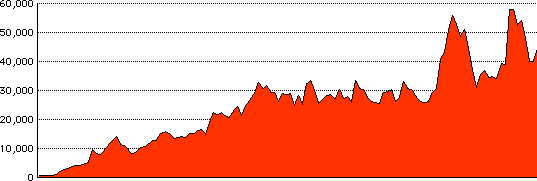
Average Daily Site Traffic at Low End Mac, April 1997 to present.
Shannon,
We've contacted Kontera, the company that puts the
ContentLink ads on our site, and they've turned off the Flash ads, as
well as the keyword "RAM", which never seemed to link to computer
memory. I hope this will be enough to eliminate the scrolling problems,
as these are the ads that don't close automatically - you have to click
the close box. I hope this will make Low End Mac a bit easier to
use.
Ad rates have their ups and downs, as does site
traffic. We had pretty steady growth from our start in 1997 through
March 2002, when things leveled of through October 2005. We've had
eight months where average daily traffic exceeded 50,000 pages - four
from March through June 2007 and four in the Dec. 2005 through April
2006 period (anticipation of the Intel transition and the first
Intel-based Macs coming to market), and we may hit that level again
this month, thanks to the recent release of Leopard.) The months
between the peak periods were at a much higher level than the average
from 2002-2005, and we anticipate continued growth in the coming
year.
As for ad rates, they total a fraction of a penny per
page view from all the ads displayed and fluctuate a bit from month to
month. We've been running behind budget since August, and we're hoping
the ContentLink ads can help boost income back to budget levels, as we
have no reserves.
Dan
Dan Knight has been publishing Low
End Mac since April 1997. Mailbag columns come from email responses to his Mac Musings, Mac Daniel, Online Tech Journal, and other columns on the site.



