Kensington Keyboard-in-a-Box USB a Good Low Cost Value
Low End Mac Reader Specials
TypeStyler For Mac OS X is Now Shipping! Download The Free Fully Functional 60 Day Tryout at www.typestyler.com
OWC: Get the Right Memory for Your Mac Top Quality, Competitive Price, Lifetime Backed Free Expert Support + Installation Videos too! MacBook & mini 8GB, iMac 16GB, Mac Pro up to 32GB. Click here
Don't install Parallels to play poker online! Poker Mac will show you how
to download and install a native Mac poker application such as Full
Tilt Poker Mac.
Laptop Hardware Provided by TechRestore - Overnight Mac & iPod Repairs.
Compare products like desktop computers, apple laptops, apple macs, and LCD Monitors side by side! All the information and reviews to make the best purchasing decision for new mobile phones, sat nav systems, or MP3 players. The Ciao online shopping community makes searching products easy for you.
- 2006.04.10
When I needed to purchase a USB keyboard for my Mac mini, I settled on a used Macally iKey, knowing that the product had a history of problems. It's the luck of the draw when you get an iKey - some work fine, others may repeat key strokes or have problems with their USB ports.
My iKey worked fine for about a week, and then the "A" and "E" keys began to activate twice on some strokes.
Since my first typing experiences were on an old 1950s vintage Royal mechanical typewriter, I may pound harder on a keyboard than I need to. This could be forcing some of the iKey's switches to travel farther downward than they should, turning them off and then on again as they move upward, so my typing style (or lack of it) could have accelerated a defect that would have occurred eventually anyway. Of course, this is only an uneducated guess.
Since I didn't feel like I should have to adjust my typing habits to accommodate a flaky used keyboard, I decided it was time for a change.
The disappointing thing about the iKey was that it really worked for me. It had the same layout and spacing as the old Apple Extended and Apple Design ADB keyboards and felt comfortable to use. I wanted something very similar - but obviously without any defects. Price was also an important factor.
I
settled on Kensington's
Keyboard-in-a-Box USB and ordered one from Amazon.com at a
total cost of $25.64 with free "Super Saver" shipping.
Keyboard Out-of-the-Box
The first thing I noticed about the Kensington keyboard was its lightness. It's much lighter than the iKey and Apple's old ADB keyboards. It's also quite thin and more compact, due to the placement of the function keys right above the top row of keys with no space in between.
The case is transparent smoke gray, and the keys are absolutely black with stark white lettering. This makes them very visible.
A wrist rest is included and is very easy to attach if you want to use it. Two auxiliary USB ports are recessed into the upper ends.
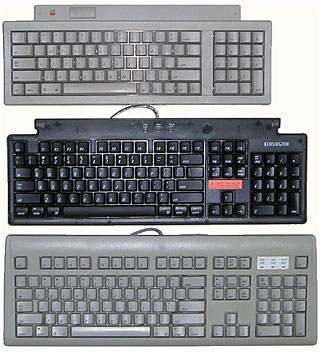
Because of the location of the function keys, the Keyboard-in-a-Box (center) is only slightly deeper than the old Apple Keyboard II (top), which had no function keys. Its layout is nearly identical to the Apple Design Keyboard (bottom), but its length is slightly shorter due to the key spacing being imperceptibly tighter. This makes the total key area about 3/8" shorter overall.
This is not likely to be noticeable even by strict touch typists and makes for a compact but fully functional keyboard.
Do the Twist
When I set it down on my desk, a problem became apparent. The keyboard rocked diagonally on two of its corners. It was about 1/4" off the desk at the high corner.
After verifying that my desk was completely flat and considering the problem for a few seconds, I unceremoniously grabbed the board at both ends and gave it a firm flex in the opposite direction of its twist. It didn't break, and I got the crude adjustment right in the first try. The keyboard now sits flat on all of its feet.
When I asked Kensington's support representative about the problem, he indicated that this particular defect had not been reported before now.
I'm not certain if it's more disturbing that the product shipped with this irregularity or that I could easily fix it the way I did. At any rate, the Keyboard-in-a-Box doesn't win any points for sturdiness. This could make it a poor choice for travel.
Plug and Play
I plugged the keyboard into a vacant slot in my USB hub and booted the Mac mini. The OS requested two key strokes and then recognized the 'board.
The pressure required for a key stroke on this keyboard is less than on Apple's ADB 'boards and similar to the iKey. However, the keys don't bottom out quite as softly as the keys on the other boards. The board also flexes slightly with each stroke, but I'm fairly heavy handed. Nonetheless, I didn't find it unpleasant to type with.
After two weeks, I had used the Keyboard-in-a-Box for writing and updating several web pages, emailing, and writing two articles for Low End Mac. It performed flawlessly and continues to do so.
Recommendations
If it bothers you that you may have to risk adjusting the flatness of a new keyboard as described above, or if you need a rugged keyboard for travel, the Kensington Keyboard-in-a-Box is probably not for you.
However, if you're looking for a light duty, economical, compact
USB keyboard with all of the functions of Apple's ADB 'boards,
Kensington's Keyboard-in-a-Box should fit the bill nicely. It works
for me.
- Link: Kensington Keyboard-in-a-Box USB
- Link: Kensington Keyboard-in-a-Box USB, $24.99 from Amazon.com
Recent Empowered articles
- One year with my 'free' Mac mini, 11.20. "For something the size of a fruitcake, the mini is a powerful little computer."
- Add desktop Trash and a classic Apple Menu to OS X for free, 11.13. Two favorite features from the classic Mac OS have never been part of OS X, but that doesn't mean you have to do without them.
- Deodorizing a stinky old iBook that smells like sweat, 10.19. Different ways to mask and otherwise attack the problem if your G3 iBook suffers from Stinky Keyboard Syndrome.
- A stinky old iBook that smells like sweat, 10.13. You just don't expect an iBook to smell like strong perspiration, but this problem seems to afflict a number of G3 iBooks.
- More in the Empowered index.
Links for the Day
- Mac of the Day: 17" iMac G4/800 MHz, July 2002 - The iMac 'grows up' with a 17" 1440 x 900 display.
- Group of the Day: LisaList supports Lisa users.
- November 8 in LEM history: 99: OS 9: I think I like it - 01: The simplified Mac life - Soured on Windows - Flea market Mac - 02: Little room for improvement in new 'Books - Combo drive upgrade for iceBooks - 04: Re-Porter - 05: Fix the old iMac or buy a Mac mini? - Apple's Copland project - 06: MacBook Core 2 - MacBook value equation - Cheap is as cheap does - 07: Problems with Classic mode in Tiger - The G4 Power Mac that won't run Leopard
- Support Low End Mac
Recent Content on Low End Mac
- Quad-Core CPU Makes Sense in MacBook Pro, OS X 10.6 Causing Overheating, Overseas Power, and More, The 'Book Review, 11.06. Also Late 2009 MacBook reviewed, how to add RAM to new MacBook, 18.4in Acer notebook used Intel i7, and SanDisk SSD chosen for Sony VAIO X.
- Dumping Macs for Google Apps, SSD in iMac, Late 2009 iMac Performance Problems, and More, Mac News Review, 11.06. /newsrev/09mnr/1106.html
- WiFi Paranoia, iMac-O-Lantern, Magic Mouse Does Click, Free Clipboard Managers, and More, Charles W. Moore, Miscellaneous Ramblings, 11.05. Also strange time stamps, problem with ColorIt on Intel Mac, and the story behind OS X 10.5.4 install discs.
- IDE Is Dead; Long Live SATA!, Dan Knight, Mac Musings, 11.04. SATA has displaced parallel ATA. While IDE hard drives haven't disappeared, the best deals are in SATA hard drives.
- QuickTime X in Snow Leopard Imports, Trims, and Publishes Video Quickly and Easily, Alan Zisman, Zis Mac, 11.04. The long, slow process of importing video into iMovie to edit it, then render it to another format, is history as QuickTime X does that much more quickly.
- More links in our archive.
Recent Deals
- Best Mac Pro Deals, 11.03. Used 2.66 GHz 4-core, $1,300; 3.0 8-core. $2,299; refurb 2.66 4-core Nehalem, $2,149; 2.93, $2,549; 2.26 8-core, $2,799; 2.93, $4,999.
- Best iPhone Deals, 11.03. New 8 GB iPhone 3G, $$99; refurb 16 GB 3GS, $149; new, $199; 32 GB, $299.
- Best 12" PowerBook G4 Deals, 11.03. Used 867 MHz SperDrive, $348; 1 GHz, $499; 1.33 Combo, $298; SD, $559; 1.5 Combo, $448; SuperDrive, $589.
- Best Power Mac G3 and PCI Video Card Deals, 11.02. Used beige 300 MHz, $25; G4/366, $49; blue & white 350, $80; 400, $90; 450, $105; PCI video cards from $15; shipping additional.
- Best Power Mac G4 and AGP Video Card Deals, 11.02. Used 400 MHz, $50; 733 MHz, $69; 933 MHz, $209; 1.25 GHz dual, $299.
- Best 15" MacBook Pro Deals, 11.02. Used 2.0 GHz, $800; 2.2, $900; 2.4, $1,000; refurb 2.53, $1,449; 2.66, $1,699; 2.8, $1,949; 3.06, $2,169; new 2.53, $1,579; 2.66, $1,799; more.
- Best Mac mini Deals, 10.30. Used 1.33 GHz G4 mini, $379; 1.42, $389; 1.5, $419; 1.83 GHz Core Duo, $350; Core 2, $439; new 2.26 GHz nVidia, $580; 2.53 GHz, $770; Server, $990.
- Best G4 iBook Deals, 10.30. Used 12" 1.07 GHz Combo, $225; 1.33 GHz, $298; 14" 1 GHz, $349; 1.33 GHz, $398; 1.42 GHz SuperDrive, $498.
- Best Classic Mac OS Deals, 10.30. System 6.0.8 floppies, $10; 7.1, $12; 7.5, $20; 7.5 CD, $4; 7.6 $13; 8.1, $11; 8.5, $20; 8.6, $90; 9.0, $20; 9.2.2, $30.
- More deals in our archive.
About LEM | Support | Usage | Privacy | Contacts
Navigation
Used Mac Dealers
Apple History
Video Cards
Email Lists
Favorite Sites
MacSurfer
MacMinute
MacInTouch
MyAppleMenu
InfoMac
Macs Only!
The Mac Observer
Accelerate Your Mac
RetroMacCast
PB Central
MacWindows
The Vintage Mac
Museum
DealMac
DealsOnTheWeb
Mac2Sell
ramseeker
Mac Driver Museum
JAG's House
System
6 Heaven
System 7 Today
the pickle's Low-End
Mac FAQ
Abandonware
Petition
Mac vs. PC Info
Affiliates
The Apple
Store
Mac
Connection
B&H
MacMall
TechRestore
ExperCom
Crucial
Memory
batteries.com
Advertise
MacMinute
MacInTouch
MyAppleMenu
InfoMac
Macs Only!
The Mac Observer
Accelerate Your Mac
RetroMacCast
PB Central
MacWindows
The Vintage Mac
Museum
DealMac
DealsOnTheWeb
Mac2Sell
ramseeker
Mac Driver Museum
JAG's House
System 6 Heaven
System 7 Today
the pickle's Low-End
Mac FAQ
Abandonware
Petition
Mac vs. PC Info
Mac Connection
B&H
MacMall
TechRestore
ExperCom
Crucial Memory
batteries.com



