One of the coolest peripherals I've had in my arsenal for the
past several months is the QPS Que! QuadSlim M2 FireWire hard
drive. This little unit with the big name is light, small, quiet,
and extremely convenient.
Basically a 2.5" ATA hard drive in a sleek little FireWire
housing that looks a bit like a Star Trek tricorder, the M2 is
available in a four capacities: 6, 10, 20, and 30 GB. My test unit
is 6 GB.
I prefer using hard drives to any other medium for file backups,
and the M2 comes with Dantz Retrospect Express backup software for
those who prefer automated backups. My method of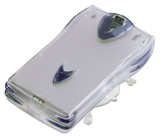 choice is just to create mirror copies of the several
partition volumes on my main computer's hard drive, and then update
them manually.
choice is just to create mirror copies of the several
partition volumes on my main computer's hard drive, and then update
them manually.
However, the M2 drive is useful for much more than backing up
your files. Last spring when I needed to reinitialize my
PowerBook's hard drive in order to create in AUX partition on which
to install SuSE Linux 7.1, I used the M2 as a parking spot for my
files during the initialization process.
The little drive is also very handy for transferring files from
one Mac to another, since it is hot-pluggable and bus-powered - at
least on machines that support powered FireWire buses.
Unfortunately, the CardBus FireWire PC cards in my WallStreet and my son's Lombard don't support bus power,
but the PCI Card FireWire adaptor in my Umax S900 does, as does of course the
built-in FireWire bus in my G4
Cube.
I live pretty far out in the boonies, and the nearest broadband
Internet connection is about 50 miles away, but if I need a big
download like the 83 MB Mac OS 9.2.1 updater, the M2 can just be
pocketed (literally) and plugged into a friend's DSL-connected iMac
in town. The OS update took about 10 minutes to download instead of
the 8-10 hours it would have required over my painfully slow rural
dial up connection. The M2 even comes with a handy belt clip, and
is shock protected in operational mode, so you can literally use it
on the move. It also comes with a shock absorbing suction cup
mounting mount.
The M2 drive is stackable, which means that you can create a
freestanding RAID array of up to five M2 drives, which are designed
to snap together - or up to ten of drives using the optional 2U-10
rack mount accessory kit. M2 RAID stacks must, of course, be
powered using the included external power supply, which is also
required for use with the PowerBook PC Card adaptor.
The M2 drive also comes with Que! D2DT (DV to DVD) MPEG-2
conversion/encoding software, which enables you to convert edited
DV footage from your DV camcorder into DVD MPEG-2 files that can be
played on your Mac. I haven't tried this, but it is a cool feature
for folks who have camcorders.
Incidentally, QPS specifies a G3 Mac as the minimum required Mac
hardware for use with the M2 drive, but it works flawlessly with my
200 MHz 604e Umax S900, which has a Macally FireWire PCI adapter
installed. I suspect that this unit will probably work with any Mac
that can be upgraded to FireWire and run Mac OS 9, but don't hold
me to that.
Hooking up the M2 is simplicity itself. You just plug one end of
a FireWire cable into the FireWire port on the back of the drive
(there are also two other FireWire ports on the drive) and the
other end into the computer or, on our older PowerBooks, into the
PC Card FireWire adapter dongle. There is a little printed quick
start installation manual and a PDF manual with expanded content on
the CD. The print one was quite adequate to get us up and
running.
The M2 drive comes formatted, but if you want to initialize,
reformat, or partition it, you can use the Charismac
Anubis formatting software that is included on the installation
CD, or, as we did, just use Apple's Drive Setup.
The Charismac installer on the CD installed the formatter and a
drive mounting utility on our drive and drops a couple of small
device driver extensions in the System Folder. Restart the Mac, and
you're ready to go.
Once the Charismac device drivers were installed and the Macs
rebooted, the M2 mounted automatically upon startup on all the test
machines. Actually, we had no problem getting it to mount on the
PowerBooks and our friend's iMac running under OS 9.1 (and
OS X on the Lombard) even without the device drivers
installed. Mac OS 9.0 (the minimum System supported) required the
drivers.
The drive appears on the desktop as a volume icon. When the
Charismac drivers are installed, it has its own, unique icon;
without theses drivers, a generic Mac OS volume icon appears. Copy
speeds are impressive, especially on the G3 machines, but even on
the 200 MHz, 604e Umax, it copied my 104 MB Eudora email archive
file in one minute, three seconds - not bad at all for that slow
old machine.
The Que! M2 QuadSlim hard drive comes in a very nice padded
carry case with individual pockets and Velcro retaining straps for
the drive, the power supply, cables, and accessories, which include
the aforementioned belt clip and mounting suction cup and two
FireWire cables, one 6-pin to 6-pin, and one 4-pin to 6-pin.
This is a great little accessory for any FireWire-equipped Mac.
Highly recommended.
Appendix
QPS Que! M2 QuadSlim Drive Specs and Features:
- Voltage 5v ± 5%
- Approvals UL - CSA - CE - FCC Class B
- 3 FireWire, IEEE1394 6-pin connectors
- Connect up to 5 drives with a single cable
- Belt clip, suction mount, carry case, 6-pin cable, 4-pin cable
included
- Option: LAN enabled 4 drive or 2 drive rack mount for networks
(Que! 1U-4Bay™ or 2U-10Bay™ rack mount kits)
- Bus Powered
- 400Mbps transfer rate
- Avg. seek time 13ms
- Buffer size 1024K
- Transfer rate up to 16.6 Mbytes/sec
- Error rate: 1 per 1013 bits read
- Internal transfer rate 121.4-234.1 Mbits/sec
- Rotational speed 4200rpm
- Height: 31.25mm Width: 137.5mm
- Length: 212.5mm
- Weight: 0.7Kg. (approx. 1.5 lbs.)
The QuadSlim drives are available from Club Mac,
MacMall, and Mac Zone. Search using quadslim. QPS is
offering a $30 mail-in rebate through 2001:09:30.
Go to the Miscellaneous Ramblings Review index.



