You know the mythological misconceptions, half-truths, and just
plain untruths that you can expect to hear anytime you mention that
you're a Mac user.
"There's no software for Macs."
"Macs aren't 'compatible'"
"Macs are too expensive."
"Macs can't be upgraded."
"Macs are slow."
And so on and so forth. One interesting thing is that most
computer-aware people have opinions about Macs, often strong
opinions, whether or not they have ever had their hands on a Mac
keyboard.
And over the years, Apple has sat back in apparent Olympian
serenity, disdaining to address the onslaught of disinformation;
leaving it up to Mac enthusiasts to stanch the flood of ignorance.
The only exception I can recall are that during the dark days of the
mid- and late-90s Apple did hire Guy Kawasaki as it official
corporate evangelist, with an eponimously named email list and posted
a website touting Mac advantages, and farther back than that the
fruit company ran some very clever and effective magazine ads that
 highlighted
the difficulty and obtuseness of how one was obliged to do things in
the PC orbit, contrasted with the ease and simplicity of living with
a Mac.
highlighted
the difficulty and obtuseness of how one was obliged to do things in
the PC orbit, contrasted with the ease and simplicity of living with
a Mac.
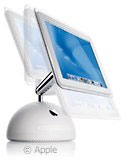
However, finally, coinciding with the release of the
G4 iMac, Apple has posted a new Web page entitled: A
special message to Windows users: Welcome, upon which they
address various assertions of erroneous conventional wisdom head-on,
with a positive spin.
Here's a few highlights. For the full rebuttals, visit Apple's Web
page.
Myth 1: Everyone uses Windows.
Well, not everyone. For instance, I don't use Windows. ;-).
Neither do George W. Bush or Bill Clinton or 25 % of America's
lawyers. Apple estimates that over 25 million people use Macs.
Myth 2: Macs don't work with PCs.
Wrong again. I detest Microsoft and its software, and, thankfully,
I'm rarely obliged to share files with Windows users, but for those
less fortunate, MS Office files are transparently cross-platform in
their file formatting. A PC can open a Word or Excel document that
was created on a Mac and never know the difference - and vice-versa.
Macs also work fine on PC networks.
Myth 3: The software I need isn't available for Macs.
This one, which is the most common misconception, always mystifies
me. The operative answer is to ask exactly what sort of software one
desires that is not available for the Mac. As Apple notes, here are
over 15,000 applications available for the Mac, and if there is some
piece of Windows software one really can't do without, there is
always Virtual PC. The only area, aside from certain highly
specialized proprietary applications, where the "no software"
assertion is partly true is in the gaming arena.
Myth 4: Macs don't run Microsoft Office.
Duh.
Myth 5: Windows has caught up with the Mac.
Uh, no. In some respects, Windows has closed the gap, but the
superiority of the Mac isn't just the user interface (and it's still
better there, too), but rather the elegantly seamless integration of
the Mac hardware and software, as well as the Mac's unrivaled plug
& play hardware interfacing with peripherals, the absence of
driver hassles (for the most part), the ease of troubleshooting, the
relative rarity of the need for troubleshooting, and, unlike XP,
there is no product activation to worry about. The Mac OS is cheaper
as well.
From my perspective, there are 1,001 ways that Macs are
objectively superior to Wintel PCs - many that would be obvious to a
five year old making a side-by-side comparison. These would include
generally difficult software installation and frequent need for same;
having to reinstall drivers for things like the mouse, keyboard, and
monitor when things glitch up; really difficult software
deinstallation; configuration hassles when adding peripherals; and
Microsoft's miserable record of backwards software compatibility. The
list of Windows aggravations and inconveniences goes on and on and on
and on.
Myth 6: Macs are far easier to use than PCs.
As Apple owns up: "Guilty as charged."
Apple did not address the "Macs are more expensive" issue,
presumably because, feature for feature, Macs really are generally
more expensive to buy than Wintel PCs, but the difference is not
nearly as dramatic as conventional wisdom would have you believe, and
these are often "Apples and lemons" comparisons. You tend to get what
you pay for. I would rather pay a bit more for a machine that will be
a pleasure to use, typically require little or no maintenance or tech
support over its service life, and which will also typically have a
longer useful service live than a nominally equivalent PC.
As for the "can't be upgraded" knock, in the context of the parts
bin oriented PC experience, that's partly true. You can't purchase a
bunch of components and build your own Mac. But how many people
actually do that, even in the PC world?
Are Macs slow? Well, clock speed-wise they may seem so, with
Pentium 4 numbers climbing to 2 GHz and beyond while the fastest
Mac tops out at 867 MHz. However, what is it you want to do? Macs
still dominate in the power-intensive graphic arts, advertising,
publishing, and movie editing fields, and they are well-represented
in science-based industries like biotech.
Again, what do you want to do that you think the Mac is too slow
for?
All of these objections to the Mac tend to be misleading
simplifications or partial truths at best. As Mac enthusiast Richard
K. Hallmark, Ph.D., observed a while back in a MacToday
magazine column entitled Why do People Choose Windows?
- All of these arguments are a smoke screen designed to conceal
the real reasons [people choose Wintel boxes over Macs].
The first of these reasons is fear. They are afraid of making a
mistake. It is easier (and safer) to go with the crowd. Perhaps
that is why the Macintosh retains its popularity among creative
professionals, the people who already know how to Think
Different.
Some folks like to choose their computer by applying the same sort
of criteria they would apply in purchasing a refrigerator - like
people who buy automobiles solely on the strength of what they read
in Consumer's Report. As long as it has four wheels and gets them
where they want to go with reasonable reliability and safety - and
doesn't stand out too much from the crowd - they are satisfied.
They couldn't care less about maximum cornering power, snappy
acceleration, elegant design and styling, and other "fun to drive"
factors. The notion that driving pleasure and utilitarian
practicality don't have to be mutually exclusive qualities never
occurs to them. They buy plain-vanilla 4-door, generic, dronemobiles
for transportation. The idea of "thinking different," of standing out
from the crowd, is abhorrent and frightening to them.
A PC box running Windows XP is the computer equivalent of a 4-door
dronemobile. It gets the job done in minimalist terms, but it sure
isn't much fun!
The "I'm buying a PC because Windows is the popular OS that
'everyone' uses," is another variant of fear. People who make this
affirmation are not against fun per se, but they are also afraid -
not of standing out from the great grey bourgeois masses, but of
being perceived as unhip. Their version of mediocrity is more trendy
than that of the Consumer's Report types, but it is nevertheless
still mediocre - and even less admirable because of its
pretentiousness. They fancy themselves as belonging to the avant
garde and are scared skinny if being thought weird or different. In
fact they are the most sheep-like of followers - the people who
always made sure to ape the dress and behavior code of popular
cliques in high school. Bereft of true imaginative vision (the
ability to "think different"), they settle for the perceived safety
of popularity. It is this sort of outlook that explains the vacuous
fatuity of network television, and of late 20th Century popular
culture in general.
- As no less than Steve Jobs has observed: "You think it's a
conspiracy by the networks to put bad shows on TV. But the shows
are bad because that's what people want. It's not like Windows
users don't have any power; I think they are happy with Windows,
and that's an incredibly depressing thought...."
There are a couple of other factors at work in relation to the
Mac's uneasy relationship with conventional business culture.
Conformist, button-down, MBA types harbour an instinctive hostility
toward the more freewheeling and nonconformist attitudes typical
among the visual arts crowd. Since Macs are the box of choice in the
vast majority of art departments, and the most visible people who use
and advocate Macs are often considered weird, well - you get the
picture.
Will Apple's myth-busting Web page help? Perhaps. With the advent
of Mac OS X and the introduction of drop-dead cool Mac hardware
like the Dual USB iBook, the TiBook, and the new G4 iMac, more PC
users are checking out the Mac. But I wouldn't expect a stampede of
forward migrators.
"When you press Wintel users about their choice," writes Dr.
Hallmark, "especially when you are armed with the facts, things get
interesting. Most will refuse to talk to you, the 'My mind is made
up, don't try to confuse me with the facts' technique. Somehow I
always get the feeling that there is something more going on here.
So, What Do They Really Mean?"
What they really mean, in most cases, is that it's not that
they're incapable of "thinking different" - they're simply afraid to
or don't want to.
Further Reading



