Version 5.8 of Tracy Turner's MacaRa Modem
Magic suite of alternative modem scripts is now available.
About 60% of Internet users still access the Internet via 56k
dialup as opposed to cable or DSL, whether because they can't justify
the higher cost of broadband, or, as in this writer's case, no
broadband service (aside from astronomically expensive satellite links)
is available in their location. For me, the nearest DSL is 50 miles
away,
MacaRa Modem Magic includes some 300 modem scripts for various
internal and Mac-compatible third-party modems, and it promises faster,
more reliable dialup Internet connections. Some users and reviewers
have enthusiastically praised them. On the other hand, skeptics have
also suggested that they are the cyber-equivalent of snake oil
remedies.
I've been using MacaRa Modem Magic modem scripts for about four
years through various versions, in both the Classic Mac OS and
OS X, and I have found that the improvement in performance with
them compared to the stock modem scripts that come bundled with the Mac
OS varies with different modems. The most noticeable improvement is
with the Global Village Platinum 33k external modem I use with my
Umax SuperMac S900 tower. On that
rig, connection speeds and download performance using some of the Modem
Magic scripts is noticeably livelier.
The key is optimization that lets the modem interface with the
computer more efficiently and allow data compression to work better -
modem scripts that ship with modems or the ones that come with the Mac
OS are often pretty mediocre optimization-wise. Many name-brand modem
manufacturers' newest modem drivers for Mac are several years or more
out-of-date.
Conversely, Modem Magic modem drivers have been created and updated
to support current standards like V.92 and V.44.
More recently, I've discovered that certain Modem Magic scripts are
a partial workaround for the bug in OS 10.3.5 that causes increasingly
undependable and erratic modem dialup behavior with my 700 MHz G3 iBook as uptime
progresses.
In general, Modem Magic scripts seem to hold onto connections more
tenaciously - dropped connections are very rare since I started using
them. Dialups tend to be faster, and connections are very reliable with
a number of the scripts, such as the iBook Internal v90, the Apple
Laptop Internal Modem, and the Apple Internal 56k Modem (V.92), among
others which support the iBook's internal software modem.
I am on a rural dialup connection with 12 miles of indifferently
maintained ancient copper wire phone lines between me and my ISP. I
guess I should be thankful that I get reasonably dependable service,
but it is slow. The stock modem scripts give a connection speed in the
Remote Access Control Panel on most days of 24000 or 26400.
Occasionally, an old 28.8k USRobotics Sportster modem on my wife's even
more ancient 68030 LC 520 would
show a 28800 connection, but that's it. I've never seen any other
modems connect from here at more than 26400 using stock Apple modem
scripts.
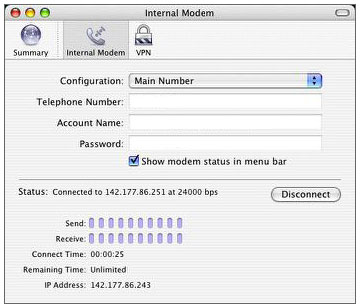
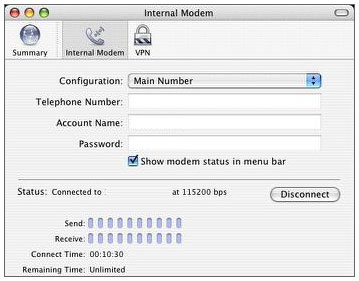
However, in the Remote Access dialog in OS 9 and Internet Connect in
OS X, the MacaRa Modem Magic scripts routinely show much higher
speeds, frequently 49333 - and even 57600 and 115200.
Therein lies some of the controversy.
MacaRa Modem Magic author Tracy Turner tells me that the 57600 and
115200 [speeds showing in Remote Access/Internet Connect] are both port
speeds . The actual line connections are slower. However, opening a
port to these two speeds is much faster than having the port set at
38400 with old V.34+ modem drivers.
"We get people arguing all day about Port Speed, Modem
to Modem speed, 7 bits, 8 bits, etc.," says Tracy. "What I feel is
important is that logins are usually fast, downloads are fast, and the
connections seem to stay stable. We did thousands of hours of tests
before our first sale."
"For a person with an iMac Modem connecting at 49333
with stability there is no point in using my product. A person with a
56K capable phone line having 26400 connections and dropped connections
with a Teleport 56 X2 flashed to V.90 - this is where we really excel.
Our drivers will connect that person at 50666 bps initial connect rate
and keep them online without drops as long as they like.
"Probably the biggest weakness in our product is a
weakness in the Mac vendor world in general:
"Due to the many competing ISPs, modem brands,
firmware versions, and different flavors of 'Apple GV Internal' modems,
a person may need to try our drivers one by one until they achieve
compatibility between their modem and driver and their ISP. Everyone
has sort of set their own personal standards of what they think V.90
code is.
"There are not good standards of V.90 even now. One
ISP will allow a '115200' connection with analog, but the next will
not. We designed our drivers to connect fast in many different
situations, yet we also kept them simple.
"This is the default speed in a Global Village Modem,
but some ISPs will have a login error until this is out of a 56K Mac
Driver. Another ISP will have 50667 as a V.90 speed, while the modems
firmware and driver will have 50666 as the rate. In this instance the
connection negotiates to slower speeds like 48000. With our drivers the
connection goes through at 50667 or 50666.
"Our modem drivers do not turn 28800 phone lines into
56k lines.
"56K Modems take digital data in your Mac and turn it
into analog carrier waves traveling at (realistically) a 53333 bps or
54666 bps speed. Some people get these speeds regularly, but by no
means a majority. Apple's modems are more likely to do 49333 bps with a
good phone line. Zoom and USR V.90 and a few [other] brands (Zoom,
Hayes, Supra) 56K modems can go 50666-52000 bps or faster regularly on
good copper pair phone lines.
"According to Fitzgerald and Dennis, page 95, edition
7 of Business Data Communications and Networking, about 80% (mostly
urban, newer phone lines) of North America can achieve 56K speed, 20%
(mostly rural, older phone lines) cannot achieve true 56k....
"Before we put each driver in our product, we logged
in repeatedly with each given modem (48000 or above) and downloaded a
36 MB file. The driver had to download the file to completion at a fast
rate or we did not put it in our product. For every driver in our
product, there are a dozen that failed to meet our standards....
"In plain English, consider the names assigned to our
modem drivers a guide rather than a static certainty. Some of the
drivers report a connect rate of 57600 or 115200 with some brands of
modems. The acid test of connection rates is timing downloads of large
files, graphics, software downloads, etc. Average throughput on
http://mac56ktest.com should be
40-50k; if not you may have pair-gain.
"If you have a long history of connections under
33600, including with our product, you probably have pair-gain, or
multiple analog-digital converters. These issues can only be remedied
by telephone company linemen (or line-women). Although telephone
companies sometimes show reluctance to deal with this, our personal
experience was that when we offered to pay for a lineman's (or
line-woman's) time to move a phone line to copper-pair configuration,
the phone company responded by doing the work at no charge. For us,
this made for 53333 bps maximum, compared to pair-gains 28800 maximum
in our case....
"MacaRa Modem Magic cannot make overloaded Servers,
PoPs, ports, nor your ISP's modems go faster. Some Internet Service
Providers suffer Net Congestion* or have too many unresolved Technical
Issues. Before you decide your ISP is at fault, see if they have other
Points of Presence (PoPs) in your Local Calling Area. PoPs change
performance frequently due to customer migration, hardware, software,
and network practices."
These seem to me to be reasonable and not extravagant claims, and
the description is consistent with what I have experienced with this
product.
Another point Tracy addressed:
"...regardless of the connect rate in remote access,
our drivers will download files or bring up bandwidth test pages faster
than other modem drivers. In several independent tests, there were up
to 3 times as fast of downloads with our drivers."
I can't say that I've gotten anything close to 3x faster downloads,
but using Modem Magic scripts in place of the stock ones does appear to
speed things up noticeably, especially with some modems.
Here are some comparison times I ran on the S900/GV Platinum rig in
OS 9.0:
Apple GV Script (Mac OS 9.0)
- Dialup connection time: 37 seconds
Load National Post Homepage: 65 seconds
GV High Speed Reliable V.92 (MacaRa Modem Magic)
- Dialup connection time: 32 seconds
Load National Post Homepage: 58 seconds
"No More Noise" script (MacaRa Modem Magic)
- Dialup connection time: 33 seconds
Load National Post Homepage: 60 seconds
The MacaRa Modem Magic 5.8 package includes installers for both the
Classic OS and OS X. Use the OS X installer for 10.0.4 or
higher (up to Jaguar and Panther, 10.2.x, 10.3, etc.). All the modem
drivers are OS X compatible. Early versions of OS X required
you to login as root, run the installer, and then log out of root.
Versions from 10.1.5 or later should work fine with you logged in as
admin. I just double-clicked the OS X installer in OS 10.3.5, and
it did its stuff slickly and quickly.
In the Classic Mac OS the Mac Modem Magic installer replaces the
Modem Scripts Folder in your System Extensions Folder with a new one
containing over 300 different high-speed modem scripts. The old Modem
Scripts Folder is saved as Modem Scripts Disabled. Existing Modem
Scripts are not thrown away; you will find them in "Extensions
Disabled" in the Classic OS, in Folders renamed "Modem Scripts (old).1"
etc.
OS 9.2.2 or older looks for the Modem Scripts in the Modem Scripts
Folder in Extensions. OS X looks for the Modem Scripts in the
Modem Scripts Folder in Library, on the hard drive. You can also
physically copy or drag the drivers from the 9.1 System Folder:
Extensions: Modem Scripts Folder into Hard Drive: Library: Modem
Scripts.
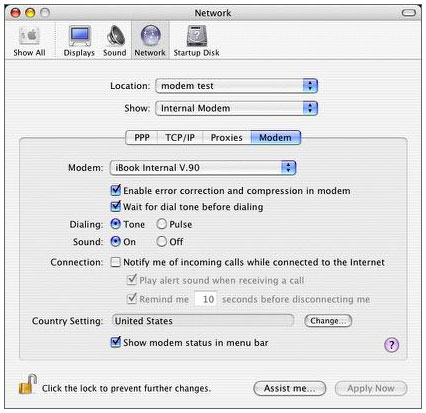
After installation finishes, go to (OS 9: the Apple Menu, Control
Panels, Modem Control Panel) or (OS X: Network system preference panel,
Configure button, Modem Tab) after installation, and use the pulldown
menu to select a new modem definition or modem script.
Since some of the MacaRa Modem Magic 5.8 scripts are available as a
free demo and they are a relatively small download, if you think they
may offer some improvement in your dialup performance, there is no
reason not to give them a try.
MacaRa Modem Magic was first conceived of and development started in
1997 due to Tracy Turner tearing his hair out over dropped connections
and stalled, broken downloads. Not all people have connection troubles.
Then again, many Mac 56k or ISDN users do get dropped connections or
slow, stalled downloads.
Initially, modem init strings and modem drivers were experimented
with for 2-3 modems. After success with both increasing download speeds
and stability, numerous Mac friends and acquaintances asked for help
with their modems. The demand for help via the Internet led to both a
tech support help site and MacaRa Modem Magic 1.x through 5.x.
"We are a big fans of the Mac," says Tracy. "There are
currently about 15 new and older Macs that we use for testing purposes
here . . . We have done our personal best to address the dropped
connections/slow downloads issues with the Mac OS."
MacaRa Modem Magic Features and claims:
- Optimizes any type of Macintosh dialup modems of any speed.
- Users typically realize an extraordinary improvement in Internet
connection speed
- Virtually eliminates dropped connections (involuntary modem
hang-up)
- Keeps on working even if you upgrade your operating system or
change modems
- Backwards compatible from System 7.5.3 to current Panther (Mac OS X
10.3)
- For users of the poorest 20% of rural telephone lines, generally
provides a tremendous improvement in stability and a modest speed
improvement.
- For users of the 80% of telephone lines in urban/metropolitan
areas, generally provides a vast speed improvement and rock-solid
stability.
- Download more Web pages, software, MP3s in less time. Avoid wasting
time waiting for stalled Web pages and downloads.
MacaRa Modem Magic 5.8 supports these common Mac 56k V.90 or V.92
Modems:
- All 68k Macs; Performas; iMacs (including flatscreens); iBooks;
eMacs; PowerBooks; and Power Mac G3, G4, and G5 modems
MacaRa Modem Magic 5.8 also supports these common V.90 or V.92
Modems:
All "Apple GV Internal 56k" Modems (Beige G3 Internal Modems, Blue
and White Tower Modems, G3 Modems, G4 Modems, Apple Cube Modems, iMac
Modems, iMac DVD Limited Edition Modems, iBook Modems, iMac Flatscreen
Modems), 3Com Modems, Atech Modems, Aztec Modems, Best Data Modems,
Boca Modems, Diamond Modems, Eiger lab Modems, Global Village Modems,
Hayes Modems, Lucent Modems, Motorola Modems, Olitech Modems, Rockwell
Modems, Supra Modems, TDK Modems, US Robotics Modems, Viking Modems,
Zoltrix Modems, Zoom Modems. Modem Magic 5.5 also supports less common
brands of modems (with extensive selections of drivers. Modem Magic
5.1.2 Modem Drivers download faster, stay connected longer than "stock"
Modem Scripts.
MacaRa Modem Magic 5.7 is free to try and currently sale priced at
$39.95 (regular price: $99.95) plus $5.25 shipping and handling for a
CD in the US, $6.50 for CDs sent outside US.