ImageJ is a
public domain graphics application written in Java that is available
in both OS X and Classic Mac OS versions, as well as Linux and
Windows versions. ImageJ was inspired by NIH Image for the Macintosh,
and it runs on any computer with a Java 1.1 or later virtual
machine.
ImageJ is being developed on Mac OS X using its built in editor
and Java compiler, plus the BBEdit editor and the Ant build tool. The
source code is freely available. The author, Wayne Rasband, is at the
Research Services Branch, National Institute of Mental Health,
Bethesda, Maryland.
The program was designed with an open architecture that provides
extensibility via Java plugins. Custom acquisition, analysis, and
processing plugins can be developed using ImageJ's built in editor
and Java compiler. User-written plugins make it possible to solve
almost any image processing or analysis problem. Plugins located in
ImageJ's plugins folder are automatically installed in the Plugins
menu - or they can be installed in other menus using Plugins/Hot
Keys/Install Plugin. Plugins can be created or modified using
Plugins/Edit. More than 150 example plugins are available for
download from the ImageJ website at <http://rsb.info.nih.gov/ij/plugins/index.html>.
ImageJ can display, edit, analyze, process, save, and print 8-bit,
16-bit, and 32-bit images, and it can open and read many image
formats including TIFF, GIF, JPEG, BMP, DICOM, FITS, and "raw," but
unfortunately not PDF or PICT, which along with the fact that it does
not support pasting from one document type to another (e.g., from a
GIF to a JPEG) using the Mac OS clipboard, is its biggest shortcoming
in my estimation, which limits its usefulness as a Mac OS
application.
However, one potential workaround would be to use ImageJ in
conjunction with the freeware ToyViewer application (see ToyViewer,
a Cool Free Graphics Tool for OS X), which supports and converts
a wide variety of graphics formats, including PDF and PICT, but is
light on image editing features. Files can be saved in TIFF, GIF,
JPEG, tab-delimited text, and raw formats.
 ImageJ
supports "stacks," a series of images that share a single window, and
is multithreaded so time-consuming operations, such as image file
reading, can be performed in parallel with other operations. It can
calculate area and pixel value statistics of user-defined selections
and can measure distances and angles. It can create density
histograms and line profile plots. It supports standard image
processing functions such as contrast manipulation, sharpening,
smoothing, edge detection, and median filtering.
ImageJ
supports "stacks," a series of images that share a single window, and
is multithreaded so time-consuming operations, such as image file
reading, can be performed in parallel with other operations. It can
calculate area and pixel value statistics of user-defined selections
and can measure distances and angles. It can create density
histograms and line profile plots. It supports standard image
processing functions such as contrast manipulation, sharpening,
smoothing, edge detection, and median filtering.
The program does geometric transformations such as scaling,
rotation, and flips. Images can be zoomed up to 32:1 and down to
1:32. All analysis and processing functions are available at any
magnification factor. The program supports any number of windows
(images) simultaneously, limited only by available memory.
Spatial calibration is available to provide real world dimensional
measurements in units such as millimeters. Density or gray scale
calibration is also available.
Another deficiency, however, is that there is no equivalent (at
least that I have been able to discover) for Photoshop Elements'
Command/Option/drag function that lets you drag a copy of a selection
elsewhere within an image (very useful for quick retouching of
photos) leaving what is being copied in place. You have to copy and
paste, which is more cumbersome.
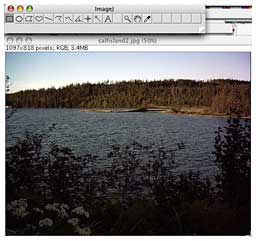
ImageJ should be reasonably intuitively comfortable to use for
anyone familiar with Mac graphics programs like the paint module of
AppleWorks, Photoshop, Color It!, or GraphicConverter. There is a
toolbar with the usual selection of tools. It's in an austere gray
theme, and the tool selection icons are a bit cryptic, but are
identified by text popups on mouseover.

The OS X version of ImageJ opens supported images, text files,
ROIs, and LUTs that are dropped on the ImageJ icon.
ImageJ Features
Data Types: 8-bit grayscale or indexed color, 16-bit
unsigned integer, 32-bit floating-point and 32-bit RGB color.
File Formats: Opens and saves all supported data types as
TIFF (uncompressed) or as raw data. Open and saves GIF, JPEG, BMP and
ASCII. Open DICOM, FITS and PGM. Opens TIFFs, GIFs, JPEGs and raw
data using a URL.
Speed: ImageJ is claimed to be the world's fastest pure
Java image processing program. It can filter a 2048 x 2048 image in
0.1 seconds - 40 million pixels per second. I'm not equipped to
verify these claims scientifically, but ImageJ is satisfyingly faster
than Photoshop Elements, although not as quick as ToyViewer or Color
It! (used in Classic mode).
Macros: You can automate tasks and create custom tools
using macros. More than 70 example macros are available on the ImageJ
Web site. You can also record your own macros.
Plugins: Extend ImageJ by developing plugins using ImageJ's
built in command recorder, editor and Java compiler. Over 100 plugins
are available.
Toolkit: Use ImageJ as a image processing toolkit to
develop applets, servlets or applications.
Image display: Tools are provided for zooming (1:32 to
32:1) and scrolling images. All analysis and processing functions
work at any magnification factor.
Regions of Interest: Create rectangular, elliptical or
irregular regions of interest (ROIs). Draw, fill, clear, filter or
measure ROIs. Transfer an ROI to another image.
Image Enhancement: Supports smoothing, sharpening, edge
detection, median filtering and thresholding on both 8-bit grayscale
and RGB color images. Interactively adjust brightness and contrast of
8, 16 and 32-bit images.
Geometric Operations: Crop, scale, resize and rotate. Flip
vertically or horizontally.
Analysis: Measure area, mean, standard deviation, min and
max of ROI or entire image. Measure lengths and angles. Use real
world measurement units such as millimeters. Calibrate using density
standards. Generate histograms and profile plots.
Editing: Cut, copy or paste images or selections. Paste
using AND, OR, XOR or "Blend" modes. Add text, arrows, rectangles,
ellipses or polygons to images.
Color Processing: Split a 32-bit color image into RGB or
HSV components. Merge 8-bit components into a color image. Convert an
RGB image to 8-bit indexed color. Apply pseudo-color palettes to
grayscale images.
Stacks: Display a "stack" of related images in a single
window. Process an entire stack using a single command. Open a folder
of images as a stack. Save stacks as multi-image TIFF files.
 In
general, ImageJ offers an awful lot of image editing power for a
freeware application. I find that I like its Brightness/Contrast and
Color Balance controls as well as or better than the ones in
Photoshop Elements.
In
general, ImageJ offers an awful lot of image editing power for a
freeware application. I find that I like its Brightness/Contrast and
Color Balance controls as well as or better than the ones in
Photoshop Elements.
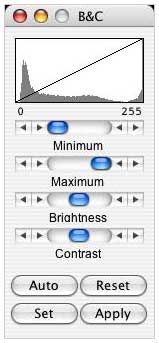
The line graph at the top of the window, which us superimposed on
the image's histogram, shows how pixel values are mapped to 8-bit
(0-255) display values. The two numbers under the plot are the
minimum and maximum displayed pixel values. These two values define
the display range, or "window". ImageJ displays images by linearly
mapping pixel values in the display range to display values in the
range 0-255. Pixels with a value less than the minimum are displayed
as black and those with a value greater than the maximum are
displayed as white.
There are four sliders: Minimum and Maximum control the lower and
upper limits of the display range. Brightness increases or decreases
image brightness by moving the display range. Contrast increases or
decreases contrast by varying the width of the display range. The
narrower the display range, the higher the contrast.
However, click on Auto, and ImageJ will automatically optimizes
brightness and contrast based on an analysis of the image's
histogram. Create a selection, and the entire image will be optimized
based on an analysis of the selection. The optimization is done by
allowing a small percentage of pixels in the the image to become
saturated (displayed as black or white). Each additional click on
Auto increases the number of saturated pixels and thus the amount of
optimization.
You can click on Reset to restore the original brightness and
contrast settings. The display range is set to the full pixel value
range of the image. A resetMinAndMax() macro call is generated if the
command recorder is running.
Click on Set to enter the minimum and maximum display range values
in a dialog box. A setMinAndMax() macro call is generated if the
command recorder is running.
Click on Apply to apply the current display range mapping function
to the pixel data. If there is a selection, only pixels within the
selection are modified. This option currently only works with 8-bit
images and stacks and with RGB stacks. This is the only B&C
option that alters the pixel data of non-RGB images.
Upgrading to the latest version of ImageJ (currently 1.3.3) is a
bit trickier than with most OS X applications. To upgrade to the
latest version of ImageJ, download the updated ij.jar from
<http://rsb.info.nih.gov/ij/upgrade/>
and replace the similarly named file in the ImageJ application with a
newer one. To do this, control-click on the ImageJ application,
select "Show Package Contents" in the contextual menu that appears,
and then drag the newer ij.jar into the
Contents/Resources/Java folder.
The missing PDF and PICT support is a pain, but ToyViewer (which I
always have open anyway) fills that gap to a considerable degree.
Another annoyance for me is that windowshading with WindowShade X
doesn't work.
As a replacement for Color It!, ImageJ isn't quite there, but it's
pretty close. Combined with the also freeware ToyViewer, these two
freeware applications have most of the bases covered.
If you're looking for a good, more than basic Mac OS X image
editing program, check this one out. It's a very modest 1000 KB
download - and the price is right.
Full Mac OS X version (1.3.1) can be downloaded at <http://rsb.info.nih.gov/ij/download/osx/>.
Full Mac Classic version can be downloaded at <http://rsb.info.nih.gov/ij/download/mac/>.
For resources on how to modify and customize ImageJ (no
programming required) visit <http://science.exeter.edu/jekstrom/J/ImJ.HTM>.



