Sometimes what seeming like the simplest things can become verycomplicated. I was delighted when Google added POP3 support to theirGmail email service.
On a rural phone line that supports 26,400 bps dialup connections ona good day, a webmail interface just doesn't cut it. POP3 support makesGmail really usable under these circumstances.
So I thought I would get a Gmail account for my wife. Signing up wasno problem, but POP3 access proved to be more of a challenge than I hadanticipated.
My wife uses a 117 MHz PowerBook1400 running Mac OS 8.6. She uses Eudora 5.1 as her email client.Gmail's POP service requires Secure Sockets Layer (SSL) support, whichEudora 5.1 has, so I figured we were good to go. However, once I had anaccount configured, I discovered that Eudora 5.1 would crash every timeI tried to check the Gmail inbox.
Okay, I thought, maybe a newer version of Eudora would have less
buggy SSL support. I downloaded Eudora 6.1, which is the last Eudora
version that supports the classic Mac OS - but not OS 8.6. It wanted
OS 9 or newer.
My wife's PowerBook has a one gigabyte hard drive with three
partitions, two of which had operating systems installed - the
aforementioned OS 8.6 and also 8.1. I decided to replace the OS 8.1
installation with OS 9 or OS 9.1.
I stuck an OS 9.0 install CD in the drive, which proceeded to click
and grunt for several minutes before the volume icon appeared on the
desktop. I trashed OS 8.1 from its partition, but OS 9.0 is a lot
larger than OS 8.1, so I had to move a lot of stuff to other partitions
in order to make room.
That done, I started the install process. But a few minutes in,
things ground to a halt, and an error dialog appeared informing me that
the installation had been unsuccessful and had been terminated.
Okay, that OS 9 install CD is pretty old. Maybe it was the
problem.
I popped in an OS 9.1 install CD. The old CD drive made some more
feeble, pathetic sounds, but it refused to spin up that disk at all,
let alone mount it. I began to suspect that the CD drive had some
issues.
I looked around and spotted an old Apple CD-300 tray-loading CD-ROM
drive that had been pulled from some old desktop Mac. The sticker on it
said it was manufactured in 1994.
Now for some way too connect it to the PowerBook.
I had also considered trying to hook the 1400 up to my WallStreet or SuperMac S900 using PowerBook SCSI disk
mode, but I've never had much luck getting that to work with this
particular PowerBook, so the CD-300 drive sounded like a more promising
workaround.
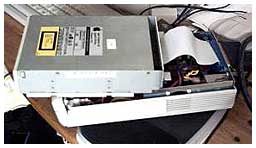 I rummaged and came up with and ancient tape
backup drive case with a SCSI interface. The tape drive guts were long
gone, but the power supply and SCSI connection cables were still there,
along with two Centronics 50 ports. The CD-300 drive was way too big to
fit inside the tape drive case, but the internal cables were plenty
long enough to work with the drive perched on top of the unit.
I rummaged and came up with and ancient tape
backup drive case with a SCSI interface. The tape drive guts were long
gone, but the power supply and SCSI connection cables were still there,
along with two Centronics 50 ports. The CD-300 drive was way too big to
fit inside the tape drive case, but the internal cables were plenty
long enough to work with the drive perched on top of the unit.
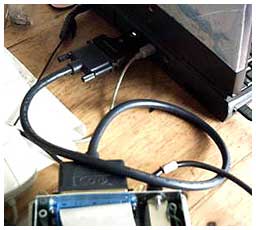 I rustled up a DB25 to Centronics 50 SCSI
cable, an HDI 30 PowerBook SCSI dock adapter, hooked everything up, and
started the PowerBook. I inserted the OS 9.1 CD in the CD-300, closed
the drawer, and the volume icon promptly showed up on the desktop.
I rustled up a DB25 to Centronics 50 SCSI
cable, an HDI 30 PowerBook SCSI dock adapter, hooked everything up, and
started the PowerBook. I inserted the OS 9.1 CD in the CD-300, closed
the drawer, and the volume icon promptly showed up on the desktop.
Actually, nine volume icons showed up on the desktop. Something was
obviously not quite right - I suspect that the SCSI connection might
have wanted an inline terminator, but after closing all but one of the
open installer windows and clicking the installer icon, the process
commenced.
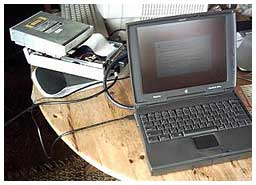 Then I discovered that OS 9.1 is even larger than
OS 9, so even more stuff had to be transferred off the partition.
Once that was done, the installation went fine.
Then I discovered that OS 9.1 is even larger than
OS 9, so even more stuff had to be transferred off the partition.
Once that was done, the installation went fine.
I disconnected the makeshift CD-ROM drive and booted the PowerBook
1400 into OS 9.1. It started up fine, but a dialog appeared telling me
there wasn't enough memory to start up with extensions on.
Oh yeah, I remembered - OS 9.1 wants more than 30 MB of RAM just to
boot. The old 1400 has 36 megabytes of RAM. I busied myself disabling
extensions, but even with a relatively skeletonized set, the 'Book
still wouldn't boot with extensions on.
Into the Memory control panel, where I assigned the largest block of
free hard drive space to virtual memory - a princely 72 MB. That was
enough to boot the machine into OS 9.1 with extensions on.
Cool. I was making progress. But why was everything happening is
slow motion? I mean even slower than usual - the 1400 is, uh, leisurely
at the best of times.
I installed Eudora 6.1, but the installer informed me that I also
needed CarbonLib 1.6 in order for the program to work. That could be
found on Apple's website at the URL conveniently provided. Or not.
Why does a company that makes such elegant hardware and software
have such a chaotic and user-unfriendly software support site?
Just asking.
After several go-rounds with the search engine, I finally found a
download link for CarbonLib 1.6, downloaded it, ran the installer, and
rebooted.
I started Eudora 6.1, configured an account for Gmail, and tried to
connect. It didn't crash the way Eudora 5.1 had, but it didn't work
either. Perhaps some sort of configuration problem, but I couldn't see
anything amiss, and Gmail works fine with Eudora 6.2 on my iBook
seemingly configured the same way.
However, I was coming to the conclusion that it really didn't matter
anyway, because OS 9.1 on a 117 MHz 603e with a 33 MHz system bus and
36 megabytes of RAM was not going to be usable.
To say that you could outtype the system was an understatement.
Every function had a time lag as the system dipped into virtual memory.
I gave up and booted back into OS 8.6, which is lively by
comparison.
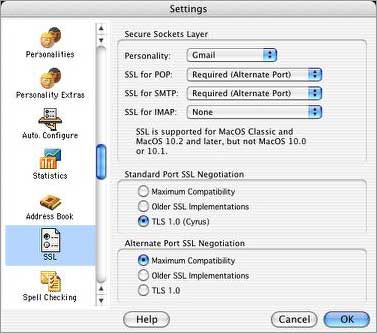
So my wife still has no POP3 support for her new Gmail account. I
think I've figured out why it won't work with Eudora 5.1. In Eudora
6.2, the SSL Settings dialog has two fields for Port SSL Negotiation
that are not present in the Eudora 5.1 SSL Settings. I assume they are
there for a reason, but it appears to be a dead end for the
present.
The moral of this tale is that for Internet use, these old Power PC
Macs are getting pretty marginalized. Only one browser, iCab, is still being actively developed for
Classic (or two, if you count WaMCom hack of Mozilla 1.3).
(Download
WaMCom here.) The latest version of Eudora no longer supports
Classic, and support for new Web services like Gmail are becoming
tenuous.



