Since I
started using dictation software on a regular basis to reduce
typing stress on my arms and hands several years ago, I've become a
more than casual user of microphones as well. I am not really a big
fan of headset microphones, although I have several of them, and
the
PlainTalk iParrott iP ST Stereo Multimedia Headset I use
with my Pismo PowerBook is the
best mic I've ever used for dictation accuracy.
However, newer Macs like my my 700 MHz G3 iBook don't support
PlainTalk amplified devices. In the early 90s, Apple tried to push
everyone to switch to USB audio technology, a strategy from which
they have partly retreated. High-end Macs have analog sound-in
ports again these days, but the iBooks and 12" PowerBook regrettably do not - and
the analog ports on machines that do have them are no longer
PlainTalk but support PC-style unamplified mics.
Consequently, I'm obliged to use a USB microphone with my iBook
for dictation, such as the Andrea AK5370 headset mic that came with
IBM
ViaVoice X - and which also works well with MacSpeech's
iListen
dictation software.
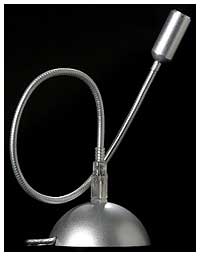 DVForge now offers a USB
mic that dispenses with the tethered discomfort and hassle of
headsets.
DVForge now offers a USB
mic that dispenses with the tethered discomfort and hassle of
headsets.
The DVForge MacMice MicFlex
USB microphone system is a USB microphone that works as
both a desktop and a portable microphone solution. Inspired by
DVForge's cool SightFlex stand
for the Apple iSight webcam, the
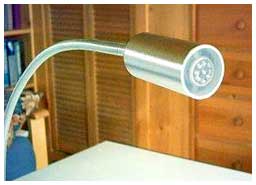
MicFlex's entire USB mic assembly is enclosed in a small,
cylindrical aluminum pod at the end of an 18" long satin polished
flexible metal tube stalk similar to those used with classic
gooseneck desk lamps.
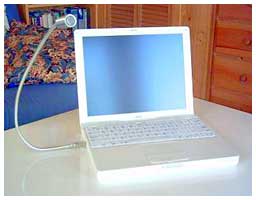 As the DVForge/MacMice
folks put it: "MicFlex can be twisted, yanked, snatched, pulled,
tugged, and otherwise deformed into pretty much any shape you can
imagine to help you find just the right position. . . .
Use it beside a display, peeking over a display or PowerBook,
peeking around a display or PowerBook, squished down in a coil,
twisted in a knot, or even sneakily peeking out from under an Apple
Cinema or Studio LCD display."
As the DVForge/MacMice
folks put it: "MicFlex can be twisted, yanked, snatched, pulled,
tugged, and otherwise deformed into pretty much any shape you can
imagine to help you find just the right position. . . .
Use it beside a display, peeking over a display or PowerBook,
peeking around a display or PowerBook, squished down in a coil,
twisted in a knot, or even sneakily peeking out from under an Apple
Cinema or Studio LCD display."
The company's design goal for the MicFlex is "to build a desktop
microphone that connects by USB and is good enough and flexible
enough to serve as the perfect all-around mic for any desktop media
application. Make it convertible, to work as a desk or a portable
microphone. And make it match the aluminum appearance of Apple's
professional products." The metallic construction and appearance
theme of the MicFlex does harmonize especially well with the metal
PowerBooks and the G5 Power Macs.
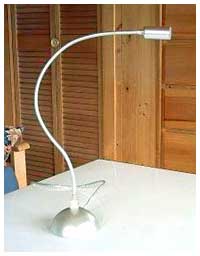 The stalk can be inserted into a weighted and stable
desktop base or plugged directly into a PowerBook, iBook, or
desktop Mac's USB port. MicFlex is plug-and-play with all Macs with
a USB port running Mac OS 9.1 or higher. It is also plug-and-play
compatible with USB equipped Windows 98Se, 2000, or XP
machines.
The stalk can be inserted into a weighted and stable
desktop base or plugged directly into a PowerBook, iBook, or
desktop Mac's USB port. MicFlex is plug-and-play with all Macs with
a USB port running Mac OS 9.1 or higher. It is also plug-and-play
compatible with USB equipped Windows 98Se, 2000, or XP
machines.
The MicFlex's base is a silver-colored, weighted hemisphere
about 3" in diameter with a smooth, non-marring contact surface,
and the mic and its stalk are quite stable and secure when
inserted. I do have some concern about whether the USB port in a
laptop might be vulnerable to damage from inadvertent impacts with
the MicFlex stalk or even stress from the cantilevered weight of
the MicFlex unit itself, but it's certainly a lot more convenient
to tuck into a laptop case than a headset with its bulky shape and
tangle-prone cable.
The MicFlex base is essentially a USB port extender with a
generous 5' long cable attached, and it can be used as a
conveniently accessible USB port for other USB devices such as
flash drives and digital cameras when the MicFlex stalk is
removed.
DVForge says that best results will be obtained with the MicFlex
or its base plugged directly into a USB port on your computer
rather than a USB Hub
 How well does the MicFlex
work? Very well indeed. With MicFlex's better than CD-quality USB
audio conversion circuit with 16-bit 48 KHz resolution and 20 HZ to
20 KHz response, it is suitable for most any sort of computer
recording or dictation, from music to voice. MicFlex is, of course,
usable with iChat AV or AIM audio chat, OS X's speech command
functions, and - according to MacMice - also ideal for recording
vocals and acoustic instruments with GarageBand.
How well does the MicFlex
work? Very well indeed. With MicFlex's better than CD-quality USB
audio conversion circuit with 16-bit 48 KHz resolution and 20 HZ to
20 KHz response, it is suitable for most any sort of computer
recording or dictation, from music to voice. MicFlex is, of course,
usable with iChat AV or AIM audio chat, OS X's speech command
functions, and - according to MacMice - also ideal for recording
vocals and acoustic instruments with GarageBand.
As noted, my principal interest was how well it would work with
dictation software - specifically MacSpeech's iListen. In my
experience, ViaVoice has not been a happy camper with mics other
than its own bundled Andrea unit, and MicFlex proved no exception.
Despite some fiddling, I couldn't get ViaVoice to recognize input
from the MicFlex.
On the other hand, MacSpeech have officially
certified the MicFlex USB microphone for use by with their iListen
speech recognition software, making it the only desktop USB
microphone currently certified for use with MacSpeech products.
"The MicFlex is a wonderful product," commented MacSpeech CEO
and Founder Andrew Taylor. "It combines the superb design one would
expect from a Macintosh product with an excellent microphone for
speech recognition."
"We knew we were building a terrific microphone with the
MicFlex," agrees DVForge President and CEO, Jack Campbell. "It is a
real joy for us to be the only desktop microphone on the market to
meet the rigorous certification requirements for MacSpeech's
exciting iListen product."
I found that iListen 1.6.6 recognized the MicFlex with no
difficulty, and all that was necessary to run the program's "Set Up
My Mic" utility to calibrate my voice profile to the MicFlex's
characteristics - which takes about five minutes. iListen declared
the MicFlex's signal quality to be suitable for dictation, and it
does a good job.
I couldn't really find much of anything not to like about the
MicFlex. It's a good, solid, functional and cleverly innovative
product.
The MicFlex is priced at $39.99 and is available from the
DVForge website.



