The increasing popularity of notebook computers, which
represent a majority of Apple systems sold, has resulted in an
amazing diversity of laptop stands offered by third-party vendors.
Laptop stands roughly divide into three categories.
The first, simplest, and oldest are stands that are designed to
help the computer run cooler, and/or keep your lap cooler as well
with the machine used in conventional laptop mode with its built-in
keyboard and trackpad. Examples include the Road Tools CoolPads, the LapBottom
[seemingly discontinued - ed], and the fan-cooled Targus
Notebook Chill Mat.
Then there are stands designed to support more comfortable and
ergonomic use of laptops in desktop substitute mode in conjunction
with an external keyboard and pointing device, some examples being
the Lapvantage Loft
Ergonomic Laptop Stand, the
Contour NoteRiser, and the
Griffin iCurve.
The third category encompasses stands intended to make laptop
computing more comfortable when sitting or reclining away from a
desk, examples being the Laptop
Laidback and the
Dexia Rack.
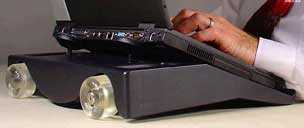 There's a
fourth category, represented by the Keynamics eWheelie Laptop Stand,
which is different from anything else on the market. The eWheelie's
unique features are that it incorporates a couple of skateboard
wheels, which make it easy to shift the computer out of your
immediate workspace when you're working at a desk or table, and its
facility to orient the laptop's keyboard at a more comfortable
angle than if it was sitting flat on the work surface - by
cantilevering it over the edge of the desk or table anchored by a
heavy weight in the stand unit.
There's a
fourth category, represented by the Keynamics eWheelie Laptop Stand,
which is different from anything else on the market. The eWheelie's
unique features are that it incorporates a couple of skateboard
wheels, which make it easy to shift the computer out of your
immediate workspace when you're working at a desk or table, and its
facility to orient the laptop's keyboard at a more comfortable
angle than if it was sitting flat on the work surface - by
cantilevering it over the edge of the desk or table anchored by a
heavy weight in the stand unit.
 Why skateboard
wheels? Well, because of the anchor weight, the eWheelie itself
weighs 10 pounds, making its built-in carry handle more than a
thoughtful convenience. Add the weight of a six or eight pound
laptop, and you have one hefty package. The skateboard wheels make
shifting the combined unit aside and back comfortably easy. No
other product on the market allows a laptop to just be wheeled out
the way, when not in use. With other products, the laptop must be
picked up.
Why skateboard
wheels? Well, because of the anchor weight, the eWheelie itself
weighs 10 pounds, making its built-in carry handle more than a
thoughtful convenience. Add the weight of a six or eight pound
laptop, and you have one hefty package. The skateboard wheels make
shifting the combined unit aside and back comfortably easy. No
other product on the market allows a laptop to just be wheeled out
the way, when not in use. With other products, the laptop must be
picked up.
This extended placement also lowers your keyboard. All laptop
stands facilitate raising your laptop, but the eWheelie Stand is
the only laptop stand that lets you really lower your keyboard, to
where your keyboard sits below your desktop. The Occupational
Safety and Health Administration of the Department of Labor
(OSHA) says that if you recline in your chair, this lowered
position for your keyboard creates a more neutral ergonomic posture
than you may otherwise have. The design of the Keynamics stand
conforms in every respect with recommendations from OSHA.
For a graphic demonstration of the Keynamics stand in use, see
http://www.laptop-ergonomics.com
The eWheelie also elevates the laptop and can be used with
external input devices when that's desirable. Greg Bright conceived
the ability to functionally separate the screen and keyboard so you
can move the laptop around the desk. He has one patent approved and
two others pending on this invention.
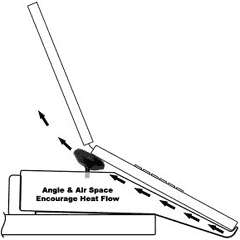 The eWheelie Laptop
Stand additionally promotes convection cooling by angling the
laptop, allowing the heat to travel up and out the back. Added air
space when the laptop rests on the rear levelers also promotes air
flow.
The eWheelie Laptop
Stand additionally promotes convection cooling by angling the
laptop, allowing the heat to travel up and out the back. Added air
space when the laptop rests on the rear levelers also promotes air
flow.
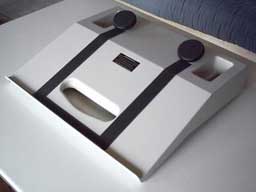
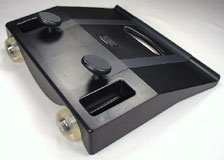 The
stand has two pockets flanking the adjustable levelers, whose main
function is to provide stability for the wheel axle bolt, but it
can also hold most cell phones, PDAs, keys, paper clips, etc.
The
stand has two pockets flanking the adjustable levelers, whose main
function is to provide stability for the wheel axle bolt, but it
can also hold most cell phones, PDAs, keys, paper clips, etc.
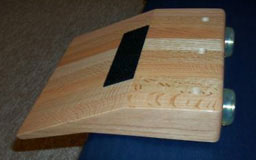 If you'll pardon a
digression, Greg built the prototype for the eWheelie stand out of
beautiful red oak, and knowing I am interested in woodworking was
kind enough to send me a photo.
If you'll pardon a
digression, Greg built the prototype for the eWheelie stand out of
beautiful red oak, and knowing I am interested in woodworking was
kind enough to send me a photo.
Of necessity, alas, the production eWheelie stand is made of ten
pounds of steel and engineered ABS plastic resin. It is available
in both black and white.
 According to
Greg, "you will not find pictures of people operating a laptop on a
desk, be it in a magazine or on a website". Why show someone
hunching over a keyboard with an unnatural posture for their back
and their hands? It's no way to sell laptops! Yet, most of us buy
laptops for this very reason - to use on a desk, at least part of
the time. "
According to
Greg, "you will not find pictures of people operating a laptop on a
desk, be it in a magazine or on a website". Why show someone
hunching over a keyboard with an unnatural posture for their back
and their hands? It's no way to sell laptops! Yet, most of us buy
laptops for this very reason - to use on a desk, at least part of
the time. "
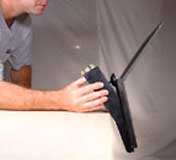 How securely
will the eWheelie stand hold a laptop in place with a real
assurance that it won't fall? Greg has tested his stand to a weight
load of twenty pounds, more than twice the weight of any Apple
laptop (save for the original Mac
Portable). The stand incorporates a substantial support lip
that works with the front edge of your laptop - regardless whether
it's squared, rounded, or lipped - plus a "landing strip" of sticky
70 durometer rubber material made by 3M.
How securely
will the eWheelie stand hold a laptop in place with a real
assurance that it won't fall? Greg has tested his stand to a weight
load of twenty pounds, more than twice the weight of any Apple
laptop (save for the original Mac
Portable). The stand incorporates a substantial support lip
that works with the front edge of your laptop - regardless whether
it's squared, rounded, or lipped - plus a "landing strip" of sticky
70 durometer rubber material made by 3M.
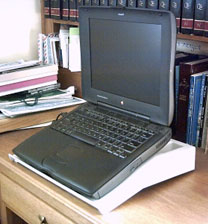 The back of
the laptop rests on inverted levelers, which also have the sure
grip of the 70 durometer (a measure
of the hardness of polymers, elastomers, and rubber) 3M material,
to ensure that the laptop, whatever its design, will fit solidly
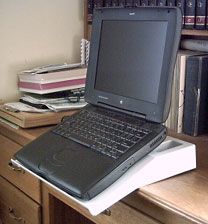
and securely on the stand. The eWheelie stand handles my wife's old
WallStreet PowerBook - one
of the biggest, heaviest Apple laptops ever made, with ease.
The back of
the laptop rests on inverted levelers, which also have the sure
grip of the 70 durometer (a measure
of the hardness of polymers, elastomers, and rubber) 3M material,
to ensure that the laptop, whatever its design, will fit solidly
and securely on the stand. The eWheelie stand handles my wife's old
WallStreet PowerBook - one
of the biggest, heaviest Apple laptops ever made, with ease.
Despite its "desk-hugging" weight, the stand and laptop unit can
be easily wheeled out of the way, when it is necessary to work by
hand at a desk. True to Greg's garage background, the stand uses
skateboard wheels complemented by hex head axle bolts and ABEC ball
bearings to provide the slickest movement possible across the
desk.
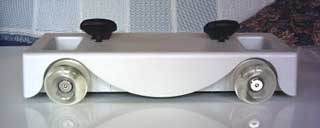 The eWheelie is
not the sort of laptop stand that you will ever consider stuffing
in your laptop case or backpack to take on the road (Keynamics has
just a US$20 lightweight, stores-flat laptop stand called the
Aviator that is ideal for taking along on the road), but for the
legions of laptop users who operate mainly in desktop substitute
mode, it's a solid and substantial piece of engineering unlike
anything else on the market. It's well worth considering.
The eWheelie is
not the sort of laptop stand that you will ever consider stuffing
in your laptop case or backpack to take on the road (Keynamics has
just a US$20 lightweight, stores-flat laptop stand called the
Aviator that is ideal for taking along on the road), but for the
legions of laptop users who operate mainly in desktop substitute
mode, it's a solid and substantial piece of engineering unlike
anything else on the market. It's well worth considering.
eWheelie laptop stand features in summary:
- Supports laptop at a 25° angle off the edge of the
desk
- Supports laptop at a 20° angle on top of the desk
- Supports up to 20 pounds on the angled surface in the
cantilevered position
- 3M resilient "Bumpon" rollstock landing strips and bottom edge
gripper - 70 durometer with roll stock landing strips and bottom
edge gripper
- Front support lip
- Total weight: 10 lbs.
- Dimensions: 14" wide x 13" deep x 4" tall
- Eight pound - 5/16" cold rolled steel anchor plate - powder
coated
- Extra thick, engineered ABS plastic resin body
- 54mm x 36 mm 90 durometer skateboard wheels
- High performance ABEC skateboard ball bearings
- Nickel plated hex head axle bolt
- Industrial grade 2" diameter, 5/16" threaded shank swivel
levelers
The eWheelie's retail price is $119, but it's currently on sale
for $89.
- Link: Keynamics



