The Lombard, or PowerBook G3
Series (Bronze Keyboard), was the low-selling "middle child" in the
PowerBook G3 family and the had some middle child identity issues.
The mighty WallStreet/PDQ PowerBooks were a tough act to
follow, and the subsequent Pismo was
significantly more powerful and refined.
When Steve Jobs raised the curtain on the company's new
professional PowerBooks during his keynote address at the World
Wide Developer's Conference in May 1999, the new 'Book, named
PowerBook G3 (surprise!), turned out to be what had been widely
predicted - a leaned-down but evolutionary development of the
highly successful "WallStreet/PDQ" G3 Series I and II PowerBooks
featuring more power, lower weight, and USB support.
The low-end 333 MHz Lombard was insignificantly faster (or even
marginally slower) in CPU performance than a 300 MHz WallStreet
(according to Macworld's MacBench 5 benchmarks, it's slower;
MacSpeedZone found the 333 MHz Lombard only 3% faster than the 300
MHz WallStreet in their tests), due to the fact that earlier model
has a 1 MB L2 cache while the low-end Lombard had to get by with a
512 KB cache - which also operated at a slower 2.5:1 ratio compared
with the 2:1 ratio on older PowerBooks.
Lombard had one PC CardBus slot (versus the WallStreet's two)
and an annoying problem was introduced with Lombard - marks would
appear on the screen caused by physical contact with the keyboard
when the 'Book was closed.
WallStreet's analog Volume and Brightness rocker switches and
Mute button were banished from the facia below the display, and
these functions moved to faster-acting keyboard commands. The
"rubbery" feeling center panels on the top and bottom of the
WallStreet machines were been continued with Lombard, but they're
of a more durable composition than the easily scratched material on
the WallStreets.
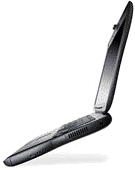 The Lombard was
Apple's first "slim" laptop and introduced the sleeker, lighter
form factor which pared away about 2 lb. of weight and 20% of
WallStreet's of thickness. This was carried over virtually
unchanged with the Pismo. Expansion bay devices from Lombard and
Pismo are also compatible.
The Lombard was
Apple's first "slim" laptop and introduced the sleeker, lighter
form factor which pared away about 2 lb. of weight and 20% of
WallStreet's of thickness. This was carried over virtually
unchanged with the Pismo. Expansion bay devices from Lombard and
Pismo are also compatible.
On the other hand, Lombard retained the 66 MHz system bus and
PC66 RAM of the WallStreet (also shared with the original iMacs),
and it was the last PowerBook available with built-in SCSI port,
while having two USB ports (and no ADB ports). It was the first
PowerBook with New World ROM. All in all, a truly transitional
model.
Only built for eight months between May 1999, and January 2000,
the Lombard sold in fewer numbers than the machines that preceded
and superseded it, and thus never attracted as much attention from
upgrade developers and vendors as its G3 siblings.
The PowerBook G3 model lineup was greatly simplified with the
advent of Lombard, with just two models and one display size.
- 333 MHz G3, 512 KB L2 cache, 66 MHz system bus, 64 MB standard
RAM, 4 GB hard drive, 24x CD-ROM
- 400 MHz G3, 1 MB L2 cache, 66 MHz system bus, 64 MB standard
RAM, 6 GB hard drive, DVD-ROM
All Lombards have a 14.1" LCD screen and 8 MB of VRAM with
an ATI RAGE LT Pro graphics processor (this is the machine's
Achilles' heel with later versions of OS X). Lombard supports
dual monitor spanning (rather than just mirroring to an external
monitor), a feature that had been gone from PowerBooks since the
5300 had been discontinued in
1996.
Lombards continued essentially unchanged through their entire
eight month production run.
My son bought one of the last 333 MHz Lombards in the late
winter of 2000, and it proved to be an admirably tough, reliable
PowerBook. It ran OS X surprisingly well, considering the
modest clock speed and poky video support, and the it's also the
oldest PowerBook that officially supports OS X 10.3
"Panther".
One CPU Upgrade
Even today, nearly eight years after the last one was built,
there are still at least three brands of processor upgrades
available for the WallStreet and four for the Pismo (that I can
think of). Both Newer Technology and PowerLogix made G3 upgrades
for the Lombard for a time, but they apparently didn't sell
especially well and have been long since discontinued. One reason
was also almost certainly that a 466 MHz or 500 MHz G3 wasn't that
much faster than the stock 333 MHz or 400 MHz CPUs that came in the
Lombard, while there were tons of 233 MHz, 250 MHz, and 266 MHz
WallStreets out there whose clock speed was essentially doubled by
installing a 466 MHz or 500 MHz G3, making the substantial cost of
the upgrade more justifiable.
However - especially as we entered the OS X era - the Lombard,
particularly the 333 MHz models, didn't have the horsepower for
really satisfactory performance, even though it remains an
attractive and versatile package otherwise. Happily, there is now a
solution - a G4 upgrade.
Daystar Technologies offers the US$265
XLR8 433 MAChSpeed G4 Lombard upgrade with a 250 MHz 1 MB
backside cache and exclusive MAChSpeed Control software as a
companion product to their successful MAChSpeed G4 Pismo upgrades.
I have a 550 MHz Daystar upgrade installed in my Pismo, and after
six weeks use I continue to be extremely pleased with its
performance.
The XLR8 433 MAChSpeed G4 Lombard, a factory installed upgrade,
transforms your PowerBook G3 Bronze into an AltiVec-energized
laptop. With its 1 MB cache (twice the size of the G3/900) and
MAChSpeed Control software transforms your Lombard that's great for
graphics, video. and games . . . It's an absolute
necessity in Mac OS X,both Jaguar and Panther.
Mac OS X and all native OS X graphics applications are optimized
for the G4s Velocity Engine. Daystar claims that you'll experience
bursts of speed that are up to 7x faster than your G3 system. Even
Mac OS X's Finder is snappy, with windows popping open
immediately.
The upgraded system is 100% compatible and runs faster than a
400 MHz PowerBook G4. This is the only
"no compromise" upgrade for Lombard. Factory installation and
testing ensures that you'll be running at full G4 speeds with no
upsets - just power-up and go.
Features:
- Exclusive factory installation and testing with standard 24
hour turnaround!
- Daystar custom shipping container included.
- No hidden costs - you can configure all your shipping costs in
the "Product Options", before you checkout!
- Low-power design runs 20% cooler than a G4/500, and it extends
battery life.
- Includes XLR8's award-winning MACh Speed Control - OS X
CPU profiling & monitoring utility.
- Includes XLR8's USB Dual Button Scrolling Mouse (a free gift,
not required for operation).
- Week-ender program available (in on Friday, back on
Monday).
- XLR8 MAChSpeed G4 - Rated the top upgrade by leading PowerBook
editors
Daystar now offers 3-way FedEx shipping options. You can
configure your three way shipping options worldwide using the
Product Options. First, select the pre-shipment for the Lombard
container going to you. Second, select the speed for the return to
Daystar. Third, select the final shipment home to you.
Price: $229.
You can read
my full Road Warrior review of the 550 MHz MAChSpeed G4 Pismo
upgrade installed on my own Pismo PowerBook on Mac Opinion.
Other Upgrade Considerations
While the 433 MHz G4 will boost the Lombard's OS X
performance nicely, processor power isn't the only consideration.
Before buying or deciding to upgrade a Lombard, several other
points should be weighed and pondered.
First, as mentioned above, the Lombard uses PC66 RAM and is
limited to 512 MB with 256 MB modules in both slots. While 512 MB
is a respectable RAM compliment for running OS X, it's no more
than adequate for medium-duty use, and you might find the big cat
gasping for more memory.
The 66 MHz system bus is actually less of an issue with a G4,
whose large L2 cache and AltiVec engine are not bus dependent.
Then there's video support. The Lombard has that poky ATI RAGE
LT Pro graphics processor with 8 MB of VRAM, which is not even
close to being enough to support OS X's Quartz Extreme and Core
Image features. (The Pismo doesn't support Quartz Extreme or Core
Image either, but its ATI RAGE 128 Mobility video accelerator, also
with 8 MB of VRAM, is more powerful.)
In hands-on experience with my own Pismo, I noticed a major
enhancement in speed after upgrading from OS X 10.2.6 "Jaguar"
to OS X 10.3 "Panther" even with the original 500 MHz G3
processor - and it's even faster with the 550 MHz Daystar G4
upgrade installed. I think that those who purchase the 433 MHz G4
Lombard upgrade will be pleased with the enhancement in
performance.
Lombards don't have built-in FireWire support, but my son's 333
MHz Lombard worked great with a Keyspan PC CardBus FireWire
adapter. Most expansion bay drives and other devices built for the
Pismo will work in the Lombard as well - and it supports older SCSI
peripherals, which can be a convenient advantage in some
instances.
If you have a Lombard that you like, that's in good condition,
and possibly has been hot rodded with a faster hard drive, more
RAM, and PC Cards, I would say that the Daystar 433 MHz upgrade
could very well be a sensible purchase. If it hasn't already been
upgraded, consider combining it with maxing out the RAM and
installing a larger capacity, faster hard drive.
Want a Lombard to go with one of Daystar's 433 MHz G4 upgrades?
Wegener
Media is currently offering the PowerBook Lombard G3/333 with
128 MB RAM, a 4 GB hard drive, and CD-ROM for US$250 - and a
similarly equipped 400 MHz model for US$330.
With Daystar's upgrade, that could put you in a G4 PowerBook for
US$515, although you'd probably want to boost RAM and put in a
bigger, faster hard drive.
Wegener Media also offer a G4 upgrade for the Lombard for
US$180, but it must be ordered with a refurbished Lombard, which
totals out at US$430.
While it might seem like a no-brainer to buy a 333 MHz Lombard
if you intend on upgrading the processor anyway, note that the 400
MHz shipped with a DVD-ROM drive, while the 333 MHz unit had a
plain-vanilla CD-ROM. It might be worth the extra grickles to pony
up for a 400 MHz unit with a DVD-ROM drive.
Lombard features:
- PowerPC G3 running at 400 MHz (1 MB L2 cache) and 333 MHz (512
KB L2 cache)
- A thinner and lighter form factor than the Series I and II G3
PowerBooks - 20% thinner and almost 2 pounds lighter (5.9 pounds)
than its predecessor.
- Longer life battery with, get this, up to five hours operation
on one battery, and with the Lombard's dual-battery capability, you
can keep working for up to 10 hours!
- 64 MB RAM standard; support for up to 512 MB
- 8 MB video RAM
- ATI RAGE LT Pro video controller
- Easy access to RAM expansion and removable hard drive via
flip-up keyboard.
- 4 GB IDE hard drive (333) and 6 GB IDE hard drive (400) - 10 GB
optional
- Built-in 56K modem. This is the same modem as in the
WallStreets and the iMac, so Lombard will support Boca Research's
Global Village GlobalFax 2.6.5 fax software (which I personally
prefer over any and all other brands of fax software I've
tried)
- 10/100Base-T ethernet
- Two USB ports
- A hot-swappable expansion bay
- A single PC Card slot
- 14.1" active-matrix TFT display
- Dual-display capability so you can add an external monitor and
expand your workspace, or video mirroring
- Another returning feature that last appeared on the PowerBook
5300 and 3400 is the Expansion Bay Blank, a light, hollow, plastic
media bay insert designed to protect the opening when you don't
have an expansion device in the bay.
- S-video out for connecting to a TV or projection device.
- 2x DVD-ROM drive (400 MHz) or 24x CD-ROM drive (333 MHz) (the
CD-ROM will work in the 400 MHz machine but the 333 MHz unit does
not support DVD). The 400 MHz model comes with a separate MPEG-2
and audio decoder chip on the logic board for DVD support.
- 4-Mbps IrDA technology for quick wireless LAN access and file
sharing
- A better cooling fan and more efficient ducting with a new
exhaust port added on left where the Series I and II modem port
resides
- The big, white Apple logo on the lid lights up



