Key Ovation Goldtouch Apple Compatible Adjustable Keyboard and
Numeric Keypad
Typing injury, a form of Repetitive Stress Injury (RSI), has become
a common problem as people spend longer and longer hours on their
computers at work, on the Internet, and for gaming. Part of the reason
is the poor ergonomic design of many computer keyboards.
Physical damage from typing tends to creep up on you, starting as
minor discomfort that barely registers. However, if you keep doing the
things that cause injury, the problem will worsen. Tendinitis can
develop.
Muscles in the hands and arms may become irritated as well, a
condition called myositis.
As soft tissues become more inflamed and swollen, they can press on
adjacent nerves, causing tingling, pain, and weakness in the fingers,
and diminished motor control.
Carpal Tunnel Syndrome in the wrist is a frequent complication of
typing injury. Sometimes scar tissue will develop.
The cumulative effect of all this can become permanently
crippling.
I suffer from typing pain myself, partly due to a more general
problem with polyneuritis
related to fibromyalgia.
Some keyboards will have me in severe pain (enough that I can't
continue typing) in less than ten minutes. Half an hour typing on other
keyboards leaves me in pain for hours, from my fingertips to my
elbows.
However, some keyboards allow me to work all day (taking breaks, of
course) without excessive discomfort. The difference appears to be
keyboard design.
Why do conventional keyboards have such a monstrously long
key-travel and stiff key springs?
My own first symptoms of computer-related typing pain came from
using an old Mac Plus
keyboard, which began to leave my hands so numb that I couldn't grip a
pen properly after a half-hour of typing.
The Mac Plus keyboard has a very hard stroke landing. Newer
keyboards with a lighter touch and more flexibility seem to be less of
a problem.
My Favorite Keyboard
My favorite computer keyboard is the built-in one on the PowerBook G3 Series WallStreet.
The beauty of the G3 Series keyboard is that the key travel is about
1/8", and the touch is both feather-light and silky-smooth. It's the
keyboard by which I measure all others.
The WallStreet's keyboard incorporates most of the characteristics I
find comfortable in a keyboard: a flat plane, feather light touch,
smooth action, short travel, and soft landing. I don't know whether the
G3 Series keyboard's flexibility (which some people don't like) was
intended to address the ergonomics issue or not, but I think it's a
significant part of the reason why these PowerBooks are so easy on the
hands.
Adjustable Keyboards
However, I don't have Carpal Tunnel Syndrome, and some users who do
find that split, splayed, arched, or otherwise modified keyboards are
more comfortable for them than the standard flat computer keyboard.
An advanced approach to positive keyboard ergonomics is adjustable
planes. An adjustable-plane keyboard recently introduced for the Mac is
the
Key Ovation Goldtouch Apple Compatible Keyboard.
Key Ovation argues that "if it isn't adjustable, it isn't
ergonomic." I don't entirely agree, but there's no disputing that
individual computer users have a variety of anatomies and physiologies,
and keyboard adjustment capability makes it possible to more precisely
accommodate these idiosyncrasies. The ergonomic advantages of
adjustable keyboards are also backed up by scientific research.
In a blind study by VSI Risk Management & Ergonomics, an
ergonomics firm located in Newark, California, of 20 government
employees who began using the Goldtouch keyboard instead of standard
flat keyboards in their office setting, all users, with the exception
of one, instinctively figured out how to position the Goldtouch board
to fit their comfort level without instruction or explanation. Neutral
hand postures were obtained with 19 of the 20 users without explanation
of how to avoid awkward wrist postures (ulnar and radial deviation)
with keying providing support for innate keyboard design.
Design
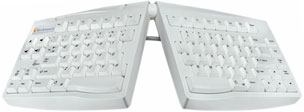
The Goldtouch Apple Compatible Adjustable Keyboard is claimed to be
the first fully adjustable ergonomic keyboard for Macintosh users, and
I can't think of any other 'board in this category that has ever
specifically supported the Mac (although makers of other ergonomic
keyboard solutions - say the Kinesis folks - will doubtless dispute Key
Ovation's assertion that "if it isn't adjustable, it isn't ergonomic").
However, the Goldtouch keyboard's signature feature is its
adjustability.
The Adjustable Ergonomic Keyboard allows you to configure its two
split alphanumeric sections both horizontally and vertically to
suit your individual body requirements.
Placing your hands flat on the keys of a keyboard can require
considerable muscular effort, which in turn can cause fatigue and
discomfort. The Goldtouch keyboard's two segments can be raised in the
center to more closely match the natural alignment of the forearm and
wrist.
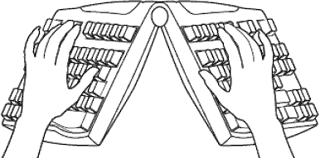 Forcing your
hands down to the keyboard is a hand movement known as pronation. This
is the rotation of the right hand in a counterclockwise direction and
clockwise for the left. The theory is that this helps you assume a more
natural posture conducive to relieving unnatural stress on your arms
and wrists, thus improving comfort and productivity while using your
computer.
Forcing your
hands down to the keyboard is a hand movement known as pronation. This
is the rotation of the right hand in a counterclockwise direction and
clockwise for the left. The theory is that this helps you assume a more
natural posture conducive to relieving unnatural stress on your arms
and wrists, thus improving comfort and productivity while using your
computer.
For example, if you orient the Goldtouch's halves in an inverted-V
"vertical tenting" configuration with the near sides splayed, your
hands and wrists can assume natural pronation body-English that doesn't
stress joints and tendons - or the carpal tunnel. Adjustment within the
0°-30° range provided in both planes is infinite, quick, and
easy to change.
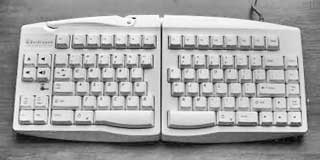 You can, of
course, also use the Goldtouch keyboard in a conventional flat
orientation. You probably wouldn't want to pay the premium price for
this sort of use exclusively, but it's very convenient if more than one
person uses the computer and other users are not accustomed to or
comfortable with typing on a split and angled 'board.
You can, of
course, also use the Goldtouch keyboard in a conventional flat
orientation. You probably wouldn't want to pay the premium price for
this sort of use exclusively, but it's very convenient if more than one
person uses the computer and other users are not accustomed to or
comfortable with typing on a split and angled 'board.
Configuration of the 'board's "back to flat" mode is simple and
virtually instant. Just flip out the large locking "over-center" lever
at the top of the 'board, orient the halves to the desired angles, and
flip the lever back home to lock the configuration in place via the
ball and socket latch mechanism.
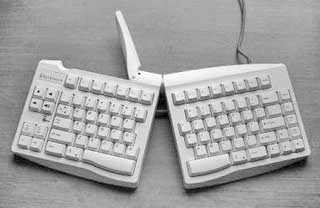 Wraparound
soft rubber-like contact pads provide traction and protection for the
support surface with the keypads set at any angle.
Wraparound
soft rubber-like contact pads provide traction and protection for the
support surface with the keypads set at any angle.
The "vertical tenting" configuration certainly does position your
hands and wrists in a more relaxed orientation and should without
question result in less stress on muscles, tendons, and those
troublesome nerve tunnel sheaths in your wrists. This mode is, of
course, more practical for touch typists - if you're of the
hunt-and-peck school, like I am, it does make it more difficult to
watch the keys.
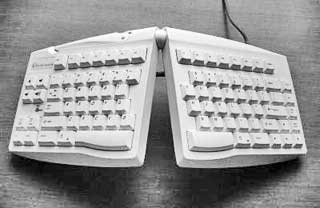 On the
other hand, adjusting to that and/or learning to touch-type could be
preferable to living with sore arms and wrists.
On the
other hand, adjusting to that and/or learning to touch-type could be
preferable to living with sore arms and wrists.
The Goldtouch Apple Compatible Keyboard has a standard QWERTY layout
for the main keys, but it's a bit unorthodox in other aspects. There is
no numeric keypad, which helps keep the keyboard footprint relatively
compact at about 18" wide (fully expanded) and 7" deep. More on this in
a moment.
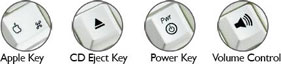 The keys
are labeled with Apple symbol conventions, but with a slightly
different configuration from usual in some instances.
The keys
are labeled with Apple symbol conventions, but with a slightly
different configuration from usual in some instances.
Apple Key Features:
- Apple Control key
- Right and left Apple and Option keys
- CD eject
- Mute and volume control
Because of the split feature, there are two space bars, flanked on
both sides by Command and Option keys, but the Control key is at the
far left of the bottom row, outboard of a Help key that is not very
helpful in that position, IMHO.
An eight-key pad on the extreme right includes the latter two keys
plus a Power key, a Num Lock key, a Mute key, two audio volume keys,
and a CD/DVD eject key, and well as Caps Lock and Num Lock warning
LEDs.
On the opposite end of the 'board, there are Home, End, Page Up, and
Page Down keys arranged vertically outboard of the main keypad, and
inverted-T navigation keys where you would expect them to be.
At the top, there are thirteen F-keys (a bonus of one over what you
get with laptop keyboards), and an extra Delete key.
Feel
In terms of keyboard function and feel, the Goldtouch Apple
Compatible Keyboard's key action is pleasantly light and smooth, with a
soft (but not flexible) landing. The key travel is longer than I
prefer, but a bit shorter than on many conventional keyboards.
The keys, which I assume from their feel are high-quality membrane
type, are reasonably quiet, although not as quiet as a PowerBook or
MacBook Pro keyboard. There is audible clicking as the keys are
depressed, but no IBM or Apple Extended
Keyboard II sort of clatter.
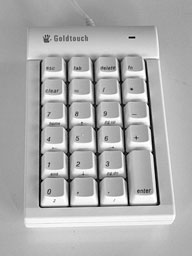 As noted
above, this Goldtouch keyboard has no numeric keypad, an omission that
helps keep the keyboard footprint relatively compact - and which I
don't personally find a major inconvenience, being used to working on
laptop keyboards, but users who work with spreadsheets would. Happily,
an optional, freestanding numeric keypad is available, and one of these
units was included with the corrected test keyboard.
As noted
above, this Goldtouch keyboard has no numeric keypad, an omission that
helps keep the keyboard footprint relatively compact - and which I
don't personally find a major inconvenience, being used to working on
laptop keyboards, but users who work with spreadsheets would. Happily,
an optional, freestanding numeric keypad is available, and one of these
units was included with the corrected test keyboard.
The Apple Compatible Numeric Keypad Hub was created specifically to
bundle with the Apple Compatible Adjustable Keyboard, which it matches
in style and quality. Because it's a freestanding module separate from
the main keyboard, the Numeric Keypad can be placed where it's most
comfortable for the individual user and provides desirable flexibility
in periodically changing arm, hand, and shoulder position.
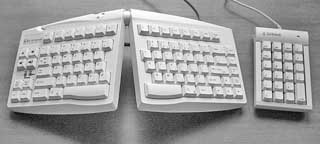 One thing I don't like about
the Goldtouch Numeric Keypad is really a criticism of the Apple
Compatible Adjustable Keyboard, which has no USB repeater ports, so one
is obliged to use up another precious port in one's USB hub to plug in
keypad.
One thing I don't like about
the Goldtouch Numeric Keypad is really a criticism of the Apple
Compatible Adjustable Keyboard, which has no USB repeater ports, so one
is obliged to use up another precious port in one's USB hub to plug in
keypad.
I'm not singling out Goldtouch on this point. More and more
keyboards these days are being designed without USB repeater ports. I
expect it has something to do with cost and the assumption that most
users have USB hubs. I do, but the port array is always filled up, and
I end up routinely unplugging devices to accommodate other
peripherals.
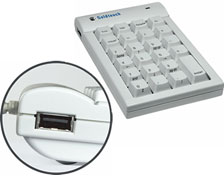 Happily, the Numeric Keypad Hub has two USB repeater ports that
support low voltage devices such as a mouse - but unfortunately it
doesn't support having the keyboard plugged into it, so you're still
going to use up two USB ports for the keyboard and keypad.
Happily, the Numeric Keypad Hub has two USB repeater ports that
support low voltage devices such as a mouse - but unfortunately it
doesn't support having the keyboard plugged into it, so you're still
going to use up two USB ports for the keyboard and keypad.
If you have typing pain issues and split/angled-orientation keypads
seem like a promising solution for you, the Goldtouch Apple Compatible
Keyboard may well be your ideal choice - and to my knowledge this is
the only such product available with a native Apple key layout and
labeling.
The Goldtouch Apple Compatible Keyboard seems solidly constructed
with a high standard of finish, and is surprisingly heavy in the
context of today's keyboards, no doubt due substantially to the
adjustment mechanism, which seems very robust.
The Goldtouch Apple Compatible Keyboard sells for $139. The Apple
Compatible Numeric Keypad Hub sells separately for $49.95. The Apple
Compatible Keyboard and Numeric Keypad Hub Bundle is $179.95.
Appendix
Goldtouch Apple Compatible Keyboard Features Include:
- USB connector
- Adjustment for wrist splay in the horizontal plan: 0°-30°,
continuously variable
- Adjustment for wrist pronation - vertical tenting 0°-30°,
continuously variable
- Easily adjusted, locking ball and socket latch mechanism
- Small, space saving footprint to bring your mouse inside your
ergonomic "comfort zone"
- Editing key layout for left-right work distribution
- Large space bars for easy thumb use
- Full size, full travel, tactile feedback keys with soft
end-stop
- Low noise key actuation
- Standard alphanumeric key layout (QWERTY)
Goldtouch Apple Compatible Numeric Keypad Features Include:
- 22 keys
- 2 USB Ports allow users maximum versatility to plug your mouse or
other low voltage devices into the keypad, for a more organized
workspace.
- The keypad has all of the essential keys, such as:
- Tab, Escape, Delete;
- Page Navigation buttons which include, home, end, page up, page
down, left and right arrows, up and down arrows.
Specifications:
- Switch life 20 million cycles
- Soft Tactile Feel
- Operating Force 2.0 oz ± 0.7 oz
- Pre-travel 0.08" ± 0.24"
- Total Travel 0.16" -0.2"
- Tactile Force 2.3 oz ± 0.7 oz
Go to the Miscellaneous Ramblings Review index.



