In early 2006, both Spotlight and the Find utility had stopped
working on my G4-upgraded Pismo
PowerBook running (at the time) Mac OS X 10.4.4 "Tiger".
It had worked fine for eight months or so, but now when I typed a
word or phrase into the Spotlight or Find search fields, no
response. And there was no audible indication that Spotlight was
updating the index on my hard drive.
I hadn't changed or installed anything new other than reverting
to a fresh OS install, and as far as I could fathom, the glitch
just manifested spontaneously.
Back to Panther
I booted back into OS X 10.3.9 "Panther" on my external FireWire
drive to double check that Panther's (superior) Find utility still
worked. It did. What the hey?
Maybe it was something in my settings or preferences imported
when I reinstalled the system. I figured I might as well bite the
bullet and do a completely clean install of Tiger and live with the
time-consuming hassle of having to restore all my settings by
dragging them over from my iBook and reinstalling some software. I
don't use a lot of system add-ons, and ones I do - like WindowShade
X and TypeIt4Me - are easy and quick to install, so that wasn't too
bad a prospect. In the end, it turned out that the preferences I
dragged over from my iBook Home Library folder mostly worked fine
with my applications, and I didn't have to do much registration key
reentry.
Unfortunately, it was all for nought. With the fresh system
install, Spotlight and Find still obstinately refused to work. So
why not cut the aggravation (I had by that point run a dozen or so
system reinstalls and updates) and just "downgrade" to 10.3.9? I
would miss Spotlight, but on the other hand, I dislike Tiger's Find
utility and much prefer the one in Panther anyway, which would
mitigate things considerably. Besides, third party disk search
utilities like Devon Technologies' EasyFind (freeware) and
SpeedSearch (shareware) can serve as alternatives to Spotlight. I
decided to go for it and hopefully end the hassle and aggravation I
was experiencing with Tiger.
It worked.
For more than a year, OS X 10.3.9 has been giving me pretty much
flawless service on the Pismo with no problems to speak of. Not a
one. I reboot every couple of months or so to refresh the memory
and have otherwise done about zero maintenance. I can't even recall
whether I had bothered to run OnyX or MainMenu to activate the cron system
maintenance scripts, repair permissions, and so forth over the past
12 months.
To the only fly in the ointment, so to speak, has been Spotlight
- or rather the lack of it. I have something of a love/hate
relationship with Spotlight, but I've become seriously addicted,
and I miss it more and more when it's not available. Devon
Technologies' freeware search utility EasyFind
helps filled the void, but being unindexed, it's substantially
slower.
Giving Tiger Another Try
Consequently, a couple of weekends ago, I decided it was time to
give Tiger another shot on the Pismo. When I experienced the
problems last year, it was with OS X 10.4.4, and there have
been four Tiger upgrades released since then, so I hoped that
whatever the issue had been in early '06, it had by now been dealt
with.
Toward ensuring that everything would go as smoothly as
possible, I ran DiskWarrior to create a
nice, fresh, optimized disk directory. It is another testament to
OS X 10.3.9's stability that after a year of daily use and no
maintenance, the verification scan found only two or three very
minor improper filename issues that were easily repaired.
I also used OnyX to run the cron scripts, repair permissions,
and dump the various system caches before running the OS X
10.4.8 combo updater. That all went smoothly, and after the
update's tandem reboots, I hopefully tried hitting Command-F.
The Find dialog appeared, but typing words into the search field
produced no response. Ditto for Spotlight.
Of course it hadn't had time yet to index the hard drive. I
listened for audible evidence that indexing process had commands.
Nothing. Just the hum of the hard drive.
Bummer. "Should have stuck with 10.3.9," I thought ruefully. On
the other hand, Tiger seemed to be running happily - and without
the sluggishness I had noted on this machine with earlier builds of
Tiger prior to 10.4.8.
Of course, 10.3.9 doesn't have Spotlight either, although it
does have an excellent Find utility that does make quick and
convenient filename searches - and Find was not working at all with
Tiger.
By Googled a bit and found a
Spotlight troubleshooting tips tutorial on OS X Daily that
offered a variety of suggestions on on how to goose recalcitrant
Spotlight indexing into action. At least the problem isn't unique
to my old PowerBook, although I'm not sure that's especially
reassuring. I tried the fixes.
Solution #1: Kill SystemUIServer using Activity Monitor.
Did so. No improvement.
Solution #2: Rebuild the Spotlight Index manually using the
command sudo mdutil -E / in the Terminal.
Tried that. Still no indexing.
Solution #3: Change Desktop Resolution
Didn't help
Solution #4: Clear caches and preferences
Tried it with MainMenu, since I had already run OnyX, but no
joy.
Solution #5: Reboot your Mac
That's what I tried first.
A Persistent Problem
I'm stymied. Whatever the problem is, it has survived several
system reinstalls including a clean one, a year plus running
OS X 10.3.9 again, and an update to 10.4.8. The weird thing is
that Spotlight worked okay on the Pismo when I first installed
Tiger back in the spring of '05.
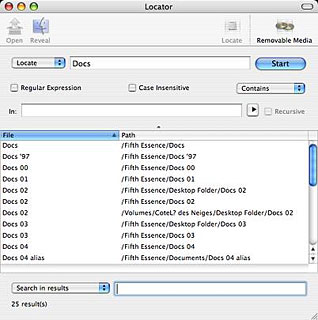 What to do? I'm
not inclined to go through the hassle and configuration tedium of
downgrading to OS X 10.3.9 again, but I can't live without a
decent filename search utility. Happily, I discovered one called
Locator,
which is a GUI front end to the /usr/bin/locate command that works
very nicely and quickly to find files on the computer. It will also
search within results, which is something I find frustratingly
lacking in Spotlight. Locator offers regular expression searches
and is able to index removable media like CDs.
What to do? I'm
not inclined to go through the hassle and configuration tedium of
downgrading to OS X 10.3.9 again, but I can't live without a
decent filename search utility. Happily, I discovered one called
Locator,
which is a GUI front end to the /usr/bin/locate command that works
very nicely and quickly to find files on the computer. It will also
search within results, which is something I find frustratingly
lacking in Spotlight. Locator offers regular expression searches
and is able to index removable media like CDs.
Of course, Locator is just for file name searches, but there is
always EasyFind for searching content. Another workaround option
would be to have DEVONthink
Pro, which has an absolutely kick-ass search engine, index all
my documents.
Of course, I'd love to find a fix for the Spotlight glitch, but
I'm not holding my breath. If anyone has any suggestions I haven't
tried, please email me. [Please see Pismo Spotlight Woes Solved with Simple
Fix for the unexpected solution.]



