Low End Mac Reader Specials
TypeStyler For Mac OS X is Now Shipping! Download The Free Fully Functional 60 Day Tryout at www.typestyler.com
OWC: Get the Right Memory for Your Mac Top Quality, Competitive Price, Lifetime Backed Free Expert Support + Installation Videos too! MacBook & mini 8GB, iMac 16GB, Mac Pro up to 32GB. Click here
Don't install Parallels to play poker online! Poker Mac will show you how
to download and install a native Mac poker application such as Full
Tilt Poker Mac.
Laptop Hardware Provided by TechRestore - Overnight Mac & iPod Repairs.
Compare products like desktop computers, apple laptops, apple macs, and LCD Monitors side by side! All the information and reviews to make the best purchasing decision for new mobile phones, sat nav systems, or MP3 players. The Ciao online shopping community makes searching products easy for you.
Miscellaneous Ramblings
Miscellaneous Ramblings Mailbag
Pismo Won't Start, Spotlight Finds Too Many Files, and Panasonic SuperDrive in Pismo
Charles Moore - 2008.08.20 - Tip Jar
Popularity: ![]()
![]()
![]()
![]()
- Dead Pismo
- Finding Too Many Files with Spotlight
- Question about Panasonic UJ-850 (or UJ-825) Drive in Pismo
Dead Pismo
From James Nakashima:
Dear Charles,
My old Pismo was limping along with dead battery for a while, but it still worked when plugged in. Now it won't work at all - even when plugged in. The cords all seem to work okay.
Could this still be a battery problem?
Kindest regards,
James
Hi James,
It seems likely that it's a power management issue or possibly a dead PRAM battery. The Pismo should work fine on its AC power adapter alone.
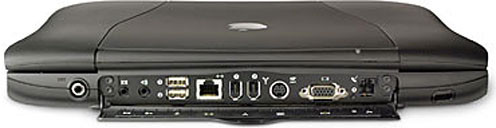
You could try a hard reset if you haven't already. Here's how to proceed:
- If the computer is on, turn it off.
- It's worth a try pulling the power adapter plug, removing the battery, and letting it sit for ten minutes or so.
- Press and release the reset button located on the rear panel of the computer between the external video and modem ports.
- Wait 5 seconds.
- Press the Power button to restart the computer.
Of course there's a chance it could be a hardware failure.
Charles
Finding Too Many Files with Spotlight
From Gerhard:
Hello Charles!
One question and a lengthy introduction, sorry for it:
I am a long time reader of Low End Mac, from around 1998 onwards. I really appreciate your work and Dan's, providing so useful information for us who like to keep their Macs for some more years - thus ending with a low-end model sooner or later. I started to use Macs in 1987 and had so bad experiences with NeXT-OS on a NeXT Workstation that I avoided OS X until 2006.
My first year with my MacBook was disastrous, caused by a faulty original installation, buggy SheepShaver, early versions of Parallels, an incompatible xDSL-modem, and my incompetence. After receiving some coaching, browsing through many OS X books, and a complete reinstall, I finally got a working laptop. But until now I feel not as productive as I had been with System 9. I had a set of well sorted applications, collected over years, the oldest dating from as early as 1985.
Where I really need your advice on is Spotlight.
Since System 7 or 7.5, searching for files on a Mac was flawless and fast (before, I relied on Norton's file search). In Sherlock, it was easy to deactivate content searching by removing one system extension. But whenever I do a search with Spotlight, I get dozens or hundreds of hits. I name my files in a way that is good enough to help me find everything, but Spotlight insists in adding hits where it found the search string somewhere deeply buried in a cache document or similar abstruse.
How do you deal with this situation? How do you accomplish an efficient file search, esp. in Tiger? Please, tell me your search strategy.
Is there is a way to deactivate content search permanently? I have heard of a rather complicated way to deactivate it for a single search, but I do not want to go through this process every time I use Spotlight. Or do you know of alternative search utilities for OS X? Probably you may pass my question also to Dan Knight.
Thank you very much.
Kind regards,
Gerhard
Hi Gerhard,
Thank you for the kind words, and I'm delighted to hear that you find Low End Mac interesting and helpful.
Sorry to hear about the bumpy start with OS X. There are still a few things I miss about OS 9 (and I still run Classic Mode on my Tiger machines), but after using OS X as my production OS since late Jaguar/early Panther, I'm now totally addicted.
However, I agree with you that filename searches in OS X are pathetic, and while I find Spotlight a useful tool, it does have a big problem with "too much information" results.
As you probably know, you can do file name searched using the Find (Command-F in the Finder) dialog, although it is vexingly cumbersome compared with the way it worked in OS 9.
What I have found works best for me is a little freeware search utility called Spotinside, which still does indexed content searches but orders the search returns much more intelligently than Spotlight. It's not perfect (for example, it routinely crashes if you try to preview large files), but it is the fastest and most efficient tool I've found for finding stuff with OS X. There are several other third-party search utilities, some quite powerful, but also too feature bloated. Spotinside is simple, fast, and effective. Works for me!
You can find my most recent review on Applelinks.
Charles
Question about Panasonic UJ-850 (or UJ-825) Drive in Pismo
From James Rohde:
Hi (again) Charles,
First, thanks for all your articles (I appreciate them all, even those that aren't directly usable for me).
Read your Low End Mac reply to Russell on the UJ-850 Panasonic DVD/SuperDrive, and when I looked, there were several on eBay. I won one with shipping for only $21.50 (yay!) and anticipate installing it in place of my DVD/CD-ROM original drive in my Pismo. I have an article printout showing how to take apart the original drive bay/mechanism but was wondering if the Panasonic needs anything special (cabling, drivers, etc.) to work with the Pismo. Mine has Tiger 10.4.11 installed, 1 GB of RAM, and 120 GB Hitachi hard drive. I'm pretty sure I have PatchBurn downloaded on my drive, but I'm at work currently (so may need to download that if I don't have it).
Any special tips or tricks to get the drive working? I know that my 500 MHz G3 won't be able to do iDVD, but would like capability to use the Panasonic for data backup as its primary use (other than reading DVDs and importing music CDs).
Thanks in advance,
Jim Rohde
Hi Jim,
My experience using these drives with Pismos over the past several years in Panther (Mac OS X 10.3) and Tiger (10.4) has been that they're pretty much plug and play, although you do need PatchBurn for full features support.
PatchBurn is fairly frequently updated, so you should check from time to time to see if you're up to date.
You might also check out Simon Royal's recent tutorial, Replacing Your Lombard or Pismo Optical Drive with a SuperDrive, if you haven't already.
Charles
Charles Moore has been a freelance journalist since 1987 and began writing for Mac websites in May 1998. His The Road Warrior column is a regular feature on MacOpinion, and he is a news editor and columnist at Applelinks.com. If you find his articles helpful, please consider making a donation to his tip jar.
Recent Miscellaneous Ramblings
- WiFi Paranoia, iMac-O-Lantern, Magic Mouse Does Click, Free Clipboard Managers, and More, 11.05. Also strange time stamps, problem with ColorIt on Intel Mac, and the story behind OS X 10.5.4 install discs.
- Google Chrome Mac Preview Has Made a Convert, 11.02. Officially a developer preview, Google's Chrome has finally made it to Intel-based Macs. It's fast, elegant, and could be your next browser.
- Fixing a Narcoleptic PowerBook G4, the Future of Tiger Support, Spam Filtering, and More, 10.28. Also installing Leopard, disappearing features, portable Thunderbird, and web page design issues.
- 2 Wireless Alternatives to Apple's Magic Mouse, 10.27. Whether you prefer buttons to buttonless, are still using Mac OS X 10.4, or don't like Bluetooth, Targus has mice to consider.
- More in the Miscellaneous Ramblings index.
Links for the Day
- Mac of the Day: 17" iMac G4/800 MHz, July 2002 - The iMac 'grows up' with a 17" 1440 x 900 display.
- Group of the Day: LisaList supports Lisa users.
- November 8 in LEM history: 99: OS 9: I think I like it - 01: The simplified Mac life - Soured on Windows - Flea market Mac - 02: Little room for improvement in new 'Books - Combo drive upgrade for iceBooks - 04: Re-Porter - 05: Fix the old iMac or buy a Mac mini? - Apple's Copland project - 06: MacBook Core 2 - MacBook value equation - Cheap is as cheap does - 07: Problems with Classic mode in Tiger - The G4 Power Mac that won't run Leopard
- Support Low End Mac
Recent Content on Low End Mac
- Quad-Core CPU Makes Sense in MacBook Pro, OS X 10.6 Causing Overheating, Overseas Power, and More, The 'Book Review, 11.06. Also Late 2009 MacBook reviewed, how to add RAM to new MacBook, 18.4in Acer notebook used Intel i7, and SanDisk SSD chosen for Sony VAIO X.
- Dumping Macs for Google Apps, SSD in iMac, Late 2009 iMac Performance Problems, and More, Mac News Review, 11.06. /newsrev/09mnr/1106.html
- IDE Is Dead; Long Live SATA!, Dan Knight, Mac Musings, 11.04. SATA has displaced parallel ATA. While IDE hard drives haven't disappeared, the best deals are in SATA hard drives.
- QuickTime X in Snow Leopard Imports, Trims, and Publishes Video Quickly and Easily, Alan Zisman, Zis Mac, 11.04. The long, slow process of importing video into iMovie to edit it, then render it to another format, is history as QuickTime X does that much more quickly.
- More links in our archive.
Recent Deals
- Best Mac Pro Deals, 11.03. Used 2.66 GHz 4-core, $1,300; 3.0 8-core. $2,299; refurb 2.66 4-core Nehalem, $2,149; 2.93, $2,549; 2.26 8-core, $2,799; 2.93, $4,999.
- Best iPhone Deals, 11.03. New 8 GB iPhone 3G, $$99; refurb 16 GB 3GS, $149; new, $199; 32 GB, $299.
- Best 12" PowerBook G4 Deals, 11.03. Used 867 MHz SperDrive, $348; 1 GHz, $499; 1.33 Combo, $298; SD, $559; 1.5 Combo, $448; SuperDrive, $589.
- Best Power Mac G3 and PCI Video Card Deals, 11.02. Used beige 300 MHz, $25; G4/366, $49; blue & white 350, $80; 400, $90; 450, $105; PCI video cards from $15; shipping additional.
- Best Power Mac G4 and AGP Video Card Deals, 11.02. Used 400 MHz, $50; 733 MHz, $69; 933 MHz, $209; 1.25 GHz dual, $299.
- Best 15" MacBook Pro Deals, 11.02. Used 2.0 GHz, $800; 2.2, $900; 2.4, $1,000; refurb 2.53, $1,449; 2.66, $1,699; 2.8, $1,949; 3.06, $2,169; new 2.53, $1,579; 2.66, $1,799; more.
- Best Mac mini Deals, 10.30. Used 1.33 GHz G4 mini, $379; 1.42, $389; 1.5, $419; 1.83 GHz Core Duo, $350; Core 2, $439; new 2.26 GHz nVidia, $580; 2.53 GHz, $770; Server, $990.
- Best G4 iBook Deals, 10.30. Used 12" 1.07 GHz Combo, $225; 1.33 GHz, $298; 14" 1 GHz, $349; 1.33 GHz, $398; 1.42 GHz SuperDrive, $498.
- Best Classic Mac OS Deals, 10.30. System 6.0.8 floppies, $10; 7.1, $12; 7.5, $20; 7.5 CD, $4; 7.6 $13; 8.1, $11; 8.5, $20; 8.6, $90; 9.0, $20; 9.2.2, $30.
- More deals in our archive.
About LEM | Support | Usage | Privacy | Contacts
Navigation
Used Mac Dealers
Apple History
Video Cards
Email Lists
Favorite Sites
MacSurfer
MacMinute
MacInTouch
MyAppleMenu
InfoMac
Macs Only!
The Mac Observer
Accelerate Your Mac
RetroMacCast
PB Central
MacWindows
The Vintage Mac
Museum
DealMac
DealsOnTheWeb
Mac2Sell
ramseeker
Mac Driver Museum
JAG's House
System
6 Heaven
System 7 Today
the pickle's Low-End
Mac FAQ
Abandonware
Petition
Mac vs. PC Info
Affiliates
The Apple
Store
Mac
Connection
B&H
MacMall
TechRestore
ExperCom
Crucial
Memory
batteries.com
Advertise
MacMinute
MacInTouch
MyAppleMenu
InfoMac
Macs Only!
The Mac Observer
Accelerate Your Mac
RetroMacCast
PB Central
MacWindows
The Vintage Mac
Museum
DealMac
DealsOnTheWeb
Mac2Sell
ramseeker
Mac Driver Museum
JAG's House
System 6 Heaven
System 7 Today
the pickle's Low-End
Mac FAQ
Abandonware
Petition
Mac vs. PC Info
Mac Connection
B&H
MacMall
TechRestore
ExperCom
Crucial Memory
batteries.com



