As you may recall if you're a regular Low End Mac reader, I've been
following the development arc of Pixelmator, the ambitious GPU-based
Mac OS X image editing program by sibling UK-based developers
Saulius and Aidas Dailide, since it was first introduced as a slightly
rough-around-the-edges version 1.0 release a little over a year ago.
(See Pixelmator 1.1.3: A
Serious Challenger to Photoshop Elements? and Pixelmator 1.2 Closing the Gap with
Photoshop Elements 6.)
Since then, in more than half a dozen update releases, Pixelmator's
progress has been steadily progressive, with each update an improvement
over the previous one.
At least until version 1.3.1, which was posted for download on
November.
I duly downloaded and installed Pixelmator 1.3.1 but soon discovered
a serious bug with certain correction tools, such as the Smudge tool
refusing to smudge and instead imitating the behavior of the Eraser
tool. This obviously would not do.
I reinstalled version 1.3, and normal behavior was restored, so I
dropped a note to the developers outlining my observations. I didn't
hear back from them, but they did release a version 1.3.2 three weeks
later, which I've been using for the past several days - happily it
works just fine.
Using It More and More
Pixelmator works so well now that I've been finding myself using it
more and more instead of Photoshop Elements 6. Once in a while I'll
find that I need one of the several power features that Photoshop has
and Pixelmator doesn't, but Pixelmator's virtue of very quick startup -
as opposed to the ponderousness of Elements (which is improved in that
department with version 6, but still pretty lazy getting going by
comparison) - and has a lithe, nimble feel to it that I find
agreeable.
I've also gotten used to and grown to like Pixelmator's
visually-arresting user interface, which has received some improvements
with version 1.3 that I'll get to in a moment. It's definitely the
prettiest image editing application I've ever used, and it's really no
hardship to work with software that's easy on the eyes in addition to
getting the job done efficiently.
The first thing that impresses you about Pixelmator is that it
starts up very quickly, taking just six seconds even on my elderly
1.33 GHz G4
PowerBook (Photoshop Elements 6? Go make coffee - well, actually
about 35 seconds).
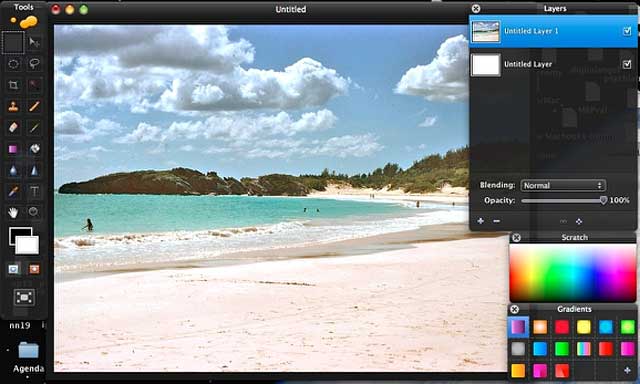
The second thing that strikes you if you're new to the program, or
even if you're not, is that Pixelmator's user interface is drop-dead
gorgeous. Stunning, really. Document and tool-palette windows are
bordered in transparent black.
Pixelmator's Tools
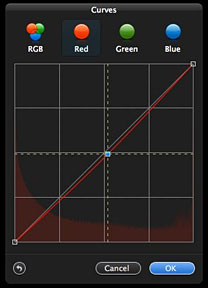 Speaking of tools, along with the standard complement you'd
expect, I especially like Pixelmator's Curves tool - the most intuitive
and and slickest I've ever used for adjusting tonal range or making
precise adjustments to individual color channels in an image.
Speaking of tools, along with the standard complement you'd
expect, I especially like Pixelmator's Curves tool - the most intuitive
and and slickest I've ever used for adjusting tonal range or making
precise adjustments to individual color channels in an image.
There is also a very cool Color Balance tool for
controlling the overall color mixture in an image if you're doing color
correction work with real time adjustments that can be applied
separately to highlights, midtones, and shadows.
Pixelmator's Auto Enhance tool can optimize less-than-perfect images
with a single click, convenient if you're in a hurry and likely to be
popular with new or casual users. It works quite well, pretty much on
par with the equivalent tool in Photoshop Elements, but when I have the
time I prefer to tweak my images with more precisely nuanced correction
tools.
I do continue to miss Elements' Lighting and Shadows adjustment
panel, especially the lighten shadows/darken highlights controls, but
Pixelmator's exposure adjustment control compensates, and is less
complex to use.
 The PSE Spot Healing tools are also conspicuous by their
absence, however, and one of the things I miss most using Pixelmator.
The Clone Stamp Tool partly compensates, but it's a lot clunkier
solution than the PSE (Photoshop Elements) pair, and the stamp-shaped
cursor is nowhere nearly precise enough for close work to suit me.
The PSE Spot Healing tools are also conspicuous by their
absence, however, and one of the things I miss most using Pixelmator.
The Clone Stamp Tool partly compensates, but it's a lot clunkier
solution than the PSE (Photoshop Elements) pair, and the stamp-shaped
cursor is nowhere nearly precise enough for close work to suit me.
On the other hand, a really cool Pixelmator wrinkle is that the
currently-selected tool's icon gets magnified in the tool palette, and
the icons are strikingly attractive. On the downside, I really dislike
having to switch to a Move Tool from a Marquee Tool in order to move
something around. I much prefer to be able to select and
option-drag.
Your GPU Is a Big Factor
The power and sophistication of your Mac's graphics support will be
a significant factor in Pixelmator's liveliness and responsiveness on
your Mac. Touted as "the World's First GPU-Powered Image Editor",
Pixelmator relies heavily on OS X's Core Image technology that uses
your Mac's video accelerator for image processing, freeing the CPU for
other tasks. And if you have a high-performance GPU with a lot of video
RAM, you should find real-time responsiveness across a wide variety of
Pixelmator operations enhanced substantially.
In
addition to Core Image, Pixelmator harnesses the power of Mac OS X's
Open GL, Automator, ColorSync, Spotlight, and many other technologies.
Pixelmator was built exclusively for Mac OS X, and it shows.
Pixelmator supports over 100 different file formats, and it can open
and save Photoshop files with layers intact.
Pixelmator is getting better and better (discounting that version
1.3.1 hiccup) with each revision. Pixelmator 1.3.x, which is code-named
"Tempo", is claimed to deliver performance gains in almost every
function of the application. Taking even greater advantage of Core
Image, OpenGL, especially noticeable when working with large images,
opening and saving, using filters and adjustments. I love its quick
startup and its less complex and less ponderous interface than
Photoshop Elements, although PSE still has a significant power,
features, and versatility edge.
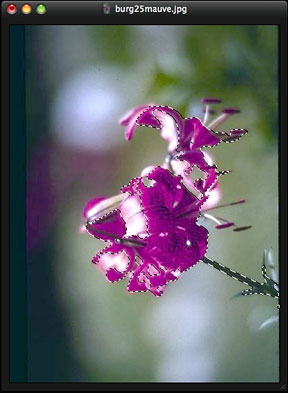 New in Pixelmator 1.3.x are a new click-and-drag approach
in Magic Wand for selecting, Paint Bucket for filling, or Magic Eraser
for removing unwanted backgrounds allows the user to drag the mouse
with instant results when working with these tools. This works so
slickly, it'll make you smile. Expect to be impressed.
New in Pixelmator 1.3.x are a new click-and-drag approach
in Magic Wand for selecting, Paint Bucket for filling, or Magic Eraser
for removing unwanted backgrounds allows the user to drag the mouse
with instant results when working with these tools. This works so
slickly, it'll make you smile. Expect to be impressed.
Pixelmator 1.3's Hue and Saturation, Colorize, and Replace Color
adjustment tools have also been redesigned, now featuring a color wheel
with color buttons nearby. The Hue and Saturation tool can also edit
different ranges of colors, while Replace Color now features a new
Radius preview slider showing a black-and-white preview of how much of
the selected color will be changed.
The Smart Palette Hide feature solves the problem of
palette clutter when one uses adjustment tools or filters in
Pixelmator, making all unnecessary palettes temporarily dissolve when
any of the adjustment tools or filters are in play, allowing you to
focus on only one image and chosen tool.
Pixelmator is layer-based, allowing you to link and arrange added
layers, blend layers, change their opacity, create clipping masks, or
even add layer masks to hide some portions of layer. You can quickly
create layers from photos, other pictures, from selections, or even
from iSight.
Other new and improved features in Pixelmator 1.3.2 include improved
Type tool, Stroke, an Action Tooltips feature, minor user interface and
compatibility improvements, Spanish and French languages, and some
bugfixes.
Pixelmator 1.3.2 requires Mac OS X 10.5.5 or later and a graphics
processor that support Core Image. It is available for US$59.
Pixelmator 1.3.2 is a free update to current Pixelmator customers. a
30-day Pixelmator trial and more information on Pixelmator can be found
at their website.
Pixelmator's star rating keeps climbing, and I'm ready to give it a
3.5 out of 4.




