Graphics have always been an important element of the Macintosh
world, almost to the point of cliché at times, but it's arguably
never been better for graphics on the Mac platform than it is now,
especially in low to medium priced bitmap and photo editing
applications.
There is also, of course, Adobe's iconic and astronomically
expensive Photoshop CS3 (currently $620 from Amazon.com),
the reference by which all other graphics programs are judged, most
often with "it's not Photoshop, but..." However, it's pretty hard to
justify paying the stiff cost of admission into the Photoshop CS club
unless you're a computer graphics professional or a company that needs
and can use the application's awesome power and deep feature set,
especially when there are now so many excellent bitmap graphics
programs that sell for a fraction of Photoshop CS's price - including
Adobe's own Photoshop Elements (PSE 6 for Mac currently sells at $83 on
Amazon.com).
Last year two very interesting new ones were added to the roster,
Acorn and Pixelmator, selling for $39.95 and $59.95 respectively. I
checked Acorn for a review last fall [see
Charles Moore Reviews Acorn 1.0.2 Bitmap Image Editor on
Applelinks] and found it good, probably worth the money for users who
want a basic bitmap application, but it didn't really grab me as a
replacement for Photoshop Elements.
Pixelmator is another story.
I've been following Pixelmator's development since I first
downloaded it last summer, and I've found it to be both the most
visually arresting graphics program I've ever encountered in terms of
user interface aesthetics and also very capable and likable in a
functional sense. The developers say their target is to make Pixelmator
a Photoshop challenger - and that isn't just hype (if they're talking
Elements rather than CS).
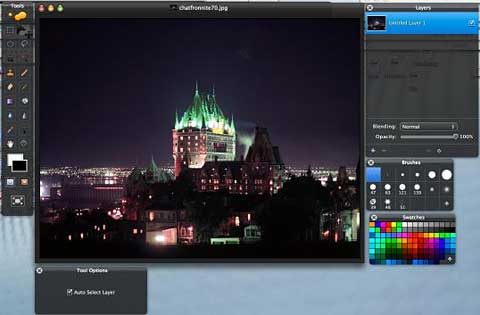
And speaking of Photoshop Elements, the bar is about to be raised
substantially with the imminent release of Elements 6 for the Mac.
Adobe has kindly supplied me with a prerelease beta copy of Elements 6,
and what was already the class of the field in affordable bitmap
programs for the Mac is now even more powerful, polished, attractive,
and impressive, but Pixelmator (version 1.1.3 of which was released
last week) is coming on strong as well.
In comparing the two programs, it's impossible not to infer that
Adobe seems to have taken serious notice of Pixelmator, since Photoshop
Elements 6's revised interface appearance, which had been generally
ho-hum and bland in previous versions, has received a radical facelift
and now sports a charcoal background theme, which obviously has a
flattering resemblance to Pixelmator's stunningly gorgeous obsidian
black interface theme. Pixelmator is still better looking, in my
estimation, but Elements 6's more subdued charcoal is arguably more
functionally practical.
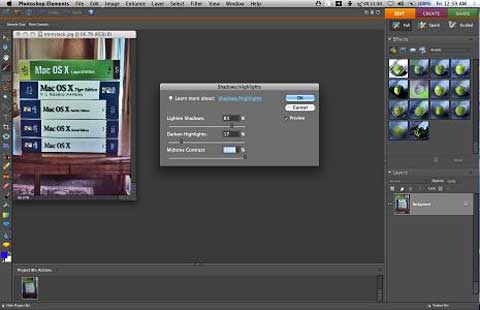
Photoshop Elements 6 for Mac
Anyway, I find myself more and more likely to choose Pixelmator for
graphics editing chores, partly because it starts up quickly - a very
respectable 13 seconds on my 1.33 GHz G4 PowerBook
(Photoshop Elements - go make a coffee - well actually about 40
seconds), a distinction that looms larger when you're using older,
slower hardware like I am, but also because once it's up and running, I
can usually accomplish what I need to do quickly and efficiently using
Pixelmator's powerful tool inventory, which I like more and more as I
become increasingly familiar with it.
Make no mistake, this is one serious and very good graphics
application for $59.95.
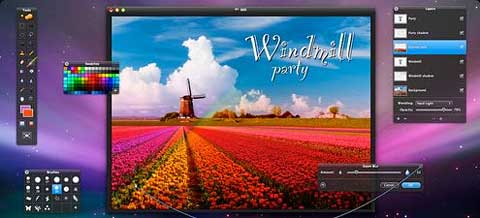
On the other hand, Photoshop Elements still has a substantial edge
in power, features, user-friendliness, and especially automation
(although to be fair, Pixelmator does support Auto Levels, Auto Color,
Auto Contrast, and even uses a Channel Mixer) as well as in speed for
many functions once you get past the sluggish start up, and it remains
a stupendous bargain at $89.95, but Pixelmator sells for $30 less.
Pixelmator is a Core Image-based image editing program for OS X that
is being promoted as an "image editor for the rest of us." Written by
UK-based developers Saulius and Aidas Dailide, the application is
touted as having "everything you need to create, edit and enhance your
images." Pixelmator supports layers and a variety of effects.
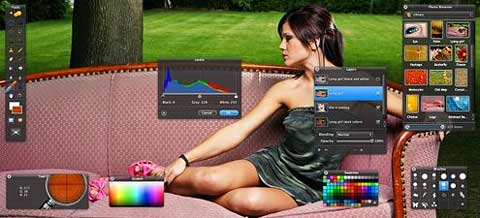
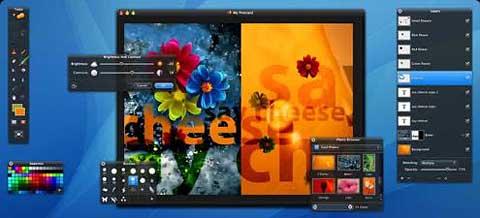
Pixelmator
is a visual tour-de-force. Stunning, really. The document windows are
bordered in black, with translucent black backgrounds for the various
tool palettes. How ideal this is in practical terms is another matter.
It's pretty, but also more than a bit distracting, and I've found
myself squinting to distinguish some of the tool selections, whose
rendering is more than a bit murky in some instances, and I found
myself easily losing track of the cursor position, while other open
stuff on your Desktop showing through gets old quickly as well. Also,
with my current favorite Leopard desktop picture, which happens to have
a lot of black area, the Pixelmator toolbar just sort of blends in and
disappears - like the Cheshire cat.
I don't want to disparage the look. It's interesting and
distinctive, and the developers have hinted that there is a cool new
feature coming that will be related to window transparency. However, as
I said, Elements' more subdued theme is more practical.
My main uses for bitmap graphics software are general resizing and
file type changing, straightforward editing and retouching (for
example, removing unwanted elements like text blurbs), and, most
importantly, photo editing: correcting, enhancing, and retouching of
images taken with my digital camera or scanned from photographic
prints, negatives, and transparencies.
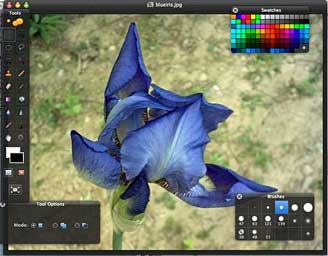 In Pixelmator, I
immediately missed Elements' superb and comprehensive photo correction
tool set, which has been further enhanced in version 6 - most
particularly the Auto Smart Fix command and the Adjust Lighting and
Adjust Color submenu selections, as well as the Spot Healing Brush,
none of which are available in Pixelmator.
In Pixelmator, I
immediately missed Elements' superb and comprehensive photo correction
tool set, which has been further enhanced in version 6 - most
particularly the Auto Smart Fix command and the Adjust Lighting and
Adjust Color submenu selections, as well as the Spot Healing Brush,
none of which are available in Pixelmator.
There is a masks palette that allows you to save your selections for
later, and the View menu is nicely conceived to allow you to quickly
open or hide just the tools and effects palettes from among the 10
available that you need to work with at the time. Pixelmator also has
"dozens" of modal color adjustment and filter palettes that appear only
when you choose the corresponding command from the menu bar. Mouseover
tool tips are supported.
Pixelmator's sophisticated layers support allows you to blend
layers, change their opacity, create clipping masks, or add layer masks
to hide some portions of layer.
The Selection tool is quite
sophisticated, allowing you to refine selections, to soften edges or
create borders. You can add text to your images in Pixelmator using
type layers, which are editable and even support OS X's built-in
spellchecker. I found the Pixelmator Brushes palette more convenient
than Elements' pulldown menu.
There are distortion, blur, sharpen, color, stylize, halftone, tile,
generator, and transition filters, and you can save in PSD, TIFF, JPEG,
PNG, PDF, and EPS, as well as can open and save Photoshop files with
layers supported.
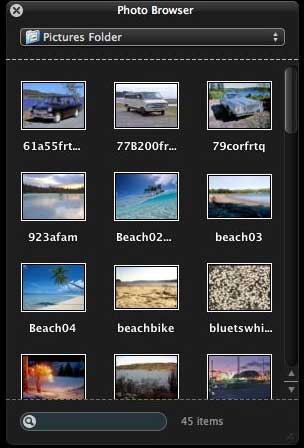 A
particularly nice touch is close integration with iPhoto. The Photo
Browser palette provides quick access to your iPhoto Library - events,
albums, Smart Albums, and pictures in your Pictures folder - via a
handy pulldown menu, and you can drag-and-drop images using the
thumbnails in the Browser as layers in Pixelmator compositions
(slick!).
A
particularly nice touch is close integration with iPhoto. The Photo
Browser palette provides quick access to your iPhoto Library - events,
albums, Smart Albums, and pictures in your Pictures folder - via a
handy pulldown menu, and you can drag-and-drop images using the
thumbnails in the Browser as layers in Pixelmator compositions
(slick!).
A Mac-only application, Pixelmator also integrates with Mac
OS X Core Image, Open GL, Automator, ColorSync, and Spotlight, and
you can use the Backup tab in the Preferences to back up your
Pixelmator preferences, swatches, and brushes to .mac.
Actually, Pixelmator is designed from the get-go to take advantage
of OS X's Core Image technology that taps the processing power of your
Mac's video card to speed image processing - an effect that will be
especially noticeable if you have a powerful GPU and lots of VRAM.
Pixelmator is the first image editor to bring Quartz Composer
compositions to image editing. Every version of Mac OS X 10.5 Leopard
comes with a free Quartz Composer application that can be used to
create almost any possible filter for use with Pixelmator and any other
application that supports Quartz Composer compositions.
Pixelmator also lets you take pictures with an iSight camera on your
Mac and add them as layers to your composition. It also supports
graphics tablets.
Pixelmator even
has a few features that outdo PSE. I especially like the convenient
"Exposure" slider tool that lets you alter image "exposure" values in
real time very slickly; it's nicer to use than the equivalent tools in
Elements.
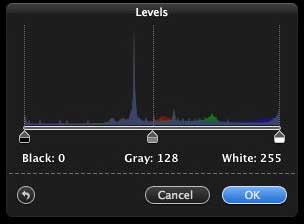
The "Levels" palette also works very well.
 Unfortunately, while some of the
tool and filter application waiting sluggishness has been improved
incrementally with the successive version releases, it's still mighty
slow, especially functions like resizing images. You also still can't
opt to open a new image from the Clipboard, and if there is a way to
adjust the setting for new image default size (640 x 480), it has thus
far eluded me. Indeed, the Preferences options are sparse to the point
of extreme minimalism.
Unfortunately, while some of the
tool and filter application waiting sluggishness has been improved
incrementally with the successive version releases, it's still mighty
slow, especially functions like resizing images. You also still can't
opt to open a new image from the Clipboard, and if there is a way to
adjust the setting for new image default size (640 x 480), it has thus
far eluded me. Indeed, the Preferences options are sparse to the point
of extreme minimalism.
Yet another shortcoming is
that if there is a way to clone-drag a selection in Pixelmator, which
is a very useful retouching function supported by both Photoshop
Elements and even the ancient Color It! [see
Charles Moore Reviews Color It! 4.5 For Mac OS X on
Applelinks], I've been unsuccessful in discovering it. The Clone Stamp
tool is something of a substitute for this, but not a totally
satisfactory one.
The Pixelmator team released Pixelmator 1.1.3 last week, featuring a
raft of enhancements, refinements, and bug fixes which you can read
in the Appendix to this review.
Pixelmator's new built-in Quick Look plugin makes it possible to
view almost any of more than 100 image file formats supported by
Pixelmator without having to launch the application itself. The
Pixelmator's Quick Look plugin is a significant enhancement not only
for Pixelmator, but also for Mac OS X 10.5 Leopard, because there
are some exotic file formats supported by Pixelmator's Quick Look
plugin that were not previously supported by Mac OS X.
Read the review of Pixelmator 1.2.
System Requirements
- Mac OS X 10.4 Tiger or later
- Core Image supported graphics card (recommended)
- Some features require iLife.
System support: PPC/Intel
$59 demoware
Go to the Miscellaneous Ramblings Review index.




