For the past seven years or so, the image editing tool I use most -
a lot more than Photoshop Elements or Pixelmator - is the very
professionally turned out freeware ToyViewer,
which I find slicker than any other software I know of for simple image
resizing and format conversion. ToyViewer also has some handy image
correction filters.
This month, ToyViewer's developer, Mr. Takeshi Ogihara, released
Version 5.0 of the application, upgrading it to support Mac OS X 10.6 "Snow Leopard",
and also releasing separate version 5.0 builds for OS X 10.4 "Tiger" and OS X 10.5 "Leopard".
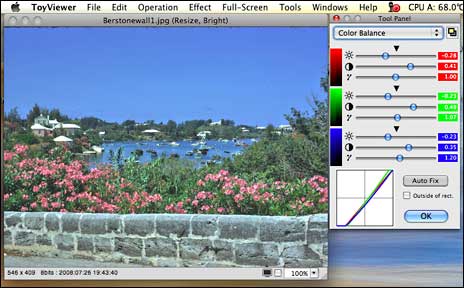
This is ToyViewer's most substantial upgrade in several years, with
the already very attractive user interface facelifted for a fresh look,
some new features, and expanded preferences.
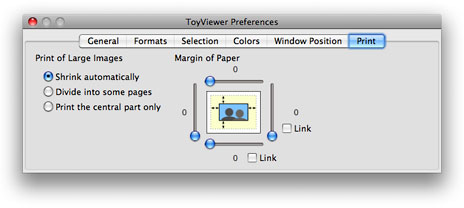
It's always a bit disconcerting when a software tool one depends on
receives a major overhaul - sort of like someone coming into your home
while your out and rearranged the furniture. That analogy is probably a
bit exaggerated with this upgrade, at least in terms of appearance,
since everything is still where one expects to find it, but in terms of
functionality with OS X 10.5, which I'm still using, there are
some problematical issues.
The most serious of these for me is the way ToyViewer 5 handles PICT
images imported through the Clipboard - one of the most frequent modes
I use with ToyViewer. OS X 10.5 screen shots are copied as PICT
images, and it's also the default screen shot format for Color It! 4.5, another
venerable image editing application I still use a lot.
The long and short of it is that at least in its Leopard iteration
(and probably the Tiger as well), ToyViewer no longer renders Clipboard
PICT images usably, with the result both grossly enlarged and its
aspect ratio distorted. This is serious enough that it will probably be
necessary for me to downgrade to ToyViewer 4.92, at least until I
upgrade my operating system to Snow Leopard. In the meantime, I'm using
OS X Preview as a "PICT buffer" of sorts to convert screen shots
copied directly to the Clipboard (Command-Shift-Option-3 or -4) and
Clipboard cuts from Color It! to ToyViewer-friendly formats.
In the release notes posted on his website, Ogihara warns that in
ToyViewer 5.0 for Mac OS X 10.4 or 10.5, "some functions won't
work as expected," attributing the reason to limitations in the WebKit
API, so current Tiger and Leopard users should check the list of
caveats he has posted before deciding whether to install this version
update or stick with ToyViewer 4.92.
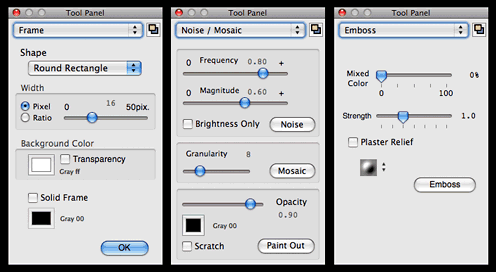
New features and changes in ToyViewer version 5.0 include:
- Color profiles embedded in image files can be replaced. Exif and
GPS information are also displayed.
- You can save image files with/without Exif and GPS
information.
- Images with CMYK color space can be dealt with easily.
- SVG image files can be displayed. Note that, however, all kinds of
SVG cannot be displayed correctly (it depends on WebKit).
- TIFF Stacks, that is, TIFF image files with multi-frame, can be
displayed. Moreover, ToyViewer can show animation of TIFF and GIF files
with multi-frame.
- Displayed images can be easily enlarged/shrunk by new mouse
operation.
- The interface to see files in a directory sequentially by using
full-screen is greatly changed. You can see two images at the same time
as an opened book, and two or more pieces be seen in
fast-forwarding.
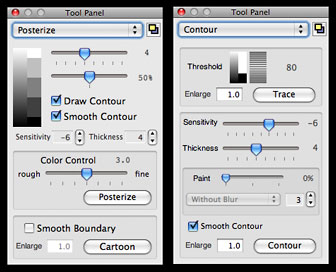
- The effect of obtaining the contour from an image is updated.
- New effect called "Cartoon" is added. You can add the contour to
cartoon and posterize effects.
- Blur effect has variations: Gaussian filter, Median filter, and
Kuwahara filter.
As before, ToyViewer can read and display image files in a wide
range of file formats including: tiff, jpg, pdf, png, gif, bmp, pict,
JPEG2000(jp2, jpc, j2k), and eps.
ToyViewer also deals with svg, jbig(bie), pcx, pcd, pnm (ppm, pbm,
pgm), xbm, mag, SUN Rasterfile and others. For example, if you have
Adobe Photoshop, ToyViewer can display psd image files. You can set
ToyViewer to display any image format if there is a filter program to
ppm format.
Displayed images can be saved as follows: tiff, pdf, gif, bmp, png,
jpg, JPEG2000 (jp2, jpc, j2k), jbig (bie), pnm, or xbm. Vector images
such as PDF can be converted into bitmap images such as jpg or
tiff.
Color profiles embedded in image files can be replaced. Exif and GPS
information are also displayed. You can save image files with/without
Exif and GPS information. Moreover, you can add comments to images
(depending on file format).
Other Features:
Scan Folder:
ToyViewer can display each image file in a folder one by one in
full-screen mode. You can also mark images to move - or to delete. With
this feature, ToyViewer can be used as a no-hassle slideshow or comic
viewer.
Full-Screen Mode:
ToyViewer can display images in full-screen and in front of all
other windows. If you like a displayed image, you can make it the
Desktop picture (wallpaper) of your Mac.
Animation:
ToyViewer provides simple animation player for animated GIFs and
TIFF Stacks. Additionally, each frame of and each page of a PDF can be
viewed as a single image.
Image Operations:
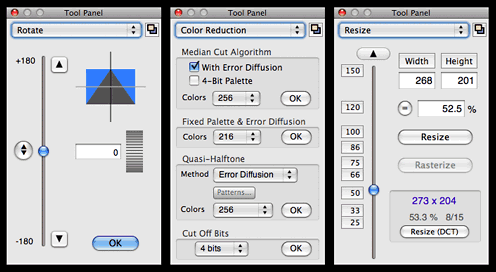
As always with ToyViewer, you can rotate, flip, clip, enlarge, or
shrink images.
Color Operations:
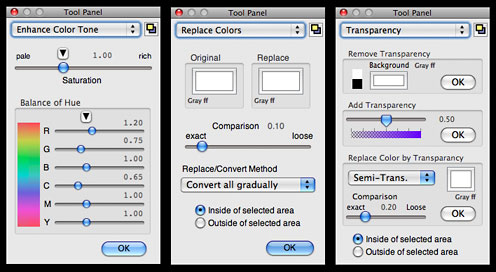
While it's complimentary to, rather than a replacement for, a
full-featured image editor like PSE or Pixelmator or Acorn, given it's
lightweight and nimble speediness, ToyViewer has surprisingly powerful
ability to adjust brightness, contrast, and color tone of images if you
need some quick and convenient image manipulation. You can replace a
specified color with another color or transparent color and also make
images with palettes or convert them to monochrome images.
Effects:
ToyViewer has some typical operations to images, such as
enhancement, blur, mosaic, and so on. You can also make
Aqua-button-like images, poster-like images, and more.
Custom Icon:
ToyViewer can attach a custom icon to any file as well as newly
saved image file.
Print:
Images can be printed. An image is automatically shrunk to be
printed on a sheet or divided into multi pages.
System requirements: Mac OS X 10.4 or later (different versions for
10.4, 10.5, and 10,6)
- Binary for Mac OS X 10.6 Snow Leopard, 6.0 MB
- Binary for Mac OS X 10.5 Leopard (Universal), 6.6 MB
- Binary for Mac OS X 10.4 Tiger (Universal), 5.6 MB
ToyViewer 5.00 is not available for Mac OS X 10.3 (Panther) and
earlier versions. You can use ToyViewer 4.92 or earlier ones with these
versions.
System Support: PPC/Intel
Freeware
Low End Mac Ratings:
- Version 4.92 - (at least for Tiger and Leopard users) 4 out of
4.
- Version 5.0 - (for Tiger and Leopard users) 2 out of 4
- Version 5.0 - (for Snow Leopard) not rated until I get to try it.
If the Clipboard glitch is not present, I provisionally anticipate 4
out of 4.



