Responding to my comment in last week's 'Book Value
column about my slow migration to my new Unibody MacBook that I was
having difficulty getting Color
It! (which we'll henceforth refer to
without the exclamation mark) 4.5 to work, Wayne Davis of Digimage Arts (and CI's developer)
kindly wrote.
Color It 4.5 works fine on Intel-processor Macs, and
in fact is running right now on a 2.53 GHz Intel Core 2 Duo 15" MacBook
Pro next to me running 10.5.6. So it should run on your new MacBook
without any problems.
The first thing to do is to run Repair Disk
Permissions in the Utilities folder. We've found that fixes all sorts
of weird little things in OS X. If that doesn't solve the problem,
you could Trash the Prefs file, but in OS X that's kind of an
involved process (see below); it's easier to just reinstall from the
original CD.
If you've got any questions please let me know!
Trash Prefs in Color It 4.5: Make sure Color It is not
running. In the Finder, hold down the Control key and click on the icon
for the Color It program. A pop-up menu appears. Choose the "Show
Package Contents" command. A window opens. Double-click on the Contents
folder to open it. The Contents window opens. Double-click on the
MacOSClassic folder to open it. The MacOSClassic window opens.
Double-click on the Color It Stuff folder to open it. Take the file
named "Color It 4.5 Prefs" and throw it in the Trash. Empty the Trash.
Close the Color It Stuff window. Double-click on the Color It program
icon to start the program. When the program starts and does not find a
Prefs file, it will create a new Prefs file with default settings.
Wayne Davis
Digimage Arts
I very much appreciate Wayne's forwarding the information and
tutorial tips, and it's a great relief to have it confirmed that Color
It will still work on the Intel machine.
I decided to take nothing to chance and trashed the old copy that
I'd dragged over from the PowerBook, then followed Wayne's instructions
for trashing the preferences, started it up, and reentered the serial
number.
Works like a charm. One more thing off my configuration To Do list.
:-)
Deep Roots
Speaking of Color It, this tremendous little program which can trace
its roots back to the days of 680x0 Macs, remains my workaday image
editor of choice - not as powerful or richly featured as Photoshop
Elements 6 or Pixelmator 1.4, but it's faster (starting virtually
instantly on my not exactly cutting edge G3 and G4 hardware. It also -
Classic Mac OS version - launches on our old 233 MHz PowerBook G3 in
less than four seconds), and has a light, quick, nimble feel to its
user interface compared to especially the formidable but ponderous
Photoshop Elements.
I've used Color It as my workhorse graphic app since way back on my
old 25 MHz 68030 LC 520 running
System 7.1, and it was even speedy (and worked pretty much as it does
today) on that hardware.
Color It has always been a pleasant place to be in the virtual
world, and version 4.5 is comfortably familiar territory for anyone
conversant with previous versions. There is no Universal Binary
version, and given the historical rate of development for this program,
I wouldn't advise holding one's breath waiting for one, but it really
shouldn't be an issue as far as performance is concerned.
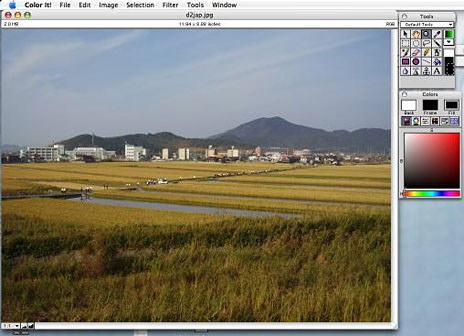
Color It 4.5 running on a MacBook.
Color It just flies on my 1.33 GHz PowerBook G4 and is
much faster than any other image editor I've tried. Just as the Classic
version of Color It 4 continues to provide sparkling performance in
OS X Classic Mode on PowerPC Macs, so long as Rosetta emulation is
supported on Macintels, there should be no cause for concern in this
regard (provided you get those new preferences configured). Color It is
extremely efficiently coded, and, for example, still only demands a
piddling 6 MB of RAM.
Transferable Skills
One cool thing about Color It is that it has always worked a lot
like Photoshop, so the skills
you develop using one of these programs will to a considerable degree
transfer to the other. There are distinctions and differences, of
course, but not ones so radical that you have to climb a steep learning
or adjustment curve when switching.
Bitmap graphics (or paint) programs are all essentially descended
from the MacPaint application that
shipped with the original Macs back in 1984. There used to be a passel of paint programs for the Mac,
including Photoshop, Canvas, Painter, SuperPaint, UltraPaint, Expert
Color Paint (a licensed version of Color It 1.0), the painting module
in HyperCard, PixelPaint Pro,
MacPaint itself, and more.
Of all of these, Color It came closest to being an all-round
Photoshop substitute "for the rest of us" at a fraction of Photoshop's
price, which is probably why it is still around while most of the
others mentioned above have been pushing up daisies in the software
boneyard for years.
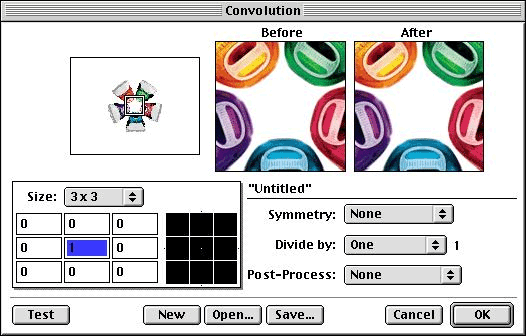
Paint It's convolution tool.
 Back
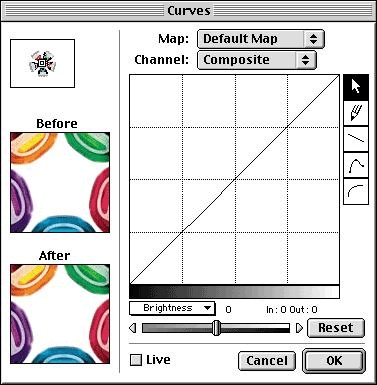
in the day, Color It even offered some features that contemporaneous
Photoshop didn't at the time, notably including multiple undos and a
convolution editor that applies convolutions (numerical pixel-by-pixel
operations) on the fly as you paint. Color It also happily supports
Photoshop plugins, vastly expanding its built-in versatility, and has a
customizable toolbox, user-friendly color controls with an intuitive
slider-bar motif, anti-aliasing and feathering options, an Unsharp Mask
function, and selection and masking tools. Color It also supports
pressure-sensitive control over input (if you have a pressure-sensitive
drawing tablet like Wacom's), does color corrections with its Levels
and Curves commands, and allows you to edit color channels separately
using paint tools and special-effects filters, including CMYK
separation channels.
Back
in the day, Color It even offered some features that contemporaneous
Photoshop didn't at the time, notably including multiple undos and a
convolution editor that applies convolutions (numerical pixel-by-pixel
operations) on the fly as you paint. Color It also happily supports
Photoshop plugins, vastly expanding its built-in versatility, and has a
customizable toolbox, user-friendly color controls with an intuitive
slider-bar motif, anti-aliasing and feathering options, an Unsharp Mask
function, and selection and masking tools. Color It also supports
pressure-sensitive control over input (if you have a pressure-sensitive
drawing tablet like Wacom's), does color corrections with its Levels
and Curves commands, and allows you to edit color channels separately
using paint tools and special-effects filters, including CMYK
separation channels.
Color It 4.5 for OS X supports all of these features and
more.
While Color It's execution of certain functions is less precise and
powerful than Photoshop's, it is more than adequate for the needs of
novices and advanced amateurs, as well as light professional use. It is
also, as noted, enough like Photoshop that those who've learned that
program will not have a steep learning-curve to climb.
For the sort of graphics work I typically do, such as converting
screenshots to GIFs or JPEGs for the Web, or doing simple image
editing, creating line art drawings for article illustrations, cleaning
up product photos, and the like, using Photoshop - even Photoshop
Elements - seems like the proverbial swatting flies with a
sledgehammer. Color It is a much better and more convenient
alternative.
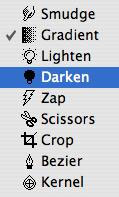 With Color
It 4.5 you can:
With Color
It 4.5 you can:
- Create, view, edit, and save animated GIF files without leaving the
program
- Catalog your image files for quicker browsing and retrieval.
- Export documents with clipping paths.
- Remove scratches, dust, redeye & more from scanned or digital
photographs with the program's built-in filters.
- Open and save PNG and progressive JPEG files.
- Quickly create client- and server-side image maps for the Web by
simply defining shapes around parts of an image.
- Apply linear or radial effects to gradient fills.
- Minimize color tables to create smaller GIF files for your Web
pages.
- Mix paint and pasted images together with different effects using
Color It 4.5's paint transfer modes.
There is an excellent, illustrated 123-page user manual and tutorial
included in PDF format, including exhaustively detailed descriptions
and instructions for all menu commands.
It's been my observation over long experience with Color It that
people who use it tend to become enthusiastic fans of the program. And
understandably so. It's a powerful bitmap graphics application with an
extremely user-friendly, attractive and well-engineered interface at a
barely more than shareware price.
Hopefully, Color It development will continue and someday there will
be a Universal Binary or even an Intel-native version
In summary....
Hooray
- Rich and powerful feature set
- Small, economical of memory
- Fast!
- User-friendly
- Stable, highly polished program
Boo
- Some functions not as powerful or precise as they would be in
Photoshop
- Color It's eraser tool is a bit poky
- Doesn't support PDF files
System Requirements:
- A Macintosh computer with a G3 or greater PowerPC chip (G3, G4 or
G5) or a Mac with an Intel chip (Intel-based Macs will utilize Apple's
Rosetta technology)
- A mere 6 MB of RAM
- A hard disk with at least 20 MB free
- Mac OS X, version 10.0 or above (version 4.5 will not function in
Mac OS 9 or earlier)
- Video that supports at least 256 grays or colors
Price:
- If you own Color It 4.0 or Enhance 4.0, you can upgrade to Color It
4.5 for $39.95. You will need to provide your Color It 4.0 or Enhance
4.0 Registration number when you order (your Registration number can be
viewed by choosing the "About Color It" or "About Enhance" command
under the Apple menu).
- If you own a previous version of Color It or Enhance or any version
of Digimage Arts' other products (Digital Darkroom or wwwART), you may
purchase Color It 4.5 for $49.95.
- If you do not presently own any of these products, the purchase
price of Color It 4.5 is $59.95.
Shipping and Handling:
- $5 for US destinations
- $7 for Canada
- $15 for international destinations
Shipments in the US and Canada are sent via First Class mail.
International shipments are sent via Global Priority Mail where
available (usually 4-6 days).
For more information, call: 800-388-8109 toll-free (US and Canada)
between 8 a.m. and 5 p.m. US Central time Monday through Friday.
International customers may call +01-515-462-5930.
Order by postal mail from:
- Digimage Arts
- PO Box 269
- Winterset, Iowa 50273-0269 USA



