At the Movies, Act 2
[an error occurred while processing this directive] - October 2000 - Tip Jar
Don't touch that mouse! Let's jump in. Several movies (well, snips
from movies) can be found at http://home.att.net/~myperforma.
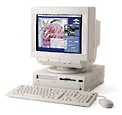
In order to view or hear the movies, either Movie
Player 2.5.1, SimpleText 1.4, or QuickTime 2.5 software must be
installed as a minimum!
There are several choices for creating movie files on my Performa. My choices are limited by the type of digitizing hardware used to convert data received from a device which is the source that generates or stores the audio/video data. The two parts must be compatible in order to create a readable file.
The table below matches digitizing hardware with the data source, whose output can be saved as a file that can be played by an appropriate application such as QuickTime.
|
|
|||||||
|
|
|
|
|
|
|
||
|
Recording or Storage Device |
|
|
|||||
|
|
|
|
|||||
|
|
|
|
|||||
|
|
|
||||||
|
|
|
|
|
|
|||
|
|
|
|
|||||
The Connectix QuickCam is connected by a serial cable to the motherboard via the serial port. An Apple TV/Tuner Card is not required. The output is audio/video recorded as a "Quick Movie" file. Note that my QuickCam records in black and white as well as shades of gray.
Several different ways to record or retrieve video and/or sound are possible using the Apple TV/Tuner Card. Movies are recorded in millions of color by using a VHS video camera. I use a Panasonic PV-320D (circa 1987) video camera to either record video or as a VCR on the fly to play back previously recorded movies. I then hook the camera to the video card input ports using cables with RCA jacks. The output is a SimpleText movie file.
By hooking up a TV antenna, hooked into the TV card, which in turn, is installed directly onto the motherboard, my Performa can be used as a VCR to record a TV show, let's say M*A*S*H. The output again is a SimpleText movie file, albeit quite large. The same is true of audio files generated from using a plain talk microphone or CD-ROM the device to generate data that is then digitized. The files saved are large files.
Reading and playing back files is a matter of hardware and software. And fun to use!
Next Time: Software and editing movies.

Links for the Day
- Mac of the Day: iMac Core Duo, Jan. 2006 - The first Intel-based iMacs ran at 1.83-2.0 GHz, came with 17" and 20" displays.
- Group of the Day: Mac Pro List is for those using a Mac Pro.
- Support Low End Mac
Recent Content
- Apple's Tablet an End Run Beyond Netbooks, Frank Fox, Stop the Noiz, 11.20. Whatever Apple has planned will leverage existing technologies while going beyond what its competitors can offer.
- i5 iMac Benchmarked, Mac mini 'Shouldn't Be Overlooked', Twitter Client for Classic Mac OS, and More, Mac News Review, 11.20. Also why Apple leaves the low end to others, 10.6.2 fixes video playback problem in 27" iMac, 3D Leopard and Snow Leopard performance, and more.
- Apple #4 in Reliability, Apple Tablet a Gadget for All?, HP's i7 Notebook Outdoes Mac Rivals, and More, The 'Book Review, 11.20. Also Flash 10.1 improves video on Hackintosh netbooks, thin-and-light notebooks impress, Windows XP finally on the way out, and more.
- NASA Chemical Sensor for iPhone, Smartphone Death Match, iPhone Earrings, and More, Ian R Campbell, 11.20. Also mobile phone dangers, new apps, GPS solution for iPod touch, new iPod and iPhone cases, and more.
- Replacing the Hard Drive in a Clamshell iBook, John Hatchett, Recycled Computing, 11.19. Yes, it is one of the most difficult Apple notebooks to disassemble and reassemble, but a 10 GB hard drive just will not do.
- IBM Model F: A Great Old Keyboard with an Outdated Layout, Tommy Thomas, Welcome to Macintosh, 11.19. Although it used a different technology than the revered IBM Model M keyboard, the Model F was a great keyboard in its own right.
- Soft Touch Keyboards, Wireless Mouse Options, Loving SeaMonkey 2, and More, Charles W. Moore, Miscellaneous Ramblings, 11.18. Also the future of browsing with PowerPC Macs and the multiple mouse input bug introduced with OS X 10.5.8.
- More links in our archive.
Recent Deals
- Best eMac Deals, 11.18. Used 1 GHz Combo, $100; SuperDrive, $269; 1.25 GHz Combo, $119; SD, $319; 1.42 GHz Combo, $289; SD, $498.
- Best Mac OS X 10.6 and Mac Box Set Deals, 11.18. "Snow Leopard", single user, $25; 5 users, $45; Mac Box Set, single user, $139; 5 users, $180; Server, $414. Shipping included.
- Best Xserve Deals, 11.18. Used 1 GHz dual G4, $649; 2.3 dual G5, $795; 3.0 4-core Xeon, $1,899; refurb 2.26 4-core, $2,499; new, $2,888; refurb 8-core, $2,999; new, $3,449; more.
- Best 15" MacBook Pro Deals, 11.17. Used 1.83 GHz, $750; 2.16, $800; 2.33, $900; refurb 2.4, $1,299; 2.53, $1,449; 2.66, $1,699; 2.8, $1,899; new 2.53, $1,579; 2.66, $1,799; more.
- Best Power Mac G4 and AGP Video Card Deals, 11.17. Used 400 MHz, $50; 933 MHz, $80; 500 dual, $60; 867 dual, $90; 1 GHz dual, $150; 1.25 GHz dual, $225; 1.42 GHz, $499.
- Best Mac OS X 10.5 Deals, 11.17. "Leopard" upgrade, $80; single user license, $135; 5 users, $173; Mac Box Set, 5 users, $230; Server, 10 users, $340; unlimited, $850. Shipping included.
- Best Mac mini Deals, 11.16. Used 1.42 GHz G4 mini, $379; 1.66 GHz Core Solo, $419; 2.0 Core 2, $450; new 2.26 GHz nVidia, $580; 2.53 GHz, $769; Server, $990.
- Best iBook G4 Deals, 11.16. Used 12" 1.07 GHz Combo, $210; 1.33 GHz, $298; 14" 1.33 GHz, $398; 1.42 GHz, $479; SuperDrive, $498.
- Best iPod shuffle Deals, 11.16. Used 1 GB, $35; 4 GB, $65; refurb 1 GB, $39; 2 GB, $59; new 2 GB, $55, 4 GB, $75. New and refurb prices include shipping.
- More deals in our archive.




