Low End Mac Reader Specials
TypeStyler For Mac OS X is Now Shipping! Download The Free Fully Functional 60 Day Tryout at www.typestyler.com
OWC: We Make DIY Upgrading Easy! Maximize your Apple MacBook / MacBook Pro. Up to 8.0GB Memory, up to 1.0TB HD & More. Easy Guide + Free, Detailed Installation Videos. Click here
Don't install Parallels to play poker online! Poker Mac will show you how
to download and install a native Mac poker application such as Full
Tilt Poker Mac.
Laptop Hardware Provided by TechRestore - Overnight Mac & iPod Repairs.
Compare products like desktop computers, apple laptops, apple macs, and LCD Monitors side by side! All the information and reviews to make the best purchasing decision for new mobile phones, sat nav systems, or MP3 players. The Ciao online shopping community makes searching products easy for you.
Compu-Analyzing a TV Classic: Where No One Has Gone Before
Tom Gabriel - 2001.06.04
My Turn is Low End Mac's column for reader-submitted articles. It's your turn to share your thoughts on all things Mac (or iPhone, iPod, etc.) and write for the Mac web. Email your submission to Dan Knight .
If TV Characters Used Real Computers got me to thinking about one of my own favorite TV (and movie) genres, science fiction, which of course has a great deal to do with computers and the future. Of course I gravitated toward television's greatest sci-fi saga, parent of spinoff, imitations, and series that would never have seen the light of day if it had not made such a great impression on the imagination of the public. I refer, of course, to Star Trek, both TV series and films.
Having considered this show, its influence, and the veritable universe it has created around itself, I have come to a conclusion which should gladden the hearts of Mac users and Mac partisans everywhere. It is verifiable and logical - even by Vulcan standards.
The technological and personal future of humanity undeniably belongs to the Macintosh.
Consider: in the best film of the Star Trek motion picture series, Star Trek IV: The Voyage Home, the crew of the Enterprise has traveled back in time to the late 1980s to bring humpback whales into the future so they can talk to a space probe that can only understand their language patterns. The probe is wreaking havoc with Earth's weather.
They must find a way to fabricate a light, strong material to
line the area in the starship where the whales will be kept, and
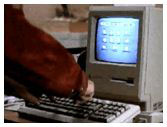
so Scotty and Dr. McCoy
arrive at a fabrication facility in San Francisco, masquerading as
a genius engineer and his assistant from Europe, there to
collaborate on production of a new alloy. The people at the
facility are skeptical, but they allow Scotty to use their computer
to draw up fabrication instructions. After first mistaking the
mouse for a microphone, Scotty gets immediately to work and
produces instructions and blueprints within a minute or so.
Guess what computer he was using? One of the early Macintosh all-in-ones (it's in the closing credits). It was fast, flexible, and efficient. It didn't crash when Scotty entered information so quickly that the twentieth-century people watching were astonished. In short, the movie Mac behaved just like Macs do in real life.
In the Star Trek universe, a Macintosh helped save the Earth from destruction. But consider also how quickly Chief Engineer Montgomery Scott was able to adapt to the (for him, and perhaps now for us) ancient computer's operating system and do his work!
I submit that this is because the operating system Scotty was accustomed to using in the future could only be a direct descendant of the OS he was called upon to use in the 20th century on that little compact Mac: easy, friendly, intuitive, and powerful.
Windows of the 23rd century? Hardly.
2001: A Space Odyssey showed the more cautionary attitude necessary for using Windows on outer space missions, presenting the psychotic break experienced by HAL (read: IBM) the computer. Most Windows users have experienced the same or similar: the PC freezes, stops what it's supposed to be doing, and won't really tell you why. The cryptic Windows error message of today is the "Dave, I don't see anything wrong with what I've done" of tomorrow.
No, the ship's computer would have to be responsive, powerful, flexible, up to any challenge, and possess a degree of sophisticated operation that would all but guarantee no possibly lethal temper tantrums.
It could only be a 23rd century version of the Mac OS (perhaps Mac OS XXIII)?
This tells us beyond any reasonable doubt that the future - the best future, as exemplified by the Star Trek universe - belongs to the Macintosh. Look at the Mac you use, whether it be an old compact or Quadra, a Power Mac 6100, 9600, an iMac, or the blazingly-fastest G4 presently being made, and realize that the genius responsible for this computer and operating system has to be the one to take humankind where no one has gone before - and back again. This will allow all of us, and the future itself, to live long and prosper.
Straightforwardly and supremely logical.
Share your perspective on the Mac by emailing with "My Turn" as your subject.

Recent My Turn articles
- Using Low End Macs for Internet Radio, 08.18. When the local public radio station moved classical music to HD radio, it was time to find another way to listen. An old iMac with iTunes solved the problem.
- 'That's Not a Computer', 07.30. Salvaging a broken PowerBook by turning it into a desktop computer.
- Upgrading a Digital Audio G4 to work better in Leopard, 06.02. In its original configuration, the dual 533 MHz Power Mac G4 was slow with Mac OS X 10.5, but add the right upgrades, and it runs Leopard quite nicely.
- My 4 favorite PowerBooks, 05.28. The PowerBook 150 has a big screen for a vintage PowerBook, the 165c has color, the 100 is diminutive, and Lombard has USB and a great keyboard.
- More in the My Turn index.
Links for the Day
- Mac of the Day: 17" iMac G4/800 MHz, July 2002 - The iMac 'grows up' with a 17" 1440 x 900 display.
- Group of the Day: LisaList supports Lisa users.
- November 8 in LEM history: 99: OS 9: I think I like it - 01: The simplified Mac life - Soured on Windows - Flea market Mac - 02: Little room for improvement in new 'Books - Combo drive upgrade for iceBooks - 04: Re-Porter - 05: Fix the old iMac or buy a Mac mini? - Apple's Copland project - 06: MacBook Core 2 - MacBook value equation - Cheap is as cheap does - 07: Problems with Classic mode in Tiger - The G4 Power Mac that won't run Leopard
- Support Low End Mac
Recent Content on Low End Mac
- Quad-Core CPU Makes Sense in MacBook Pro, OS X 10.6 Causing Overheating, Overseas Power, and More, The 'Book Review, 11.06. Also Late 2009 MacBook reviewed, how to add RAM to new MacBook, 18.4in Acer notebook used Intel i7, and SanDisk SSD chosen for Sony VAIO X.
- Dumping Macs for Google Apps, SSD in iMac, Late 2009 iMac Performance Problems, and More, Mac News Review, 11.06. /newsrev/09mnr/1106.html
- WiFi Paranoia, iMac-O-Lantern, Magic Mouse Does Click, Free Clipboard Managers, and More, Charles W. Moore, Miscellaneous Ramblings, 11.05. Also strange time stamps, problem with ColorIt on Intel Mac, and the story behind OS X 10.5.4 install discs.
- IDE Is Dead; Long Live SATA!, Dan Knight, Mac Musings, 11.04. SATA has displaced parallel ATA. While IDE hard drives haven't disappeared, the best deals are in SATA hard drives.
- QuickTime X in Snow Leopard Imports, Trims, and Publishes Video Quickly and Easily, Alan Zisman, Zis Mac, 11.04. The long, slow process of importing video into iMovie to edit it, then render it to another format, is history as QuickTime X does that much more quickly.
- More links in our archive.
Recent Deals
- Best Mac Pro Deals, 11.03. Used 2.66 GHz 4-core, $1,300; 3.0 8-core. $2,299; refurb 2.66 4-core Nehalem, $2,149; 2.93, $2,549; 2.26 8-core, $2,799; 2.93, $4,999.
- Best iPhone Deals, 11.03. New 8 GB iPhone 3G, $$99; refurb 16 GB 3GS, $149; new, $199; 32 GB, $299.
- Best 12" PowerBook G4 Deals, 11.03. Used 867 MHz SperDrive, $348; 1 GHz, $499; 1.33 Combo, $298; SD, $559; 1.5 Combo, $448; SuperDrive, $589.
- Best Power Mac G3 and PCI Video Card Deals, 11.02. Used beige 300 MHz, $25; G4/366, $49; blue & white 350, $80; 400, $90; 450, $105; PCI video cards from $15; shipping additional.
- Best Power Mac G4 and AGP Video Card Deals, 11.02. Used 400 MHz, $50; 733 MHz, $69; 933 MHz, $209; 1.25 GHz dual, $299.
- Best 15" MacBook Pro Deals, 11.02. Used 2.0 GHz, $800; 2.2, $900; 2.4, $1,000; refurb 2.53, $1,449; 2.66, $1,699; 2.8, $1,949; 3.06, $2,169; new 2.53, $1,579; 2.66, $1,799; more.
- Best Mac mini Deals, 10.30. Used 1.33 GHz G4 mini, $379; 1.42, $389; 1.5, $419; 1.83 GHz Core Duo, $350; Core 2, $439; new 2.26 GHz nVidia, $580; 2.53 GHz, $770; Server, $990.
- Best G4 iBook Deals, 10.30. Used 12" 1.07 GHz Combo, $225; 1.33 GHz, $298; 14" 1 GHz, $349; 1.33 GHz, $398; 1.42 GHz SuperDrive, $498.
- Best Classic Mac OS Deals, 10.30. System 6.0.8 floppies, $10; 7.1, $12; 7.5, $20; 7.5 CD, $4; 7.6 $13; 8.1, $11; 8.5, $20; 8.6, $90; 9.0, $20; 9.2.2, $30.
- More deals in our archive.
About LEM | Support | Usage | Privacy | Contacts
Navigation
Used Mac Dealers
Apple History
Video Cards
Email Lists
Favorite Sites
MacSurfer
MacMinute
MacInTouch
MyAppleMenu
InfoMac
Macs Only!
The Mac Observer
Accelerate Your Mac
RetroMacCast
PB Central
MacWindows
The Vintage Mac
Museum
DealMac
DealsOnTheWeb
Mac2Sell
ramseeker
Mac Driver Museum
JAG's House
System
6 Heaven
System 7 Today
the pickle's Low-End
Mac FAQ
Abandonware
Petition
Mac vs. PC Info
Affiliates
The Apple
Store
Mac
Connection
B&H
MacMall
TechRestore
ExperCom
Crucial
Memory
batteries.com
Advertise
MacMinute
MacInTouch
MyAppleMenu
InfoMac
Macs Only!
The Mac Observer
Accelerate Your Mac
RetroMacCast
PB Central
MacWindows
The Vintage Mac
Museum
DealMac
DealsOnTheWeb
Mac2Sell
ramseeker
Mac Driver Museum
JAG's House
System 6 Heaven
System 7 Today
the pickle's Low-End
Mac FAQ
Abandonware
Petition
Mac vs. PC Info
Mac Connection
B&H
MacMall
TechRestore
ExperCom
Crucial Memory
batteries.com



