Low End Mac Reader Specials
TypeStyler For Mac OS X is Now Shipping! Download The Free Fully Functional 60 Day Tryout at www.typestyler.com
OWC: Mercury On-The-Go FW800+USB2 up to 1.0TB. Bus Powered, no external power supply needed. Macworld Editors Choice, CNET Very Good Starting from $99.97, 500GB $159.99. Click here
Don't install Parallels to play poker online! Poker Mac will show you how
to download and install a native Mac poker application such as Full
Tilt Poker Mac.
Laptop Hardware Provided by TechRestore - Overnight Mac & iPod Repairs.
Compare products like desktop computers, apple laptops, apple macs, and LCD Monitors side by side! All the information and reviews to make the best purchasing decision for new mobile phones, sat nav systems, or MP3 players. The Ciao online shopping community makes searching products easy for you.
The Joys of a Silent Mac
Dustin Rinebold - 2002.06.11
My Turn is Low End Mac's column for reader-submitted articles. It's your turn to share your thoughts on all things Mac (or iPhone, iPod, etc.) and write for the Mac web. Email your submission to Dan Knight .
A couple of months back, I sat down at a bookstore coffee shop with my iBook, and noticed a woman sitting at the table next to me feverishly typing away at a PowerBook 100. She must have caught me staring, because she looked over at me and said, "You must think I'm nuts to still be using this old thing."
"Actually not at all," I replied. "600 MHz doesn't make much difference when pounding something out in a word processor."
As it turns out, the woman is a professional writer and uses her PowerBook 100 extensively on the road. She uses an iMac at home to email, browse the Net, and so on - but for any actual writing, she sticks to her PowerBook or a Mac Plus she has situated in a separate room.
She explained that as a writer, there are two things that are important to her. First, she prefers System 6 over anything else. The reason being that the extra bells and whistles of more advanced operating systems were only distracting to the creative process and offered very little benefit for what she was doing.
And second, she likes complete silence, which means no fans and, more importantly, no hard drives. Her Mac Plus has an external hard drive that she backs everything up to, as well as an additional external floppy drive. For writing, she leaves the hard drive off, boots to one floppy, and uses the other floppy drive for an old copy of Word - which still leaves room on the disk for several hundred pages of text. Amazing!
After I got home that night, the Mac geek in me began to think. Now, I'm not a writer, but I can certainly appreciate the joy of booting a Mac to a floppy and hearing only the tapping of my fingers on the keyboard as I write!
To put myself in that place, I pulled out my old trusty 512Ke and wrote a couple of sentences in MacWrite. The silence was deafening, and very, very nice.
I quickly realized how easy it is to concentrate on writing when it's silent, as well as not having a million other things on the screen to distract you. As I'm writing this, I have the Instant Messenger icon bouncing in my dock trying to get my attention, iTunes busy cranking out some classic rock, and Explorer waiting for me to bring it to the foreground again to check sports scores and what's left of my stock.
I can see how the simplicity of the early days of computing on a Mac can be alluring. I convinced myself that I need to have a simple, silent Mac set up at the house . . . for no reason other than "just because." You other Mac geeks out there know exactly what I'm talking about!
Unfortunately, there's a problem - my 512Ke is a little too
old. I don't like the keyboard, and there's just not enough memory. My
Plus is maxed out at 4 megs, but still I have to deal with the loud,
rather
clunky keyboard. So the question is
. . . what is the best Mac I can build that will both run
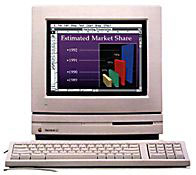
System 6 and operate on only floppy drives? My solution: the Macintosh LC.
But wait - the LC has a fan, right? Yes, it does, but it's a fan separate from the power supply, and the biggest generator of heat in an LC is the hard drive. With dual floppy drives, you can disable the fan without worry.
Well, I hoped so at least! So I put it to the test. I pulled two LCs out of the closet, tore out the hard drive from one and replaced it with the floppy from the other, disabled the fan, and fiddled with my new creation to see what it could do. I was pleasantly surprised with the results. With 1.4 meg floppies, I can fit System 6, printer drivers, and everything I need to get to the Internet via TCP/IP - all on one disk! The other drive can be used for anything. I found that playing old Infocom games via Telnet in total silence was quite a treat!
Why the LC? I liked being able to have two floppy drives in the case together - that way there is no external floppy off to the side. I ruled out much of the Mac II line, because I tend to think that disabling a fan built into a power supply is a bad idea, although I don't have any proof that this is the case. Once I get an extra Mac II class machine that I don't mind burning up, I'll give that a try. Imagine a silent IIfx running dual floppies under System 6!
You might be able to get away with disabling the fan in an SE, but I don't have one around to test with. Another possible solution would be a IIsi. You'd have to deal with an external floppy drive, but I'd bet that disabling the fan would be no problem. This is pretty much all you have to work with when you're limited to System 6.
System 7 can technically fit on a single floppy, but it's too stripped down to be much use.
The LC has been powered on for over a month straight without any complaint. With the 12 inch color monitor that neatly sits on the top of the case, my dual floppy drive creation makes a neat little silent writing machine that fits snugly at the corner of my desk. It might be a Road Apple, but for this very specific type of task, it fits the bill just fine!
This silent computing thing has really grown on me! Sure, I can spin the drive down on my iBook and type in silence, but for some reason I'm having tons of difficulty installing System 6 on it!
Sigh . . . time to start looking for a PowerBook 100 on eBay, I guess. <g>
Share your perspective on the Mac by emailing with "My Turn" as your subject.

Recent My Turn articles
- Using Low End Macs for Internet Radio, 08.18. When the local public radio station moved classical music to HD radio, it was time to find another way to listen. An old iMac with iTunes solved the problem.
- 'That's Not a Computer', 07.30. Salvaging a broken PowerBook by turning it into a desktop computer.
- Upgrading a Digital Audio G4 to work better in Leopard, 06.02. In its original configuration, the dual 533 MHz Power Mac G4 was slow with Mac OS X 10.5, but add the right upgrades, and it runs Leopard quite nicely.
- My 4 favorite PowerBooks, 05.28. The PowerBook 150 has a big screen for a vintage PowerBook, the 165c has color, the 100 is diminutive, and Lombard has USB and a great keyboard.
- More in the My Turn index.
Links for the Day
- Mac of the Day: 17" iMac G4/800 MHz, July 2002 - The iMac 'grows up' with a 17" 1440 x 900 display.
- Group of the Day: LisaList supports Lisa users.
- November 8 in LEM history: 99: OS 9: I think I like it - 01: The simplified Mac life - Soured on Windows - Flea market Mac - 02: Little room for improvement in new 'Books - Combo drive upgrade for iceBooks - 04: Re-Porter - 05: Fix the old iMac or buy a Mac mini? - Apple's Copland project - 06: MacBook Core 2 - MacBook value equation - Cheap is as cheap does - 07: Problems with Classic mode in Tiger - The G4 Power Mac that won't run Leopard
- Support Low End Mac
Recent Content on Low End Mac
- Quad-Core CPU Makes Sense in MacBook Pro, OS X 10.6 Causing Overheating, Overseas Power, and More, The 'Book Review, 11.06. Also Late 2009 MacBook reviewed, how to add RAM to new MacBook, 18.4in Acer notebook used Intel i7, and SanDisk SSD chosen for Sony VAIO X.
- Dumping Macs for Google Apps, SSD in iMac, Late 2009 iMac Performance Problems, and More, Mac News Review, 11.06. /newsrev/09mnr/1106.html
- WiFi Paranoia, iMac-O-Lantern, Magic Mouse Does Click, Free Clipboard Managers, and More, Charles W. Moore, Miscellaneous Ramblings, 11.05. Also strange time stamps, problem with ColorIt on Intel Mac, and the story behind OS X 10.5.4 install discs.
- IDE Is Dead; Long Live SATA!, Dan Knight, Mac Musings, 11.04. SATA has displaced parallel ATA. While IDE hard drives haven't disappeared, the best deals are in SATA hard drives.
- QuickTime X in Snow Leopard Imports, Trims, and Publishes Video Quickly and Easily, Alan Zisman, Zis Mac, 11.04. The long, slow process of importing video into iMovie to edit it, then render it to another format, is history as QuickTime X does that much more quickly.
- More links in our archive.
Recent Deals
- Best Mac Pro Deals, 11.03. Used 2.66 GHz 4-core, $1,300; 3.0 8-core. $2,299; refurb 2.66 4-core Nehalem, $2,149; 2.93, $2,549; 2.26 8-core, $2,799; 2.93, $4,999.
- Best iPhone Deals, 11.03. New 8 GB iPhone 3G, $$99; refurb 16 GB 3GS, $149; new, $199; 32 GB, $299.
- Best 12" PowerBook G4 Deals, 11.03. Used 867 MHz SperDrive, $348; 1 GHz, $499; 1.33 Combo, $298; SD, $559; 1.5 Combo, $448; SuperDrive, $589.
- Best Power Mac G3 and PCI Video Card Deals, 11.02. Used beige 300 MHz, $25; G4/366, $49; blue & white 350, $80; 400, $90; 450, $105; PCI video cards from $15; shipping additional.
- Best Power Mac G4 and AGP Video Card Deals, 11.02. Used 400 MHz, $50; 733 MHz, $69; 933 MHz, $209; 1.25 GHz dual, $299.
- Best 15" MacBook Pro Deals, 11.02. Used 2.0 GHz, $800; 2.2, $900; 2.4, $1,000; refurb 2.53, $1,449; 2.66, $1,699; 2.8, $1,949; 3.06, $2,169; new 2.53, $1,579; 2.66, $1,799; more.
- Best Mac mini Deals, 10.30. Used 1.33 GHz G4 mini, $379; 1.42, $389; 1.5, $419; 1.83 GHz Core Duo, $350; Core 2, $439; new 2.26 GHz nVidia, $580; 2.53 GHz, $770; Server, $990.
- Best G4 iBook Deals, 10.30. Used 12" 1.07 GHz Combo, $225; 1.33 GHz, $298; 14" 1 GHz, $349; 1.33 GHz, $398; 1.42 GHz SuperDrive, $498.
- Best Classic Mac OS Deals, 10.30. System 6.0.8 floppies, $10; 7.1, $12; 7.5, $20; 7.5 CD, $4; 7.6 $13; 8.1, $11; 8.5, $20; 8.6, $90; 9.0, $20; 9.2.2, $30.
- More deals in our archive.
About LEM | Support | Usage | Privacy | Contacts
Navigation
Used Mac Dealers
Apple History
Video Cards
Email Lists
Favorite Sites
MacSurfer
MacMinute
MacInTouch
MyAppleMenu
InfoMac
Macs Only!
The Mac Observer
Accelerate Your Mac
RetroMacCast
PB Central
MacWindows
The Vintage Mac
Museum
DealMac
DealsOnTheWeb
Mac2Sell
ramseeker
Mac Driver Museum
JAG's House
System
6 Heaven
System 7 Today
the pickle's Low-End
Mac FAQ
Abandonware
Petition
Mac vs. PC Info
Affiliates
The Apple
Store
Mac
Connection
B&H
MacMall
TechRestore
ExperCom
Crucial
Memory
batteries.com
Advertise
MacMinute
MacInTouch
MyAppleMenu
InfoMac
Macs Only!
The Mac Observer
Accelerate Your Mac
RetroMacCast
PB Central
MacWindows
The Vintage Mac
Museum
DealMac
DealsOnTheWeb
Mac2Sell
ramseeker
Mac Driver Museum
JAG's House
System 6 Heaven
System 7 Today
the pickle's Low-End
Mac FAQ
Abandonware
Petition
Mac vs. PC Info
Mac Connection
B&H
MacMall
TechRestore
ExperCom
Crucial Memory
batteries.com



