First off, I'd just like to say "Wow!" I can't believe this is my
seventh article on Low End Mac. It sure has been a lot of fun writing
these articles, and I hope you've enjoyed
reading them.
Anyway, to get on with today's topic....
When a screen shot of Leopard first reached my hard drive, I was
stunned at that new interface. How pretty!
But I thought Leopard just had a new UI and nothing else. So I stuck
with Panther and Tiger on my Macs.
But when I saw Leopard "live" in the local Apple Store, I simply
couldn't say no. An hour later, Leopard was installing on my Dual 533 Power Mac (using
LeopardAssist).
Nice UI! Leopard had tons of new features, but sadly the stock
Nvidia GeForce 2 MX video card in my Power Mac couldn't handle them all.
I had to go back to Tiger (which runs at incredible speeds).
Two weeks passed. When I was offered an eMac with 512 MB of RAM (now
upgraded to 1 GB), a 40 GB drive, and Radeon graphics for $105, I
got out my checkbook. Now that very eMac, which shipped with Mac
OS X 10.2.8, runs Leopard at awesome speeds. It is now my main
Mac, and I will never regret that purchase.
Anyway, with the eMac's Radeon chip, I was able to use every cool
feature of Leopard. I'd like to talk about the most important and make
this kind of a "mini-guide" to Leopard.
Cover
Flow: Cover Flow in the Finder has got to be the best
idea since sliced bread. It looks cool and works even cooler.
Sweet.
Time
Machine: Sadly, it's not a DeLorean. But still, cool!
This feature backs up your files to another drive every hour, and, if
you accidentally delete something, it lets you go back and find it.
This wipes the floor with Windows' System Restore!
Photo
Booth: Now shipping on every Mac. This pretty piece of
software lets you take funny pictures of yourself, friends, and
extraterrestrials that landed in your back yard.
Front
Row: Just like Apple TV. Awesome for hooking your Mac up
to your television. I actually hooked the eMac up to my 32" JVC TV.
Once again, wipes the floor with Microsoft, this time the Media Center.
(Why does Microsoft have such boring names for its software?)
Spaces:
Cool. Lets you have multiple desktops/workspaces.
Mail:
This version of Mail has some awesome new features. It has a new
interface and lets you see the progress of receiving/sending mail. Just
like Outlook Express!
Stacks:
I cannot believe how I have lived without this. Pretty little thing
that lets you drag folders to the Dock, and view them as lists, fans,
or grids. Sweet.
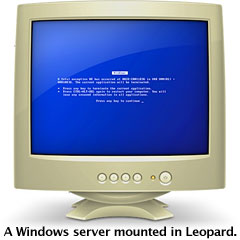 Insulting Microsoft: That's right. Every Windows PC on
your network appears as an old beige monitor showing the Blue Screen of
Death. Hilarious!
Insulting Microsoft: That's right. Every Windows PC on
your network appears as an old beige monitor showing the Blue Screen of
Death. Hilarious!
Boot
Camp: Intel folks will be happy to know they can install
Windows on their Mac now, without any problems. Perhaps the most
anticipated feature of Leopard, it works great!
New UI: Semitransparent Finder bar. 3D Dock. These are two
examples of the extreme goodness known as Leopard's UI. Some icons have
been changed too, for example the System Preferences icon, now a lot
more professional.
TextEdit:
That's right, the little piece of software I'm using to write this
right now. Now opens Word documents without any trouble, and has some
cool new features. Doesn't beat iWork or AppleWorks, but still very
good.
Eject Button in Finder: There is now a little "Eject" button
in the Finder menu bar. Very useful for ejecting CDs! [Editor's note:
You can
add a menu bar eject button to earlier versions of OS X, which
I have been doing for years. Invaluable! dk]
The Intro Video: The video that plays after installing
Leopard is just great! You should be able to find it on YouTube.
These are just a few of the cool new features in Leopard. If you
have a supported machine, get it. If you don't have a supported
machine, get it. LeopardAssist makes it very easy to install Leopard on
most unsupported G4 Macs, and it always works fine. I've used it on a
350 MHz Power Mac
just fine. I did have the Radeon card, though.
I tend to end my articles with a conclusion. So what is it this
time? It's that Leopard is the coolest, biggest update to the Mac OS
since the very first System Software 1.0. The
features are just too cool to describe - you have to try it.
Leopard is definitely the future of operating systems, and I advise
Microsoft to copy Mac OS X a little better the next time - and try
making it fast.
Resources
Share your perspective on the Mac by emailing with "My Turn" as your subject.



