PowerBook, iBook, MacBook, and other portable computing is covered
in The 'Book Review. iPod, iPhone,
and Apple TV news is covered in The iNews
Review.
All prices are in US dollars unless otherwise noted.
News & Opinion
Products
Software
News & Opinion
'The Street': Mac Users Are Snobs
ITWire's Alex
Zaharov-Reutt says:
"Think you're cool with your MacBook, MacBook Pro, MacBook Air,
iMac, or Mac Pro? US stock Market news site 'The Street' has news for
you: they think you're a snob!....
"Taken from research conducted by Internet advertising research firm
Mindset Media, Insanely Great Mac says that the research 'found Mac
users to be more liberal, less modest and more assured of their own
superiority'.
"Mac users strong enough to watch
The Street's video clip without getting so offended they'll smash
their screen will discover the 2 minute and 18 second video says the
following....
"Mac users 'self centred, arrogant, conceited'. Out of the Mindset
Media study of 7500 Mac and PC users, 'Mac users do really think they
are superior'. They think they are 'self important, extraordinary and
more intellectually curious'."
Link: Are
Mac Users Snobs? 'The Street' Thinks So
Mac Freeware Resource Posted
Simon Elliott, an Apple Distinguished Educator and the main trainer
for the West Cornwall Apple Regional Training Centre, has posted an
excellent and pretty comprehensive list of links to OpenSource and
freeware Mac software applications.
Open-Source Alternatives to Commercial Mac
Software
MacLife's
Susie Ochs reports:
"Nope, not even one cent - these open-source offerings are free for
the taking. Check 'em out and who knows? You might even wind up
replacing a big-budget app. Free your mind to free your Mac.
"Macs are expensive. Let's just go ahead and admit that right away.
Yes, they're the best computers on the market, and each new Mac
includes useful software like Mail, Safari, TextEdit, and the iLife
suite for no extra charge. But many consider certain high-priced
software packages - specifically, Microsoft Office and Adobe Photoshop,
although the list doesn't end there - to be so standard that they're
practically required purchases. Indeed, when people ask us about
switching from a PC to the Mac, one of the first questions usually is,
'I'll have to rebuy Office, won't I?'
"Not necessarily...."
Link: A Penny for Your
Apps - Open-Source Alternatives
Instaling Leopard? Uninstall SideTrack First
InfoWorld's
Paul Venezia says:
"Summary: Make sure you uninstall SideTrack 1.5
before doing a Tiger-to-Leopard upgrade.
"I'm not the kind of guy that leaps on new operating systems before
the shrink wrap has shrunk. I like to let others take the lumps of a .0
release before I subject my core laptops and workstations to the latest
and greatest. Thus, I kept my 17" MacBook Pro on Tiger until this
evening.
"I probably would have stayed there for awhile longer if I hadn't
picked up a MacBook Air. I've been using it daily since I got it,
switching back to the 17" when I needed the screen space (heavy coding,
lots of RDP connections, etc.), and I found that several of the
features in Leopard were too good to pass up, especially spaces and the
spring-loaded dock folders....
"The system updated successfully and rebooted. Happy that things
looked like they had gone well, I started to log in - but had no
keyboard....
"Then I remembered that I'd installed SideTrack...."
Link: Finally,
Leopard - Uninstall SideTrack First
Products
Dualy Extreme Delivers Up to 5x the Range with
AirPort Extreme Base Station
PR: QuickerTek has upgraded the high-end Apple AirPort
Extreme Base Station (802.11n). Dualy Extreme with 1 Watt of RF power
enables the Base Station with additional speed and range - up to five
times the standard wireless range. The increased power seeks out more
distant wireless signals and locks onto them with twin 500 milliwatt
transceivers (or 1 Watt Transceivers) coupled to two antennas that
create two combined signals paths for up to five times more wireless
range.
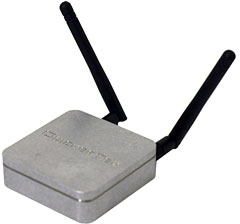 Several options are available
featuring with 500 milliwatt of RF power (two 500 mW Transceivers) and
another option with 1 Watt of RF power (two 1 Watt Transceivers).
QuickerTek can install the Dualy Extreme on the customer's Base
Station, or an already-upgraded Base Station can be purchased from
QuickerTek complete.
Several options are available
featuring with 500 milliwatt of RF power (two 500 mW Transceivers) and
another option with 1 Watt of RF power (two 1 Watt Transceivers).
QuickerTek can install the Dualy Extreme on the customer's Base
Station, or an already-upgraded Base Station can be purchased from
QuickerTek complete.
Dualy Extreme is ideal for wireless networks at work, school,
hotels, coffee shops - anywhere signal strength and speed are hampered
by distance and common office and home wireless obstacles. The upgraded
AirPort Base Station operates at the full 2.4 GHz range using the
high-speed MIMO capability.
Two 500 milliwatt or 1 Watt Transceivers inside Dualy Extreme reach
out to access points and computers capable of 802.11b/g/n wireless
networking, manufactured by a wide variety of common hardware
vendors.
And the dual 3dBi antennas (one for each Transceiver) provide the
speed necessary for 802.11n wireless that runs in the higher 2.4 GHz
wireless range. Dualy Extreme may be upgraded with even more powerful
antennas for even greater distance and wireless speeds. Both antennas
are attached via 3-foot cables so you can get the antennas up and away
from common desktop wireless impediments.
Dualy Extreme is also designed to mimic the appearance of the Apple
AirPort Base Station, so it blends nicely with other Apple
equipment.
Dualy Extreme Compatibility - Apple AirPort Extreme Base Stations -
(first version and the gigabit version); common 802.11b/g/n wireless
computers and access points; 120/240 VAC wall outlet power adapter;
- Proprietary cabling included;
- Some disassembly required to connect to the Base Station; Size:
2.75"x 2.75"x 0.70";
- FCC, CE rated
Dualy Extreme Pricing (SRP)
- Upgrade kit (500 milliwatt) - for user installation: $350
- Upgrade kit (1 Watt) - for user installation: $495
- Upgrade QuickerTek installed on your Base Station Extreme (500
milliwatt): $400
- Upgrade QuickerTek installed on your Base Station Extreme (1 Watt):
$550
- Upgraded Base Station Extreme (500 milliwatt) - Base Station and
Dualy Extreme already installed): $580
- Upgraded Base Station Extreme (1 Watt) - Base Station and Dualy
Extreme already installed): $730
Like most QuickerTek products, the Dualy Extreme is backed with a
one-year warranty on parts and labor.
Link: Dualy
Extreme
MaxConnect Makes Room for 4 More Hard Drives in
2008 Mac Pro
PR: MaxUpgrades announces availability of MaxConnect for the
New early 2008 Apple Mac Pro system , MaxConnect an internal hard disk
drive mounting solution, that allows four additional SATA hard disk
drives to be installed in the Optical bay of the Mac Pro system.
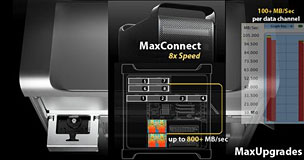 MaxConnect for Apple Mac Pro Optical bay
internal hard disk expansion solution allows Mac Pro system to utilize
two extra SATA DATA channels (available on the logic board) along with
existing Optical Drive, MaxConnect flexible design allows Mac Pro
system to house eight hard Disk Drives internally.
MaxConnect for Apple Mac Pro Optical bay
internal hard disk expansion solution allows Mac Pro system to utilize
two extra SATA DATA channels (available on the logic board) along with
existing Optical Drive, MaxConnect flexible design allows Mac Pro
system to house eight hard Disk Drives internally.
MaxConnect hard disk drive mounting system allows users to install
eight disk drives without any PCI Host Controller, this enables users
to install six SATA disk drives connected to native SATA ports of the
Mac Pro System and two ATA/IDE Hard Disk drives connected via ATA data
channel, all eight disk drives are bootable and native Mac Pro drive
interface support, Mac Pro System can have 6 TB SATA RAID with transfer
rate exceeding 600+ MB/sec (sustained transfer rate).
MaxConnect for Mac Pro Optical Drive Bay Features
- Two piece construction, Precision machined Aluminum.
- Slip in Design in the Optical Bay, no modification needed.
- Optimized for Air Flow.
- Surface Treated for electrical insulation.
- Flexible Upgradability.
- Install two SATA drives in the Optical Drive bay with the Optical
drive (Optical Drive with 6 total SATA drives, on board SATA Channels
No SATA Controller required).
- Install two SATA drives in the Optical Drive bay with two ATA/IDE
Drive (8 total internal SATA drives: No SATA Controller required).
- Install four SATA drives in the Optical Drive bay (8 total internal
SATA drives: Two internal ports SATA Controller required).
The MaxConnect internal hard disk drive mounting solution ships with
power cables, SATA Data Cables, it is priced at $129.
Link:
MaxConnect for Mac Pro Optical Drive Bay Disk Mounting Assembly
Sonnet's Basic Ethernet Adapter for PCI
Express
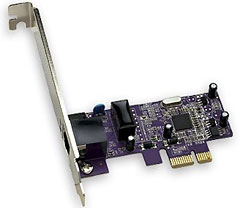
PR: Sonnet Technologies announces the immediate availability
of Presto Gigabit PCIe Basic, its latest PCI Express (PCIe) adapter
card for Mac Pro, and Power Mac G5 & Windows computers with PCI
Express expansion slots. Presto Gigabit PCIe Basic is a Gigabit
Ethernet network adapter card that expands or adds Gigabit Ethernet
connectivity in any compatible computer.
Presto Gigabit PCIe Basic offers basic networking support, yet it
supports gigabit speeds over common CAT-5 cabling, so costly cable
replacement is unnecessary. This Sonnet card offers plug-and-play
installation and simple configuration, and its 1000/100/10Base-T
auto-negotiation and full/half duplex communication support allow it to
be used in most networks. Presto Gigabit PCIe Basic includes a low
profile mounting bracket that enables the card to be easily installed
in low profile PCs.
 Mac Compatibility
- Mac Pro
- Power Mac G5 (with PCI Express slots)
- Mac OS X Version 10.5 and later
PC Compatibility
- PC with PCI Express slot
- Windows Vista
- Windows XP with SP2
- Windows Server 2003
Presto Gigabit PCIe Basic (part number GE1000-E) is available now
for the retail price of $39.95.
Link: Presto
Gigabit PCIe Basic
iMac VESA Adapter Kit
PR: imacmount.com introduces its iMac VESA Adapter Kit. The
iMac VESA Adapter Kit is specifically designed for Apple iMac
all-in-one computers that are deemed VESA noncompliant or
non-compatible by wall mount and articulating arm manufacturers. These
iMac models include: 20" Aluminum iMac, 17" and 20" iMac Intel Core 2
Duo, 17" and 20" iMac with iSight, and also the G5 17" and G5 20" 2006
iMac models.
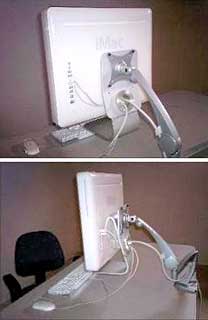 The iMac VESA Adapter Kit integrates with the iMac's stand and
cable management hole using a patent pending fastening system. Its
unique design eliminates the need to remove the stand from the iMac or
modify the computer in any way; ensuring that warranty is not void due
to the disassembling of the computer. This feature also maintains the
integrity of the iMac as a "portable" computer system as the stand
remains intact with the iMac. After the interface adapter bracket is
attached to the VESA mounting device being used, the fastening system
allows the user to mount and dismount their iMac computer quickly and
easily.
The iMac VESA Adapter Kit integrates with the iMac's stand and
cable management hole using a patent pending fastening system. Its
unique design eliminates the need to remove the stand from the iMac or
modify the computer in any way; ensuring that warranty is not void due
to the disassembling of the computer. This feature also maintains the
integrity of the iMac as a "portable" computer system as the stand
remains intact with the iMac. After the interface adapter bracket is
attached to the VESA mounting device being used, the fastening system
allows the user to mount and dismount their iMac computer quickly and
easily.
By providing a method for attaching noncompliant iMac computers to
VESA mounting devices, users of the 17" and 20" iMac computers may now
enjoy the same ergonomic benefits other computer users have from
mounting their displays. Users now have the option to recapture desk
space, position and adjust their iMac to meet their specific needs, and
ultimately increase their comfort and productivity. It is our belief
that computer equipment should be adaptable to the user's needs and
requirements, not the other way around.
The iMac VESA Adapter Kit is made from high-grade aluminum steel
with a durable powder-coat and clear anodize finish complimentary to
the elegant Apple iMac style. With the iMac VESA Adapter Kit attached,
the iMac complies with the VESA MIS-D, 100, C version specification and
will connect to any VESA-compliant mounting system having a 100mm x
100mm (approx. 4" x 4") attachment. The fastening system is hollow and
allows the user to still utilize the cable management hole of the stand
for cables, even after the system is mounted.
The iMac VESA Adapter Kit It is compatible with any 17" and 20"
Apple iMac computer. At imacmount.com, our goal is to provide a
practical solution to Apple iMac users who want to mount their iMac
all-in-one computer using VESA wall mounting systems and articulating
arms.
Link: imacmount.com
Software
MacSpeech Dictate Ships
PR: MacSpeech, Inc. has announced that MacSpeech Dictate 1.0,
a new speech recognition solution for the Mac, began shipping to
iListen Founding Customers. Crossgrades from iListen to MacSpeech
Dictate will go into production next. New copies of MacSpeech Dictate
will go into production following crossgrades, shipping directly to
satisfying pre-orders from Macworld Expo, and then through the
distributors for various retail stores and resellers.
"MacSpeech is quickly ramping up to handle the staggering demand for
MacSpeech Dictate that followed our demonstrations at Macworld Expo in
January," explained Andrew Taylor, president and CEO of MacSpeech, Inc.
"The release of this product will happen in deliberate steps. First we
are taking care of those whose early help brought the company to this
point."
MacSpeech Dictate is a new speech recognition product for the Mac,
with underlying speech recognition powered by the dictation technology
used in Dragon NaturallySpeaking from Nuance Communications, Inc.
MacSpeech Dictate delivers a Mac user experience, and conforms to
behaviors already familiar to Macintosh fans worldwide. Beyond
dictation, MacSpeech Dictate lets people perform basic navigation of
their Mac and control it with their voice using familiar commands like
print, cut, copy, paste, etc.
System requirements: MacSpeech Dictate requires Mac OS X 10.4.11 or
higher, including Mac OS X 10.5, and requires Intel-based Macintosh
hardware.
New MacSpeech Dictate solutions with a choice of headsets, will be
priced starting at $199. Registered customers of iListen will be
eligible to purchase MacSpeech Dictate at special introductory
crossgrade price of $79 (regularly $99). Anyone who purchased the
MacSpeech product, iListen, in 2008, can crossgrade to MacSpeech
Dictate for $29 through April 15, 2008.
Link: MacSpeech
Ettore Software Shipping TypeIt4Me 4.0
PR: First previewed at Macworld Conference & Expo
2008
Ettore Software Ltd. has started shipping an enhanced version of its
long-standing text expander for Mac, TypeIt4Me, introduced at Macworld
Expo in January. Since 1989, TypeIt4Me has allowed users to set up
short abbreviations which expand to words, pictures, phrases,
paragraphs or indeed entire pages when typed.
New TypeIt4Me version 4.0 will now automatically correct spelling
mistakes. Unlike competing products which require the user to set up
long lists of typos and their correct spelling, TypeIt4Me's AutoCorrect
uses Apple's built-in OS X spellchecker, AppleSpell and requires no
user set up. Users can turn AutoCorrect on/off via a hotkey, which also
allows changing among up to three supported languages (including
English, French, German, Italian, Dutch, Swedish, Spanish and
Portuguese).
Company founder and CEO, Riccardo Ettore says: "Users have long been
able to define commonly mistyped words to expand to their correct
spelling. With 4.0, they can now leverage the power of OS X's built-in
spell- checker and have their typos automatically corrected while they
continue typing, instead of seeing it underlined in red."
Also new in 4.0 is Autocue, which allows users to define boilerplate
text with variable parts to be typed when prompted at expansion
time.
TypeIt4Me 4.0 costs $27 ($14 for students/ teachers). Upgrades are
$9, but free for users who bought the previous version after 1 August
2006
Link: TypeIt4Me
Desktop Mac
Deals
Low End Mac updates the following price trackers monthly:
For deals on current and discontinued 'Books, see our 13" MacBook and MacBook Pro,
MacBook Air, 13" MacBook Pro, 15" MacBook Pro, 17" MacBook Pro, 12" PowerBook G4, 15" PowerBook G4, 17" PowerBook G4, titanium PowerBook G4,
iBook G4, PowerBook G3, and iBook G3 deals.
We also track iPad,
iPhone, iPod touch, iPod classic, iPod nano, and iPod shuffle deals.



