Low End Mac will be closed Nov. 27 through 30 for the Thanksgiving
holiday, so we're posting our news roundups on Wednesday this week.
We'll be back on Monday with new content.
PowerBook, iBook, MacBook, and other portable computing is covered
in The 'Book Review. iPod, iPhone,
and Apple TV news is covered in The iNews
Review.
All prices are in US dollars unless otherwise noted.
News & Opinion
Products
Software
News & Opinion
Why I've Switched from Ubuntu to Mac
ECM
Architect's Jeff Potts reports:
"It pains me to say it, but I've left Ubuntu as my primary OS and
switched to Mac. I used Ubuntu as my primary operating system on my
Dell laptop for over two years. I loved it. I felt very productive in
the OS, especially relative to Windows. Many people have commented on
how excited I must be ("Dude, you're getting a Mac!") but for me it
kind of feels like it did when we moved out of the house our kids were
born in - I know we moved for the right reasons, but the old place was
special to me.
"So why the switch? With Ubuntu there were a few annoyances....
"Could I have fixed these issues? Given enough time, probably. But
I'd rather spend my time elsewhere rather than fooling around with
stuff that ought to 'just work'...."
Link: Why
I've Switched from Ubuntu to Mac
Picking the Right Mac
IT
Management's Ryan Faas reports:
"Computers tend to be one of those big-ticket items that make it on
to many holiday shopping lists. With the current state of the economy,
choosing the best machine for your money is probably a bigger concern
for would-be computer shoppers this year than in the past.
"If you're thinking about buying a Mac for your family (or even
yourself), understanding Apple's product line can be important to
making that right choice, whether you're a longtime Mac fan or someone
just considering switching from a PC."
Link:
Picking the Right Apple: A Guide to Apple's Mac Lineup
Is Apple Still Worthy of the Jolly Roger?
The Register's
Rik Myslewski has posted the Mac Report Card, Part Two:
"In August 1983, Steve Capps of Apple's original Macintosh Division
famously hoisted a pirate flag over his team's Cupertino building to
embody Steve Jobs's dictum that 'It's better to be a pirate than join
the navy.' From that day forward, members of the Mac community have
been a little feistier, a little more insular, a little more picky, and
a little more self-righteous than other computer users.
"Five months after the flag went up, Jobs, Capps, and Co. unleashed
the first Macintosh with that iconic
'1984' Super Bowl ad, and after 25 years, their symbol of
rule-breaking innovation is still on the market. The question is
whether Apple is still the pirate it once was.
"Last week, in honor of the Mac's upcoming quarter century
anniversary, we unloaded Part One of our Apple Report Card, grading the
company/cult on everything from sales to CEOs. Now, we give you Part
Two, which dares to ask if today's Apple is just another money-hungry
tech biz. How does it score on innovation? The environment? Corporate
philanthropy?"
"Being a member of the Mac gang also meant defending your turf. The
Ford versus Chevy arguments of the 50s and 60s were small potatoes
compared to the Mac versus PC bickering of the 80s and 90s. Web
discussion groups and user forums bristled with invective and trash
talk. It was Sunnis versus Shi'ites sans IEDs and mortar rounds - with
the Linux-using Kurds keeping a safe and peaceful distance.
"But those scrappy days are drawing to a close...."
Editor's note: I'm disappointed in Apple and Steve
Jobs in the area of philanthropy. Myslewski was unable to find evidence
that Apple engages in any charitable giving, although it did donate
$100,000 to fight Proposition 8, the constitutional amendment to end
gay marriage in California. After Jobs' return, Apple ended its
corporate giving in 1997 and is listed as one of
America's Least Philanthropic Companies.
It appears that Jobs doesn't engage in any charitable
giving. As Leander
Kahney said on Wired in January 2006, "On the evidence, he's
nothing more than a greedy capitalist who's amassed an obscene fortune.
It's shameful." In writing on the Jobs legacy earlier this year,
BusinessWeek's
Arik Hesseldahl says, "Jobs isn't widely known for his association
with philanthropic causes." That's an undertatement - the
tongue-in-cheek
Complete Book of Steve Jobs' Philanthropy is a title page
followed by 49 blank pages.
Kudos to those in the Mac community who are
charitable: Small Dog
Electronics comes to mind for its support of Doctors Without
Borders, Amnesty International, Puppy Mill Rescue, the Vermont
Foodbank, and other causes. On a much smaller scale, Low End Mac
supports a local food bank and Kids Food Basket, an amazing local
program that provides sack dinners to over 1,500 school children who
otherwise would not have an evening meal - and hopes to double that. It
all began when
one woman decided to do something about childhood hunger in Grand
Rapids, Michigan. It's an honor to be associated with programs like
this. dk
Link: The
Apple Armada - Still Worthy of the Jolly Roger?
Products
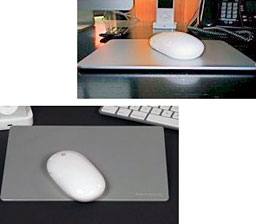
MacPadd Aluminum Mousepad
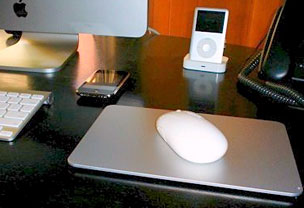 PR: MacPadd is an aluminum mouse pad
with a patented finish, design providing superior tracking performance
developed for the iMac and MacBook Pro user community offering reduced
friction and wrist action with an elegant design on a non-slip base. No
more scratching or wearing the desk surface. Truly superior
responsiveness, accuracy, feel, and appearance.
PR: MacPadd is an aluminum mouse pad
with a patented finish, design providing superior tracking performance
developed for the iMac and MacBook Pro user community offering reduced
friction and wrist action with an elegant design on a non-slip base. No
more scratching or wearing the desk surface. Truly superior
responsiveness, accuracy, feel, and appearance.
100% precision machined anodized aluminum keeping with the Apple's
corporate thrust to manufacture quality products. MacPadd is also
stylish and developed minimizing the carbon foot print in its
manufacture.
The interior design shift on many desks these days is aluminum trim,
so these pads are matching both the Apple motif and general interior
design trend.
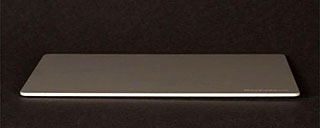 Advantages of the aluminum mouse pad include
durability, style, and quality. The surface cleans very easily (spills,
dirty hands, body oils, etc.). Laser mice perform better on the
reflective surface. Reduced stress on wrist (reducing chance of carpal
tunnel syndrome) when mousing (less friction). There is increased
battery life on the wireless laser mouse (reduced battery use). Using a
mouse pad does not scratch your desktop, and the mouse tracks
precisely
Advantages of the aluminum mouse pad include
durability, style, and quality. The surface cleans very easily (spills,
dirty hands, body oils, etc.). Laser mice perform better on the
reflective surface. Reduced stress on wrist (reducing chance of carpal
tunnel syndrome) when mousing (less friction). There is increased
battery life on the wireless laser mouse (reduced battery use). Using a
mouse pad does not scratch your desktop, and the mouse tracks
precisely
The mouse pad weighs about 6 oz. In the same spirit as Apple Inc.
engages some of the most sophisticated manufacturing methods in the
world to get the accuracy and quality required for performance and
design. At the same time the product, systems, sub-components and
suppliers comply with the International Organization for
Standardization (ISO).
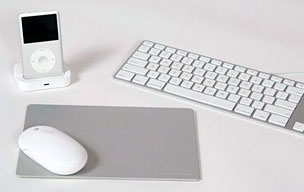 MacPadd's dimensions are 9" x 6" x
1/4" total depth.
MacPadd's dimensions are 9" x 6" x
1/4" total depth.
This product is precision designed and manufactured for its target
market, the Mac users of the world. Other mouse pads are developed from
fossil fuels products (rubber) and are typically given away or thrown
away items sometimes used as promotional products. MacPadd is meant for
the discriminating Mac community of users to be your last mouse pad,
using a natural material that could be recycled if and when it is no
longer needed.
Key Features of MacPadd
MacPadd is a high end mouse pad made of solid aluminum, then
anodized to specification to provide superior mouse-to-screen tracking
performance. This product has been engineered and tested, not just mass
produced and punched out with a die.
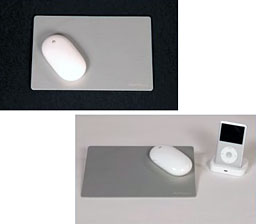 Top Ten Features of MacPadd
- MacPadd has an antibacterial surface that can be easily cleaned.
Great for offices or homes that have all kinds of fingers on the mouse
pad. Use soap and water or antibacterial wipe (dry and use).
- MacPadd reduces wrist fatigue with an ultra smooth surface for
excellent mouse glide. This surface is claimed to beat all other mouse
pads in smoothness and performance.
- MacPadd is cool looking. Design to compliment the iMac and MacBook
Pro this mouse pad is both elegant and Desktop hot!
- MacPadd is solid aluminum. It was developed to provide customers
with a quality product that will last forever, not just a throw
away.
- MacPadd has a simple design. No big logos, instead modestly laser
etched Trademark on the lower right corner. Custom logos available for
corporate customers.
- MacPadd provides protection for the MacBook in your carry bag. This
solid piece of aluminum will act as a shield in your carry bag against
sharp objects and knocks during travel.
 MacPadd's manufacturing is established to
reduce carbon foot print and product is recyclable should it ever be
necessary or desirable.
MacPadd's manufacturing is established to
reduce carbon foot print and product is recyclable should it ever be
necessary or desirable.- MacPadd is an original. Designed to improve the user - computer
interface, our mouse pad eliminates the frustration of losing the
cursor on the screen.
- MacPadd is industrial strength for those dirty work spaces
(warehouses, shops, etc.). The pad is easily cleaned.
- BEST OF ALL - MacPadd has a great price.
Available in Canada and the USA.
$24.99
Link: MacPadd
OWC Exclusive Rebates on Hitachi Hard Drives and
External Solutions
PR: Other World Computing (OWC) has partnered with Hitachi
Global Storage Technologies to offer consumers up to $120 in rebates on
select bundles featuring OWC Mercury Elite-AL Pro, OWC Mercury
On-The-Go, OWC Mercury Rack Pro, OWC Neptune, NewerTech miniStack,
NewerTech Guardian MAXimus FireWire, and NewerTech Voyager Docking
Station storage solutions featuring Hitachi hard drives. Rebates of up
to $30 are also available on select Hitachi bare hard drives, DIY "Add
a Drive" Upgrade Kits, and on Hitachi hard drive/NewerTech Voyager hard
drive dock bundles.
Qualifying storage products must be purchased from OWC between
November 11 and November 30 at macsales.com, and customers must
download individual Hitachi rebate forms to check for purchase date
deadlines and rebate submission guidelines. Rebates up to $120 are
available for these select solutions and drives purchased before Nov.
30:
- Up to $120 back on OWC Mercury Rack Pro
Solutions for select 3.0 TB and 4.0 TB Solutions. Options include
RAID-0, RAID 0+1, RAID-0 Stripe and RAID READY JBOD Solutions with
FireWire 800, USB 2.0, and/or eSATA interface options.
- Up to $120 back on OWC Mercury Elite-AL
Pro Single and Dual-Drive RAID Solutions with available FireWire
800, FireWire 400, USB 2.0, and/or eSATA for select 750 GB, 1.0 TB, 1.5
TB, and 2.0 TB Solutions.
- Up to $60 back on NewerTech
Guardian MAXimus RAID-1 Mirror FireWire 800/400+USB 2.0 Solutions
for select 750 GB x 2 and 1.0 TB x 2 Models.
- Up to $30 back on NewerTech
miniStack Solutions with available FireWire 800, FireWire 400, USB
2.0, and/or eSATA for select 750 GB and 1.0 TB Solutions.
- Up to $20 back on select OWC Mercury 320 GB
On-The-Go Bus Powered Portable Solutions and DIY Kits with
available FireWire 800, FireWire 400, and/or USB 2.0 Interface
options.
- Up to $30 back on select OWC Neptune
FireWire 400 External Storage Solutions
- Get up to $30 Back on NewerTech Voyager
FireWire 800/400+USB 2.0+eSATA Docking Station Bundles
- Up to $20 back on Hitachi
2.5" SATA 320 GB 7200 RPM and 5400 RPM Notebook Hard Drives and DIY
Mercury On-The-Go Enclosure Kits
- Up to $30 back on Hitachi 7K1000
DeskStar 3.5" 7200 RPM SATA 32 MB 750 GB and 1.0 TB HDD
Software
Clone X Creates a Copy of Your System
Installation
PR: Clone X is dedicated to the duplication of your hard
disk. You can create useable copies of your disk (including the startup
disk) as well as special copies, such as the creation of bootable DVD
or minimum System disks.
With Mac OS X, the system is a very complex construction with
multiple folders, most of them being inaccessible (invisible,
protected, or permission denied). Moreover, any copy or installation
must preserve permissions and ownership of each file.
- Copy an entire disk: Clone X provides functions to copy the entire
disk contents into another disk (bootable copy), or into a
subfolder.
- Clone your System: Clone X provides powerful features to copy your
System, even if the system was installed and updated many times with
the updaters provided by Apple.
- Restore your disk or your System: starting from a copy, Clone X
will be able to restore your system or your entire disk, back to a
previous clean state. Clone X can also restore a selection of files or
folders.
- Bootable DVD creation: Clone X creates your personal bootable OS X
DVD including your desired applications. Creates an Intel compatible
DVD on a Mac Intel, and a PPC compatible DVD on a PPC Mac.
- Create minimal System disks: Clone X can copy a minimal System to a
disk, so that you can install it on a small partition, create a disk
for tests, or restart from a clean reduced System.
Main Features
- Copy entire disk into another disk or a subfolder.
- Copy with or without the Users documents and settings.
- Restore an entire disk or specific files.
- Bootable DVD creation.
- Minimal System creation.
- Disk comparison.
- OS X only.
New in version 3.2:
- [new] Add a tool to backup to Network Volumes. (Can't boot with
it).
- [new] Clone X will warn you if disks names contain invalid
characters. These can prevent bootable copy to boot depending on the OS
version.
- [change] Corrected a language copy bug. Sometimes languages were
copied even if you asked Clone X to do not copy them.
- [change] Expert restore, sometimes Clone X can't be stopped bug
corrected.
- [other] Several minor updates.
System requirements: Mac OS X 10.4 or later.
System support: PPC/Intel
$49
Trial mode available
Link: Clone
X
Free LaCie SilverKeeper Automates External Backups,
Supports 10.5.5
PR: SilverKeeper V2.0 is a new release of LaCie's free backup
application. It has been designed to support Apple's OS X operating
system for Intel and PowerPC based Macintosh computers.
It is now compatible with OS X 10.3.9 through 10.5.x. This includes
the current version 10.5.5 of OS X. SilverKeeper is a freeware
application from LaCie that automates backups to external storage
devices like hard drives, network drives, and other removable storage
devices that have IDE, SATA, eSATA, IDE/ATA/ATAPI, SCSI, USB, or
FireWire interfaces.
Almost any read/write device that can mount a writable volume on the
Macintosh Desktop can be used with SilverKeeper.
SilverKeeper requires OS X 10.3.9, 10.4.11, or 10.5.x.
This version of SilverKeeper is not recommended for older versions
of the Mac OS. Click here for previous version of SilverKeeper.
Documentation is provided as a set of SilverKeeper Help and ReadMe
files that are installed with the application. If you would like to
preview the SilverKeeper documentation before installing, please
download from these links. These are PDF files that can be opened with
either Preview or Adobe Reader.
New in version 2.0.1:
- Re-implemented in X-Code for OS X. No longer uses CarbonLib. No
longer compatible with OS 9.
- Compatible with Intel and PowerPC Macintosh computers.
- Compatible with OS X 10.3.9, 10.4.x, 10.5.x. For OS 9 users, v1.1.4
will still be available.
- SilverKeeper now can run in the dock or in the background.
- SilverKeeper can be minimized. We still recommend that you do not
run other applications or use your computer while backups are being
performed. There is a preference setting to sound an alert when the
backup is complete.
- Setup wizard added to assist users with common setup tasks.
System requirements: Mac OS X 10.3.9 or later
System support: PPC/Intel
SilverKeeper is freeware, but you must provide LaCie with your name
and email address before you can download the program.
Link: SilverKeeper
Desktop Mac
Deals
Low End Mac updates the following price trackers monthly:
For deals on current and discontinued 'Books, see our 13" MacBook and MacBook Pro,
MacBook Air, 13" MacBook Pro, 15" MacBook Pro, 17" MacBook Pro, 12" PowerBook G4, 15" PowerBook G4, 17" PowerBook G4, titanium PowerBook G4,
iBook G4, PowerBook G3, and iBook G3 deals.
We also track iPad,
iPhone, iPod touch, iPod classic, iPod nano, and iPod shuffle deals.



