
This PowerBook G3 Series II, code named PDQ, was announced Sept. 1, 1998. Changes from the earlier G3 Series include a 66 MHz motherboard for all versions and standard 14.1″ screen. The 1024 x 768 screen will also automatically scale, allowing users to emulate 640 x 480 and 800 x 600 resolutions.
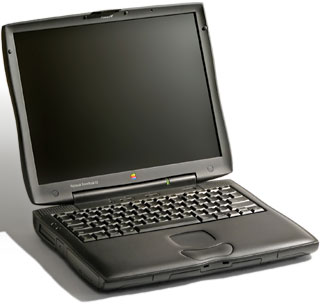 As with the May 1998 version of the PowerBook G3 Series, the floppy drive is optional. Shades of the iMac! (However, no hint of USB on this PowerBook, although it can be added with a PC Card.)
Although Apple lists the G3 Series as supporting only 192 MB of memory, many users have been able to exceed that limit, sometimes reaching a total 512 MB installed RAM.
In the field, a single battery typically yields 2.5-3 hours of use with Apple’s original 49 Watt-Hour battery. Using two fresh Apple batteries could increase that, possibly boosting it into the 5-6 hour range, and NewerTech’s 64 Watt-Hour NuPower battery should extend those times by 25% – close to 4 hours with one fully charged battery and 7.5 hours with two. (Running DVD movies will run your batteries down much faster.)
The G3 Series was replaced by another model called the PowerBook G3 (a.k.a. Lombard) in May 1999.
- Got a G3 PowerBook or iBook? Join our G-Books Group or PowerBooks and iBooks Forum.
- Our Mac OS 9 Group is for those using Mac OS 9, either natively or in Classic Mode.
- Our Puma Group is for those using Mac OS X 10.1.
- Our Jaguar Group is for those using Mac OS X 10.2.
If you have a hard drive larger than 8 GB, you should partition is so that the first partition is under 8 GB in size (for simplicity, we suggest 7 GB). Failure to do this could eventually result in an unbootable computer, as all System files must be within the first 8 GB of drive space. These Macs can work successfully with larger drives for some time, but once a System files goes outside of the first 8 GB of space, you’ll have nothing but problems.
Mac OS X
If you have a hard drive over 8 GB in size, you must partition it or you will not be able to install Mac OS X. If you are creating the partition within OS X, it must be smaller than 7.45 as reported by Disk Utility (because sometimes a GB is billion bytes and sometimes it’s 1,073,741,824 bytes); we suggest simply setting it at 7 GB to avoid having to redo the whole installation if the partition ends up bigger than specified (it happens). Mac OS X must be completely within the first 8 GB of space on your hard drive or you will not be able to run OS X.
Non-Apple upgrades and peripherals (such as replacement drives and third-party memory) may cause problems when installing or booting into Mac OS X.
Be sure to read and follow Apple’s “Read Before You Install” install instructions to increase the likelihood of getting OS X installed and running on the first try.
Warnings
According to Accelerate Your Mac, many WallStreet owners have reported problems with IBM/Hitachi Travelstar drives where the computer will not wake up from sleep. This is due to a magnetic sensor that responds to a magnet in the Travelstar drive. This problem does not impact other PowerBook G3 models, only WallStreet.
According to the Road Warrior, the drive controller in G3 PowerBooks is incompatible with some ATA-6/Ultra ATA-100 hard drives. When replacing the internal hard drive, you should be sure to obtain an ATA-5/Ultra ATA-66 compliant drive or an ATA-6 or ATA-7/Ultra ATA-133 drive known to work with WallStreet.
Apple’s DVD drive for WallStreet supports five region switches, and this number is tracked in PRAM. Resetting the PRAM will clear the switch counter and let you start all over. (Resetting the PRAM may change other computer settings.) To reset the PRAM:
- With the computer off, press Fn-Shift-Ctrl-Power.
- Startup with extensions off (hold down the Shift key during startup).
- Restart the computer with extensions enabled.
Details
- introduced 1998.09.01 starting at $2,799; discontinued 1999.05.10
- Requires Mac OS 8.0 or later; Mac OS 9.2.2 recommended; 10.2.x officially supported, 10.3.x and 10.4.x can generally be installed using XpostFacto 4
- CPU: 233, 266, or 300 MHz PPC 750 (G3)
- Bus: 66 MHz
- Performance: 764/941/1052 (233/266/300 MHz), MacBench 4; 812/966 (266/300 MHz), MacBench 5
- ROM: 4 MB
- RAM: 32 or 64 MB, expandable to 512 MB using 256 MB 100 MHz 144-pin SO-DIMMs (one must be low profile) in both slots. Most low profile 256 MB modules use high density memory and are not compatible; low density 256 MB modules are compatible.
- Level 2 cache: 512 KB on 233, 1 MB on 266 and 300
- Video: ATI Rage LT Pro
- VRAM: 4 MB
- display: 14.1″ 24-bit 1024 x 768 91 ppi color active matrix, resolution scaling to 640 x 480 and 800 x 600 (special edition with 12.1″ display occasionally available at a lower price, only supports 8-bit and 16-bit video)
- Video out: VGA port
- Hard drive: 4 or 8 GB EIDE
- expansion bay: specific to WallStreet/PDQ
- CD-ROM: 20x, removable, DVD optional
- floppy drive: optional
- expansions bays: two
- ADB: 1 port for keyboard and mouse
- serial: 1 DIN-8 RS-422 port on back of computer
- SCSI: HDI30 connector on back of computer
- 10Base-T ethernet and v.90 56k modem standard
- PC Card slots: 2
- infrared: supports IrDA 1.1 and Apple’s IRtalk protocol
- size: 10.4 x 12.7 x 2.0″ (51 x 32.3 x 4.3 cm)
- Weight: 7.8 pounds with battery
- Model identifier: PowerBook1,1
- family number: M4753
Accelerators & Upgrades
- Peek at first PowerBook G3 upgrades from Newer, Go2Mac.com, 7/27/00. 466 MHz card will upgrade almost all WallStreet models, all Lombards.
- Combo drive expansion bay module, MCE Technologies, $389. 8x DVD, 24x10x24x CD. 2 MB buffer.
Online Resources




Keywords: #pdqpowerbook #powerbookg3 #8gbpartition
Short link: http://goo.gl/sWZAAI
searchword: pdq
