Pros:
Ultra-lightweight, ultra-thin, ultra-cool. Great battery life. Display
quality is equal to or greater than that of any Mac (or PC, for that
matter) notebook. Standard hard drive model reasonably priced.
Cons: Battery not
user-replaceable. Memory not upgradeable. No built-in optical drive.
Solid-state drive version ultra-expensive.
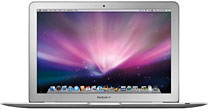
I finally managed to get my hands on a MacBook Air (MBA) with the
optional solid-state drive (SSD). I have read a lot of reviews of the
MBA, but very little specifically about the model with the optional
SSD.
The MBA is an impressive feat of engineering, although something of
a niche player. If you're part of the market segment toward which the
MBA is directed, it is well worth the investment.
Is the SSD worth the (significant) extra cost? The answer to that
requires a bit more analysis.
Solidly Built
First, the MBA really does fit inside a manila envelope. And at an
even 3 pounds, it won't weigh you down, even when traveling light. When
I first took the MBA out of the box, my instinct was to treat it like a
fine piece of bone china - very delicately. I was in fear of breaking
it.
Don't let its diminutive depth deceive you - this is a solid
notebook. Despite its thickness (or lack thereof), you eventually see
that it is every bit as durable as a standard MacBook, likely due to its
aluminum construction.
The screen and full-size keyboard are impressive. The keyboard felt
especially solid. The backlit keys are black with white letters, a
noticeable and welcome improvement over the shades of gray theme on the
MacBook Pro. I manually turn backlighting on and off on my MacBook Pro
often. The backlighting is great in very dark conditions, but it
actually hurts in low-light situations by washing out the letters on
the keys. That's not an issue with the MBA's black keys.
The MBA screen, 13.3" (diagonal) glossy widescreen TFT display with
support for millions of colors, appears to be identical to the
MacBook's, with the addition of LED backlighting in the MBA. I'm not a
fan of glossy displays, but that's just personal preference. The
backlighting enables the MBA's display to instantly return to full
brightness when you wake from sleep and undoubtedly contributes to its
brighter and clearer appearance as opposed to the MacBook. The MBA
screen also seems to have a wider viewing angle.
Like the MacBook, the MBA has no dedicated video RAM, but uses the
Intel GMA X3100 graphics processor with 144 MB of RAM shared with main
memory. It's clearly not designed for gaming or high-end video
editing.
Comparing Models
I was fortunate to be able to spend a great deal of time with the
base model as well as the upgraded version. Both models include a
specially designed miniature version of the Intel Core 2 Duo processor
with 4 MB on-chip shared L2 cache running at full processor speed,
800 MHz frontside bus, and 2 GB of 667 MHz DDR2 SDRAM soldered to
the board. The base model's processor runs at 1.6 GHz and has an 80 GB
1.8" hard drive; the high-end version has a 1.8 GHz processor and a 64
GB solid state drive. Unfortunately, I was not able to swing having
both units at the same time to do a side-by-side analysis, so my
observations are just that - observations.
There seems to be little to no noticeable difference in processor
speeds. The 200 MHz speed difference is negligible, given the likely
and intended uses of the MBA. Calling a 200 MHz speed difference
"negligible" seems almost insane, given the fact that I well remember
rejoicing when Apple introduced the Colour Classic II and I
could finally get a Mac running at a whopping 33 MHz, a whole 17 MHz
faster than my 16 MHz Classic II.
Response to Criticism
I have read numerous reviews and opinions of the MBA and can say
that most (but not all) of the criticism it has received (which is not
much, by the way) is unwarranted and can be answered fairly
quickly:
Criticism: It has no internal optical drive, ethernet port, FireWire
port, or expansion card slot, and it has only one USB port. Therefore
it can't be used as a desktop replacement.
Response: The MBA is clearly not intended to be a
desktop replacement. If you added all those items, it would be about
the same size as a MacBook, thus defeating the whole purpose the model.
If you can't live without any of those features, buy something
else.
Criticism: The available hard drives are too small.
Response: Although smaller than what we have come to
expect, the sizes should be sufficient for the intended uses. With the
weak graphics system, you wouldn't be using iMovie or Photoshop - and
their correspondingly large files - anymore than you would on the
MacBook. Again, yes, there are some things the MBA just can't do (or
can't do very well), but then it's not designed to do any of those
things.
Criticism: Memory is not upgradeable.
Response: Not the ideal situation, but at least they
gave us 2 GB standard.
Criticism: No user-replaceable battery.
Response: I agree; this is a legitimate issue. Apple
made a lot of choices when designing the MBA. This is one of the few
areas where I believe they had to make a compromise. Time will tell
just how big an issue this is. Although you won't be able to swap out a
drained battery for a fresh one on a long flight, the internal battery
is not necessarily non-user-replaceable. According to MacInTouch, the MBA
is not all that difficult to break into.
Likewise, you might be able to upgrade the hard drive when a larger
one in the same form factor becomes available. Currently, the 80 GB
model is the largest made in the 5mm thick form factor that fits in the
MBA.
Remote Disc
I installed Microsoft Office 2004 using the Remote Disc feature.
Remote Disc partially compensates for the MBA's lack of an internal
optical drive by allowing it to wirelessly "borrow" the optical drive
of another Mac - or even a Windows PC. This feature worked flawlessly,
though it is clearly slower than a built-in drive. The necessity of
using another computer to install CD- or DVD-based software on the MBA
is more evidence that it is not intended as a desktop replacement.
If you must have a MBA but can't live without any of the missing
features, most of them are available as external options, including a
USB SuperDrive (which only works with the MBA, by the way), a USB
ethernet adapter, and a USB modem.
Although I did not test it, the MBA can boot from a remote disc,
giving some insurance in the unlikely event a catastrophic crash
requires reinstallation of the OS.
Multitouch Trackpad
A less-hyped, but nonetheless compelling, feature of the MBA is its
trackpad. The trackpad has the same Multitouch feature a the iPhone.
Drag two fingers up or down the trackpad to scroll up and down a web
page. Twisting two fingers rotates an image in Preview. Pinch and open
gestures zoom images.
I don't own an iPhone, so this was my first introduction to
Multitouch. The more I use it, the more I miss it when I go back to my
iMac. It's almost addictive.
Migration Assistant Failure
One significant issue I encountered was the inability to use
Migration Assistant wirelessly. Despite several attempts, including one
where it was left to itself for several hours, Migration Assistant
never worked. It continued to (apparently) hang up while "calculating"
the size of the files to migrate. The MacInTouch review above reports
similar problems.
I did not purchase the USB ethernet adapter so I don't know if that
would have solved whatever issue I was having.
Performance Comparison
Although the lack of perceptible speed difference in the 1.6 vs. the
1.8 GHz models was not unexpected, the apparently equivalent
performance of the ATA hard drive vs. the SSD was both unexpected and
disappointing. An SSD has no moving parts, unlike a standard hard drive
in which the drive head has to traverse across a spinning platter to
find the information it needs. Theoretically, the SSD should noticeably
outperform a hard drive.
If it does, I didn't notice it in the MBA. Granted, both models I
evaluated had little additional software installed, meaning their
drives were less than half full. One benchmark
published on Mac Rumors purports that the SSD will eventually make
a great difference when more software is loaded and the drive becomes
more fragmented. Obviously I can't vouch for this, but it certainly
makes sense.
Flash Drive Worth It?
Is the SSD worth it? It depends. If you're expecting
knock-your-socks-off performance gains over the hard drive, then no -
at least not at first. If you are a true road warrior, constantly
lugging your Mac around the world, and are concerned about durability,
then probably yes.
Just to emphasize: the SSD has no moving parts. No head to clang
against the platter, obliterating gigabytes of data or killing the hard
drive altogether. Although the MBA, like other Mac notebooks, is
equipped with technology that is supposed to park the head when it
detects the Mac going into free-fall, and thus guard against a hard
drive crash, I don't want to place all my data-storage eggs in that
basket. With the SSD, even if your MBA is destroyed while dropping off
your desk onto the floor, your data should still survive.
Another reason to purchase the SSD model is longer battery life.
Apple advertises 5 hours of battery life with the MBA. I was not able
to get quite 4 hours with the hard drive model. With the SSD, I
actually exceeded the 5 hour mark by almost 4 minutes, including run
time on reserve power, before it shut off altogether.
While both models are cooler on the lap than the MacBook or the
MacBook Pro, the SSD model seemed to be a tad cooler than the ATA
model.
Bottom Line
The MacBook Air is a compelling purchase for the true road warrior.
It adds far less heft to your carryon baggage than any notebook on the
market. Its battery life is outstanding, though once the battery is
dead, that's it until you get to an outlet to recharge.
If you're not necessarily a road warrior, but someone who lives to
be on the bleeding edge of technology and to own the latest, greatest,
coolest gadget, then you should immediately stop reading this column,
go purchase a MBA, and then return to finish reading. Right now there
is no electronic device in the world as hip and fashionable as the
MBA.
Instantly Sold on It
When my wife first saw an ad for the MBA, she was sold. Its svelte
form factor and light weight did it for her. Bulk and weight are the
two main reasons she has only carried a notebook around when
absolutely, unavoidably necessary, despite the fact that having one
with her would often be handy. A secondary reason was the small track
pads, which caused her fingers to grow fatigued easily. In addition to
portability, she enjoys working on a notebook while sitting on the
couch watching TV, but the combination of weight, trackpad, and
eventual heat buildup usually make this a short proposition.
The MBA ran the table on her reasons not to carry a notebook, so she
is now the proud owner of a MBA that she can't put down. Although she
doesn't fit either profile of the classic MBA user, I suspect there are
more than a few individuals out there in the same situation.





