Dan Knight
- 2002.10.04
I've been using a Contour MiniPro optical
mouse with my TiBook
and love it. It's compact, comes with a case to keep the cord from
tangling during transit, and even lets me change the color of the mouse
button. I can also program the second mouse button for a double-click,
command-click, etc.
My wife also used a MiniPro with her 14" iBook until she wore the
poor thing out. Nobody seems to stock Contour mice locally, so it was
off to CompUSA to look at our options.
First, it had to be optical. There is no going back to the
traditional rubber ball mouse. Optical tracks beautifully and doesn't
need constant cleaning. Second, it had to be inexpensive. Third, it had
to have a good feel to it.
Using a small mouse spoils you. I used to love full sized mice; now
I prefer something smaller - and it's not just because I'm using a
laptop. A mouse doesn't need to be something so big you can rest your
whole hand on it.
Anyhow, looking over the vast range of optical USB mice from
Macally, Logitech, Microsoft, Kensington, and others, 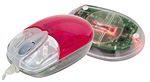 we decided to pick up a pair of midsized Macally
iOptiJr mice, one for the iceBook and another to replace that
horrendous round mouse on her business's iMac.
we decided to pick up a pair of midsized Macally
iOptiJr mice, one for the iceBook and another to replace that
horrendous round mouse on her business's iMac.
The iOptiJr falls between the larger size of traditional mice and
the compact size of the MiniPro and other tiny mice. It has two
buttons, each with a depression that fits a finger just so, and a
clickable scroll wheel. The cover, strawberry in the photo above, can
be swapped for other flavors such as lime and blueberry. Macally also
makes a white version to complement the white iMac and iceBook, the
iceMouseJr.
Drivers are
available from the Macally website; they do not come with the mouse.
These settings work very nicely: one click on the left, command-click
on the right, double-click on the scroll wheel. If you have other
ideas, you can program other behaviors - and you can create custom sets
for your most used applications. The driver works the same way whether
as a control panel in the classic Mac OS or as an application in
OS X.
We've been using the new mice for several weeks and are very happy
with the results. I'm finally getting used to a scroll wheel (this
isn't the first mouse I've used with one, nor will it be the last). The
scroll wheel isn't the smoothest I've ever used, and the amount of
pressure required to use the scroll wheel as a button seems excessive,
but it's still a nice inexpensive mouse.
Overall, we're very pleased with the iOptiJr. Not only is this a
nice mouse, it's quite affordable at US$30. If you're looking to
replace an old mouse, want a mouse to use with your 'Book, or just want
more buttons than Apple offers, the iOptiJr merits consideration.
Manufacturers and distributors: Interested in having your product
reviewed? Please read our review
policy.



