Dan Knight
- 2001.04.27
I have yet to find the perfect mouse, although I've found several
good ones.
Back in the ADB era, I discovered the the Kensington Mouse and
Mouse-in-a-Box, very nice two- and one-button mice. Best of all, they
were about half the cost of Apple's mouse.
But once I got my first Contour UniMouse, a three-button USB
mouse, I immediately switched mice on the blue & white G3 (the only
Mac with both ADB and USB ports standard) I used at work. Kensington
had been nice, but this was even better. I especially liked the
rubberized grips along the side. Very comfortable.
The UniMouse simply wore out after two years of heavy use. Contour
Design makes a small optical mouse, it's their MiniPro. I bought one at
Macworld Expo, used it a bit, and it sold me on optical (see Make Mine Optical), but I wanted a
full-sized mouse on my desk.
I've used the Kensington Mouse, Mouse-in-a-Box, and Mouse-in-a-Box PS2/USB. I'd seen good online
reviews of the Kensington optical line, so I figured I really couldn't
go wrong for US$25.
I ordered a Kensington
Mouse-in-a-Box Optical from Outpost.com in January and used it for
months. It felt nice, tracked well, and had nice software.
Alas, it's got a tendency to multiclick when you click once - that
means pushing the button usually gives one click, sometimes gives two
clicks, and every now and then does a whole bunch of clicks. Unplugging
the mouse and then plugging it back in sometimes helped. 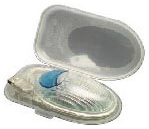 Restarting my TiBook sometimes helped.
Shutting down completely usually heled. And sometimes I just had to
unplug the darned thing and let it sit for a day or so.
Restarting my TiBook sometimes helped.
Shutting down completely usually heled. And sometimes I just had to
unplug the darned thing and let it sit for a day or so.
That left me to either use the trackpad or dig out another mouse.
Well, I'd bought the MiniPro to use with my TiBook; it was time to put
the mouse to daily use.
First, the MiniPro is small. It's designed to go into the field with
your PowerBook or iBook - it even comes with a protective plastic case
to hold the mouse and keep the cord from getting tangled on everything.
I have large hands, so the MiniPro feels small when I use it.
Second, the MiniPro is a two-button mouse, but with a difference.
There's a large single button (blue in the photo, although you can use
any of five different colored buttons that ship with the mouse) with a
smaller button behind it. I have them programmed as click and
double-click. I don't find the small button nearly as convenient as
having separate right and left mouse buttons, but it works.
Tracking is exceptional. I usually use my mouse on a Contour UniTray, a large solid mousepad
with a gel wrist rest. I only need a few inches of movement to zip the
cursor from one side of the screen to the other.
The weight and feel of the MiniPro are good. Subjectively, it seems
nearly as heavy as the lightweight full-sized Kensington Mouse-in-a-Box
Optical, but the translucent plastics have a smooth cool feel. Although
small, it feels solid.
One unexpected surprise is how much more responsive the MiniPro
mouse is compared with the Kensington Mouse-in-a-Box Optical. It's got
to be a driver issue, because the Kensington seems positively sluggish
at times. Move the mouse, wait for the driver to move the cursor.
Click, wait for a response. The Contour drivers, a customized version
of USB Overdrive, don't have
that kind of delay.
I also discovered that Contour Design has dropped the price again.
This was a $70 mouse when the introduced it at Macworld Expo last July.
The retail price was down to $35 by January, and it's now dropped to
$25.
Is this the perfect mouse? Not for me. Although I'm using it instead
of the Kensington, given the choice between the right size and the
right click, I'll use a mouse that only clicks once when I click it
once. I'd prefer a larger mouse - say an optical version of the amazing
UniMouse (the old fashioned mouseball version is down to $15 on the
Contour site).
The MiniPro is a great alternative to the trackpad, which I don't
consider nearly as tactile as a mouse. It would be a good alternative
to the round "puck" mouse that Apple shipped with iMacs and Power Macs
for a couple years. And it might be perfect for kids and others with
small hands.
Most of all, it's a compact top-quality mouse that's easy to pack up
and take into the field with your laptop. If you're looking for a nice
small mouse, it merits consideration.
Links
Manufacturers and distributors: Interested in having your product
reviewed? Please read our review
policy.



