MacUSB & FireWire

Channels
 Power Macs
 iMac Channel
 iBook/PowerBook
 MacInSchool
Computer Profiles
 iMac
 Power Mac
 PowerBook/iBook
 Performas
 Mac Clones
 Older Macs
 LisaNeXT
Editorial Archive
Mac Daniel's Advice
Email Lists
LEMchat (uses AIM)
Online Tech Journal
Consumer
 advice, reviews
 guides, deals
Software
Apple History
Best of the Web
 Best of the Mac Web surveys
Miscellaneous Links
 Best Used Mac Buys
 Used Mac Dealers
 Video Cards
 Mac OS X
 Mac Linux
 Macspeak
 RAM Upgrades
About Low End Mac
Site Contacts

Open Link

Support LEM

Affiliates

The Apple Store
.mac
iTunes Store
Club Mac
MacMall
MacResQ
ExperCom
eBay
Amazon.com
PayPal
PCMall
PC Zone
Crucial Memory

Our advertising is handled by BackBeat Media. For detailed price quotes and advertising information, please contactat BackBeat Media (646-546-5194). This number is for advertising only.

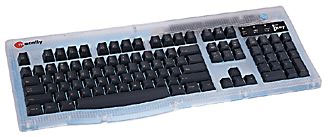
Macally iKey
Guide to USB Keyboards

Updated December 7, 1999

This is as complete listing of USB keyboards as possible. Every known USB keyboard is listed.

All USB keyboards are not created equal. Some are beige, while others come in one or more colors to complement current Macs. Some have a lot of extra programmable buttons. One even has a volume knob. I was unable to find pricing on many of these. In some cases, these keyboards may not be available in your market.

They should all work with the Mac or USB-equipped PCs, but you'll want to verify that before buying.

Note that many of these have PC layouts which do not match the standard Macintosh Extended Keyboard layout. The biggest issues: the Alt and Cmd (or Windows) keys are reversed, and there may not be a power key. Keyboards with Mac layout are marked with bold type.

If you know of a utility that can remap the Alt/Option and Cmd/Windows keys, please email Dan Knight . I'm testing some Windows keyboards on the Mac, and such a utility would be a life saver.

Note that not all keyboards have additional USB ports. Specifications subject to change, so be sure to visit the manufacturer's site for more details before buying.

Brand: Product Name

Comments

US Price

Outpost.com

Acer: Aspire USB Keyboard

two ports, beige, PC layout (but looks close to Mac layout), volume control, review

$19

no

Adesso: NuForm USB

ergonomic, four ports, bondi, PC layout, wrist rest, review

no

Ariston: USB Keyboard

two ports, beige, PC layout

$30

Belkin: MediaBoard

two ports, beige, PC layout, extra buttons, quiet, wrist rest

$50

yes

Belkin: UltraBoard 98

two ports, beige, PC layout, quiet

$20

yes

Belkin: USB Classic Keyboard

two ports, beige, PC layout, wrist rest, quiet

$40

no

Behavior Tech: 7700U Keyboard

two ports, beige, PC layout

no

Behavior Tech: 7932M Keyboard

no USB ports, one PS/2 mouse port, beige, PC layout

no

Behavior Tech: 8112 Keyboard

ergonomic, two ports, beige, unique layout

no

Behavior Tech: 8113W Keyboard

no USB ports, one PS/2 mouse port, beige, unique layout

no

Cherry: G80-3000 Keyboard

three ports, beige, PC layout

$80

no

Macally: iKey

two ports, ice, Mac layout, review

$69

yes

Macally: iMediaKey Keyboard

two ports, ice, wrist rest, Mac layout, extra buttons

$89

no

Macally: NewWave Extended Keyboard

two ports, beige, wrist rest, PC layout, extra buttons

$35

no

Micro Connectors: USB Keyboard

two ports, all iMac colors plus graphite, Mac layout, compact

$60

blueberry, graphite, grape, strawberry, lime, tangerine

Microsoft: Natural Keyboard Elite

ergonomic, two ports, beige, wrist rest, PC layout

no

Microsoft: Natural Keyboard Pro

ergonomic, two ports, beige, wrist rest, PC layout, extra buttons

$80

yes

Qtronix: Scorpius 980N Plus

PS/2 mouse port, beige and all iMac colors plus ice, PC layout (but appears very close to Mac layout), wrist rest, extra buttons

no

Qtronix: Scorpius 980NH Plus

two ports, beige, PC layout (but appears very close to Mac layout), wrist rest, extra buttons

no

Qtronix: Scorpius 980A

beige and all iMac colors plus ice, PC layout (but appears very close to Mac layout)

no

Qtronix: Scorpius 980H

two ports, beige, PC layout (but appears very close to Mac layout)

no

Qtronix: Scorpius 990PW

beige, PC layout, no numeric keypad, trackball, compact, extra buttons

no

Qtronix: AppleGrace 105i

two ports, all iMac colors plus ice, PC layout

no

Samsung: USB Keyboard

four ports, beige, PC layout, wrist rest

no

iMaccessories: iBoard

ergonomic, two ports, ice, PC layout, wrist rest

$80

no


  • Manufacturers and distributors: Interested in having your product reviewed? Please read our review policy.

Entire Low End Mac website copyright ©1997-2008 by Cobweb Publishing, Inc., unless otherwise noted. All rights reserved. Advice presented in good faith, but what works for one may not work for all. Please report errors to .
  LINKS: We allow and encourage links to any public page as long as the linked page does not appear within a frame that prevents bookmarking it.
  Access our RSS news feed at http://lowendmac.com/feed.xml.
  Email may be published at our discretion; email addresses will not be published without permission, and we will encrypt them in hopes of avoiding spammers. If you prefer your message not be published, mark it "not for publication." Letters may be edited for length, context, and to match house style.
  PRIVACY: We don't collect personal information unless you explicitly provide it. For more details, see our Terms of Use.
  Low End Mac is an independent publication and has not been authorized, sponsored, or otherwise approved by Apple Inc. Apple, the Apple logo, Macintosh, iBook, iMac, eMac, iPod, PowerBook, MacBook, Mac Pro, Apple TV, and AirPort are registered trademarks of Apple Inc. Additional company and product names may be trademarks or registered trademarks and are hereby acknowledged.