Last week, Apple added a video camera to its hot-selling iPod nano
music player; afterwards, Steve Jobs told the NY Times'
David Pogue: "I'm sure there will always be dedicated devices, and
they may have a few advantages in doing just one thing," he said, "but
I think the general-purpose devices will win the day, because I think
people just probably aren't willing to pay for a dedicated device."
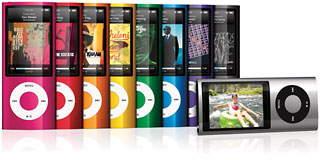
5th generation iPod nano gains video capability.
While Pogue had been asking Jobs about Amazon's
Kindle ebook reader, the comment was could just as easily be
comparing the new video-enabled nano to small pocket-sized digital
camcorders, which have become increasingly popular over the past year
or two. Pure Digital's Flip line of pocket camcorders currently has
about 20% of the camcorder market, for example.
Jobs has a point - certainly lots of people are taking lots of
videos and still photos with the cameras built-into their mobile
phones. I have no doubt that the video nano will be popular.
Mobile phone cameras (including the one in Apple's iPhone) are
convenient, but dedicated digital cameras are still big sellers,
offering better picture quality and resolution and more features than
mobile phone cameras. Similarly, while pocket camcorders are one more
gadget to tote around, they provide a better video-shooting experience
than mobile phones - or the new nano.
If you're going to be happy with a few minutes of low-resolution
video, pretty much anything will do - and certainly huge numbers of
clips uploaded to YouTube fall into that category.
But if you want to shoot something longer, your mobile phone
probably doesn't have the storage. And while an iPod nano's 8 GB of
storage theoretically will let you store a lot of video, it's probably
going to be full of music, leaving much less room for video storage. If
you know you want to shoot, say, an hour's worth of video, the nano may
not be up to the task.
And the nano shoots standard definition - 640 x 480 pixel - video
clips. So did the first generation of pocket camcorders. But the
current generation of pocket camcorders all shoot 720p HD (high
definition) video: 1280 x 720 pixels. Kodak's
new Zi8 model offers the higher 1080p resolution.
Unlike any of the dedicated pocket camcorders, the video nano offers
a set of 16 video effects, ranging from Sepia to Kaleidoscope, but
frankly, while fun, I can't really get excited about those. And like
the special effects built into many digital cameras, I think this sort
of thing can be done better after downloading content onto a
computer.
So while the nano's new video camera will be a popular addition to
what is already a popular Apple product, there will, I suspect, remain
a market for dedicated pocket camcorders occupying a middle ground
between video-capable mobile phones and MP3 players and much larger
(and much more functional) full-featured camcorders.
The Flip line (from Pure Digital, now owned by Cisco) pretty much
created the pocket camcorder product category and remain best sellers.
I've tried out Flip models along with Kodak's Zi6 (but not that company's
newer Zi8); my favourite pocket camcorder is Creative Labs' Vado HD,
however.
The
Vado HD has 4 or 8 GB of storage built-in, offering up to 2 or 4
hours of 720p recording; the Flip Mino provides half the storage. The
Vado has a somewhat wider-angle lens and arguably better video quality.
It has a larger LCD viewfinder than the Flip Mino.
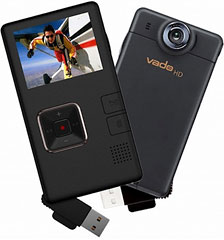
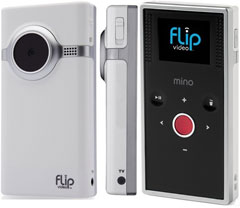
The Vado HD has a much bigger screen than the Flip Mino.
A big hit against the Vado, however, is that Creative Labs is
best-known for its Sound Blaster series of sound cards and devices; the
company has a long history of working with PCs - and virtually no
experience making its devices compatible with Macs. In general, it
hasn't much cared.
The Vado HD produces Windows-style AVI video clips; both Flip and
Kodak save files in QuickTime-friendly MP4. Mac users can view the
Vado's video by downloading the free Perian QuickTime add-on (highly recommended
whether working with a Vado or not).
But trying to work with Vado-produced video clips on a Mac has been
somewhere between a pain and impossible. Even with Perian installed,
iMovie doesn't like the Vado's AVI files and refuses to import them;
even converting them to MP4 with the HandBrake video conversion utility, iMovie
remains unconvinced. As a result, I've ended up editing my Vado video
clips in (gasp) Microsoft Vista's Windows Movie Maker.
That's all changed, however.
On September 7 - ironically, just a couple of days before Apple
announced its new video-capable iPod nano, Creative finally released a
Mac version of its Vado Central software. This is available
for download by owners of Vado HD and the original (standard
definition 640 x 480 pixel) Vado model. It will be built-into new Vado
HD (2nd gen) 4 GB and 8 GB models, which retail for $180 and
$200 respectively.
Vado Central can be installed onto your Mac or - for owners of
current Vado or Vado HD camcorders - copied onto the Vado for use with
whatever Mac is available. It's a humble 836 KB (yes, kilobytes) and a
universal app, so it should work on both Intel and PowerPC Macs.
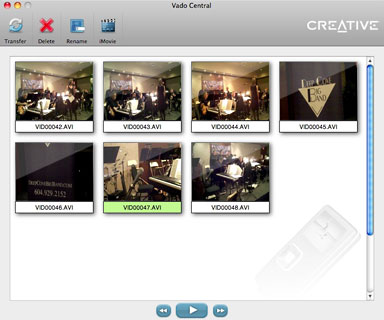 With such a small file size, you might think you're
getting a pretty minimal application, and you wouldn't be far wrong.
This isn't Final Cut Pro or even iMovie, but it doesn't try to be.
With such a small file size, you might think you're
getting a pretty minimal application, and you wouldn't be far wrong.
This isn't Final Cut Pro or even iMovie, but it doesn't try to be.
When run for the first time, the software will ask permission to
download and install a FLV2iTunes "transcoder application" needed for
video export to iMovie. Let it.
Vado Central offers just a few features: Buttons on the bottom let
you play a video clip, with fast forward and rewind
buttons that jump to the next or previous clip. You can transfer
selected video clips to your Mac's Movie folder or other location, or
add them to an iMovie event, optionally opening iMovie at the same
time. Doing so automatically converts the Windows-friendly clip to an
iMovie-friendly MP4 format.
You can delete or rename a video clip on the Vado -
though since the Vado opens up as a disc on the Desktop, you could do
this in the Finder. (Note - pressing Delete does not move the video
clip to the Trash - it's gone for good).
An iMovie icon duplicates the iMovie functions of the
transfer button, converting your file, adding it to an iMovie
event, and opening iMovie with that event loaded.
The Flip's FlipShare Mac software - aside from being built into
every Flip model sold - has more features, along with options to view
and organize video clips. You can use it to email video clips, publish
clips to popular destinations like YouTube, capture stills from your
video clips, create a DVD, and more.
Still, I've never been enamored of FlipShare - all these features
can be done better with software already on most Macs.
So Vado Central doesn't do very much, but what it does is just what
I needed - provide a way to use Creative's pocket camcorder hardware
with my Mac.
Thank you, Creative. 



