I have been anxious to try the final version of Mac OS X
ever since it was released. Now that I have had the opportunity to
try it out, these are some of my opinions about it on several
different machines.
Before installing OS X on my PowerBook G3, I had been using Mac OS 9.1.
My PowerBook has 192 MB of RAM, and the original 4 GB hard
drive (it is getting kind of small). For those who don't know, the
PowerBook G3/333 (a.k.a. Lombard) has two USB ports, one SCSI port,
an internal 56K modem, and 8 MB of VRAM. The screen is a
bright 14.1" TFT LCD.
The installation of OS X went without a problem. It
installed in roughly 25 minutes, which is just a little more than
OS 9 - but considering that it is installing 1.1 GB worth of
files, it is pretty good. Startup time is about the same as 9,
except that the "happy Mac" stays on the screen longer than in
OS 9, and the picture is just a little different.
When the computer restarted to the desktop, there were some
settings I wanted to change right away. First of all, I want
certain items in the dock. I like to have my sticky notes, iTunes,
and the calculator docked so I can access them easily without
cluttering my desktop.
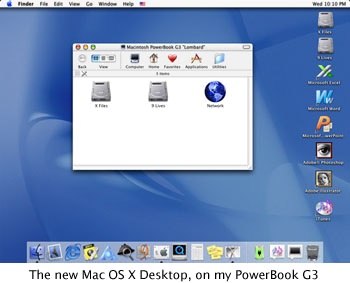
After I did that, I opened my System Preferences. I selected my
screen saver (I love that new Forest slide show), display settings
(it seems faster when on thousands of colours), and network
preferences.
I can connect to the Internet in two ways: through dialup
(EarthLink) or over a network. I really like how OS X can
determine if you are hooked up to an ISP via ethernet or by
telephone modem. It saves me some time setting it all up.
Internet Explorer 5.1 Preview is fast. Very fast. In fact, it
loads pages much faster than anything I have used on the
traditional Mac OS (except maybe Opera). The bad thing about it is
IE 5.1 likes to crash. It crashes a lot.
QuickTime 5 isn't much different than QT5 for Mac OS 8 and 9.
About the only difference is that the player is OS X native.
QuickTime performance isn't as good as on OS 9, but since my
PowerBook is 333 MHz, it seems to handle it well enough. I like the
active window dragging that QuickTime has to offer.
The lack of support for the volume buttons is annoying. I like
to listen to MP3s and CDs on my PowerBook and don't want to
constantly open the System Preferences just to change the volume.
What's funny is that the brightness buttons work fine when the
"display" system preference is open, and sometimes the volume
buttons will decide to work.
Classic seems to function okay. It is compatible with almost all
of the programs that I have. It's a bit slower than running in OS
9.1 directly, but it's not too bad. The only problem is that it
likes to "stop responding" a lot. I find I am forcing it to quit
more than I think I should.
Solid window resizing - that's one thing that Apple needs to
fix. It does not work well on either of my two machines. It is
tolerable, but barely. It would be nice if Apple could fix it so
that it is as fast as it should be. Windows 98 does a good job with
this on a 100 MHz Pentium system, so there is no reason a 400 MHz
G4 should have any problems. Actually, what would be nice is that
if Apple could offer ways to turn these effects off individually (I
don't like the fading menus, but I love the miniaturize
window/genie effect).
Another thing that they should do is give you the ability to
turn off the anti-aliased text. I sort of like it, but it does get
annoying having your system font constantly blurry. Apple might
also give you some options for changing the system and view font
and the sizes, like they do in OS 9.
OS X isn't the best OS to customize. You really can't do
much to customize it - sure you can change the views (column, list,
and icon), change the desktop picture, and change the dock size.
You can also change the icon sizes (I like to have large icons on
my desktop).
Apple bundles several applications with OS X. These are all
native apps, packages actually (in OS 9 they appear as folders
because they contain everything the app needs inside them. If you
hold down the control key and click on them in OS X, you can
view the package contents), and some of them are very useful like
the calculator and sticky notes application. The new chess game is
fun (you can even control it with your voice, although I wasn't
able to get that to work), and the new Mail application is
incredibly easy to use and pretty fast as well.
When you run an application and miniaturize a window, then click
on the background, you will notice that if you select the
application again, it won't bring up the miniaturized window. Also
if you have multiple windows open in an app and just select one, it
doesn't bring the rest of the app's windows to the front. This is
something new for the Mac OS, but Windows has had it for a
while.
Installing it on my Power Mac G4
went without a problem as well. My G4 is a 400 MHz Gigabit Ethernet
model, 320 MB RAM, 20 GB hard drive, and 4 GB hard drive.
OS X seems very fast on my G4. I thought it ran well on my
PowerBook, but it seems to be twice as fast on my G4. There is
virtually no difference in QuickTime performance; the dock, menus,
and solid window dragging work fine. Solid window resizing was
again slow.
I was also able to try it out on an iMac DV+, 450 MHz, 192 MB RAM, 8 MB
VRAM, 20 GB hard drive. It ran well on there, almost as well as it
runs on my G4. I installed it on my mom's new 500 MHz iMac CD-RW, 320 MB RAM, 16 MB
VRAM, 20 GB hard drive. There was virtually no difference in
performance between that and my G4.
If you install OS X from the CD, you have Build 4K78. There
are two updaters for OS X, the 10.0.1 update, which upgrades
OS X to Build 4L13, and the 10.0.2 update, which updates
OS X to Build 4P12. Version 10.0.1 must be installed before
you apply the 10.0.2 update.
Since 10.0.2 has only been out for a couple days, I haven't had
much of a chance to play around with it. It seems that applications
run at about the same speed as they did in Build 4K78 and 4L13, but
Build 4P12 supports CD burning and is supposed to be faster than
any previous version, while updating the system for increased
stability.
When I installed the update onto my PowerBook, I didn't consider
the statement "if it ain't broke, don't fix it." One minute the
'Book was working fine; the next it wouldn't open any application
regardless of what type. I couldn't even get it to start up from an
OS 9 CD.
I finally managed, somehow, to get it started from a 9.1 CD and
reformatted my hard drive into two partitions, X Files and 9 Lives.
(You can guess which is for which OS). I now reinstalled OS X
Build 4L13 and all is well again.
Aside from this one little thing, OS X does not generally
crash or freeze, and this is why I like it. I have gone over a week
without turning my G4 off or restarting it, and it still works
great. Unlike OS 9, where your memory gets fragmented,
OS X has much better memory management and can handle this
much better than 9 can.
Even though I love OS X, it is still not really for the
general public, although it is getting very close as more and more
programs are being written to run on it.
It still lacks support for SCSI drives on the beige G3s, the floppy drive on the beige G3
(support for which may or may not be added), PCMCIA cards in
PowerBooks, and the volume buttons on the Pro Keyboard and the
PowerBook/iBook keyboards. The energy saving mode for PowerBooks is
not nearly as good as in OS 9 (your battery drains pretty fast
if you have your machine sleeping in X, not to mention lower
battery life in general).
Yes, OS X does need work. However, I am willing to overlook
that for now so that I can use an incredibly advanced, stable
operating system with a GUI that looks absolutely beautiful.
Low End Mac is an independent publication and has not been authorized,
sponsored, or otherwise approved by Apple Inc. Opinions expressed are
those of their authors and may not reflect the opinion of Cobweb
Publishing. Advice is presented in good faith, but what works for one
may not work for all.
unless otherwise noted. All
rights reserved. Low End Mac, LowEndMac, and lowendmac.com are
trademarks of Cobweb Publishing Inc. Apple, the Apple logo, Macintosh,
iPad, iPhone, iMac, iPod, MacBook, Mac Pro, and AirPort are
Additional company and product names may be trademarks or
registered trademarks and are hereby acknowledged.
: We allow and encourage links to
any public page as long as the linked page does not appear within a
frame that prevents bookmarking it.
Email may be published at our discretion unless marked "not for
publication"; email addresses will not be published without permission,
and we will encrypt them in hopes of avoiding spammers. Letters may be
edited for length, context, and to match house style.
: We don't collect personal
information unless you explicitly provide it, and we don't share the
information we have with others. For more details, see our



