Currently in the Mac lineup, there are three desktop models and
three laptop models.
The desktop lines include the iMac (available in three
screen sizes from 17" to 24"), the Mac mini, and the
significantly more expensive Mac
Pro. The notebook lineup includes the 13" MacBook, and
the 15" and
17" MacBook
Pro.
Each model is designed for a specific type of user, but I can't help
but feel that certain users have been completely left out by Apple -
including me.
Let's look at the past few laptops I've bought and the experiences
I've had with each one.
iBooks and PowerBooks
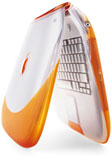 The first new laptop I owned was a
tangerine 1999 iBook.
It was reasonably fast at 300 MHz, but the hard drive was far too small
(3.2 GB), the screen had too low a resolution
(800 x 600), and there was no way to connect the machine to a projector
for presentations. I did, however, appreciate the rugged exterior's
ability to stand up to various drops and bumps.
The first new laptop I owned was a
tangerine 1999 iBook.
It was reasonably fast at 300 MHz, but the hard drive was far too small
(3.2 GB), the screen had too low a resolution
(800 x 600), and there was no way to connect the machine to a projector
for presentations. I did, however, appreciate the rugged exterior's
ability to stand up to various drops and bumps.
After the iBook, I upgraded to a 333 MHz Lombard PowerBook G3. This
machine was well-built, relatively rugged, and much better in terms of
screen size (14" 1024 x 768) and overall features. However, once
OS X came out, it was too slow to be productive in an everyday
setting.
I replaced it with a 400 MHz titanium PowerBook G4.
In terms of speed and features, it was a significant upgrade. I had
access to wireless networks, much better battery life, and a DVD-ROM
drive. I also found it far too fragile for use as a true portable
computer - just putting it in my backpack would scratch and damage the
casing.
When Apple came out with the 12" PowerBook at the
beginning of 2003, I was anxious to get my hands on one. It offered a
good size for school and the features and speed that I needed. For the
most part, it was generally a good machine.
Almost four years later, however, it's showing its age in ways that
it shouldn't. The casing is scratched up near the wrist rest in a way
I'd never seen before. The lid is warped and rocks from side to side
when closed. The screen has several white spots in it - something I
hadn't seen until this computer.
Yes, it got near daily use for four years, but still, I can't help
but feeling like my Lombard or iBook would have held up better - and I
even had a padded sleeve for this machine!
That being said, I got 3-1/2 good years out of the machine with no
major incident. I think it was money well spent.
Windows Notebooks
After that I was using a nearly 8-year old IBM ThinkPad
600E. In terms of construction, it was up to the standard of the
old Lombard. The LCD, which is as old as the computer, had no dead
pixels, let alone white spots. It 366 MHz Pentium II is still fairly
fast, with the exception of opening PDF files and viewing Flash-based
video online, and Windows XP (I had to upgrade from Windows 2000 to run
some software) actually runs well on it, even with only 192 MB of RAM.
It has, however, had a new keyboard, new motherboard, and new battery -
but considering the originals lasted 7 years, there's not much to
complain about.
Recently I was given a
Toshiba Satellite A25 notebook that had been purchased new in 2005,
and I figured that I might as well use it, since it was the newest
machine I own. The specs are impressive - Pentium 4 at 2.66 GHz, 15"
screen, DVD/CD-RW combo drive, SD card slot, 768 MB of RAM, and 120 GB
hard drive.
However, the computer itself is an ease-of-use nightmare, as many PC
laptops seem to be. Nothing on it "just works", and accomplishing any
task requires some playing around with settings or switches.
Wireless networking is touchy - sometimes it just refuses to connect
to certain wireless networks - and this is with the latest drivers.
Sometimes the sound decides not to work, and restarting the computer is
the only fix. The power management drivers are flaky at best. The
keyboard is not only awful to type on - the keys actually come off
easily! The casing of the computer is not particularly solid, and it
would probably hold up just about as well as my titanium PowerBook if
dropped. It's also about 2" thick and weighs somewhere in the
neighborhood of 7 lb. It doesn't even fit properly in my computer
case.
It reminds me why I've been buying Macs for so long. The Mac OS is
elegant, connecting to networks is simple, and the construction of the
machines themselves is fairly decent. I remind myself, however, that
this Toshiba was free, so even if it lasts for just six months, I come
out ahead.
MacBooks Today
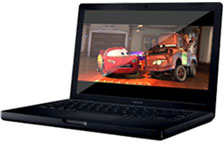 Out of
the Mac laptops currently offered, I'm impressed with the construction
of the black MacBook. The material has a nice soft feel to it, it
doesn't bend easily, and the seams match up almost perfectly.
Out of
the Mac laptops currently offered, I'm impressed with the construction
of the black MacBook. The material has a nice soft feel to it, it
doesn't bend easily, and the seams match up almost perfectly.
The screen resolution (1280 x 800), however, is not high enough for
me - I find that I run out of space on the screen too easily. I also
find the glossy screen to be unworkable, especially when doing photo
editing, as colors are too saturated.
I like the built-in camera, and the keyboard feels very solid. In
fact, it almost feels like an old G3 PowerBook in terms of overall
quality.
But the screen alone is enough for me not to buy one. It's the most
important part of a laptop, and if I don't have enough space to work, I
wouldn't want to purchase the machine.
The 15" or 17" MacBook Pro would be decent, but the 17" screen makes
the machine too big to carry around in a backpack, and I'm not
particularly thrilled at repeating the whole metal-casing "looks great
when new" ordeal that I went through with my TiBook and my 12"
PowerBook.
Right now, the machine I'm leaning toward isn't a Mac.
Think(Pad) Different
I'm currently most impressed with the features of the new ThinkPad
T60 15" widescreen. I can get it with a WXGA+ (1440 x 900) screen,
which would give me a high enough resolution to get work done (they say
high enough to have two pages side by side - and that's exactly what I
need).
Just like the MacBook Pro, it comes with Bluetooth and 802.11n, and
I can even order it with a WWAN card, which I'd have to add to the Mac.
I also like the fact that I can expand the RAM up to 4 GB, and
that the hard drive is easily accessed, unlike with the MacBook
Pro.
The ThinkPad's drivers also tend to be better than, say, Toshiba's,
and I've had a good experience with the 600E. Another nice feature is
the ability to restore the system from a partition on the hard drive -
I've been stuck before, away from home with no system CDs and a crashed
computer.
Why Not a Mac?
Why not a Mac this time around? Apple just doesn't offer what I need
right now, all OS preferences aside. I need a rugged notebook that I
can throw in my backpack that has a high-resolution matte screen, as
well as room for significant upgrades. The black MacBook fits the first
part but not the second or third, and even though the MacBook Pro gets
the second and part of the third, it totally misses the first part with
it's aluminum casing.
Apple also misses me in their desktop lineup. When I purchased it,
my dual 1.8 GHz G5 was
the perfect machine for my needs, and it has proven itself to be
expandable and reliable. For $1,600 or so, I had an expandable desktop
computer with room for up to 4 GB of RAM, and two SATA hard
drives. I could add my own monitor and add a new video card if I wanted
to. The whole system, with a 19" LCD monitor, was under $2,000, and
I've since added RAM and a second hard drive.
At $2,500, the current Mac Pro, costs much more than I would want to
spend on a desktop, while the Mac mini and the iMac don't offer the
expandability that I need. I'm not planning on getting rid of my G5
anytime soon, but I'm starting to wonder if I'll have to build a PC for
myself next time instead of buying a Mac desktop, as much as I prefer
using the Mac OS.
Two Models Apple Needs
I'd like to see two new models from Apple right now. The first would
be a more rugged version of the MacBook Pro. I'd gladly pay a little
bit more for a more rugged case, perhaps similar to that of the black
MacBook, and I would think that people who plan to use the Mac for
business (those who travel frequently) would also appreciate a stronger
case. I'd also like to see it able to accommodate more RAM (2 GB
isn't enough) and have better access to the hard drive in case
something should happen. Think of it as a 15.4" MacBook.
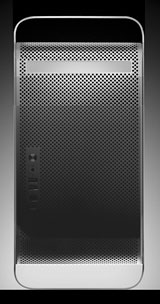 The second
machine would be a sort of "entry-level" Mac Pro. Instead of two
optical drives, it could have one (like the Power Mac G5 did), maybe
only two PCIe slots instead of four, and a single dual-core processor
instead of the two dual-core Xeon processors in the Mac Pro. I would
expect that such a machine should sell somewhere in the $1,500-1,800
range, offering a lot more expandability than the Mac mini for those
who need less power and expansion options than the Mac Pro offers.
The second
machine would be a sort of "entry-level" Mac Pro. Instead of two
optical drives, it could have one (like the Power Mac G5 did), maybe
only two PCIe slots instead of four, and a single dual-core processor
instead of the two dual-core Xeon processors in the Mac Pro. I would
expect that such a machine should sell somewhere in the $1,500-1,800
range, offering a lot more expandability than the Mac mini for those
who need less power and expansion options than the Mac Pro offers.
In the meantime, it looks like I might end up buying a ThinkPad for
my portable computing needs.



