I pity G4 users. Sure, I want the graphics, the speed, and the
cool graphite case, but there is something I don't want - something
that sits in a corner of the hard drive, taking up memory and
slowing down your system.
No, isn't a program made by Microsoft; it is made by Apple. It
is called Mac OS 9. Although Mac OS 9 has some excellent features,
it takes up 22-32 MB of memory, versus Mac OS 8.6, which takes only
14-18 MB.
Mac OS 9 does not work well on anything below a fast PowerPC
603e. If you have a slower Mac - the
x200 series or x100 series - I don't recommend it.
Perhaps the new features in OS 9, like Multiple Users, Software
Update, Sherlock II, and the key chain are the problems. Take them
away, and you really just have a bloated Mac OS 8.6. Sure, 9's
features are great, but is it worth 24 MB of RAM and over 200 MB of
hard disk space just to use these few features?
I don't think so.
If you have several people using the computer, OS 9 might be a
good idea so you can use the Multiple users control panel. But why
not just use Apple's long forgotten product that first shipped with
Performas, At Ease? It works fine from System 7 through Mac OS
8.6.
I have used Macs since the 80s, and I have used almost every
operating system from System 6 all the way up to 9. I have chosen
my favourites very carefully, based on what is included in them,
how much memory they use, etc.
System 7.1 & 7.5.3
You may notice I recommend 7.1 for some machines. You may say,
"why not use 7.0, or 7.0.1?" but there is a good reason for using
7.1. Despite some bug fixes, 7.1 is 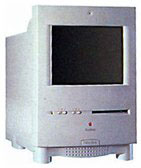 also
usually among the minimum requirements for some software programs.
It is also the last operating system that works well with such Macs
as the LC, LC
II, and Colour Classic.
also
usually among the minimum requirements for some software programs.
It is also the last operating system that works well with such Macs
as the LC, LC
II, and Colour Classic.
You may also notice that I recommend 7.5 for some machines. The
reason is that, while it is a more advanced operating system than
7.1, 7.5 doesn't use as much memory as 7.5.3 does, and you can
still use Open Transport and programs requiring 7.5 without using
as much hard disk space and RAM.
For information on compact Macs, see my article What can you squeeze into a compact Mac?
If you have a Macintosh II or LC with
no more than 2 MB of RAM, use System 6.0.8. If you have 4 MB or
more, use 7.1. Using System 7.5 slows down the computer, although
7.5 can be used if you have a PMMU and a decent amount of memory
(at least 16 MB) in your Mac II.
If you have an LC II, you can use System 6.0.8L, if you want to
use System 6, but I like System 7.1. If you have a Performa 400,
405, or 410, it came with 7.0.1P, but you may use standard System
7.0.1 or 7.1 with no problem. You will just lose the "Performa
features," like the Launcher, hidden desktop "while in background,"
and "About this Computer." In place of "About this Computer" you
will see "About this Macintosh." 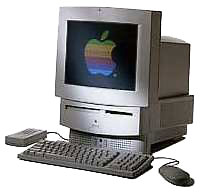 There you
will see "Macintosh LC" (they are Performa-ized Mac LC IIs) where
the Apple logo used to be.
There you
will see "Macintosh LC" (they are Performa-ized Mac LC IIs) where
the Apple logo used to be.
If you have a Macintosh LC III,
LC III+, LC
520, or LC 550 with no more than
8 MB of memory, you can use System 7.1 with the correct system
enabler. If you have at least 8 MB, you can use 7.5. If you have 12
MB or more, 7.5.3 or 7.6.1 works fine (try to get an FPU if you
will be running 7.6.1).
If you use any type of Quadra, Centris, or '040/'LC040 based
Performa or LC, you must use 7.1 or higher with the correct system
enabler. Some came with 7.5. Although they can run 8.1, I recommend
7.6.1. For more information, see my Options
for '040's.
Mac OS 8.0 & 8.1
For a PowerPC-based machine, it is well worth the effort to buy
and install Mac OS 8 or 8.1. Mac OS 8 provided PowerPC-native
Finder support, which means that your Power Mac will run the Mac OS
8 Finder in PowerPC code, making it faster. Mac OS 8.5 or higher is
totally PowerPC native, and if you have 32 MB of memory or more,
8.5 may make your Mac feel even faster than with OS 8.
I recommend against 8.5 or higher if you have a Power Mac 6100
or a member of the x200 series. The
exception is the 6360, which will run
8.5 with no problems. If you opt to buy 8.5, make sure you download
the 8.6 update from Apple. It fixes some bugs, and even displays
the system version on startup.
Mac OS 9
Even though the bloated, problematic Mac OS 9 is the current Mac
OS, I still hold my hopes high for Mac OS X. If it is as good as
people say it is, it will become the standard in operating systems.
Maybe other OSes will be built to imitate it, much like Microsoft
tried to imitate the Mac OS with Windows.
I think OS X is the OS that the world is waiting for.
Low End Mac is an independent publication and has not been authorized,
sponsored, or otherwise approved by Apple Inc. Opinions expressed are
those of their authors and may not reflect the opinion of Cobweb
Publishing. Advice is presented in good faith, but what works for one
may not work for all.
unless otherwise noted. All
rights reserved. Low End Mac, LowEndMac, and lowendmac.com are
trademarks of Cobweb Publishing Inc. Apple, the Apple logo, Macintosh,
iPad, iPhone, iMac, iPod, MacBook, Mac Pro, and AirPort are
Additional company and product names may be trademarks or
registered trademarks and are hereby acknowledged.
: We allow and encourage links to
any public page as long as the linked page does not appear within a
frame that prevents bookmarking it.
Email may be published at our discretion unless marked "not for
publication"; email addresses will not be published without permission,
and we will encrypt them in hopes of avoiding spammers. Letters may be
edited for length, context, and to match house style.
: We don't collect personal
information unless you explicitly provide it, and we don't share the
information we have with others. For more details, see our



