Except as noted, prices are in US dollars.
Which 'Books Don't Have Backup Batteries?
Apple has posted a Knowledge Base
article describing which portable Macintosh computers do not
contain a backup battery and what this means.
Portable Macintosh Computers without a Backup Battery
- iBook (every model ever made)
- PowerBook G4 (12")
Because there is no backup battery in the computers listed in the
section above, additional care should be taken ensure the AC adapter is
plugged in.
When removing the main battery without the AC Adapter, the computer
should be shut down since the contents of RAM are lost when no power is
available. There is a small capacitor that maintains the system clock
long enough to swap the main battery.
The PRAM is not affected by the long term removal of the main system
battery.
JR Hill Announces New PB G4 12" and 17" Screen
Protectors
JR Hill has announced
Screen Protectors for the new 12" and 17" PowerBook G4s. Available in
both full grain leather or durable vinyl, Screen Protectors protect the
PowerBook G4's screen from the keyboard when closed. All Screen
Protectors come with lifetime warranty and are available now.
Leather
- for Apple PowerBook G4 17", $17.49
- for Apple PowerBook G4 12", $12.49
- for Apple PowerBook G4 15", $17.49
- for Apple PowerBook G3, $12.49
- for Apple iBook 12", $12.49
- for Apple iBook 14", $12.49
Vinyl
- for Apple PowerBook G4 17", $9.99
- for Apple PowerBook G4 12", $6.99
- for Apple PowerBook G4 15", $9.99
- for Apple PowerBook G3, $6.99
- for Apple iBook 12", $6.99
- for Apple iBook 14", $6.99
The PowerBook G4 Sleeve is a form fitted, padded, full grain leather
sleeve made for people who don't want a full sized notebook computer
bag. The Sleeve can either be carried by itself or be placed into a
briefcase or backpack. The Sleeve also features a zipper on all three
sides, leather piping, and handles, along with a lifetime warranty.
- The Sleeve for PowerBook G4, Leather, $99.99
- The Sleeve for PowerBook G4, Nylon, $74.99
T3Hub Ultraportable USB-Hub
T3Hub is the first USB hub to pick up the design of the new
generation of portables from Apple.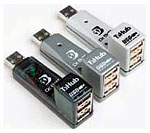
Typically T3Hub will be used when the internal USB connections of
the computer no longer satisfy the needs of a growing array of USB
peripherals.
T3Hub is available in the colors Ice (iBook 2001), Titanium (G4
PowerBook), and also in the classical translucent Graphite.
T3Hub is equally useful when it comes to quick expansion of the
number of USB ports on a desktop computer.
In either setup, T3Hub will expand a single USB port on the computer
into three USB ports.
T3Hub plugs directly into the USB connector on the computer. An
optional USB extension pigtail is provided to reduce strain on the
built-in port.
Like all mobile USB hubs T3Hub cannot be connected to another
non-powered hub such as the hub that is integrated into every USB
keyboard for the Mac. As a result T3Hub is always connected directly to
one of the computer's built-in USB ports.
Features
- T3Hub can be installed without turning your computer off.
- T3Hub is compatible with all USB devices.
- T3Hub is platform-independent, Mac OS (both 9 and X flavors),
Win98/ME, Win2k, and Linux are fully supported.
- T3Hub is a piece of art:
- T3Hub Silver matches the white iBooks.
- T3Hub Titanium matches the TiBook
- T3Hub Graphite is an astounding addition beside just about any
computer!
- includes a separate USB extension cable to reduce strain on
built-in USB ports.
Technical Features:
- compliant with USB 1.1 specs
- Plug-and-Play compatible
- bus error recognition and correction
- 12 and 1.5 Mbps transfer rate available on all 3 connectors.
- 3 USB Type A Ports for USB-devices, active devices indicated via
LED.
T3Hub sells for $33.95
Universal Laptop Power Adapter
Want to power several different notebooks without buying separate
adapters for each one? Targus has an answer. Ultra-thin, ultra-light
and ultra-portable, the
Targus Universal AC Adapter is the perfect 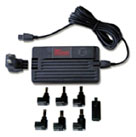 choice when you need a convenient power
source that won't weigh you down - or when you're replacing a broken,
lost or stolen original adapter. This universal adapter features
patented PowerTips technology that automatically controls the voltage
to match your notebook's requirements. Please confirm compatibility
with your notebook model from the chart below before ordering. Click on
the Related Products link at the right for a selection of PowerTips for
wireless phones, PDA's and portable printers.
choice when you need a convenient power
source that won't weigh you down - or when you're replacing a broken,
lost or stolen original adapter. This universal adapter features
patented PowerTips technology that automatically controls the voltage
to match your notebook's requirements. Please confirm compatibility
with your notebook model from the chart below before ordering. Click on
the Related Products link at the right for a selection of PowerTips for
wireless phones, PDA's and portable printers.
Features and Benefits
- Light and compact - only 8.5 ounces (240g) and 1/2 inch (1.27 cm)
thick
- unique, wall-hugging design
- UL and CE approved
- Includes 10" power cord
- Built-in surge protection
- Also works with cellular phones, PDA's, and portable printers*
Works with Apple iBook (presumably Clamshell only), PowerBook G3,
PowerBook 3400, and a whole passel of PC laptops.
Price: $114.95
powerbookmedic.com - PowerBook Parts,
Installations, Repairs
PowerBookMedic offers
parts, installations, and repairs for G3 & G4 Apple laptops and
iBooks, as well as for older models.
Servicing all of the following PowerBook and iBook computer models:
G4 Titanium, G3 Pismo, G3 Lombard, G3 Wallstreet, iBook (white), iBook
Clamshell (pre-2001), and older models.
PowerBook Medic offers a working on arrival guarantee on all parts
and repairs, as well as a 48 hour satisfaction guarantee.
TiBook Tote and Tilt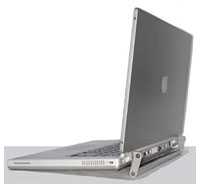
The
TiBook Tote and Tilt features:
- Tote your PowerBook by a handle.
- Tilt to allow for air circulation under your PowerBook, helps to
increase battery life and performance
- Easy access to rear data ports.
- Installs in five minutes.
- Does not void warranty.
- 100% handmade in the USA.
- All aluminum construction for lightness & sturdiness.
- Color powder coated to complement the PowerBook.
Price: $44.95
iBook Tote and Tilt 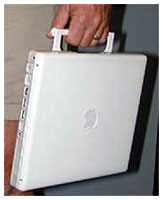
The
iBook Tote and Tilt features:
- Tote your iBook by a handle.
- Tilt to allow air circulation under your iBook.
- Installs in less than five minutes.
- Does not void warranty.
100% made in the USA.
- Color matches iBook.
- For 12.1" Display Only
iBook Tote and Tilt price: $39.95
Celestia 1.2.5 Space Planetarium
Fly-thru/Simulation Software
Not a specifically portable computer item but cool, Celestia is a free real-time
space simulation that lets you experience our universe in three
dimensions. Unlike most planetarium software, Celestia doesn't confine
you to the surface of the Earth. You can travel throughout the solar
system, to any of over 100,000 stars, or even beyond the galaxy. All
travel in Celestia is seamless; the exponential zoom feature lets you
explore space across a huge range of scales, from galaxy clusters down
to spacecraft only a few meters across. A "point-and-goto" interface
makes it simple to navigate through the universe to the object you want
to visit.
Celestia 1.2.5 is now available for Mac OS X. In addition to
supporting all of the new 1.2.5 features, the new build has a Cocoa
interface. However, Celestia for Mac OS X should still be
considered alpha software.
The new release includes a lot of bug fixes and some major new
features. In 1.2.5, comet tails are rendered, so you can see striking
views of Hale-Bopp in 1997 and other famous comet encounters. The
accuracy of Celestia has improved dramatically. It's possible now to
watch the moons of Jupiter eclipse each other, follow the Voyager
spacecraft on their grand tours of the solar system, and see the
eclipse of Xerxes in 479 B.C.E.
System requirements: Mac OS X 10.1.2
Celestia is freeware.
Bargain 'Books
There are two different versions of WallStreet running at 233 MHz,
the cacheless MainStreet version and the
later Series II with
a level 2 cache. It's not always possible to determine from the
vendor's listing which is being offered, so we've included links within
this paragraph to the two models. The same goes for the PowerBook G4/667 (Gigabit
Ethernet/2001) and G4/667 (DVI).
Models are specified with RAM/HD/media drive. RAM is in MB. Hard
drive size is in GB unless noted as GB. RAM noted as 128+128 indicates
additional RAM installed by dealer.
- new PowerBook
G4/800, 512/40/Combo, AirPort, $2,149.49
- used PowerBook 1400c/133,
16/1 GB, 30 day warranty, $399.99
- used PowerBook 1400c/133,
32/1 GB, 30 day warranty, $449.99
- used PowerBook 1400c/133,
40/1 GB, 30 day warranty, $459.99
- used PowerBook 1400c/133,
48/1 GB, 30 day warranty, $409.99
- used PowerBook 1400c/133,
64/1 GB, 30 day warranty, $479.99
- used PowerBook 1400c/133,
64/2 GB, 30 day warranty, $499.99
- used PowerBook 1400c/166,
32/2 GB, 30 day warranty, $429.99
- used PowerBook 1400c/166,
64/1 GB, 30 day warranty, $399.99
- used PowerBook 3400c/200,
32/2/CD-ROM, 30 day warranty, $499.99
- used PowerBook Lombard
G3/333, 192/20, 30 day warranty, $799.99
- PowerBook Pismo
G3/500, 128/12/DVD-ROM, $1,099.99
- Add a 30 GB hard drive, installed, $89.99
- Add 1 GB of RAM, $119.99
- Add 512 MB of RAM, $64.99
- Add a Targus carrying bag, reconditioned, lifetime warranty,
$9.99
The new 12" PowerBook is in stock at Power Max and come with a free
copy of QuickBooks Pro for OS X.
- iBook 600 12",
128/20/CD-ROM, $799. Receive a free Epson C42UX Printer (after dual
rebates).
- refurbished iBook
800 12", 128/30/Combo, $1,188. eceive a free Epson C42UX Printer
(after dual rebates).
- refurbished iBook 800
14", 256/30/Combo, refurbished, $1,399. Receive a free Epson C42UX
Printer (after dual rebates).
- iBook 700 12",
128+128/20/CD-ROM, $994
- iBook 800 12",
128+256/30/Combo, 32 MB Video RAM, $1,294
- iBook 800 14",
640/40/Combo, 32 MB Video RAM, free Brenthaven case, $1,844
For more deals on current or recently discontinued models, see our
Best PowerBook
G4 Deals and Best
iBook Deals.



