Biggest and Fastest Notebook Hard Drives, Best Laptop for Blogging, New Scrolling Tool, Linux on a PowerBook, and More
Low End Mac Reader Specials
Memory To Go Special: New 2008 iMac 2GB $42 / iMac Intel Core2 DUO & MacBook Pro 2GB $36 - 1GB $20.
MacPro 8 Core Memory 8GB kit $286 / 4GB kit $143 / 2GB kit $93 -- Free shipping available. LIfetime warranty.
Download Typestyler, still the Ultimate Styling Tool for Internet, Print and Video
Graphics. Works great in Classic with a Native OS X Version on the way. Free
Tryout: www.typestyler.com
LA Computer Company: Specials on AppleCare, iMac's, Apple Batteries and Apple A/C Adapters. Also Great prices on Used Apple Computers. Call 1-800-941-7654 Click Here.
OWC: Juice up your iPod w/NewerTech High Capacity Battery from $19.99 Free Installation Videos for most models. Pro Installation Service w/FedEx Shipping From $57.95 (Battery Included). - www.MacSales.com
Mac users can finally play Party Poker for Mac. Not only that, they can also learn how to play PokerStars for Mac.
Laptop Hardware Provided by TechRestore - Overnight Mac & iPod Repairs.
Compare products like desktop computers, laptops, and LCD TVs side by side! All the information and reviews to make the best purchasing decision for a new cell phone GPS products or MP3 players. The Ciao network makes searching products easy for you.
Charles Moore
- 2005.05.20
Low End Mac Reader Specials
Memory To Go Special: New 2008 iMac 2GB $42 / iMac Intel Core2 DUO & MacBook Pro 2GB $36 - 1GB $20.
MacPro 8 Core Memory 8GB kit $286 / 4GB kit $143 / 2GB kit $93 -- Free shipping available. LIfetime warranty.
Download Typestyler, still the Ultimate Styling Tool for Internet, Print and Video
Graphics. Works great in Classic with a Native OS X Version on the way. Free
Tryout: www.typestyler.com
LA Computer Company: Specials on AppleCare, iMac's, Apple Batteries and Apple A/C Adapters. Also Great prices on Used Apple Computers. Call 1-800-941-7654 Click Here.
OWC: Burn DVDs, DVD-DL, CDs, DVD-Ram - FAST! Superdrive upgrades from OWC starting from $31.99 with options for nearly every Mac. Models with Lightscribe, Blu-Ray too!
Mac users can finally play Party Poker for Mac. Not only that, they can also learn how to play PokerStars for Mac.
Laptop Hardware Provided by TechRestore - Overnight Mac & iPod Repairs.
Compare products like desktop computers, laptops, and LCD TVs side by side! All the information and reviews to make the best purchasing decision for a new cell phone GPS products or MP3 players. The Ciao network makes searching products easy for you.
This Week's PowerBook, iBook, and Notebook News
General
Apple and Mac desktops is covered in The Mac News Review. iPod news is
covered in iPod News
Review.
Tiger Talk
- Only Use Mac OS X 10.4-Compatible Disk Utilities
with Mac OS X 10.4 Volumes
- DiskWarrior Updated for Tiger
News & Opinion
Products and Services
- Seagate Ships 120 GB Notebook Drive
- Hitachi Ships World's Fastest 100 GB Notebook Hard
Drive
- ClickScroll 1.3 2D Scrolling Tool: No Scrollbars
or Scroll Wheels
- MCE 8x Internal SuperDrive Upgrade for iBook
G4
- LapWorks Laptop Desk: Protect Dad's Genes from Hot
Laptops
- MacWireless Whip AirPort Antennas
- QuickerTek 1 Watt Transceiver for AirPort
Installations
Tech Trends
Windows Watch
Bargain 'Books
Tiger Talk
Only Use Mac OS X 10.4-Compatible Disk
Utilities with Mac OS X 10.4 Volumes
A new Apple
Knowledge Base article says:
"To avoid issues with a Mac OS X 10.4 volume, do not use disk
utility software that was released before Tiger (late April 2005)
with it. If you do, the software might report false errors or
attempt 'repairs' that could lead to data loss.
"Third-party disk utility software includes Alsoft DiskWarrior,
Micromat Tech Tool, and Symantec Norton Disk Doctor. Consult
third-party utility manufacturers to find out which software
versions are compatible with Mac OS X 10.4.
"You can use Disk Utility in Mac OS X 10.3.9 and only version
10.3.9 to check or repair a Mac OS X 10.4 volume. Don't use an
earlier version of Disk Utility, such as when started from a Mac
OS X 10.3 disc.
"Of course, you can also use Disk Utility included with Mac
OS X Tiger.
"Mac OS X 10.4 adds support for Extended Attributes. A disk
repair application that's not Mac OS X 10.4-aware may
incorrectly report Extended Attributes as directory damage. You may
get an error message such as "Cannot be rebuilt. The original
directory is too severely damaged" that is untrue.
"To prevent these issues, make sure that you only use Mac
OS X 10.4 Tiger-compatible disk utilities to verify or repair
a volume that has Tiger installed on it."
DiskWarrior Updated for Tiger
PR: DiskWarrior
is the most highly decorated Mac disk repair utility ever. It
repairs disks that no other program can repair. New hardware
monitoring helps protect your data from drive malfunctions.

DiskWarrior is claimed
to be the safest, the most technologically advanced, and the most
powerful utility to eliminate directory damage available for any
computer. DiskWarrior uses a different approach to disk directory
repair than other programs. DiskWarrior is not a disk repair
program in the conventional sense. Instead of patching the original
directory, it uses a patent-pending technology to quickly build a
new replacement directory using data recovered from the original
directory, thereby recovering files and folders that you thought
were lost and that no other program could recover.
The first thing DiskWarrior does is it scavenges your original
directory to find all the file data it can. It then uses this data
to build an entirely new replacement directory. DiskWarrior is the
only product that finds all of your data. Its patent pending method
always results in a perfectly rebuilt directory without any errors
and that contains all of your file and folder data.
Hardware failure presents a potential threat to your data. When
a drive mechanism fails, the data on the drive can be lost, with an
expensive data recovery service your only option to retrieve your
data. DiskWarrior can be used to activate internal diagnostics that
are built into disk devices to help determine if a drive is in
danger of physical malfunction. If the potential for failure is
indicated, DiskWarrior will notify you, giving you the opportunity
to back up your data before the drive fails. These tests can be
executed manually, or you can choose to have the tests run
automatically every hour, day, or week. DiskWarrior also provides
several notification options should the diagnostics report a
problem.
With DiskWarrior there is never a risk of losing directory data
and thus never a risk of losing access to your files.
Only DiskWarrior has all of these features:
- Uses directory data to quickly rebuild the directory
structure
- Eliminates risk of losing access to files - other disk "repair"
utilities attempt to fix the directory by patching the directory
structure and risk deleting sections of the directory
- Scavenges directory to find all salvageable file and folder
data, even data contained in damaged nodes
- Eliminates unseen directory errors, preventing minor directory
errors from escalating into major problems
- Recovers lost files and folders
- Optimizes directory for maximum directory performance, speeding
up overall disk performance
- Monitors drive hardware for potential drive failure
- Verification of replacement directory ensures data
integrity
- Comparison of original directory with replacement directory
tells you which files and folders may have been affected by
directory damage
- Patented preview feature to view what the disk will look like
after the directory is rebuilt, allowing you to view files and
folders before any directory changes are written to disk
- Repairs damaged boot blocks and blesses the system folder to
ensure that the computer will start from the repaired disk
- Checks custom icon files for corruption, eliminating a common
cause of system crashes
- Repairs problems with wrapper volume System files caused when
HFS Plus disks are initialized under Mac OS 9.0 - 9.0.4
- Safely permits interruptions of any kind, including power
outages
- Advanced "Verify Reads and Writes" technology protects your
data
- Supports bad block sparing software
- Supports file journaling (Mac OS X 10.2.2 or later)
DiskWarrior ships on a CD-ROM that will start up in Mac
OS X on a Mac with a G3 or higher processor (including a G5)
with built-in USB and 128 MB of RAM (256 MB recommended).
Once started from the DiskWarrior CD, DiskWarrior can be run
from the CD to eliminate all damage to any HFS (Mac OS Standard)
and HFS Plus (Mac OS Extended) disk directories, including your
normal startup disk as well as journaled disks. Version 2.1 of
DiskWarrior, also included, runs and installs on a 68020 Mac or
better when started from Mac OS 7.1 to 9.x. Either version of
DiskWarrior repairs any supported disk no matter which version of
the Mac OS is installed on the disk being repaired.
To rebuild the directory on a Mac OS Standard (HFS) or Mac OS
Extended (HFS Plus) disk, DiskWarrior requires a Mac OS computer
with a G3 or better processor (such as a G4 or G5) with built-in
USB and a minimum of 256 MB RAM (384 MB or more recommended) to
start up and run from the DiskWarrior CD, regardless of what
operating system is installed on the disk to be rebuilt. The
computer must also have the latest firmware updates installed. The
disk to be rebuilt must be locally connected, must not be write
protected, and must have a valid partition map. If you plan to
rebuild the directory on your startup disk, you need to start up
from another disk capable of starting up in Mac OS X 10.2.1
through 10.4, such as the DiskWarrior CD. (DiskWarrior cannot be
run while started up from the Apple Mac OS X install CD.)
Note: DiskWarrior CD revision 38 is now shipping with
DiskWarrior 3.0.3. All Mac models introduced as of 05/03/2005 and
meeting the above requirements for DiskWarrior are supported. The
new Power Mac G5 models introduced on 04/27/2005 and the new iMac
models introduced on 05/03/2005 are supported.
If you wish to enable DiskWarrior's automatic hardware
monitoring, you will need to install the DiskWarrior application on
your Mac OS computer. To install the DiskWarrior application, you
must have a Mac OS computer running Mac OS X 10.2.1 through
10.4 with at least 256 MB RAM. Installing DiskWarrior is not
required to run the application from the DiskWarrior CD to rebuild
a disk directory.
New in this version: Uses your original 3.0, 3.0.1 or 3.0.2 CD
to create a new startup CD containing DiskWarrior 3.0.3, which adds
Tiger compatibility. The new CD will only start up the same Mac
models as the original CD. The included Read Me lists details and
requirements.
System requirements: Mac OS X 10.2.1 or higher
DiskWarrior sells for $79.95 ($39.95 upgrade)
News & Opinion
Which Laptop for Blogging?
problogger.net's
Darren Rowse says:
"A regular reader of ProBlogger, Mark from The Rock and Roll
Report, has asked the following question that I thought I'd open up
to all readers for discussion....
"I personally have been a fan of Macs since I started blogging.
I find them to be well worth the money, easy to use and a lot of
fun. There are a few things that you need to consider though - the
main one is that there are some products unavailable on Macs (there
are others that you can't get on PC though) and that you'll
probably have to buy the Mac version of some of the software that
you already have.
"Having said this - Macs come with some amazing software built
in (iTunes, iPhoto, iMovie, etc.) which are a big feature."
Ubuntu Linux, Yellow Dog Linux, and Mac
OS X on One PowerBook
Intuitive System's
Dave Taylor says:
"This article details the trials and tribulations of turning a
perfectly good Apple PowerBook into a tri-boot system with Mac
OS X, Yellow Dog Linux, and Ubuntu Linux.
"Mac OS X is built of two components, Darwin, the BSD-based Unix
underpinnings, and Aqua, the beautiful graphical user interface we
Mac heads have all grown to love. However, there are other
operating systems and other work environments that can be installed
on an Apple system, based on popular open source Linux
applications. If you're looking for Intel-based versions of Linux,
there are dozens and dozens, but the PowerPC chip cuts those
options down quite a bit. I decided it'd be interesting to install
the most popular Linux for PowerPC - Yellow Dog 4.0 - and an up and
coming Debian-based Linux distro that's getting quite a bit of buzz
in the community: Ubuntu Linux.
"Unlike Microsoft's VirtualPC application, these operating
systems can't be installed within Mac OS X, but rather have to
be installed adjacent to, or instead of Mac OS X. I decided to
install all three on my new 1 GHz Aluminum PowerBook G4
system. With 1 GB of RAM and a 60 GB drive, I figure there was
plenty of space to steal 8 GB for the two Linux installations
and still have plenty to continue running Mac OS X with all my
favorite applications."
Products and Services
Seagate Ships 120 GB Notebook Drive
Macworld UK's Paul
Kallender reports:
"Seagate will ship 120 GB 2.5-inch notebook drives in June
2005.
"The Momentus-branded hard drive series includes a 120 GB drive
that spins at 5,400 rpm and a 100 GB drive that spins at 7,200 rpm.
This is the first time notebook drives with these combinations of
rotational speeds and capacities have been announced by Seagate,
according to Mark Walker manager of product marketing at the
company."
Hitachi Ships World's Fastest 100 GB Notebook
Hard Drive
The Register's
Tony Smith reports:
"Hitachi yesterday claimed the notebook hard drive performance
lead as it shipped what it reckons is the world's fastest 2.5in HDD
for mobile applications.
"The 100 GB Travelstar 7K100 spins at a desktop-standard 7200
rpm. Hitachi says its own benchmarks show the drive operates seven
per cent faster than 3.5in 7200 rpm, 2 MB cache
desktop-specific drives."
ClickScroll 1.3 2D Scrolling Tool: No
Scrollbars or Scroll Wheels
PR: ClickScroll gives
your Mac a highly addictive feature: scrolling without scrollbars
and scroll wheels.
No need to move your eyes anymore when you need to scroll a web
page or a text document - simply call ClickScroll once and gently
move your mouse around.
ClickScroll supports multi-button mice for fast access, as well
as single-button ones. It is the perfect scrolling software for
laptops users.
With ClickScroll, take advantage of the following features:
- Seamless integration: ClickScroll can be called in
virtually every Mac OS X application (Finder, Mail, Safari,
Internet Explorer, Word, Photoshop, etc.).
- Themes support: Do you want to create your own
ClickScroll theme? Use the ClickScroll Interface Builder and let
your creativity work for you !
- Visual feedback: ClickScroll lets you know what it is
doing all the time with a Mac OS X-friendly interface.
- 2D scrolling: ClickScroll now supports both horizontal
and vertical scrolling to provide a richer experience.
With ClickScroll, enjoy these unique features :
- Themes support
- 2D Scrolling
- User-defined themes support
New in this version:
- Mac OS X 10.4 "Tiger" support
- Added the ability to invert scrolling
- Now supports restricted accounts
System Requirements: Mac OS X 10.3 or better
ClickScroll is €6 shareware.
MCE 8x Internal SuperDrive Upgrade for iBook
G4
PR: Tiger is a roaring success! And for a limited time
get Apple's new Mac OS X 10.4 (Tiger) for only $79 ($50 off
the regular price!) when you purchase this drive! The new MCE 8x DVD±R/RW
"SuperDrive" upgrade with Double Layer (also called
Dual-Layer) Support for the iBook G4 allows you to author
professional-quality DVDs as well as create, store, and share their
collections of videos, music and photography. Plus, the fast,
highly reliable drives are compatible with most computer and
set-top DVD video players and other DVD burners - so video and data
DVDs created using these drives can be shared with business
associates, friends, and family. Starting at just $199.
MCE Technologies was the first company in the world to engineer
and offer a SuperDrive upgrade for the PowerBook G4. We continue
this long heritage with the MCE 8x Internal SuperDrive Upgrade with
Double Layer support for the iBook G4... hands down the most
technically advanced optical drive ever created for the Apple
PowerBook. Recording at 8x to both DVD-R and DVD+R media the MCE 8x
Internal SuperDrive upgrade brings the PowerBook G4 on par with
even the fastest drives Apple offers for their Power Mac G5
towers... even more amazing is that the MCE 8x SuperDrive upgrade
has true Double Layer support which means you now have the ability
to record up to 8.5 GB of data on a single side of a Double Layer
DVD. With Tiger (Mac OS X 10.4), you can even record to 8.5 GB
Double Layer discs with this drive natively... by dragging and
dropping right in the Finder.
The additional storage capacity of the DVD+R Double Layer disc
enables you to record up to 4 hours of DVD-quality video or 16
hours of VHS-quality video, without the need to turn over the disc.
You can now archive up to 8.5 GB of computer files on a single
disc, which almost doubles the storage capacity compared with the
4.7 GB for the single-layer DVD-recordable discs currently
available.
The MCE 8x Internal SuperDrive Upgrade is a dual drive and
records to both DVD-R/RW and DVD+R/RW media. It also reads and
writes standard CD-R/RW media and is compatible with all of Apple's
iApps including iTunes, iDVD, iPhoto, and Finder Burning.
You may install it yourself* or, if you prefer, you may have the
MCE 8x SuperDrive upgrade professionally installed into your iBook
G4 by MCE Technologies or one of Apple's worldwide Authorized
Upgrade Centers.
Features
- 8x DVD-R and DVD+R recorder
- 4x DVD-RW and DVD+RW recorder
- 2.4x DVD+R Double Layer recorder
- 24x CD-R and 24x CD-RW recorder
- Convenient slot-loading mechanism
- 2 MB Cache Buffer
- Buffer underrun protection
- Bootable
- Compatible with iDVD, DVD Studio Pro, iTunes, Disc Burner and
Apple DVD Player
The New MCE 8x Internal SuperDrive Upgrade is compatible with
both the 12" and 14" iBook G4.
The Double Layer DVD+R system uses two thin embedded organic dye
films for data storage separated by a spacer layer (see figure).
Heating with a focused laser beam irreversibly modifies the
physical and chemical structure of each layer such that the
modified areas have different optical properties to those of their
unmodified surroundings. This causes a variation in reflectivity as
the disc rotates to provide a read-out signal as with commercially
pressed read-only discs. Did you get all that?? It just means that
there are two recording layers inside the DVD instead of just
one... two layers means twice the recording capacity! Now wasn't
that easier?
Onboard Liquid Crystal Tilt/Thickness Compensator
Not every disc is created equal. The MCE 8x SuperDrive Upgrade
for iBook G4 implements an onboard liquid crystal tilt/thickness
compensator... the first time ever in a portable form factor. This
cutting edge technology provides accurate, reliable read and write
performance with a variety of disc characteristics, even with
irregularly curved or thick / thin media. This technology is also
effective in recording DVD+R double layer media.
System Requirements: iBook G4 running Mac OS 10.2, Mac OS 10.3,
Mac OS 10.4 (or later)
The MCE 8x Internal SuperDrive Upgrade with Double Layer support
is compatible with all versions of Mac OS X, including Tiger, and
is seamlessly compatible with Apple's iApps including iTunes, iDVD,
and iPhoto. In addition, it is compatible with Finder Burning and
DVD Studio Pro, Apple's professional DVD Authoring software.
Once installed, a quick check of Apple System Profiler indicates
that your new MCE 8x Internal SuperDrive enjoys native Mac OS
support... meaning it is Apple-certified. No third-party drivers to
download and hassle with. This native Mac OS support is your
guarantee that your MCE 8x drive will ALWAYS be compatible with all
current and future Mac OS updates and versions, as well as iApp
software. No other drive available for the iBook G4 can make this
claim.
Now you can record up to 4 hours instead of 2 hours of the
highest quality DVD video on a single disc. Or store 8.5 gigabytes,
equaling about 12 fully recorded CD-Rs, instead of just 4.7
gigabytes, on a single-sided DVD. Double Layer recording technology
built into the MCE 8x Internal SuperDrive upgrade makes it
possible.
LapWorks Laptop Desk: Protect Dad's
Genes from Hot Laptops
PR: Designed to take the hassles and hazards out of using
laptops, the $29.95 Laptop
Desk from LapWorks Inc. could help protect the little
swimmers of want-to-be fathers when they're without a desk and must
use their laptop on their lap.
The folding portable desk creates a 21" protective workspace
across the lap and addresses both culprits cited in the study
"Increase in Scrotal Temperature in Laptop Computer Users",
published in the UK journal Human Reproduction in December 2004.
Researchers said that the combination of 1) the heat generated by
the laptop and 2) pressing the thighs together to balance one
increases temperatures around men's privates and over time can
result in decreased sperm production.
Dr. Yefim Sheynkin of the State University of New York at
Stonybrook said, "The body needs to maintain a proper testicular
temperature for normal sperm production and development. Portable
computers in a laptop position produce scrotal hyperthermia by both
the direct heating effect of the computer and the sitting position
necessary to balance the computer."
The Laptop Desk cools laptops with heat-conducting polycarbonate
plastic and recessed ventilation channels. A thermal study
conducted by the California Polytechnic University at Pomona proved
the Laptop Desk reduces the heat passed through to the lap by 8 -
10%.
Its 21" lap span also allows men to sit in a more natural
posture with legs spread apart.
Sally Longyear, a Menlo Park, Calif.-based Certified Industrial
Ergonomist and experienced leader in injury prevention, stresses
correct laptop-using posture to avoid other computer-related
injuries. "Users should choose a work platform that spans their
entire lap so they can relax their knees instead of squeezing them
together to balance a laptop. This minimizes strain on the
shoulders, neck, back and arms." Ms. Longyear's website, http://www.working-well.org,
answers ergonomic questions to help computer users live
"pain-free."
"I designed the Laptop Desk to address the hazards of using a
laptop - to the user and the computer itself," said Jose Calero,
LapWorks' president. "Constant overheating is the laptop's worst
enemy, shortening its life and causing sluggish performance. Users
may experience hot leg plus neck, back and shoulder strain from the
poor ergonomic typing angles."
On a desk, the Laptop Desk folds into a five-position wedge,
inclining the keyboard for more ergonomic typing to save men's
wrists as well as their little swimmers. LapWorks' thermal study
concluded that inclining a laptop cools it by 15% - 20% because
more hot air escapes.
LapWorks offers two models - the 22-ounce Version 2.0 and the
14.6-ounce UltraLite for notebooks of 5 pounds or less. Both fold
in half for easy traveling in any computer bag.
"Depending on which analyst you talk to, there are about 100
million laptop users worldwide, with 60 million in the U.S. alone,"
continued Calero. "Presumably half of them are men. This isn't the
first time laptops have been reported as hazardous to men. I
donated Laptop Desks to the doctor who treated the Swedish patient
who burned his privates on an overheated laptop in 2002. The doctor
told me such a protective device would've helped."
MacWireless Whip AirPort Antennas
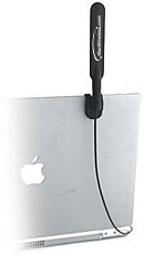
PR: MacWireless
whip AirPort antennas are designed to shape and extend
the signal from your Mac's wireless card. The adaptable design
allows it to work with almost any Macintosh computer that has an
AirPort or wireless card. With 4 dBi of gain this whip antenna
outshines the competition.
- Includes clips for permanent or removable mounting to laptop
displays, desktop displays, and more.
- Cable Length: 14" - 30".
- Dimensions: 6" x .75".
- Weight: 1 oz.
- Connector: RP-SMA plus adapter for selected use.
- 802.11a/b/g Compatible.
Requires an AirPort card, AirPort Extreme card, or other
wireless card with an antenna port.
The whip antenna will work with the following Macs:
PowerBooks
- All G3s
- All G4s (G4 12" may require modification)
PowerMacs
- All G3s
- All G4s (G4 Cube may require modification)
- All G5s
Factors Affecting Range and Performance of All Wireless
Networks
Range estimates are typical and require line of sight. Basically
that means you will need a clear unobstructed view of the antenna
from the remote point in the link.
Keep in mind that walls and obstacles will limit your operating
range and could even prevent you from establishing a link. Signals
generally will not penetrate metal or concrete walls. Trees and
leaves are obstructions to 802.11 frequencies so they will
partially or entirely block the signal. Other factors that will
reduce range and affect coverage area include metal studs in walls,
concrete fiberboard walls, aluminum siding, foil-backed insulation
in the walls or under the siding, pipes and electrical wiring,
furniture and sources of interference. The primary source of
interference in the home will be the microwave oven. Other sources
include other wireless equipment, cordless phones, radio
transmitters and other electrical equipment. Due to the increased
gain, installing range extender antennas in the presence of
interference could actually yield equal or worse range.
These solutions work for the vast majority of our customers.
However, due to the numerous factors affecting range and
performance we do not guarantee that you will achieve any specific
improvement in range for your specific application.
4 dBi Whip Antenna, $49.98
QuickerTek 1 Watt Transceiver for AirPort
Installations
PR: QuickerTek has announced
the 1 Watt Transceiver for Apple AirPort users in Point to Point
and MultiPoint wireless systems. This product extends wireless
systems with outdoor mounted antennas, allowing wireless
connections from building to building, when used with directional
antennas. This Transceiver product is at the core of many
Point-to-Point wireless systems. The 1 Watt Transceiver is
available from stock for $400.
This high powered Transceiver maximizes the wireless power
available to Apple AirPort users under Mac OS 9 and Mac
OS X as well as the latest 10.4.x "Tiger". It operates on all
2.4 GHz, WiFi systems and supports both 802.11g and 802.11b
wireless networks. This Transceiver is designed especially for
Apple users and works on all the AirPort enabled Mac desktops
including G5 and Mac Mini - like our 500 mW Transceivers. Apple
wireless products have RF output of only 30 mW limiting range to
well under 100 feet, while this new Transceiver outputs 1 Watt
(1000 mW) and easily overcomes coax cable and remote antenna signal
transmission losses across far greater distances.
"Since the introduction of our 27 dBm Transceivers, customers
have asked about extending wireless range from feet out past a
mile," said Rick Estes, president, QuickerTek. "This 1 Watt
Transceiver puts the stationary wireless installation within reach
of those customers that really need this extended range
technology," Estes continued. "If you need more power, distance
across outdoor areas, Extreme and Snow Base Station compatibility
connecting G5, G5 and Mac Minis, then the 1 Watt Transceiver is
your best option," Estes said.
The kit comes with mounting brackets, adapter cable, low loss
coax, wall mounted power supply and utility software CD. The
Transceiver does not require any installation software.
QuickerTek is a recognized leading innovator of antennas and RF
products for Apple desktop and portable computers. QuickerTek
products can be purchased at Mac dealers such as Small Dog
Electronics, TechnoWarehouse, PowerBook Medic, Mac-Pro, Di-No
Computers, LA Computers and many others.
Tech Trends
Hitachi 4 GB Microdrive Helps palmOne ''Drive
Your Life''
palmOne, Inc. has chosen the industry's most popular one-inch
hard drive from Hitachi Global Storage Technologies as the trusted
data repository for its new LifeDrive mobile manager product.
The Hitachi 4 GB Microdrive digital media is at the heart of
palmOne's new LifeDrive mobile manager, a business productivity,
mobile computing and entertainment device that's designed to propel
the mobile digital lifestyle.
When developing its newest product, palmOne posed the question,
"What drives your life?" to its customers. And what drives them is
the ability to be connected wirelessly; to work remotely; to carry
large amounts of digital pictures, music and video/audio files; and
to be entertained anywhere. The key to making all this happen is
intelligent, usable software in a compelling package, with
high-capacity, local storage that's - above all - reliable.
"Hitachi's Microdrive meets our criteria better than any other
storage technology we evaluated," said Page Murray, palmOne vice
president of marketing. "In creating a product that centralizes so
much of consumers' digital information, the Microdrive's
reliability over four product generations was the assurance we were
looking for in choosing what's essentially a mobile data bank for
the LifeDrive."
With high storage capacity in a small, affordable form factor,
the Hitachi Microdrive led the penetration of one-inch hard drives
in consumer electronic products, first in digital still and video
cameras, MP3 players, personal media players and, now, mobile
computing devices. Invented nearly six years ago and field tested
in millions of devices, the Microdrive has paved the way for new
innovations on miniature devices, which are now being integrated
into a single intelligent device from palmOne.
"As the market-leading one-inch hard drive, Hitachi's Microdrive
has enabled palmOne to bring inventive thinking to a life-changing
product," said Bill Healy, senior vice president, product marketing
and strategy, Hitachi Global Storage Technologies. "Like our
relationship with palmOne, Hitachi has worked closely with leading
consumer electronic manufacturers over the past several years to
integrate the Microdrive into devices that have achieved
iconic-level status, and this is largely due to the availability of
high capacity, miniature storage."
"Miniature hard drives have enabled the fast-growing MP3 market,
by providing small, robust, high-capacity storage at a reasonable
price," said John Buttress, IDC research manager for hard drives.
"These miniature hard drives also can meet storage requirements
that will enable small handheld devices to converge into
multifunction devices, such as the LifeDrive. IDC believes these
converged devices, especially multifunction cell phones will be the
next significant market opportunity for the hard drive
industry."
Consumers have long trusted their digital data to the Hitachi
Microdrive. Over the past six years, many end users and CE device
manufacturers have banked on the Microdrive to record and store
their data - both business and personal.
In its fourth product generation, the Hitachi Microdrive is
available in 4 and 6-GB capacities. The latest Microdrive offers a
data transfer rate that's 30 percent faster than its predecessor,
so users can get to their music, pictures, data more quickly. The
one-inch hard drive weighs less than a double A battery and is
smaller than a match book.
The LifeDrive Mobile Manager
Announced separately, palmOne unveiled the worldwide
availability of LifeDrive mobile
manager, retailing at USD $499 (estimated US street price).
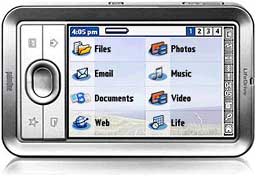
With 4 GB of storage capacity (3.85 GB user
available) provided by the Microdrive, LifeDrive users can store
the following:
- 1,200 office documents
- 6,000 emails
- 1,000 photos
- 300 songs
- 2.5 hours of video
- 10,000 appointments
- 10,000 contacts
- 50 voicemails
If the LifeDrive were dedicated to one type of media, it would
be able to hold 1,000 songs, 8 hours of video (or four movies) or
48,000 photos.
Windows Watch
Dell to Launch 19" Widescreen Notebook Next
Year
The Register's Tony
Smith reports:
"Dell is preparing a monster 19in widescreen notebook for
release next year, according to moles, cited by DigiTimes, claim
the beast will be produced by Compal, which is already producing a
range of widescreen notebooks for Dell....
"Digitimes' sources claim all the major notebook vendors,
including Apple, HP, Acer and Dell, are planning to increase the
number of widescreen notebooks they offer.... Apple is believed to
have signed a deal with Quanta to produce a widescreen iBook."
Bargain 'Books
Bargain 'Books are used unless otherwise indicated. New and
refurbished units have a one-year Apple warranty and are eligible
for AppleCare.
There are two different versions of WallStreet running at 233
MHz, the cacheless MainStreet
version and the later Series II
with a level 2 cache. It's not always possible to determine from
the vendor's listing which is being offered, so we've included
links within this paragraph to the two models. The same goes for
the PowerBook G4/667 (VGA) and
G4/667 (DVI), the titanium vs.
aluminum 15" PowerBook G4 at 1 GHz, and 1.25 GHz to 1.5 GHz
15" PowerBooks.

- PowerBook Pismo G3/400,
192/10 GB/DVD, $415
- PowerBook Pismo G3/500,
256/12 GB/DVD, $459
- new 12" iBook G4/1 GHz,
256/40/CD-ROM, AirPort, $849
- new 12" PowerBook G4/1.33
GHz, 256/60/SuperDrive, AirPort, Bluetooth, $1,399
- new 12" PowerBook G4/1.33
GHz, 256/60/SuperDrive, Bluetooth, AirPort Card, PC2700 SO DIMM
256 MB DDR 333, AirPort Express Base Station, Kensington
Pocketmouse Bluetooth, $1,599
Wegener
Media
- PowerBook 5300cs/100, 8/775
MB/floppy, no battery, no AC, $29.99
- PowerBook 5300cs/100, 8/775
MB/floppy, $49.99
- One year extended warranty, add $40
PowerBook
Guy
- 12" iBook G3/500,
192/10/CD-ROM, OS X, $399.95
- 12" iBook G3/500,
192/30/CD-ROM, OS X, $449.95
- 12" iBook G3/800,
256/30/Combo, $639.99
- 15" titanium PowerBook G4/1
GHz, 512/60/SuperDrive, $1,299
For more deals on current or recently discontinued models, see
our Best PowerBook G4 Deals,
Best iBook G4 Deals, Best PowerBook G3 Deals, and Best iBook G3 Deals.

Recent 'Book Reviews
- Mac Netbook Coming?, $179 64 GB SSD, Apple Owns 20% of US Notebook Market, and More, 10.03.
Also head of Norton AntiVirus team uses a Mac, Toshiba demos new battery technology, 1 TB notebook drives due in 2010, bargain 'Books from $150 to $2,699, and more.
- $200 64 GB SSD for Your 'Book, Apple Steering Customers Away from MacBook Pro, and More, 09.26.
Also how a $550 Windows notebook can cost over $1,200, netbooks may cut into MacBook sales, widescreens getting wider, bargain 'Books from $150 to $2,699, and more.
- Mac Notebook Share up 60% in US, Apple Refurbs a Great Deal, RIP PowerBook G4, and More, 09.19.
Also speculation on next generation MacBooks, refreshing a WallStreet, running a PowerBook 5300 from flash memory, 3G modem sale booming, bargain 'Books from $150 to $2,699, and more.
- BYO $550 Mac Netbook, New MacBooks Rumored for October, Notebook Battery Famine, and More, 09.12.
Also MacBook Air owners have mixed results with latest update, Intel's fast and costly solid state drives, laptop docking station, bargain 'Books from $150 to $2,699, and more.
- More in the .
Links for the Day
- Mac of the Day: Power Mac 8200, Apr. 1996 - The minitower version of 7200 was never sold in America.
- List of the Day: G4 List is for those using Power Mac G4s or G4 upgrades.
- October 6 in LEM history: 98: USB is a good thing - Can Apple save Emailer? - 99: Kihei iMacs - 00: Advice about PDS Power Macs - 03: A replacement PowerBook battery - 04: AirPort Express - 05: The Apple Lisa story - 06: Don't ignore battery recall - Use any networked computer as an additional Mac display
Recent Content on Low End Mac
- $19,800 Bentley Ego Laptop Remarkably Similar to 1999 Clamshell iBook, Charles W. Moore, Miscellaneous Ramblings, 10.06.
Granted, Apple's iBook didn't have white gold trim, a padded leather exterior, or come in colors to match your Bentley automobile.
- Use Your FileMaker Pro Databases on Your iPhone, Adam Rosen, Adam's Apple, 10.06.
Although there's no version of FileMaker Pro for the iPhone, FMTouch will let you use your data and layouts on it.
- The Cost of Moving to Small Business Server vs. Moving to Leopard Server., Andrew J Fishkin, Best Tools for the Job, 10.06.
Upgrading the existing SBS 2003 Server would cost less, the the server will run up against hardware limitations long before a Mac Pro does.
- Best eMac Deals, Low End Mac Deals, 10.06.
Used 700 MHz CD, $110; CD-RW, $130; Combo, $170; 800 CD, $170; 1 GHz Combo, $250; SuperDrive, $280; 1.25 Combo, $290; SD, $360; 1.42 Combo, $359.
- Best MacBook Air Deals, Low End Mac Deals, 10.06.
Used 1.6 HD, $1,299; refurb, $1,499; new, $1,669 after rebate; 1.8, $1,919 a/r; 1.6 SSD, $2,294 a/r; used 1.8 SSD, $1,997; refurb, $2,299; new, $2,349 a/r.
- Best iPod shuffle Deals, Low End Mac Deals, 10.06.
Refurb 3G/1 GB, $39; 2 GB, $59; new 1 GB (3G or 4G), $47; 2 GB (3G or 4G), $67. Prices include ground shipping.
- Getting the Most from Your G3 Mac, Simon Royal, Mac Spectrum, 10.03.
Most G3 Macs can be upgraded so they can run Mac OS X 10.4 'Tiger' quite nicely. Here's how.
- Apple Drops iPhone NDA, Defecting to Android, Auto Performance Apps for the iPhone, and More, iNews Review, 10.03.
Also more research needed on cellphone cancer link, file sharing app for the iPhone, three new power accessories from Macally, several new iPhone apps, and more.
- Best Power Mac G4 and AGP Video Card Deals, Low End Mac Deals, 10.03.
Used 450 MHz, $75; 500, $99; 733, $150; 800, $199; 1.25 GHz, C$349; 867 MHz dual, $225; 1 GHz, $349; 1.25, $499; 1.42, $600.
- OS X and Safari Shares Grow in September, Toxic Mac Pro?, Green Hard Drives, and More, Mac News Review, 10.03.
Also Vista terrible as Mac market grows, CrossOver Mac Pro reviewed, SimpleTech Pro Drives, and a new toolkit for working on computers.
- Best iBook G3 Deals, Low End Mac Deals, 10.03.
Used 300 MHz clamshell, $150; 366, $199; 500 CD, $149; 800, $190; 600 CD-RW, $240; 800 Combo, $300; 900, $399; 14" 600, $360; 900, $469.
- Best Mac OS X 10.0-10.3 Deals, Low End Mac Deals, 10.03.
Mac OS X 10.0.3, $30; 10.1, $20; 10.2, $60; 10.3 CD, DVD, $100; CD, $119; 10.1 Server, unlimited users, $65; 10.3 Server, unlimited, $150.
- Why I'm Switching from Windows Small Business Server to Leopard Server, Andrew J Fishkin, Best Tools for the Job, 10.02.
Windows SBS 2003 has served very well, but with SBS 2008 just around the corner, it's time to reconsider that choice. Leopard Server has a lot to offer.
- The Unwritten Rule Behind Apple's App Store Rejections, Tim Nash, Taking Back the Market, 10.02.
"If you want to work with someone, don't attack or try to take over part of what they think of as theirs."
- The Best Browsers for Older Macs Running Tiger, Charles W. Moore, Miscellaneous Ramblings, 10.02.
A dial-up user's overview of browsers for Mac OS X 10.4 puts the emphasis on reliability, downloads, and speed.
- Best MacBook Deals, Low End Mac Deals, 10.02.
Used 1.83 GHz, $649; 2.0 SD, $750; refurb 2.1 GHz, $899; 2.4, $1,099; black, $1,299; new 2.1, $1,019 after rebate; 2.4, $1,204 a/r; black, $1,394 a/r.
- CodeWeavers Brings Google's Chrome Browser to Intel Macs, Alan Zisman, Zis Mac, 10.02.
Google's new Chrome browser uses separate processes for each tab and brings other changes to Windows users. Now Mac fans can try it as well.
- Best iMac G5 Deals, Low End Mac Deals, 10.02.
Used 17" 1.6 GHz Combo, $450; 2.0 SuperDrive, $500; 1.9 iSight, $625; 20" 1.8 GHz, $550; 2.0, $600; 2.1 iSight, $650.
- Best iPod touch Deals, Low End Mac Deals, 10.02.
Used 1G/8 GB, $160; refurb, $179; new, $198; used 16, $200; refurb, $219; new, $265; refurb 32, $319; new, $345; 2G/8 GB, $229; 16, $280; 32, $380.
- More links in our archive.
Low End Mac Reader Specials
Memory To Go Special: New 2008 iMac 2GB $42 / iMac Intel Core2 DUO & MacBook Pro 2GB $36 - 1GB $20. MacPro 8 Core Memory 8GB kit $286 / 4GB kit $143 / 2GB kit $93 -- Free shipping available. LIfetime warranty.
Download Typestyler, still the Ultimate Styling Tool for Internet, Print and Video Graphics. Works great in Classic with a Native OS X Version on the way. Free Tryout: www.typestyler.com
LA Computer Company: Specials on AppleCare, iMac's, Apple Batteries and Apple A/C Adapters. Also Great prices on Used Apple Computers. Call 1-800-941-7654 Click Here.
OWC: Juice up your iPod w/NewerTech High Capacity Battery from $19.99 Free Installation Videos for most models. Pro Installation Service w/FedEx Shipping From $57.95 (Battery Included). - www.MacSales.com
Mac users can finally play Party Poker for Mac. Not only that, they can also learn how to play PokerStars for Mac.
Laptop Hardware Provided by TechRestore - Overnight Mac & iPod Repairs.
Compare products like desktop computers, laptops, and LCD TVs side by side! All the information and reviews to make the best purchasing decision for a new cell phone GPS products or MP3 players. The Ciao network makes searching products easy for you.
Charles Moore - 2005.05.20
Low End Mac Reader Specials
Memory To Go Special: New 2008 iMac 2GB $42 / iMac Intel Core2 DUO & MacBook Pro 2GB $36 - 1GB $20.
MacPro 8 Core Memory 8GB kit $286 / 4GB kit $143 / 2GB kit $93 -- Free shipping available. LIfetime warranty.
Download Typestyler, still the Ultimate Styling Tool for Internet, Print and Video
Graphics. Works great in Classic with a Native OS X Version on the way. Free
Tryout: www.typestyler.com
LA Computer Company: Specials on AppleCare, iMac's, Apple Batteries and Apple A/C Adapters. Also Great prices on Used Apple Computers. Call 1-800-941-7654 Click Here.
OWC: Burn DVDs, DVD-DL, CDs, DVD-Ram - FAST! Superdrive upgrades from OWC starting from $31.99 with options for nearly every Mac. Models with Lightscribe, Blu-Ray too!
Mac users can finally play Party Poker for Mac. Not only that, they can also learn how to play PokerStars for Mac.
Laptop Hardware Provided by TechRestore - Overnight Mac & iPod Repairs.
Compare products like desktop computers, laptops, and LCD TVs side by side! All the information and reviews to make the best purchasing decision for a new cell phone GPS products or MP3 players. The Ciao network makes searching products easy for you.
This Week's PowerBook, iBook, and Notebook News
Low End Mac Reader Specials
Memory To Go Special: New 2008 iMac 2GB $42 / iMac Intel Core2 DUO & MacBook Pro 2GB $36 - 1GB $20. MacPro 8 Core Memory 8GB kit $286 / 4GB kit $143 / 2GB kit $93 -- Free shipping available. LIfetime warranty.
Download Typestyler, still the Ultimate Styling Tool for Internet, Print and Video Graphics. Works great in Classic with a Native OS X Version on the way. Free Tryout: www.typestyler.com
LA Computer Company: Specials on AppleCare, iMac's, Apple Batteries and Apple A/C Adapters. Also Great prices on Used Apple Computers. Call 1-800-941-7654 Click Here.
OWC: Burn DVDs, DVD-DL, CDs, DVD-Ram - FAST! Superdrive upgrades from OWC starting from $31.99 with options for nearly every Mac. Models with Lightscribe, Blu-Ray too!
Mac users can finally play Party Poker for Mac. Not only that, they can also learn how to play PokerStars for Mac.
Laptop Hardware Provided by TechRestore - Overnight Mac & iPod Repairs.
Compare products like desktop computers, laptops, and LCD TVs side by side! All the information and reviews to make the best purchasing decision for a new cell phone GPS products or MP3 players. The Ciao network makes searching products easy for you.
General Apple and Mac desktops is covered in The Mac News Review. iPod news is covered in iPod News Review.
Tiger Talk
- Only Use Mac OS X 10.4-Compatible Disk Utilities with Mac OS X 10.4 Volumes
- DiskWarrior Updated for Tiger
News & Opinion
Products and Services
- Seagate Ships 120 GB Notebook Drive
- Hitachi Ships World's Fastest 100 GB Notebook Hard Drive
- ClickScroll 1.3 2D Scrolling Tool: No Scrollbars or Scroll Wheels
- MCE 8x Internal SuperDrive Upgrade for iBook G4
- LapWorks Laptop Desk: Protect Dad's Genes from Hot Laptops
- MacWireless Whip AirPort Antennas
- QuickerTek 1 Watt Transceiver for AirPort Installations
Tech Trends
Windows Watch
Bargain 'Books
Tiger Talk
Only Use Mac OS X 10.4-Compatible Disk Utilities with Mac OS X 10.4 Volumes
A new Apple Knowledge Base article says:
"To avoid issues with a Mac OS X 10.4 volume, do not use disk utility software that was released before Tiger (late April 2005) with it. If you do, the software might report false errors or attempt 'repairs' that could lead to data loss.
"Third-party disk utility software includes Alsoft DiskWarrior, Micromat Tech Tool, and Symantec Norton Disk Doctor. Consult third-party utility manufacturers to find out which software versions are compatible with Mac OS X 10.4.
"You can use Disk Utility in Mac OS X 10.3.9 and only version 10.3.9 to check or repair a Mac OS X 10.4 volume. Don't use an earlier version of Disk Utility, such as when started from a Mac OS X 10.3 disc.
"Of course, you can also use Disk Utility included with Mac OS X Tiger.
"Mac OS X 10.4 adds support for Extended Attributes. A disk repair application that's not Mac OS X 10.4-aware may incorrectly report Extended Attributes as directory damage. You may get an error message such as "Cannot be rebuilt. The original directory is too severely damaged" that is untrue.
"To prevent these issues, make sure that you only use Mac OS X 10.4 Tiger-compatible disk utilities to verify or repair a volume that has Tiger installed on it."
DiskWarrior Updated for Tiger
PR: DiskWarrior is the most highly decorated Mac disk repair utility ever. It repairs disks that no other program can repair. New hardware monitoring helps protect your data from drive malfunctions.
DiskWarrior is claimed
to be the safest, the most technologically advanced, and the most
powerful utility to eliminate directory damage available for any
computer. DiskWarrior uses a different approach to disk directory
repair than other programs. DiskWarrior is not a disk repair
program in the conventional sense. Instead of patching the original
directory, it uses a patent-pending technology to quickly build a
new replacement directory using data recovered from the original
directory, thereby recovering files and folders that you thought
were lost and that no other program could recover.
The first thing DiskWarrior does is it scavenges your original directory to find all the file data it can. It then uses this data to build an entirely new replacement directory. DiskWarrior is the only product that finds all of your data. Its patent pending method always results in a perfectly rebuilt directory without any errors and that contains all of your file and folder data.
Hardware failure presents a potential threat to your data. When a drive mechanism fails, the data on the drive can be lost, with an expensive data recovery service your only option to retrieve your data. DiskWarrior can be used to activate internal diagnostics that are built into disk devices to help determine if a drive is in danger of physical malfunction. If the potential for failure is indicated, DiskWarrior will notify you, giving you the opportunity to back up your data before the drive fails. These tests can be executed manually, or you can choose to have the tests run automatically every hour, day, or week. DiskWarrior also provides several notification options should the diagnostics report a problem.
With DiskWarrior there is never a risk of losing directory data and thus never a risk of losing access to your files.
Only DiskWarrior has all of these features:
- Uses directory data to quickly rebuild the directory structure
- Eliminates risk of losing access to files - other disk "repair" utilities attempt to fix the directory by patching the directory structure and risk deleting sections of the directory
- Scavenges directory to find all salvageable file and folder data, even data contained in damaged nodes
- Eliminates unseen directory errors, preventing minor directory errors from escalating into major problems
- Recovers lost files and folders
- Optimizes directory for maximum directory performance, speeding up overall disk performance
- Monitors drive hardware for potential drive failure
- Verification of replacement directory ensures data integrity
- Comparison of original directory with replacement directory tells you which files and folders may have been affected by directory damage
- Patented preview feature to view what the disk will look like after the directory is rebuilt, allowing you to view files and folders before any directory changes are written to disk
- Repairs damaged boot blocks and blesses the system folder to ensure that the computer will start from the repaired disk
- Checks custom icon files for corruption, eliminating a common cause of system crashes
- Repairs problems with wrapper volume System files caused when HFS Plus disks are initialized under Mac OS 9.0 - 9.0.4
- Safely permits interruptions of any kind, including power outages
- Advanced "Verify Reads and Writes" technology protects your data
- Supports bad block sparing software
- Supports file journaling (Mac OS X 10.2.2 or later)
DiskWarrior ships on a CD-ROM that will start up in Mac OS X on a Mac with a G3 or higher processor (including a G5) with built-in USB and 128 MB of RAM (256 MB recommended).
Once started from the DiskWarrior CD, DiskWarrior can be run from the CD to eliminate all damage to any HFS (Mac OS Standard) and HFS Plus (Mac OS Extended) disk directories, including your normal startup disk as well as journaled disks. Version 2.1 of DiskWarrior, also included, runs and installs on a 68020 Mac or better when started from Mac OS 7.1 to 9.x. Either version of DiskWarrior repairs any supported disk no matter which version of the Mac OS is installed on the disk being repaired.
To rebuild the directory on a Mac OS Standard (HFS) or Mac OS Extended (HFS Plus) disk, DiskWarrior requires a Mac OS computer with a G3 or better processor (such as a G4 or G5) with built-in USB and a minimum of 256 MB RAM (384 MB or more recommended) to start up and run from the DiskWarrior CD, regardless of what operating system is installed on the disk to be rebuilt. The computer must also have the latest firmware updates installed. The disk to be rebuilt must be locally connected, must not be write protected, and must have a valid partition map. If you plan to rebuild the directory on your startup disk, you need to start up from another disk capable of starting up in Mac OS X 10.2.1 through 10.4, such as the DiskWarrior CD. (DiskWarrior cannot be run while started up from the Apple Mac OS X install CD.)
Note: DiskWarrior CD revision 38 is now shipping with DiskWarrior 3.0.3. All Mac models introduced as of 05/03/2005 and meeting the above requirements for DiskWarrior are supported. The new Power Mac G5 models introduced on 04/27/2005 and the new iMac models introduced on 05/03/2005 are supported.
If you wish to enable DiskWarrior's automatic hardware monitoring, you will need to install the DiskWarrior application on your Mac OS computer. To install the DiskWarrior application, you must have a Mac OS computer running Mac OS X 10.2.1 through 10.4 with at least 256 MB RAM. Installing DiskWarrior is not required to run the application from the DiskWarrior CD to rebuild a disk directory.
New in this version: Uses your original 3.0, 3.0.1 or 3.0.2 CD to create a new startup CD containing DiskWarrior 3.0.3, which adds Tiger compatibility. The new CD will only start up the same Mac models as the original CD. The included Read Me lists details and requirements.
System requirements: Mac OS X 10.2.1 or higher
DiskWarrior sells for $79.95 ($39.95 upgrade)
News & Opinion
Which Laptop for Blogging?
problogger.net's Darren Rowse says:
"A regular reader of ProBlogger, Mark from The Rock and Roll Report, has asked the following question that I thought I'd open up to all readers for discussion....
"I personally have been a fan of Macs since I started blogging. I find them to be well worth the money, easy to use and a lot of fun. There are a few things that you need to consider though - the main one is that there are some products unavailable on Macs (there are others that you can't get on PC though) and that you'll probably have to buy the Mac version of some of the software that you already have.
"Having said this - Macs come with some amazing software built in (iTunes, iPhoto, iMovie, etc.) which are a big feature."
Ubuntu Linux, Yellow Dog Linux, and Mac OS X on One PowerBook
Intuitive System's Dave Taylor says:
"This article details the trials and tribulations of turning a perfectly good Apple PowerBook into a tri-boot system with Mac OS X, Yellow Dog Linux, and Ubuntu Linux.
"Mac OS X is built of two components, Darwin, the BSD-based Unix underpinnings, and Aqua, the beautiful graphical user interface we Mac heads have all grown to love. However, there are other operating systems and other work environments that can be installed on an Apple system, based on popular open source Linux applications. If you're looking for Intel-based versions of Linux, there are dozens and dozens, but the PowerPC chip cuts those options down quite a bit. I decided it'd be interesting to install the most popular Linux for PowerPC - Yellow Dog 4.0 - and an up and coming Debian-based Linux distro that's getting quite a bit of buzz in the community: Ubuntu Linux.
"Unlike Microsoft's VirtualPC application, these operating systems can't be installed within Mac OS X, but rather have to be installed adjacent to, or instead of Mac OS X. I decided to install all three on my new 1 GHz Aluminum PowerBook G4 system. With 1 GB of RAM and a 60 GB drive, I figure there was plenty of space to steal 8 GB for the two Linux installations and still have plenty to continue running Mac OS X with all my favorite applications."
Products and Services
Seagate Ships 120 GB Notebook Drive
Macworld UK's Paul Kallender reports:
"Seagate will ship 120 GB 2.5-inch notebook drives in June 2005.
"The Momentus-branded hard drive series includes a 120 GB drive that spins at 5,400 rpm and a 100 GB drive that spins at 7,200 rpm. This is the first time notebook drives with these combinations of rotational speeds and capacities have been announced by Seagate, according to Mark Walker manager of product marketing at the company."
Hitachi Ships World's Fastest 100 GB Notebook Hard Drive
The Register's Tony Smith reports:
"Hitachi yesterday claimed the notebook hard drive performance lead as it shipped what it reckons is the world's fastest 2.5in HDD for mobile applications.
"The 100 GB Travelstar 7K100 spins at a desktop-standard 7200 rpm. Hitachi says its own benchmarks show the drive operates seven per cent faster than 3.5in 7200 rpm, 2 MB cache desktop-specific drives."
ClickScroll 1.3 2D Scrolling Tool: No Scrollbars or Scroll Wheels
PR: ClickScroll gives your Mac a highly addictive feature: scrolling without scrollbars and scroll wheels.
No need to move your eyes anymore when you need to scroll a web page or a text document - simply call ClickScroll once and gently move your mouse around.
ClickScroll supports multi-button mice for fast access, as well as single-button ones. It is the perfect scrolling software for laptops users.
With ClickScroll, take advantage of the following features:
- Seamless integration: ClickScroll can be called in virtually every Mac OS X application (Finder, Mail, Safari, Internet Explorer, Word, Photoshop, etc.).
- Themes support: Do you want to create your own ClickScroll theme? Use the ClickScroll Interface Builder and let your creativity work for you !
- Visual feedback: ClickScroll lets you know what it is doing all the time with a Mac OS X-friendly interface.
- 2D scrolling: ClickScroll now supports both horizontal and vertical scrolling to provide a richer experience.
With ClickScroll, enjoy these unique features :
- Themes support
- 2D Scrolling
- User-defined themes support
New in this version:
- Mac OS X 10.4 "Tiger" support
- Added the ability to invert scrolling
- Now supports restricted accounts
System Requirements: Mac OS X 10.3 or better
ClickScroll is €6 shareware.
MCE 8x Internal SuperDrive Upgrade for iBook G4
PR: Tiger is a roaring success! And for a limited time get Apple's new Mac OS X 10.4 (Tiger) for only $79 ($50 off the regular price!) when you purchase this drive! The new MCE 8x DVD±R/RW "SuperDrive" upgrade with Double Layer (also called Dual-Layer) Support for the iBook G4 allows you to author professional-quality DVDs as well as create, store, and share their collections of videos, music and photography. Plus, the fast, highly reliable drives are compatible with most computer and set-top DVD video players and other DVD burners - so video and data DVDs created using these drives can be shared with business associates, friends, and family. Starting at just $199.
MCE Technologies was the first company in the world to engineer and offer a SuperDrive upgrade for the PowerBook G4. We continue this long heritage with the MCE 8x Internal SuperDrive Upgrade with Double Layer support for the iBook G4... hands down the most technically advanced optical drive ever created for the Apple PowerBook. Recording at 8x to both DVD-R and DVD+R media the MCE 8x Internal SuperDrive upgrade brings the PowerBook G4 on par with even the fastest drives Apple offers for their Power Mac G5 towers... even more amazing is that the MCE 8x SuperDrive upgrade has true Double Layer support which means you now have the ability to record up to 8.5 GB of data on a single side of a Double Layer DVD. With Tiger (Mac OS X 10.4), you can even record to 8.5 GB Double Layer discs with this drive natively... by dragging and dropping right in the Finder.
The additional storage capacity of the DVD+R Double Layer disc enables you to record up to 4 hours of DVD-quality video or 16 hours of VHS-quality video, without the need to turn over the disc. You can now archive up to 8.5 GB of computer files on a single disc, which almost doubles the storage capacity compared with the 4.7 GB for the single-layer DVD-recordable discs currently available.
The MCE 8x Internal SuperDrive Upgrade is a dual drive and records to both DVD-R/RW and DVD+R/RW media. It also reads and writes standard CD-R/RW media and is compatible with all of Apple's iApps including iTunes, iDVD, iPhoto, and Finder Burning.
You may install it yourself* or, if you prefer, you may have the MCE 8x SuperDrive upgrade professionally installed into your iBook G4 by MCE Technologies or one of Apple's worldwide Authorized Upgrade Centers.
Features
- 8x DVD-R and DVD+R recorder
- 4x DVD-RW and DVD+RW recorder
- 2.4x DVD+R Double Layer recorder
- 24x CD-R and 24x CD-RW recorder
- Convenient slot-loading mechanism
- 2 MB Cache Buffer
- Buffer underrun protection
- Bootable
- Compatible with iDVD, DVD Studio Pro, iTunes, Disc Burner and Apple DVD Player
The New MCE 8x Internal SuperDrive Upgrade is compatible with both the 12" and 14" iBook G4.
The Double Layer DVD+R system uses two thin embedded organic dye films for data storage separated by a spacer layer (see figure). Heating with a focused laser beam irreversibly modifies the physical and chemical structure of each layer such that the modified areas have different optical properties to those of their unmodified surroundings. This causes a variation in reflectivity as the disc rotates to provide a read-out signal as with commercially pressed read-only discs. Did you get all that?? It just means that there are two recording layers inside the DVD instead of just one... two layers means twice the recording capacity! Now wasn't that easier?
Onboard Liquid Crystal Tilt/Thickness Compensator
Not every disc is created equal. The MCE 8x SuperDrive Upgrade for iBook G4 implements an onboard liquid crystal tilt/thickness compensator... the first time ever in a portable form factor. This cutting edge technology provides accurate, reliable read and write performance with a variety of disc characteristics, even with irregularly curved or thick / thin media. This technology is also effective in recording DVD+R double layer media.
System Requirements: iBook G4 running Mac OS 10.2, Mac OS 10.3, Mac OS 10.4 (or later)
The MCE 8x Internal SuperDrive Upgrade with Double Layer support is compatible with all versions of Mac OS X, including Tiger, and is seamlessly compatible with Apple's iApps including iTunes, iDVD, and iPhoto. In addition, it is compatible with Finder Burning and DVD Studio Pro, Apple's professional DVD Authoring software.
Once installed, a quick check of Apple System Profiler indicates that your new MCE 8x Internal SuperDrive enjoys native Mac OS support... meaning it is Apple-certified. No third-party drivers to download and hassle with. This native Mac OS support is your guarantee that your MCE 8x drive will ALWAYS be compatible with all current and future Mac OS updates and versions, as well as iApp software. No other drive available for the iBook G4 can make this claim.
Now you can record up to 4 hours instead of 2 hours of the highest quality DVD video on a single disc. Or store 8.5 gigabytes, equaling about 12 fully recorded CD-Rs, instead of just 4.7 gigabytes, on a single-sided DVD. Double Layer recording technology built into the MCE 8x Internal SuperDrive upgrade makes it possible.
LapWorks Laptop Desk: Protect Dad's Genes from Hot Laptops
PR: Designed to take the hassles and hazards out of using laptops, the $29.95 Laptop Desk from LapWorks Inc. could help protect the little swimmers of want-to-be fathers when they're without a desk and must use their laptop on their lap.
The folding portable desk creates a 21" protective workspace across the lap and addresses both culprits cited in the study "Increase in Scrotal Temperature in Laptop Computer Users", published in the UK journal Human Reproduction in December 2004. Researchers said that the combination of 1) the heat generated by the laptop and 2) pressing the thighs together to balance one increases temperatures around men's privates and over time can result in decreased sperm production.
Dr. Yefim Sheynkin of the State University of New York at Stonybrook said, "The body needs to maintain a proper testicular temperature for normal sperm production and development. Portable computers in a laptop position produce scrotal hyperthermia by both the direct heating effect of the computer and the sitting position necessary to balance the computer."
The Laptop Desk cools laptops with heat-conducting polycarbonate plastic and recessed ventilation channels. A thermal study conducted by the California Polytechnic University at Pomona proved the Laptop Desk reduces the heat passed through to the lap by 8 - 10%.
Its 21" lap span also allows men to sit in a more natural posture with legs spread apart.
Sally Longyear, a Menlo Park, Calif.-based Certified Industrial Ergonomist and experienced leader in injury prevention, stresses correct laptop-using posture to avoid other computer-related injuries. "Users should choose a work platform that spans their entire lap so they can relax their knees instead of squeezing them together to balance a laptop. This minimizes strain on the shoulders, neck, back and arms." Ms. Longyear's website, http://www.working-well.org, answers ergonomic questions to help computer users live "pain-free."
"I designed the Laptop Desk to address the hazards of using a laptop - to the user and the computer itself," said Jose Calero, LapWorks' president. "Constant overheating is the laptop's worst enemy, shortening its life and causing sluggish performance. Users may experience hot leg plus neck, back and shoulder strain from the poor ergonomic typing angles."
On a desk, the Laptop Desk folds into a five-position wedge, inclining the keyboard for more ergonomic typing to save men's wrists as well as their little swimmers. LapWorks' thermal study concluded that inclining a laptop cools it by 15% - 20% because more hot air escapes.
LapWorks offers two models - the 22-ounce Version 2.0 and the 14.6-ounce UltraLite for notebooks of 5 pounds or less. Both fold in half for easy traveling in any computer bag.
"Depending on which analyst you talk to, there are about 100 million laptop users worldwide, with 60 million in the U.S. alone," continued Calero. "Presumably half of them are men. This isn't the first time laptops have been reported as hazardous to men. I donated Laptop Desks to the doctor who treated the Swedish patient who burned his privates on an overheated laptop in 2002. The doctor told me such a protective device would've helped."
MacWireless Whip AirPort Antennas
PR: MacWireless
whip AirPort antennas are designed to shape and extend
the signal from your Mac's wireless card. The adaptable design
allows it to work with almost any Macintosh computer that has an
AirPort or wireless card. With 4 dBi of gain this whip antenna
outshines the competition.
- Includes clips for permanent or removable mounting to laptop displays, desktop displays, and more.
- Cable Length: 14" - 30".
- Dimensions: 6" x .75".
- Weight: 1 oz.
- Connector: RP-SMA plus adapter for selected use.
- 802.11a/b/g Compatible.
Requires an AirPort card, AirPort Extreme card, or other wireless card with an antenna port.
The whip antenna will work with the following Macs:
PowerBooks
- All G3s
- All G4s (G4 12" may require modification)
PowerMacs
- All G3s
- All G4s (G4 Cube may require modification)
- All G5s
Factors Affecting Range and Performance of All Wireless Networks
Range estimates are typical and require line of sight. Basically that means you will need a clear unobstructed view of the antenna from the remote point in the link.
Keep in mind that walls and obstacles will limit your operating range and could even prevent you from establishing a link. Signals generally will not penetrate metal or concrete walls. Trees and leaves are obstructions to 802.11 frequencies so they will partially or entirely block the signal. Other factors that will reduce range and affect coverage area include metal studs in walls, concrete fiberboard walls, aluminum siding, foil-backed insulation in the walls or under the siding, pipes and electrical wiring, furniture and sources of interference. The primary source of interference in the home will be the microwave oven. Other sources include other wireless equipment, cordless phones, radio transmitters and other electrical equipment. Due to the increased gain, installing range extender antennas in the presence of interference could actually yield equal or worse range.
These solutions work for the vast majority of our customers. However, due to the numerous factors affecting range and performance we do not guarantee that you will achieve any specific improvement in range for your specific application.
4 dBi Whip Antenna, $49.98
QuickerTek 1 Watt Transceiver for AirPort Installations
PR: QuickerTek has announced the 1 Watt Transceiver for Apple AirPort users in Point to Point and MultiPoint wireless systems. This product extends wireless systems with outdoor mounted antennas, allowing wireless connections from building to building, when used with directional antennas. This Transceiver product is at the core of many Point-to-Point wireless systems. The 1 Watt Transceiver is available from stock for $400.
This high powered Transceiver maximizes the wireless power available to Apple AirPort users under Mac OS 9 and Mac OS X as well as the latest 10.4.x "Tiger". It operates on all 2.4 GHz, WiFi systems and supports both 802.11g and 802.11b wireless networks. This Transceiver is designed especially for Apple users and works on all the AirPort enabled Mac desktops including G5 and Mac Mini - like our 500 mW Transceivers. Apple wireless products have RF output of only 30 mW limiting range to well under 100 feet, while this new Transceiver outputs 1 Watt (1000 mW) and easily overcomes coax cable and remote antenna signal transmission losses across far greater distances.
"Since the introduction of our 27 dBm Transceivers, customers have asked about extending wireless range from feet out past a mile," said Rick Estes, president, QuickerTek. "This 1 Watt Transceiver puts the stationary wireless installation within reach of those customers that really need this extended range technology," Estes continued. "If you need more power, distance across outdoor areas, Extreme and Snow Base Station compatibility connecting G5, G5 and Mac Minis, then the 1 Watt Transceiver is your best option," Estes said.
The kit comes with mounting brackets, adapter cable, low loss coax, wall mounted power supply and utility software CD. The Transceiver does not require any installation software.
QuickerTek is a recognized leading innovator of antennas and RF products for Apple desktop and portable computers. QuickerTek products can be purchased at Mac dealers such as Small Dog Electronics, TechnoWarehouse, PowerBook Medic, Mac-Pro, Di-No Computers, LA Computers and many others.
Tech Trends
Hitachi 4 GB Microdrive Helps palmOne ''Drive Your Life''
palmOne, Inc. has chosen the industry's most popular one-inch hard drive from Hitachi Global Storage Technologies as the trusted data repository for its new LifeDrive mobile manager product.
The Hitachi 4 GB Microdrive digital media is at the heart of palmOne's new LifeDrive mobile manager, a business productivity, mobile computing and entertainment device that's designed to propel the mobile digital lifestyle.
When developing its newest product, palmOne posed the question, "What drives your life?" to its customers. And what drives them is the ability to be connected wirelessly; to work remotely; to carry large amounts of digital pictures, music and video/audio files; and to be entertained anywhere. The key to making all this happen is intelligent, usable software in a compelling package, with high-capacity, local storage that's - above all - reliable.
"Hitachi's Microdrive meets our criteria better than any other storage technology we evaluated," said Page Murray, palmOne vice president of marketing. "In creating a product that centralizes so much of consumers' digital information, the Microdrive's reliability over four product generations was the assurance we were looking for in choosing what's essentially a mobile data bank for the LifeDrive."
With high storage capacity in a small, affordable form factor, the Hitachi Microdrive led the penetration of one-inch hard drives in consumer electronic products, first in digital still and video cameras, MP3 players, personal media players and, now, mobile computing devices. Invented nearly six years ago and field tested in millions of devices, the Microdrive has paved the way for new innovations on miniature devices, which are now being integrated into a single intelligent device from palmOne.
"As the market-leading one-inch hard drive, Hitachi's Microdrive has enabled palmOne to bring inventive thinking to a life-changing product," said Bill Healy, senior vice president, product marketing and strategy, Hitachi Global Storage Technologies. "Like our relationship with palmOne, Hitachi has worked closely with leading consumer electronic manufacturers over the past several years to integrate the Microdrive into devices that have achieved iconic-level status, and this is largely due to the availability of high capacity, miniature storage."
"Miniature hard drives have enabled the fast-growing MP3 market, by providing small, robust, high-capacity storage at a reasonable price," said John Buttress, IDC research manager for hard drives. "These miniature hard drives also can meet storage requirements that will enable small handheld devices to converge into multifunction devices, such as the LifeDrive. IDC believes these converged devices, especially multifunction cell phones will be the next significant market opportunity for the hard drive industry."
Consumers have long trusted their digital data to the Hitachi Microdrive. Over the past six years, many end users and CE device manufacturers have banked on the Microdrive to record and store their data - both business and personal.
In its fourth product generation, the Hitachi Microdrive is available in 4 and 6-GB capacities. The latest Microdrive offers a data transfer rate that's 30 percent faster than its predecessor, so users can get to their music, pictures, data more quickly. The one-inch hard drive weighs less than a double A battery and is smaller than a match book.
The LifeDrive Mobile Manager
Announced separately, palmOne unveiled the worldwide availability of LifeDrive mobile manager, retailing at USD $499 (estimated US street price).
With 4 GB of storage capacity (3.85 GB user
available) provided by the Microdrive, LifeDrive users can store
the following:
- 1,200 office documents
- 6,000 emails
- 1,000 photos
- 300 songs
- 2.5 hours of video
- 10,000 appointments
- 10,000 contacts
- 50 voicemails
If the LifeDrive were dedicated to one type of media, it would be able to hold 1,000 songs, 8 hours of video (or four movies) or 48,000 photos.
Windows Watch
Dell to Launch 19" Widescreen Notebook Next Year
The Register's Tony Smith reports:
"Dell is preparing a monster 19in widescreen notebook for release next year, according to moles, cited by DigiTimes, claim the beast will be produced by Compal, which is already producing a range of widescreen notebooks for Dell....
"Digitimes' sources claim all the major notebook vendors, including Apple, HP, Acer and Dell, are planning to increase the number of widescreen notebooks they offer.... Apple is believed to have signed a deal with Quanta to produce a widescreen iBook."
Bargain 'Books
Bargain 'Books are used unless otherwise indicated. New and refurbished units have a one-year Apple warranty and are eligible for AppleCare.
There are two different versions of WallStreet running at 233 MHz, the cacheless MainStreet version and the later Series II with a level 2 cache. It's not always possible to determine from the vendor's listing which is being offered, so we've included links within this paragraph to the two models. The same goes for the PowerBook G4/667 (VGA) and G4/667 (DVI), the titanium vs. aluminum 15" PowerBook G4 at 1 GHz, and 1.25 GHz to 1.5 GHz 15" PowerBooks.
- PowerBook Pismo G3/400, 192/10 GB/DVD, $415
- PowerBook Pismo G3/500, 256/12 GB/DVD, $459
- new 12" iBook G4/1 GHz, 256/40/CD-ROM, AirPort, $849
- new 12" PowerBook G4/1.33 GHz, 256/60/SuperDrive, AirPort, Bluetooth, $1,399
- new 12" PowerBook G4/1.33 GHz, 256/60/SuperDrive, Bluetooth, AirPort Card, PC2700 SO DIMM 256 MB DDR 333, AirPort Express Base Station, Kensington Pocketmouse Bluetooth, $1,599
Wegener Media
- PowerBook 5300cs/100, 8/775 MB/floppy, no battery, no AC, $29.99
- PowerBook 5300cs/100, 8/775 MB/floppy, $49.99
- One year extended warranty, add $40
PowerBook Guy
- 12" iBook G3/500, 192/10/CD-ROM, OS X, $399.95
- 12" iBook G3/500, 192/30/CD-ROM, OS X, $449.95
- 12" iBook G3/800, 256/30/Combo, $639.99
- 15" titanium PowerBook G4/1 GHz, 512/60/SuperDrive, $1,299
For more deals on current or recently discontinued models, see
our Best PowerBook G4 Deals,
Best iBook G4 Deals, Best PowerBook G3 Deals, and Best iBook G3 Deals.

About LEM | Support | Usage | Privacy | Contacts

