All prices are in US dollars unless otherwise noted.
General Apple and Mac desktops is covered in The Mac News Review. iPod, iPhone, and Apple
TV news is covered in The iNews
Review.
News & Opinion
Apple Updates
Products
News & Opinion
Apple Posts 2008 Environmental Update
A 2008 Environmental Update
signed by Steve Jobs says:
"For the past several years, Apple has made a concerted effort to be
more transparent about the steps we are taking to protect the
environment and make our business more sustainable. In this
environmental update, I'd like to inform you of our recent progress and
introduce you to a groundbreaking system of reporting that we believe
is unmatched in our industry."
Link: Apple 2008 Environmental
Update
Greenpeace Says Apple Is Greener, Has More To
Do
Sci-Tech
Today's Frederick Lane reports:
"At last Tuesday's laptop event on the Apple campus in Cupertino,
Calif., the environment got a lot of attention. CEO Steve Jobs, who has
been pushing for a 'greener Apple' for months, flatly declared that the
new Mac laptops, with their unibody aluminum construction and less
toxic parts, 'are the industry's greenest notebooks.'
"The verdict from the planet's leading environmental group,
Greenpeace, is a qualified yes. 'Compared to where Apple was before
Tuesday,' said Casey Harrell, Greenpeace International's toxics
campaigner, 'its laptops are definitely better. That in and of itself
is a good thing. But not all toxic pieces have been eliminated
yet.'"
Link:
Apple Is Greener, Greenpeace Says, But Has More To Do
10 Things You May Not Know About the Aluminum
MacBook
APC Magazine's Dan Warne
reports:
"We've had one of the new MacBooks for 24 hours and
have discovered some interesting secrets hiding within...
- Yeah, target disk mode . . . about that...
- The system migration tool has been updated
- The system chipset has changed, not just the GPU
- Break the glass screen fascia; replace the whole screen
- The MacBooks run a special build of OS X, not yet released to other
Macs
- The battery indicator is now on the left side of the notebook
- The chiclet keyboard on the MacBook is very firmly supported
- The speakers are surprisingly good
- The viewing angle on the LCD is still lacking
- Installing a hard drive is now even more superbly easy
- How about a full set of system profiler specs?"
Link:
Top 10 Things You Didn't Know About the New MacBook
FireWire's Absence from Aluminum MacBook:
Inconvenience or Fatal Flaw?
Macworld's
Peter Cohen says:
"As our first look at Apple's new laptops suggests, there's plenty
to talk about with the new laptops introduced this week. But it's
what's not there in the revamped MacBook product line that has people
talking - yelling in some cases. And that's Apple's as-of-yet
unexplained decision to drop FireWire connectivity from its
consumer-focused laptops. Some users are saying point-blank that
they're not going to order the new hardware without FireWire.
"The absence of FireWire ports is certainly an inconvenience for
some users. But it shouldn't be considered a deal-breaker for most of
us, anyway...."
Link: FireWire's
MacBook Absence - Inconvenience or Fatal Flaw?
The FireWire Controversy
SchwarzTech's Eric Schwarz says:
"I decided I'd wait the weekend before writing this article to
collect some outside opinions and gather my own thoughts. Last Tuesday,
Apple's new MacBook marked what many are considering the next step in
the slow death of FireWire. First, it was the iPods, followed a few
years later with the MacBook
Air. Is this port really necessary?....
"Most of the people I know who have MacBooks have not used the
FireWire port. Some have had their MacBooks for over 2 years and have
never connected anything there. Some have external USB drives for
backup (because that's mostly what Best Buy/Wal-Mart/Circuit City
sell). None knew about Target Disk Mode. My point is, FireWire is not
something that people even think about nowadays unless they need it.
It's not a consumer-grade connection."
Link: The FireWire
Controversy
FireWire, USB, and Nvidia Controller Inside
Aluminum MacBooks
AppleInsider's
Prince McLean reports:
"Apple's new MacBook and MacBook Pro models contain more innovation
than just their case design, graphics, and the improved accessibility
of their internals. Here's a look at other details related to FireWire,
USB, and the new Nvidia-based controller that replaces Intel's
chipset."
Link:
Inside the New MacBooks: FireWire, USB, and the Nvidia
Controller
FireWire Omission on Aluminum MacBooks a
Troubleshooting Nightmare
MacFixIt
reports:
"Apple's omission of a FireWire port on the new Aluminum (Late 2008)
MacBooks is stirring discontent among MacFixIt readers and on Apple's
discussion boards....
"Indeed, the elimination of FireWire target disk mode leaves a huge
troubleshooting gap. Many users utilize FireWire target disk mode to
diagnose issues, retrieve files from otherwise defunct computers, run
disk repairs while booted from another drive in lieu of a Mac OS X
startup disc and perform other procedures....
"There are limited USB-to-FireWire converters, but most don't
provide power or 6-pin connectivity...."
Link: FireWire
Omission on New MacBooks a Troubleshooting, iMove Nightmare (only
available to paid subscribers)
Petition Asks for FireWire Ports in Aluminum
MacBooks
Thorsten Raasch has created and posted an online FireWire ports in
Apple consumer notebooks Petition to Apple Inc. The petition reads:
"To: Apple Inc.
"We all love your products, Apple Inc.! But your recently refreshed
line of consumer notebooks lacks the possibility to plug in digital
audio and video equipment as well as fast mass storage devices.
Therefore, we pledge to purchase a new MacBook or MacBook Air if you,
the inventor of FireWire technology, would be so kind to bring back
FireWire ports to those products.
"Sincerely,
The Undersigned"
Link: FireWire Ports in
Apple Consumer Notebooks Petition
FireWire and Matte Screens on the Way Out?
TidBITS' Adam
C. Engst says:
"Last week's introduction of the redesigned MacBook and MacBook Pro brought a
number of welcome (or at least interesting) changes - the buttonless
glass trackpad, a magnetic latch for the MacBook Pro, the capability to
drive a 30-inch external display, and more.
"But two seemingly small details have generated a firestorm of
complaints from Mac users: the elimination of FireWire from the
MacBook, and the dropping of a matte screen option from the MacBook and
15-inch MacBook Pro (the 17-inch MacBook Pro retains the matte option
for now). Has Apple gone too far in the quest to simplify, or are users
just whining? And with the removal of FireWire - first from the MacBook
Air and now with the MacBook - are we seeing the beginning of the end
of the technology for Mac users?"
Link: On
the Way Out: FireWire and Matte Screens?
Why Glossy Screens Don't Work in Notebooks
The Apple Core's Jason D.
O'Grady says:
"I've been complaining about Apple's switch to glossy screens for a
while now. As I've said in the past, glossy screens simply don't work
on portables as the glare makes the screen practically unreadable.
"What started as an option on the MacBook Pro, became the only
choice on the MacBook. Then the iMac. The MacBook Air. Now Apple's gone
100 percent glossy across their entire line. Bummer...."
Jason has also posted a note and a photo from a reader that
graphically underscores his aversion to glossy screens.
Link: Why Glossy Screens Don't Work in
Notebooks
Display a Strength of New MacBook Pro
The Houston Chronicle's Bob Levitus says:
"...new MacBook Pros, along with all other Apple notebooks, now have
ultrathin glossy LED-backlit displays. The new screen is thinner and
brighter, and with its gorgeous, richly saturated colors and deep dark
blacks, it may be the best-looking notebook display I've ever
seen...."
Link: Display
Is a Strength of New MacBook Pro
Audio and Video in the New MacBooks
AppleInsider's
Prince McLean reports:
"Apple's new MacBook and MacBook Pro models present a variety of
changes in the way audio and video are handled, including support for
iPhone-style integrated mic headphones and the new DisplayPort
standard. Here's what's new in audio and video...."
Link:
Inside the New MacBooks: Audio and Video
MacBook Pro Does Not Support Both GPUs
Simultaneously
MacRumors'
Arnold Kim reports:
"When Apple introduced new MacBook Pro notebooks with two types of
Graphics Processing Units (GPUs) from Nvidia, many wondered if both
GPUs could be used simultaneously. Nvidia's Hybrid SLI/GeForce Boost
technology allows some notebook configurations to use one or both of a
notebook's GPUs. When both GPUs are utilized simultaneously, the user
can see dramatic performance boosts.
"Nvidia has since clarified that the new MacBook Pro only supports
the ability to switch between the integrated and discrete GPUs for
power conservation ('HybridPower'), but does not allow the use of both
at the same time ('GeForce Boost')...."
Link:
MacBook Pro Does Not Support Both GPUs Simultaneously
MacBook and MacBook Pro Benchmarked
Primate Labs says:
"Earlier this week Apple released new MacBooks and MacBook Pros.
While the biggest changes are the new enclosures and the new graphics
cards, the new laptops also have a new chipset (an Nvidia chipset
instead of an Intel chipset) and faster DDR3 memory. These last two
features might improve processor performance even though the new
MacBooks and MacBook Pros don't really have upgraded processors.
"So, do the new MacBooks and MacBook Pros have better processor
performance than the old MacBooks and MacBook Pros? Does the new memory
and chipset make a difference? Let's find out!...
"I used Geekbench 2, our cross-platform benchmark, to measure the
processor and memory performance of the new MacBooks and MacBook
Pros...."
Link:
Primate Labs Blog Posts MacBook and MacBook Pro Performance (October
2008)
Performance Analysis: 'Late 2008' MacBook and
MacBook Pro
Bare Feats' rob-ART Morgan reports:
"The 'late 2008' MacBook and MacBook Pro have significant
performance improvements that we are anxious to benchmark. We plan to
test both as soon as we get our hands on them. Meanwhile, we want to
give them both our preliminary assessment from a performance
standpoint...."
Link: Performance Analysis: 'Late
2008' MacBook and MacBook Pro
Next-gen 17" MacBook Pro Due 'in a Few
Months'
AppleInsider
reports:
"Apple on Tuesday introduced its next-generation 13-inch MacBooks
and 15-inch MacBook Pros but was unable to ramp production of its new
17-inch model, which is now expected to make an appearance by early
next year.
"...a report published by MacNN earlier this week noted two problems
that appear to have plagued the new notebook. Specifically, the site
reported that the 'initial run of 17-inch models have both optical
drive and display issues, which will delay shipments.'"
Link:
Apple's Next-gen 17-Inch MacBook Pro Due in a Few Months
I Chose a New MacBook
The
Apple Blog's Tom Reestman says:
"Fellow TAB writer, Charles Moore, wrote a great article about why
it's a good idea to seriously consider the 'mature technology' of a
refurbished Mac as soon as a new generation is announced. I won't
recount the details in that article, but his reasoning is very sound,
and it's solid advice.
"So solid, in fact, you might almost wonder why it makes sense not
to take advantage of the especially good deals that can be had as soon
as a new model comes out. Well, I thought I'd look at it from the other
side - or, at least my side - and describe why I took a different path
and ordered a brand new MacBook...."
Link:
I Chose a New MacBook
New MacBook Pro Battery Has Less Power than Old
One
Gizmodo
reports:
"This confirms what I suspected - the new MacBook Pro battery has a
lower capacity than the old one. About 16 percent less to be specific.
The old battery was rated at 5600mAh/60Wh, but the new ones are rated
at 4700mAh/50Wh. This perfectly explains why you now need to use the
integrated Nvidia GeForce 9400M on the new Pro to get the same
five-hour (rated, not real world) battery life as you did with the
discrete 8600M GT on the previous-gen Pro...."
Link:
New MacBook Pro Battery Has Less Battery Power than Old One
Apple Updates
Apple Service Program Addresses Distorted Video/No
Video Issues in MacBook Pro
Apple has announced a service
program for MacBook Pro users whose machines have certain Nvidia
graphics processor units and are experiencing video anomalies such as
distorted or scrambled video - a fault that has been acknowledged by
Nvidia.
"In July 2008, Nvidia publicly acknowledged a higher than normal
failure rate for some of their graphics processors due to a packaging
defect. At that same time, Nvidia assured Apple that Mac computers with
these graphics processors were not affected. However, after an
Apple-led investigation, Apple has determined that some MacBook Pro
computers with the Nvidia GeForce 8600M GT graphics processor may be
affected. If the Nvidia graphics processor in your MacBook Pro has
failed, or fails within two years of the original date of purchase, a
repair will be done free of charge, even if your MacBook Pro is out of
warranty.
"What to look for:
- Distorted or scrambled video on the computer screen
- No video on the computer screen (or external display) even though
the computer is on
"Specific products affected:
- MacBook Pro 15-inch and 17-inch models with Nvidia GeForce 8600M GT
graphics processors
- MacBook Pro (17-Inch, 2.4 GHz)
- MacBook Pro (15-Inch, 2.4/2.2 GHz)
- MacBook Pro (Early 2008)
"These computers were manufactured between approximately May 2007
and September 2008
"Products Affected
MacBook Pro, models with Nvidia GeForce 8600M GT graphics
processors
"Resolution
"If your MacBook Pro is exhibiting any of the symptoms listed above,
please take it to an Apple Retail Store or an Apple Authorized Service
Provider (AASP) for evaluation, or call your local Apple Contact
Center. Before visiting the Genius Bar at the Apple Retail Store,
please make a reservation.
"Apple is issuing refunds to customers who may have paid for repairs
related to this issue. Contact Apple for details on the refund
process.
"If your MacBook Pro is not experiencing any of these symptoms, you
do not need to contact Apple."
Link: MacBook Pro: Distorted Video or No
Video Issues
Products
QuickerTek External Battery/Charger for MacBook
Pro
PR: QuickerTek has announced the Apple Juicz External
Battery/Charger for the 15" and 17" MacBook Pro. This new product gives
users up to 10 additional hours of computing power, and gives users far
more flexibility in how and when they choose to use their computers.
Styled to blend with your Apple equipment, the MacBook Pro External
Battery/Charger is both lightweight and good looking. The Apple Juicz
External Battery/Charger will be available in three weeks. Pre-orders
are being taken online.
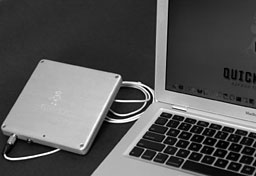 QuickerTek announces the Apple Juicz External
Battery/Charger for the 15" and 17" MacBook Pro. This new product gives
users up to 10 additional hours of computing power.
QuickerTek announces the Apple Juicz External
Battery/Charger for the 15" and 17" MacBook Pro. This new product gives
users up to 10 additional hours of computing power.
This product is an logical extension of our first MacBook Air
External Battery/Charger, gives MacBook Pro users far more flexibility
in how and when they choose to use their computers. A total of 8 to 10
additional hours of battery power and uses the MagSafe adapter which is
included in the kit.
The Apple Juicz External Battery/Charger recharges in only three
hours, while the stock MacBook Pro battery recharges in five hours.
Styled to blend with your Apple equipment, the MacBook Pro External
Battery/Charger is both lightweight and good looking.
Specifications:
- Physical: 9 x 6 x 1 inches
- Weight: 5 pounds
- Battery: Li-Ion Polymer
The Apple Juicz External Battery/Charger will be available in three
weeks. Pre-orders are being taken through the webstore. Like most
QuickerTek products, the Apple Juicz External Battery/Charger for the
15" and 17" MacBook Pro is backed with a one-year warranty on parts and
labor.
Link: Apple
Juicz External Battery/Charger
New Axiotron Service Converts MacBook to
Modbook
PR: Axiotron announced Axiotron Modservice, a groundbreaking
new service that will for the first time enable customers to transform
their existing Apple MacBook computer into an Axiotron Modbook, the one and only
Mac-based tablet computer. Customers will be able to send their Apple
MacBook to an Axiotron authorized and trained service provider for
conversion into a full-featured Axiotron Modbook.
Axiotron Modservice will be available for pre-ordering in the US
beginning October 28, 2008, starting at just $1,299.
Our Axiotron Modservice is a customer-driven initiative, plain and
simple.
The Axiotron Modbook is the world's only tablet Mac solution - an
award-winning tablet computer that seamlessly integrates an Apple
MacBook, a state-of-the-art Penabled digitizer from Wacom and
Axiotron's own hardware and software technology. The result: a
revolutionary slate tablet that lets users draw and write directly on
the screen.
Until now, all Axiotron Modbooks have incorporated only brand new
Apple MacBook base systems. With Axiotron Modservice, virtually any
Intel Core 2 Duo-based Apple MacBook can become an Axiotron Modbook.
This new service also enables enterprises and educational institutions
to take advantage of their existing supply agreements for Apple
hardware when purchasing Axiotron Modbooks.
"Our Axiotron Modservice is a customer-driven initiative, plain and
simple," said Axiotron CEO Andreas Haas. "We have had intense demand
for a service that would give customers a way to turn their computer
into a Modbook, and we are excited to offer them this new option."
When Axiotron launches Modservice on October 28, 2008, customers can
place a pre-order for the service. Customers who pre-order early secure
a place in line when Modbook conversions begin in November.
Axiotron will soon announce an expansion of its US network of
service providers to perform Axiotron Modservice, as well as a new line
of warranty options for the service.
Link: Axiotron Modservice
InvisibleShield Brings Military-Grade Protection
to New MacBook Models
PR: Zagg Inc., provider of protective film coverings for
personal electronics, introduces the InvisibleShield for the new
MacBook 13" and MacBook Pro 15" models. With a sleek aluminum casing
and ultra-thin LCD display, these stylish laptops require a unique,
low-profile brand of protection.
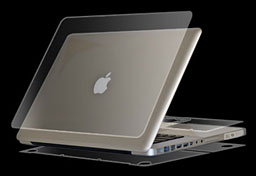 Zagg's InvisibleShield is a thin
polyurethane film originally created for the military to protect the
leading edge of helicopter blades. What's unique about this
military-grade, patented film is how tough it is - it doesn't scratch.
What makes Zagg's exclusive InvisibleShield so strong, flexible and
scratchproof? Its Nano-Memory technology. With this technology, it also
allows it to curve and contour around an entire device (not just the
screen) and adhere to the device unless you want to remove it (without
leaving adhesive).
Zagg's InvisibleShield is a thin
polyurethane film originally created for the military to protect the
leading edge of helicopter blades. What's unique about this
military-grade, patented film is how tough it is - it doesn't scratch.
What makes Zagg's exclusive InvisibleShield so strong, flexible and
scratchproof? Its Nano-Memory technology. With this technology, it also
allows it to curve and contour around an entire device (not just the
screen) and adhere to the device unless you want to remove it (without
leaving adhesive).
Introduced to the world in early 2005, the InvisibleShield is the
first product of its kind. Its patent-pending solution of wrapping
handheld devices with a clear protective film, has revolutionized the
industry and has changed the way people think of protecting their
beloved gadgets. Others have tried to imitate the InvisibleShield so
don't be fooled by cheap copycats.
Apart from keeping your devices scratch-free, the InvisibleShield
provides some unexpected benefits. Unlike cases, its uncompromising
design doesn't take away from the look and feel of your device. It adds
no bulk, allowing you to freely hold, carry, and dock your device
without interruption. Also, its "grippy" feel gives your device an
improved grip making it less likely that you will drop your
once-slippery device.
The InvisibleShield is made from a patented adhesive film exclusive
to Zagg for the purpose of protecting high-performance mobile
electronics such as laptops, mobile phones, PDAs and gaming devices.
Zagg's InvisibleShield, the thinnest protective skin of its kind,
protects the new MacBook and MacBook Pro from wear and tear without
altering the innovative design.
"Apple's new MacBook models incorporate some of the most impressive,
forward-thinking aesthetics in the industry," said Robert G. Pedersen
II, President and CEO of Zagg. "As the toughest transparent skin on the
market, the InvisibleShield keeps them looking new for life without
covering up the attractive aluminum casing."
Combining this military-grade strength with precision-cut designs
for over 2,500 different devices, the InvisibleShield, backed by a
lifetime guarantee, allows customers to use their electronics without
the fear of scratches or nicks.
Link: InvisibleShield
RAMJET Releases Memory Upgrades for New MacBook
and MacBook Pro
PR: These kits contain two (2) 2 Gig module and are
specifically designed and SPD configured for the MacBook Pro and
MacBook
4 Gig DDR3-1066 Kit for MacBook Pro
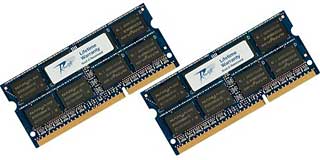 Specifications: DDR3-1066,
1066 MHz, PC3-8500, CAS Latency 7, Non-ECC, Unbuffered, 1.5V, 204-pin
SO-DIMMs
Specifications: DDR3-1066,
1066 MHz, PC3-8500, CAS Latency 7, Non-ECC, Unbuffered, 1.5V, 204-pin
SO-DIMMs
This kit contains two (2) 2 Gig module and is specifically designed
and SPD configured for the MacBook Pro.
This module is compatible with the latest Apple Firmware.
Price: $139
Link: 4 Gig DDR3-1066
Kit for MacBook Pro
4 Gig DDR3-1066 Kit for MacBook (2x 2 Gig)
Specifications: DDR3-1066, 1066 MHz, PC3-8500, CAS Latency 7,
Non-ECC, Unbuffered, 1.5V, 204-pin SO-DIMMs
This kit contains two (2) 2 Gig module and is specifically designed
and SPD configured for the MacBook Aluminum.
This module is compatible with the latest Apple Firmware.
Link: 4 Gig DDR3-1066
Kit for MacBook
OWC High Performance Hard Drives for MacBooks
& MacBook Pros
PR: Other World Computing (OWC) has announced a full
selection of new 7200 RPM and 5400 RPM 2.5" SATA internal hard drives
in capacities up to 500 GB for Apple's MacBook, MacBook Pro 15", and
MacBook Pro 17" models. The OWC hard drive lineup offers higher
capacity and performance compared to standard factory drive options.
OWC also provides greater performance for Apple's MacBook models with
4 GB OWC Memory Upgrades from as low as $69.99.
OWC 2.5" SATA internal hard drive upgrades are available
immediately, with the most popular options including:
- Hitachi Travelstar 5K320 - 320 GB 2.5" 5400 RPM with 8 MB
cache, 3 year warranty $74.99*
- Hitachi Travelstar 7K320 - 320 GB 2.5" 7200 RPM with 16 MB cache, 3
year warranty $109.99*
- Seagate Momentus 7200.3 - 320 GB 2.5" 7200 RPM with 16 MB cache, 5
year warranty $119.99
- Samsung Spinpoint M6 - 500 GB 2.5" 5400 RPM with 8 MB cache, 3
year warranty $179.99
*Price after $20 Hitachi Sponsored rebate
OWC Drive Upgrades Offer Bigger Capacities, Higher Performance, and
Longer Warranties
Apple's MacBook and MacBook Pro models have shipped standard with
drive capacities as low as 60 GB, with the recently announced new
models offering as little as 160 GB drive capacity. The wider selection
of drives available from OWC enables MacBook and MacBook Pro owners to
select the drive that best meets their needs. Offering bigger capacity
and higher performance, OWC's drive upgrades often cost far less than
similar options installed at the factory, as well as offering a longer
warranty. In addition, MacBook and MacBook Pro owners that purchase a
new drive from OWC also enjoy the benefit of keeping their existing
drive, which can be used as a temporary backup drive, converted into an
external storage solution, or sent to OWC for a cash back trade-in.
Easy to Install with Free Online Video Guide
Link:
MacBook and MacBook Pro Upgrades
OWC 4 GB DDR3 Memory Upgrade Kit for New
MacBooks
PR: Other World Computing (OWC) offers a 4 GB DDR3 OWC
Memory Upgrade Kit for Apple's new MacBook 13" and MacBook Pro 15"
models, which were announced Tuesday (October 14, 2008) and are just
starting to ship. OWC Memory is also available in modules and kits of
up to 4 GB for all previous MacBook and MacBook Pro models, as
well as for nearly every current and past Apple computer model.
OWC Kit pricing for upgrading new MacBook 13" and MacBook Pro 15"
models:
* 4 GB DDR3 Memory Upgrade Kit - $139.99 (matched pair of
2 GB memory modules)
OWC Memory is also available immediately for all previous Core 2 Duo
MacBook and MacBook Pro models, including the still offered MacBook
"White" 2.1 GHz, in a 4 GB DDR2 Memory Upgrade Kit (matched pair
of 2 GB memory modules), priced at $69.99. Additional memory
savings are also available for customers who take advantage of OWC's
trade-in program, which provides $7.50 Cash Back per 1 GB Apple
Factory Standard memory module.
In addition to memory, OWC offers MacBook and MacBook Pro owners a
full selection of 5400 RPM and 7200 RPM internal hard drive options in
capacities up to 500 GB to upgrade/replace their factory stock drives.
Prices start at $59.99 for a 200 GB 5400 RPM drive, with the most
popular upgrades including a 320 GB 7200 RPM drive priced at $119.99
and a 500 GB 5400 RPM drive priced at $179.99.
"OWC is all about maximizing performance, and as our real-world
testing illustrates, more memory makes an impressively tremendous
difference," said Larry O'Connor, President, OWC. "Installing the full
4 GB of memory lets you truly reap the full performance of Apple's
MacBook and MacBook Pro systems."
OWC is an Apple Developer Connection Premiere member and OWC brand
memory upgrades meet Apple's electrical and mechanical design
requirements. OWC maintains an active state-of-the-art test lab to
ensure the highest product quality and reliability. Its modules provide
a lifetime of high-performance, reliable operation, backed with a Money
Back Guarantee and OWC's Lifetime Advance Replacement Warranty.
OWC also offers a full line of memory for upgrading nearly every
Apple model made in the last twenty years, including Mac Pro Xeon,
iMac, PowerMac, Xserve, iBook, and PowerBook computers.
Link:
MacBook and MacBook Pro Upgrades
Bargain 'Books
Bargain 'Books are used unless otherwise indicated. New and
refurbished units have a one-year Apple warranty and are eligible for
AppleCare.
PowerBook, iBook, and MacBook profiles linked in our Portable Mac Index.
Changes from last week are major price drops on MacBook Air, no 15"
MacBook Pros at all (as of October 26), and price cuts in the 17"
MacBook Pro - some substantial. Each model comes with an Apple one-year
warranty, and ground shipping is free.
- refurb 1.6 GHz MacBook Air, 2 GB/80, $1,349
- refurb 1.8 GHz MacBook Air, 2 GB/80, $1,399
- refurb 1.8 GHz MacBook Air, 2 GB/64 SSD, $1,799
- refurb 2.4 GHz Penryn MacBook, white, 2 GB/160/SD, $1,049
- refurb 17" 2.4 GHz Santa Rosa MacBook Pro, 2 GB/160/SD, $1,899
- refurb 17" 2.5 GHz Penryn MacBook Pro, 2 GB/250/SD, $2,099
- refurb 17" 2.6 GHz Penryn MacBook Pro, 2 GB/250/SD, $2,299
- refurb 17" 2.6 GHz hi-res Penryn MacBook Pro, 2 GB/250/SD,
$2,399
- 15" 2.2 GHz Core 2 MacBook Pro, 2 GB/120/SD, $1,349.99
- 15" 2.4 GHz Core 2 MacBook Pro, 2 GB/160/SD, $1,443.99
- 15'' 2.4 GHz Core 2 MacBook Pro, 2 GB/200/SD, $1,499.98
- 15'' 2.4 GHz Core 2 MacBook Pro, 2 GB/200/SD, $1,643.99
- 1.6 GHz MacBook Air, 2 GB/80, $1,499.99
- 1.83 GHz Core Duo MacBook, white, 512/60/Combo, 60 day warranty,
$645.99
- 2.0 GHz Core Duo MacBook, white, 512/60/Combo, 60 day warranty,
$699.99
- 2.0 GHz Core Duo MacBook, black, 512/80/SD, 60 day warranty,
$749.99
- 2.0 GHz Core 2 MacBook, white, 1 GB/80/SD, 60 day warranty,
$769.99
- 2.0 GHz Core 2 MacBook, black, 1 GB/120/SD, 60 day warranty,
$799.99
- 15" PowerBook G4/1.25 GHz, 256/60/Combo, $599.99
- 15" PowerBook G4/1.33 GHz, 256/60/Combo, $639.99
- 15" PowerBook G4/1.5 GHz, 1 GB/80/Combo, $679.99
- 15" PowerBook G4/1.67 GHz, 1 GB/80/SD, $729.99
- 15" hi-res PowerBook G4/1.67 GHz, 512/80/SD $799.99
- 12" PowerBook G4/1 GHz, 256/40/Combo, $699.95
- 12" PowerBook G4/1.33 GHz, 512/60/DVD, $849.95
- 12" PowerBook G4/1.5 GHz, 256 RAM, 60/Combo, $849.95
- 15" PowerBook G4/1.25 GHz, 512/60/SD, $949.95
- 15" PowerBook G4/1.33 GHz, 512/60/SD, $999.95
- 15" PowerBook G4/1.5 GHz, 512/80/Combo, 1 year warranty,
$894.95
- 15" PowerBook G4/1.5 GHz, 512/80/SD, $929.95
- 15" PowerBook G4/1.67 GHz, 1 GB/80/SD, $1,199.95
- 17" PowerBook G4/1 GHz, 512/60/SD, $1,109.95
- 17" PowerBook G4/1.67 GHz, 512/120/Combo, 1 year warranty,
$1,089.95
- 12" iBook G4/800, 640/0/Combo, APX, no hard drive, $259
- 15" PowerBook G4/1.5 GHz, 1 GB/80/Combo, $655
- 15" PowerBook G4/1.67 GHz, 1 GB/80/Combo, $729
- 15" hi-res PowerBook G4/1.67 GHz, 1 GB/80/SD, $759
- 15" 2.1 GHz Core Duo MacBook Pro, 512/80/SD, $1,109
- 12" iBook G4/1.33 GHz, 768/40/Combo, AP, AppleCare, $599.95
- 15" PowerBook G4/667 MHz DVI, 256/30/Combo, $479.95
- 15" PowerBook G4/1.5 GHz, 1 GB/80/Combo, APX, $849.95
- 15" 2.16 GHz Core 2 MacBook Pro, 1 GB/120/SD, APX, $1,499.95
For more deals on current and discontinued 'Books, see our MacBook deals, MacBook Air deals, 15" MacBook Pro deals,
17" MacBook Pro
deals, 12"
PowerBook G4 deals, 15" PowerBook G4 deals,
17" PowerBook G4
deals, titanium
PowerBook G4 deals, iBook G4 deals, PowerBook G3 deals, and
iBook G3 deals.



