
The PowerBook 2000 (FireWire), a.k.a. Pismo, is the Energizer Bunny of Apple notebooks. It just goes on and on and on, with many owners of these now machines still using them as their main workhorse computers.
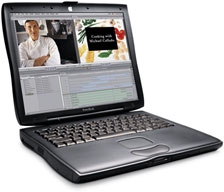 First unveiled at Macworld Expo Tokyo in February 2000, with its UMA motherboard, 400 or 500 MHz G3 processors, and 1 MB of Level 2 (L2) cache, Pismo was substantially more than just a speed-bumped Lombard PowerBook G3 with FireWire substituted for SCSI and AirPort wireless support added.
The UMA motherboard features a 100 MHz system bus, which makes a 400 MHz Pismo roughly 30% faster than a 400 MHz Lombard, thanks to the faster bus plus faster RAM and hard drives. As with the iBook, Pismo’s sleep light pulses rather than blinks.
Pismo comes with two 400 Mbps FireWire ports with bus power, so SCSI is history, and Apple introduced FireWire Target Disk Mode as a replacement for SCSI Disk Mode. When used in Target Disk Mode and connected to another Mac by a FireWire cable, the PowerBook operates like a FireWire mass storage device with the SBP-2 (Serial Bus Protocol) standard.
Pismo also had two 12 Mbps USB 1.1 ports with UTA USB implementation and independent busses for each USB port. The sound system supports 44.1 kHz 16-bit stereo sound output and input, available simultaneously, and it was originally available with hard drives of 6, 12, or 18 GB capacity. Pismo uses PC100-compliant SO-DIMM modules and supports up to 512 MB of RAM – or even 1024 MB with two 512 MB modules, although there are some minor limitations that inhere with 1 GB of RAM installed. Pismo has 8 MB of video memory that can support millions of colors on external displays up to 21″ (1680 x 1050). The S-video port was retained, allowing you to connect the PowerBook to any standard television or VCR. For presentations, you can continue to look at the screen on your PowerBook while your audience focuses on the larger TV screen.
All this in a package that sold for about the same price as a PowerBook 1400 did two years earlier, but Pismo is roughly 10 times more powerful.
Upgrades
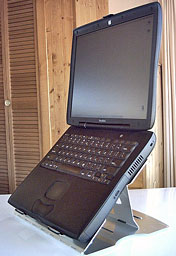 It’s fascinating, and more than a bit ironic, that the Pismo PowerBook was arguably more popular after it was discontinued than during it’s relatively short nine-month production run.
What explains the Pismo’s Methuselah-like longevity?
Aside from being a generally robust and reliable design, the key to the Pismo’s remarkable longevity has certainly been its upgradability and easy expandability. No Apple notebook since the Pismo was discontinued at the end of 2000 has offered the combination of superb tactile ergonomics, deep feature set, versatility, and potential for hardware updating and upgrading that the Pismo does. The processor is more easily upgradable than with the later G4 PowerBooks, with several CPU upgrade solutions available from different vendors. The removable device expansion bay makes upgrading the optical drive a ten-second hot-swap snap.
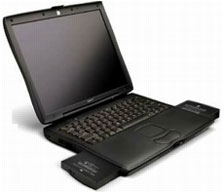 While even a stock Pismo can be a useful platform for basic, light-to-medium duty computing tasks, most Pismos still in active service by now have been somewhat breathed-on, and many, such as my two machines, have been seriously hot-rodded thanks to the Pismo’s unparalleled receptivity to hardware tweaking.
My own Pismos were my number two (and two-B) utility and road computers for years, used daily for research and drafting, as well as most disk-burning (with a FastMac 8x SuperDrive module in the expansion bay) and scanning. I find that Ed Hamrick’s excellent VueScan scanner software and Photoshop Elements 4 both work well with the 550 MHz G4 processor upgrades. Photoshop is optimized for the AltiVec vector engine, so the G4 can take advantage of that. (I haven’t tried Elements 6 on the Pismo, and given its somewhat sluggish response on my 1.33 GHz G4 PowerBook, my surmise is that Version 6 would be a bridge too far for the old Pismo, even a hot-rodded one.)
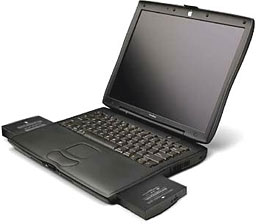 The Pismo has a much better than average keyboard (the best ever in my experience, except for the G3 Series WallStreet PowerBook and maybe the PowerBook 1400 – why Apple has never been able or willing to put as good a keyboard in any subsequent notebook, including the latest MacBook Pros, is a head-scratcher) and a nice form factor that is reasonably handy to pack around, although it’s not nearly as light and trim as a 12″ PowerBook or 12″ iBook, let alone a MacBook Air. However, it’s not humongously bigger or heavier than a 13″ MacBook.
MacBook 13.3″
- Height: 1.08 inches (2.75 cm)
- Width: 12.78 inches (32.5 cm)
- Depth: 8.92 inches (22.7 cm)
- Weight: 5.2 pounds (2.36 kg)
PowerBook G3 FireWire 14.1″
- Height: 1.7 inches (4.3 cm)
- Width: 12.7 inches (32.3 cm)
- Depth: 10.4 inches (26.4 cm)
- Weight: 6.1 pounds (2.8 kg)
The Pismo’s trackpad is very decent as well, and again, in my experience, better than any trackpad Apple has shipped in a notebook since, and the trackpad button is decent. Its organically contoured palm rests are the perfect width and have a “just right” feel that has not been matched in any later Apple notebook. I much prefer the tactile feel of the Pismo’s polycarbonate plastic case material to the feel of the metal ‘Books
The Pismo’s two built-in USB 1.1 ports, two FireWire 400 ports, ethernet, modem, analog sound in/out, VGA, S-video, and IrDA infrared ports provide better than decent connectivity. It supports WiFi connectivity via either an internal 802.11b AirPort Card or a PC Card adapter (I use a Buffalo G54 802.11g Wireless PC CardBus Adapter I got from Wegener Media, and it works perfectly with the AirPort drivers in OS X), and you can also add USB 2.0 and FireWire 800 support with PC Card adapters. Upgrading RAM is easy, and swapping in a higher capacity (up to 128 GB), faster hard drive is about a 20 minute task without hurrying.
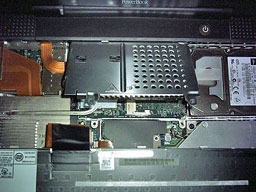 A few paragraphs ago I mentioned that the Pismo can support floppy disks by way of a (now-discontinued) VST SuperDisk module, which is convenient for accessing the old files and software that I have archived on stacks of floppies without the hassles of connecting an external USB floppy drive. I also find the ability to boot into OS 9 a desirable convenience that I don’t have with my 17″ G4 PowerBook. The Pismo is also still officially supported by the latest OS X 10.4 Tiger version (10.4.11), and some folks have succeeded in doing unsupported hack installs of OS X 10.5 Leopard on Pismos, but again, based on Leopard’s lackluster performance on my 1.33 GHz G4 machine with 64 MB of VRAM and 1.5 GB of RAM, I’m highly skeptical that I would find Leopard’s performance acceptable on a Pismo, so OS X 10.4.11 is the end of the OS road for my Pismos.
The Pismo’s greatest shortcoming is its now-puny and non-upgradable video support. The ATI Rage Mobility 128 graphics processor with 8 MB of video RAM was middle-of-the-road respectable for a high-end laptop in 2000, but it’s severely deficient for running, say, streamed video, and it doesn’t support the Core Image, Core Video, and Quartz Extreme features in recent versions of Mac OS X. There were reports a couple of years back that Daystar was working on a video card update for this model, but no product was ever released, and I’m doubtful that one ever will be.
The Pismo has two FireWire ports (connected to a single internal bus) and an ethernet port, so you can connect it to newer Macs via ethernet or FireWire Target Disk Mode, which can be very convenient.
With its 1024 x 768 resolution conventional aspect ratio screen and relatively coarse pixel density, the Pismo’s display is not anything to get up in the night and write home about in this era of bright and crisp high-res widescreens. It’s decent and serviceable – but no more – and the tendency of its backlight to take on a “pink” tinge as it ages is one on the Pismo’s few bad habits, afflicting one of my two Pismos.
The other notable one is that the OEM DVD-ROM drives were prone to early failure – but who wants a plain-vanilla read-only drive these days anyway? FastMac and Wegener Media, to name two, offer a variety of reasonably priced optical drive expansion bay module Combo drive and SuperDrive upgrades for the Pismo.
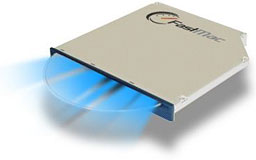 The expandability parade just keeps rolling. FastMac even offers Blu-ray optical drive upgrades for the Pismo. Indeed, there is a certain irony that the Pismo is supported by this upgrade but the MacBook Pro and MacBook were not, presumably because their cases are too slim to accommodate this hardware. Go figure.
Pismo supports both screen mirroring and screen spanning when using VGA or S-video output.
Lid Closed Mode
Pismo supports “lid closed” (or clamshell) mode, which leaves the built-in display off and dedicates all video RAM to an external display. To used lid closed mode, your ‘Book must be plugged into the AC adapter and connected to an external display and a USB mouse and keyboard (you might also want to consider external speakers).
Power up your ‘Book until the desktop appears on the external display and then close the lid. Your ‘Book will go to sleep, but you can wake it by moving the mouse or using the keyboard. The built-in display will remain off, and the external monitor will become your only display. Since all 8 MB of video RAM is now dedicated to the external monitor, you may have more colors available at higher resolutions. The Pismo is designed to run safely in closed lid mode, but if your Pismo runs hot (perhaps due to a G4 upgrade, a fast hard drive, or high ambient temperatures), you may want to open the lid when in lid closed mode: The screen will remain off and the computer will more readily vent heat from the CPU.
To resume use of the internal display, you need to disconnect the external display, put the computer to sleep, and then open the lid. This will wake up your ‘Book and restore use of the built-in display.
Is It Worth Upgrading?
Being something of a Pismo guru, a question I’m frequently asked is whether it makes economic sense to upgrade (or buy and upgrade) a Pismo rather than opting for a newer machine. It really depends partly on factors that are not economically quantifiable, such as, in my case, the fact that I really like so many things about the Pismo, such as its aforementioned tactile friendliness, but also the ease of working on it (e.g.: installing hardware upgrades).
The removable device expansion bay is a tremendous feature – the bay will accommodate a second battery for extended runtime, and you can get expansion bay housings to use with 2.5″ hard drives, making it possible for the Pismo to support two internal hard disks. MCE Engineering offers the MCE Xcaret Pro-99 Do-It-Yourself Expansion Bay Hard Drive Kit for Pismo and Lombard PowerBooks for $69 if you have a loose IDE hard drive left over from upgrading to a higher capacity drive, or they will sell you the Pro-99 unit with a 40 GB to 100 GB hard drive preinstalled.
Changing the main hard drive or the processor card is a 10-20 minute job without hurrying, requiring only simple tools like a small Philips and a Torx T-8 screwdriver.
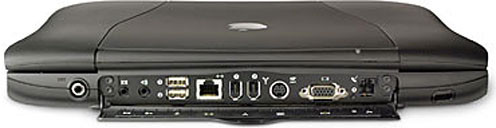
Then there are the PC Card slot, two FireWire and two USB slots, S-video out, the built-in hardware modem, ethernet, and even IrDA infrared connectivity. None of the more recent Apple notebooks comes close to matching this degree of expandability and versatility.
Costing an upgraded Pismo precisely is difficult, because much depends on whether you already have a Pismo or will have to buy one to start with, and it also depends on how much of the installation work you intend on doing yourself.
I only have 640 MB of RAM in my #1 Pismo and 576 MB in the other (and I wish I had a gigabyte in both), but for what I do with these machines, performance in Tiger is good enough that I haven’t been compelled to buy more RAM.
While the Pismo was the first PowerBook that was available with an optional internal AirPort WiFi card (the clamshell iBook was the first AirPort-equipped Mac laptop), neither of my Pismos came thus equipped, and as noted above I have added a Buffalo G54 802.11g Wireless PC CardBus Adapter from Wegener Media, which has a limited stock of these or other brand cards that will work in the Pismo.
Essentially, you just insert the Buffalo card into the PC Card slot, and you’re good to go. On my Pismo, running OS X 10.4.11, the OS automatically recognizes the card and thinks it’s a real AirPort card. No driver or other software installs are necessary. It “just works.”
FastMac sells TruePower replacement batteries for the Pismo for $99.95. Other World Computing once had batteries for Pismo but has since discontinued them.
So in terms of costing, there are so many variables it is really impossible to generalize. Here is a rundown for a nicely tricked-out Pismo at the lowest prices cited:
- Pismo 400, about $200
- 1 GB RAM, about $100
- 550 MHz G4 upgrade, $200 from Wegener
- Western Digital Scorpio 120 GB hard drive (largest supported), $75 from Amazon.com
- 8x dual-layer SuperDrive, $100 from FastMac
- 7800 mAh battery, $150 from FastMac
- Buffalo WiFi card, $16 from Amazon.com
This all comes to a grand total of $841 before taxes or shipping.
Apple frequently has Certified Refurbished MacBook Airs for that price or less at the Online Apple Store with a full one-year warranty, AppleCare eligibility, USB 3.0, AirPort Extreme, FaceTime cameras, and so forth, and they are in a whole ‘nother galaxy performance-wise.
Consequently, it’s very hard to make a rational case for going for a hot-rodded old machine that maxes out with a 550 MHz G4, unless you’re a consummate and fanatical Pismo fan. Pportable computers tend to live a hard life. Upgrading incrementally over a period of years, as I have, makes more sense, but I would be irresponsible not to suggest considering the MacBook or even a nice, late model G4 aluminum PowerBook with a 1.67 GHz processor for the same money.
For pretty well everything I want to do with my Pismos, as non-first-line machines, the 550 MHz G4s running OS X 10.4 Tiger have been perfectly adequate. Using these machines, one might expect to feel compromised during production work with a computer designed over a decade ago, but it’s surprising how little one is reminded that one is working with vintage hardware.
Of course, when I get into processor intensive stuff or a lot of multitasking, I noticed the difference between the Pismo and my 1.33 GHz G4 PowerBook (itself far from cutting edge at the time), and I expect the contrast with any Intel-based Apple notebook would be quite vivid, but you can only type so fast, and for about 85% of the stuff I do, the distinction is hardly noticeable.
Another Pismo advantage is that these machines run really cool, even with the G4 upgrades, and consequently are comfortable to use as a literal laptop. I anticipate Pismo computing well into the second decade of the 21st Century.
Appendix: Pismo PowerBook Specifications
Pismo PowerBook G3/400 MHz
- PowerPC 750 (G3) 400 MHz
- 100 MHz System Bus
- 1 MB Level 2 cache
- Maximum RAM 1 GB (64 MB standard)
- Active-matrix 14.1″ color display (1024 x 768)
- ATI Rage Mobility 128 graphics controller with 8 MB of video SDRAM
- Video resolutions and bit-depth
- 24-bit 1024 x 768 color active matrix with resolution scaling to 640 x 480 and 800 x 600.
- S-video and VGA output support 512 x 384, 640 x 480, 800 x 600, 832 x 624, and 1024 x 768 with 24-bit color.
- VGA also supports 640 x 870, 800 x 500, 856 x 480, 1024 x 640, 1152 x 864, 1152 x 870, 1280 x 960, 1280 x 1024, 1360 x 768, 1600 x 1000, and 1680 x 1050 with 24-bit color; 1920 x 1200 possible with 8-bit color.
- S-video also supports 720 x 480.
- Lithium Ion battery (up to 5 hours use)
- tappable trackpad
- 2 built-in speakers and microphone
- 1 PC card slot
- 10/100 Base-T ethernet
- Built-in 56k Fax/Modem
- infrared support and S-video-out
- 16-bit stereo sound input/output
- 6x DVD-ROM drive
- 6 GB hard drive (10 GB on later models); supports up to 128 GB
- 2 FireWire ports
- 2 USB 1.1 ports
- Size: 10.4″ x 12.7″ x 1.7″
- Weight: 6.1 pounds
Pismo PowerBook G3/500 MHz
Differences from the 400 MHz model:
- PowerPC 750 (G3) 500 MHz
- Maximum RAM 1 GB (128 MB standard)
- 12 GB hard drive (18 or 20 GB optional); supports up to 128 GB
Previous model: Compleat Guide to the Lombard PowerBook
Next model: Compleat Guide to Titanium PowerBooks
* No, it isn’t a typo. Compleat is a legitimate, albeit archaic, spelling for complete. As Kenneth G. Wilson says in The Columbia Guide to Standard American English: “This obsolete spelling of the adjective complete suggests an air of antiquity that seems to please some of those who name things….” We find that fitting for Low End Mac’s Compleat Guides to “obsolete” hardware and software.
Keyword: #compleatpismo
Short link: http://goo.gl/RKHZuy
searchword: compleatpismo
