Greetings.
I'm one of the new writers at Low End Mac. I learned computing on
an Apple IIe in the early 80s and got my first Mac (an original LC or "Elsie") as a high school
graduation present in 1991. It served me nearly seven years.
My main machine these days is a 12" 1.2 GHz G4 iBook G4 (the
"iceBook"), while my wife has been using a 400 MHz G3 iMac ("Kihei").
My column is called "The Efficient Mac User". I work a full-time
educational job that takes 50-60 hour weeks, do some other
consulting and writing, and I'm finishing a graduate degree, so my
computing (and my life) has to be about efficiency. I mean
efficiency in the fullest sense - not just avoiding the waste of
time or money, but efficiency in mental and physical health and
energy as it relates to work and computing, in making use of what
you have, and in getting the most from the tools available.
My approach will largely rely on personal experience -
situations I have been in or that I am facing currently, and how I
deal with them.
My presuppositions are these: First, most Mac users value the
"productivity factor" on a Mac - they appreciate (and even rely on)
the freedom to focus on the work being done, not on the computer
itself. Second, busy Mac users (and even not-so-busy ones) are
thankful for any help they can get with increasing their efficiency
for whatever computing task is before them. Third, many of the
questions that I face are not unique to me; others may want to hear
how I worked through getting answers.
This leads to my first Efficient Mac User scenario: What to do
with an ailing iMac?
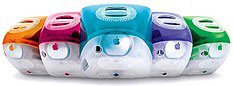 My wife
Marcie's iMac has been having hard drive trouble. Last January, the
original drive - a noisy 13 GB Maxtor - was not only annoyingly
loud, but it was also too small for our needs. I wanted to upgrade
her machine to Panther (OS X 10.3) and suspected that 13 GB
would be too small. On top of that, Marcie wanted our copy of
Virtual PC on her machine.
My wife
Marcie's iMac has been having hard drive trouble. Last January, the
original drive - a noisy 13 GB Maxtor - was not only annoyingly
loud, but it was also too small for our needs. I wanted to upgrade
her machine to Panther (OS X 10.3) and suspected that 13 GB
would be too small. On top of that, Marcie wanted our copy of
Virtual PC on her machine.
I determined to upgrade her hard drive to something above 30
GB.
Around the same time, we had decided to get rid of our last
Windows PC (yes, I confess that I've owned and used more than one
machine running that dreaded operating system), which was seeing
less and less usage, finally dwindling down to running only when
Marcie wanted to use Photoshop Album to organize our photos (a call
to Adobe - step up with a Mac version!).
The 40 GB Maxtor hard drive in that machine was still fairly new
- only 2 years old. Why not pull it and drop it in the iMac?
That transition went as smoothly as I could have imagined. I
found good directions online for accessing the hard drive of the
iMac, and I was in and out in a little more than an hour's time. It
seemed like our troubles were behind us.
But in August, new difficulties arose. First, I upgraded her
iMac to Tiger (OS X 10.4) - and found Apple's reputation for
older-system-friendly upgrades to be accurate.
Everything appeared to be fine, but a couple of weeks into the
Tiger-on-the-iMac era she called me at work: "Mail doesn't respond
when I ask it to check for new mail. In fact, it won't let me view
any other messages, either." I talked her through a force-quit,
then suggested that she go ahead and restart just for good
measure.
After log-off, her system hung like a noose.
First, it locked up on the gray screen, not even showing a dark
gray Apple logo. After a hard reset (using the power button), it
locked up on the gray apple logo. At this point, I told Marcie to
shut it off. I would work on it when I got home.
The first time I tried starting up, it showed a "question-mark
folder", indicating that it couldn't find a bootable System on the
hard drive. Another manual reset produced the same result, and a
third and final one elicited some kind of UNIX diagnostic that
threw a bunch of commands up on the screen, peppered with the
occasional English comment.
I kid you not, one of them said something like, "big trouble -
we're hanging badly"!
Well, I know trouble when I see it, so I restarted from a System
install CD, then switched the startup volume to my external
FireWire drive, where I have a diagnostic and repair boot volume
set up.
I started by running Disk Utility, then TechTool Deluxe, then
TechTool Pro - none of which could repair the damage to my drive.
(Actually, just the partition of the drive that holds System and
program files. I keep all stored documents, photos, and other files
safely stored on another partition. See Michel Munger's recent article on
partitioning for more on that subject).
With a sigh, I resigned to erasing that partition and
reinstalling the system. This time the system installed more
quickly, and I was optimistic that all would be well. "Maybe it was
a mistake to go the upgrade route with Tiger, instead of a clean
install...."
Five days later, I found out it made no difference. We were back
to hanging on gray apples and flashing "question-mark folders". The
most frustrating part was that I had literally just finished
reinstalling software and restoring Mail accounts, iPhoto and
iTunes libraries, and Quicken data the night before.
Some snooping on Apple's discussion boards led me to conclude
that I very likely have a failing hard drive.
- This brings me to my theory/rant about Windows XP and hardware,
especially hardware with moving parts like hard drives. If you've
ever used this OS, you know that WinXP spins up the hard drive very
often - move the mouse and the drive spins up. The system itself is
very resource-intensive. Add to that frequent restarts and the kind
of maintenance (e.g., scanning for viruses regularly) that a WinXP
machine requires - not to mention the drastic measures, like a full
reformat and reinstall, that occur pretty regularly, in my
experience - and you have, shall we say, more-than-average wear on
that hard drive. Thus, my Maxtor drive, which was new in January
2002 and theoretically should have lasted 4-6 years, has worn out
in 2-1/2.
We were faced with the big decision: Upgrade the iMac's hard
drive or go in a different direction?
This is a 1999-vintage iMac. It shows no signs of impending
failure in any other way, but it also is at its max in terms of the
usage we ask of it. Even with a 512 MB stick of RAM in there, it is
far from zippy running OS X. Tiger helped things a bit
compared to Panther, but we won't be running any video-editing
software on this machine unless it's a Classic app, and even that
would face the difficulties of OS 9 emulation in
OS X.
Marcie's idea of running Photoshop Album on Virtual PC didn't
pan out for this very reason. She ran it twice, I think, before
deciding to switch to iPhoto.
Plus you can bet that some future version of OS X won't support
this hardware. At 400 MHz, Tiger barely does.
I'm pretty committed to the Low End Mac philosophy. I've always
loved the fact that we run a 5+ year old Mac as one of our primary
machines. I don't think "bleeding edge of technology" applies to
95% of the Mac world. (I will concede that such a mindset is more
applicable in the Wintel world, since you have to upgrade your
hardware to upgrade your software....)
But I also have to face the question from an Efficient Mac User
perspective. What would it cost to upgrade the hard drive? (All
numbers are rough estimates)
- $100 - cost of a new drive
- $75 - 1.5 hours @ $50/hour to install the drive
- $200 - 4 hours @ $50/hour to install system, iLife, iPhoto,
other basic software (based on the last time I did it)
- TOTAL: $375
This cost would get us back to where were in July. Is this
really the most efficient route?
I surfed over to Apple Discounts to take a look around. Aha!
That same cost would get me a discounted Mac mini; another $150 would get me a
substantially upgraded mini (1.42 GHz, 512 MB RAM, 80 GB hard
drive, AirPort and Bluetooth installed).
- A few words about Apple Discounts: Though they are not a
subsidiary of Apple, they pull their information directly off of
the Apple Store online. Apple sells returns, refurbished machines,
and close-outs at discounted rates through the Apple Store. Apple
Discounts lists all of the current deals on their site. They also
offer a Dashboard Widget and a daily email list. You can also get
similar deals at your local Apple Store. On the last weekend of
each month, they fire-sale all of their returns and close-outs;
you'll find everything from earbuds to iPods to cameras to
PowerBooks.
With the iMac, I'm looking at only $100 of cash outlay. But I
work a lot, and when I'm not working I'd rather not be
digging around inside an iMac if I can help it.
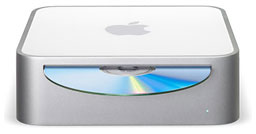 The upgraded Mini (which
is the configuration I would want, both for the RAM and the
AirPort) still costs $150 more. But I will also have a Mac that
should last another 5+ years and probably see another 3 or 4 OS
upgrades.
The upgraded Mini (which
is the configuration I would want, both for the RAM and the
AirPort) still costs $150 more. But I will also have a Mac that
should last another 5+ years and probably see another 3 or 4 OS
upgrades.
Yes, the Mini requires a monitor. But I've got a 17" CRT in the
basement that I seldom use. It's easy enough to move it to Marcie's
little computer desk.
Plus the Mini will arrive with Tiger, iLife 5, AppleWorks, and
Quicken already installed. Plug it in and go - no more hours spent
reloading the OS and these programs. Further, it will run faster,
which will make my wife's life more efficient, too.
For me, Low End Mac doesn't mean "low life expectancy". It means
affordable, long-lasting, and as much as you need. The Mac mini is
today's Low End Mac, and it brings the promise of The Efficient Mac
User back to the Eubanks household.
I'll let you know how it turns out.

Link: Apple
Discounts



