In
order to squeeze as many years of use as possible out of you Mac
and keep it zippy, you need to do some basic maintenance. In this
three-part tutorial, we will cover some hardware and software
maintenance. This article is about your computer's hard drive.
It's important to maintain your hard drive because your
operating system, your software, and your data resides on it.
Here is a brutal reality: Your hard drive has mechanical parts
that will fail one day. You should not ask yourself if it will
fail, but when. There are two cases of data loss that you may
face:
- Your disk gets confused by damaged directory structures.
- Your disk crashes.
Protecting Your Directory
The first step is maintaining the directory structures, and it
is the easiest step because, unlike a crash, directory damage can
be fixed. The directory keeps track of all your files, from the
operating system to your tiniest JPEG or Word document. If the
directory is damaged, your hard drive doesn't know where everything
is and can overwrite or damage files.
Directory damage is sly. It comes in without knocking, and it
doesn't let you know about its presence. In fact, data loss can
happen several weeks or several months after uncorrected directory
damage begins, which makes directory protection mandatory
preventive maintenance.
To avoid data loss, you have to start with the right formatting
and journaling. Journaling, available under Panther and Tiger,
monitors your disk's activity and records it in a log. Should your
Mac shut down unexpectedly or should you experience disk problems,
recovery will be faster and repair will be easier.
If your disk is already formatted, start up your Mac from the
Mac OS X Installation CD - hold down the C key at startup -
and use Disk Utility to turn on journaling. TechTool Pro 4 and
Cocktail can also do this, as can some other utilities.
If you are reformatting your disk, choose "Mac OS X Extended
(Journaled)" before going ahead.
On top of journaling, I add another recommendation when
formatting: Split your drive into system and data partitions.
Partition 1 should be used for nothing but the Mac OS X system
and applications, and partition 2 for your documents. Why? With
this kind of setup, you can still access your documents partition
to salvage data in case you didn't have a full backup should the
system partition run into serious trouble.
Ideally, this kind of split should be done with two hard drives
- a "system" drive and a "documents" drive - but I recommend
partitions if you are on a budget.
Disk Utilities
Journaling isn't everything. You still have to do preventive
maintenance to detect potential directory damage before it's too
late. Firstly, you should know that Apple's basic Disk Utility can
do a fine job
unless it runs into severe damage. To use it,
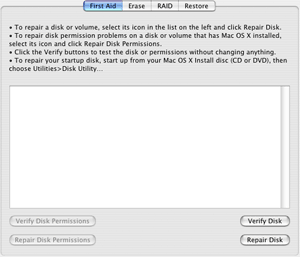
start up your Mac with your Mac OS X Installation CD and
launch Disk Utility. Then choose a drive, click on First Aid, and
click on Repair Disk. Running this test every two weeks or once a
month is a smart idea.
If Disk Utility reports damage that it cannot repair, you have
to decide whether you want to back up everything and reformat your
drive or if you prefer using a utility to fix it. Most people like
to use a utility. Several of them are available, but which one
should you adopt - DiskWarrior, TechTool Pro, or Norton
SystemWorks?
The answer is tricky, because each of these programs has
strengths and weaknesses.
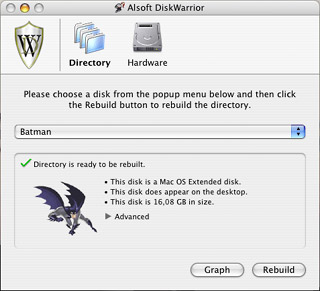 Alsoft DiskWarrior is the pound-for-pound
champion. It draws a graph of your disk directory to let you know
if it needs to be rebuilt. If you rebuild the directory - a task
that takes a bit of time on a system disk - all potential damage
disappears because DiskWarrior discards the old directory and
replaces it with a new one.
Alsoft DiskWarrior is the pound-for-pound
champion. It draws a graph of your disk directory to let you know
if it needs to be rebuilt. If you rebuild the directory - a task
that takes a bit of time on a system disk - all potential damage
disappears because DiskWarrior discards the old directory and
replaces it with a new one.
If you have DiskWarrior handy, just start up your Mac from the
DiskWarrior CD. Click on the Directory button, then click on Graph
to see the graphic and click on Rebuild to go ahead with directory
rebuilding. Doing this once a month or every other month should be
enough.
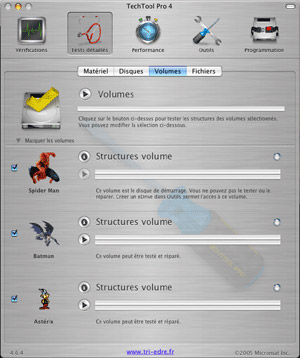 TechTool Pro 4 works differently, because it
separates the job into parts. Under its Tests panel, TechTool can
scan and rebuild volumes structures (this takes a long time). It
can optimize the directory separately using the feature called
Maintenance (found under the Performance panel). TechTool Pro 4
does some nice work, but I have had some trouble with its slow
execution, and it sometimes damaged my directories. On the other
hand, it comes with an amazing set of hardware tests, which we will
look at in a future column.
TechTool Pro 4 works differently, because it
separates the job into parts. Under its Tests panel, TechTool can
scan and rebuild volumes structures (this takes a long time). It
can optimize the directory separately using the feature called
Maintenance (found under the Performance panel). TechTool Pro 4
does some nice work, but I have had some trouble with its slow
execution, and it sometimes damaged my directories. On the other
hand, it comes with an amazing set of hardware tests, which we will
look at in a future column.
Where does Norton SystemWorks stand? I know it has a bad
reputation, in part because Symantec is not a good Mac developer,
but there are reasons to like it.
Norton, with its Disk Doctor component, tries to "patch" your
disk directory instead of rebuilding it completely. That makes
Norton the fastest utility for preventive maintenance. The big
drawback is that patching is not easy: It is not always a permanent
solution and it exposes your directory to additional errors. This
is part of the reason why Norton caused trouble when "fixing" some
people's disks.
Don't demonize it, however, because apart from speed, it has
another major strength. Do you remember the old days, when you used
Mac OS 9 and saw a flashing question mark at startup? Your Mac
was unable to mount your hard drive, even if a utility was able to
"see" it.
This can also happen under Mac OS X, with the difference
that when starting up, you get a "Please restart your computer"
screen, a Unix crash known as a kernel panic. Believe it or not,
Norton Disk Doctor is the best tool when this happens. It fixes a
series of major errors and mounts your drive. Just when things
looked hopeless, Norton saved your butt...
The final verdict on utilities? If money is not a concern, buy
all three, because each of them has different strengths. If you
have to pick just one, DiskWarrior is my recommendation. And if you
cannot mount your disks correctly, Norton is probably less
expensive than bringing your Mac to a technician....
Minimize the Workload
As I stated above, a hard drive can crash because of wear and
tear. To prevent this, you have to minimize your disk's workload.
The first way to achieve that? Know when to put your Mac to sleep
and when to shut it down. The jury is still out on this one, mostly
because there are many credible theories about the amount of wear
and tear caused by different user habits.
Here are the main points:
- Every time you start up your Mac, the cold hard drive receives
an electrical charge and works very hard to get your Mac ready for
use. This puts a lot of stress on a drive.
- If you leave your Mac on at all times, your disk remains hot
and it keeps spinning, wearing it out slowly.
- If you put the computer to sleep or put the hard drive to
sleep, every wake-up process will put some stress on the
drive.
There is no perfect solution. Apple recommends you shut a
computer down it you don't plan to use it for eight hours or more.
Otherwise you may put it to sleep or leave it on. Personally, I
have been following Apple's advice, and it has served me well.
Optimize Your Files
Another method to reduce your hard drive's work is to defragment
your files and optimize your data. When your files are fragmented
(that means your file isn't stored in one place on your hard drive;
two or more parts of the file are stored in different places), your
hard drive has to work harder to read and write them.
Imagine that all your tools are scattered around your house.
Putting them all together in a basement room or toolbox will save
you a lot of time and effort when you need to find several of them
for a project. With your hard drive, the difference is that
additional wear and tear will make it wear out sooner than it
should.
What can you do about it? Optimize your data on the disk. I know
two tools that do this well: Norton Speed Disk (part of Norton
SystemWorks) and TechTool Pro 4's Optimization feature. Both will
analyze your files, gather the scattered pieces, and rewrite them
without fragmentation to make file access a lesser pain. Your
system may also run a bit faster as a result.
There is no consensus about file optimization, because the
operation is demanding for a hard drive - it can create more wear
and tear than it prevents if done too often. Therefore it is
crucial to take a good look at the graphics produced by the
optimization tool before going ahead with the whole process.
Defragment and optimize your disk only when fragmentation is
severe. For most users, this will only be necessary two or three
times a year.
Verify Your SMART Status
Are you smart?
What I mean to ask is whether your disk passes the SMART test.
SMART (Self-Monitoring Analysis and Reporting Technology) can allow
a small piece of software to take a quick look at your drive and
let you know when it is about to fail. When you get a warning, it
means that your drive may crash soon. It is nice to know it
beforehand.
My software recommendation is SMARTReporter, and it is. Once
installed, it checks your hard drive at startup and displays a
small icon in the Finder's menu bar. The green disk means that
everything is okay, and the red disk means - well, I'll let you
guess.
Note that SMART doesn't work with external USB or FireWire
drives. 
Links
Michel Munger is a journalist who lives in Montréal. He discovered the Mac in 1994, and his work on a PC reminds him every day why he embraced Apple's platform. Munger has also authored some MacDaniel columns.