After
reviewing Mozilla Thunderbird and Eudora as potential alternatives to Apple Mail,
it's time to dive into commercial solutions to find more choices.
Microsoft Entourage is this week's pick.
The first thing to know is that I used Entourage for many years
under Mac OS 9 and X - until I discovered Mozilla Thunderbird.
I know it well enough that all the compliments and criticism listed
here are sincere and deserved.
What would be the best way to describe Entourage? I'd say that
Dick Pound, chairman of the World Anti-Doping Agency, should
investigate it. The Macintosh Business Unit at Microsoft took
freeware Outlook Express and injected several doses of
steroids.
Years ago, Outlook Express 5 was a cute, free email application
I quickly adopted. Its interface was a natural successor to the
beloved Claris Emailer, and its features served basic needs
well.
Microsoft decided to add Personal Information Management (PIM)
features, Office integration, and flexibility to the package and
then renamed it Entourage. In the Office 2004 release, Microsoft
added some more steroids to make it even more complete.
In short: Entourage now offers a great interface, a large
selection of features, and tight integration with the Microsoft
Office suite.
In my opinion, it's the best overall email software on the
market.
Eudora has more raw power and subtleties, but Entourage is
vastly superior as far as simplicity is concerned. It makes
managing your mail easy and shortens every path to its powerful
features.
My views on open source and a few points of criticism prevent me
and many users from choosing it. However, should your work require
project management and other tools that Microsoft Office offers,
Entourage is definitely your choice.
It all starts with the interface. Where Thunderbird is brilliant
and Eudora should improve, Entourage is solid. I can complain about
one flaw, which is the toolbar that doesn't allow you to change a
single button. Shame on Microsoft.
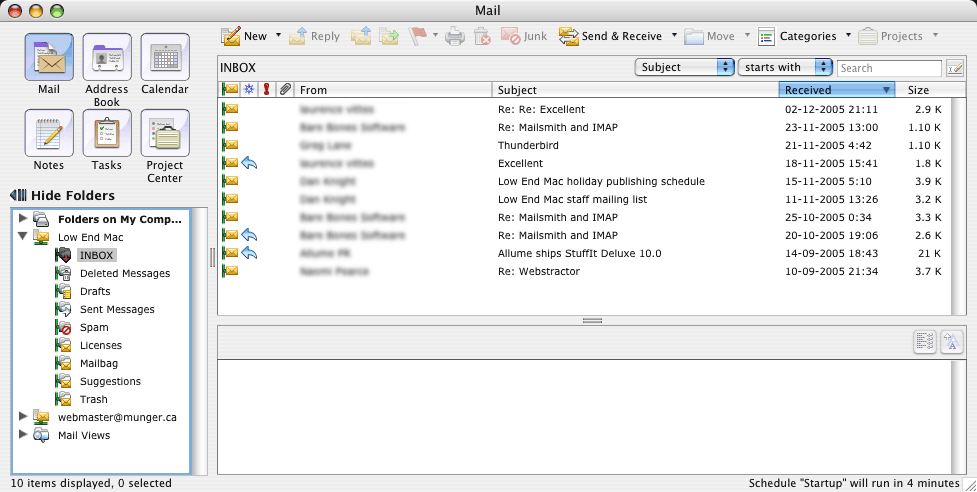
But overall, Entourage's interface is neat. Its main window
offers the same placement (folders on the left and a list of
messages and a preview pane on the right) as Thunderbird. Also,
there are six buttons that make your mail, address book, calendar,
notes, tasks, and Project Center easily accessible.
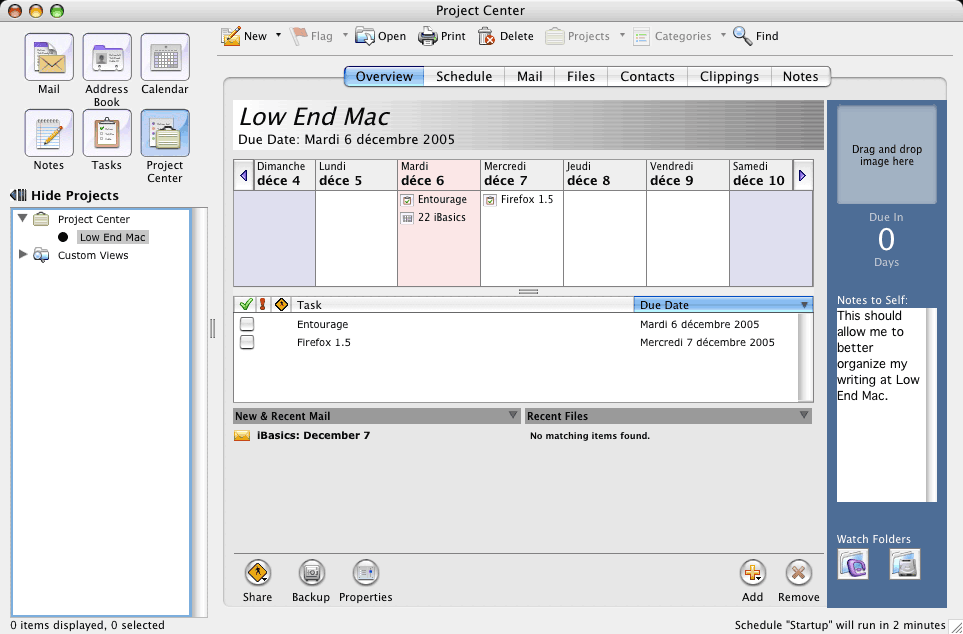
Emails, contacts, calendar events, notes, and tasks can be
linked together. Not only can you tie them together, but you can
use the Project Center to centralize all parts of a project, from
messages to files and a schedule, among other things. The features
also include making a backup of the project and the ability to
share it with other users.
The Project Center can be used as a hub to organize work
projects and keep track of everything at once directly from your
Mac and as a gateway to the rest of the Office suite.
But what about the email itself?
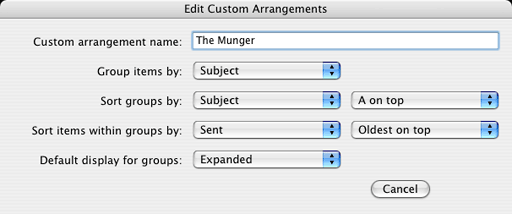
Entourage has all the flexibility you could want in daily
management, from simple flagging and priorities to the possibility
of adding and removing columns in the message list pane. You can
thread messages and reorder them any way you want, especially if
you take the time to create a custom arrangement. That's a power
user's dream.
It has a reliable junk mail filter and a great mailing list
manager with plenty of little options that truly serve mailing list
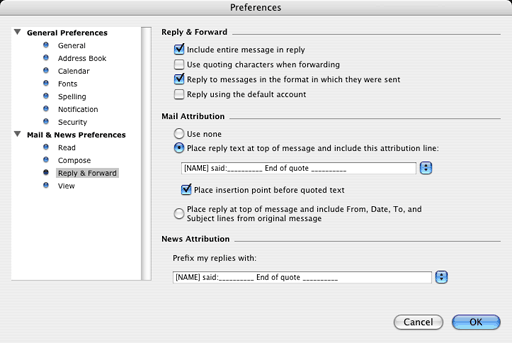
subscribers well. On top of that, you can change attribution lines
(for replies) without digging into obscure files, as I do with
Thunderbird.
Entourage supports IMAP as well as Thunderbird does, and it
supports HTML.
Sending an attachment is also an easy task. Entourage offers
many encoding options for different platforms, ensuring that your
recipient will receive the right type of encoding.
There are also a few gizmos, such as the scrapbook, but for most
of us they are just toys.
Another area where Entourage is impressive is its further
integration with MS Office. It uses the same dictionary and "spell
as you type" functionality. It also lets you customize your text
editing options in Word fashion. If you like the AutoCorrect and
AutoFormat features, you can benefit from them in Entourage,
too.
Another neat trick: Entourage can smooth fonts even when they
are in very small sizes. It makes them easier to read instead of
jagged. I am sure that older eyes can appreciate this.
Criticism
There is also some well-deserved criticism to dish out. As
useful as Entourage is, it is expensive. It forces you to buy the
whole Office suite. That means US$399 for the standard version and
US$239 for an upgrade. That's not cheap for email!
The price point means thinking about your needs before reaching
for your wallet. Do you need the extra features and Office
integration? Do you need the rest of the Office suite? Does the
project management function mean concrete time savings? (For that
last question, yes.)
Performance is another issue for those of us with older Macs. My
five-year-old G4 has two 450 MHz
processors, and while other email software responds well, MS
Entourage is simply sluggish. I remember receiving an email from a
reader telling me that he found Thunderbird slow on his G3 setup.
If Thunderbird seems slow, Entourage has to be one heck of a
snail!
Database integrity is another issue. While other software splits
mailboxes and folders into several databases, Entourage uses one
file for the whole database. This adds possibilities for features,
but if that one file becomes corrupt, your whole mail database is
corrupt.
That's quite a risk. It makes your mail vulnerable to file
problems. Therefore, you may lose mail if you have to force quit
the application or if a power failure shuts down your Mac while you
use Entourage. A potential solution is making daily backups of the
mail database.
With all of this in mind, Entourage is a great alternative to
Apple Mail. It offers plenty of power and Office integration. But
mostly it makes email management easy. It's expensive, but
Microsoft offers a 30-day test drive for your convenience.

Link:
Microsoft Office (including Entourage)
Michel Munger is a journalist who lives in Montréal. He discovered the Mac in 1994, and his work on a PC reminds him every day why he embraced Apple's platform. Munger has also authored some MacDaniel columns.