Q: How can I mimic the Apple Menu Items using System 6?
A: As far as I can determine, you cannot duplicate the Apple Menu
feature using System 6, but you can make a facsimile.
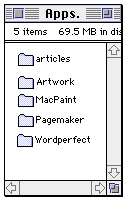 First, create a folder called
"Applications" or "Apps." that holds your most often used word
processor, spreadsheet program, etc. Then turn all of the icons into
"Small Icons" under the Views menu. Line up all of the small icons in a
narrow column and set the shape of the window to a narrow column, as in
the image to the right. You can then move the file to the left side of
the desktop.
First, create a folder called
"Applications" or "Apps." that holds your most often used word
processor, spreadsheet program, etc. Then turn all of the icons into
"Small Icons" under the Views menu. Line up all of the small icons in a
narrow column and set the shape of the window to a narrow column, as in
the image to the right. You can then move the file to the left side of
the desktop.
Not only is this technique useful on System 6 Macs, it is useful on
any Mac with a screen smaller than 13". This technique is very well
suited for the compact Macs,
older PowerBooks, and 12" screen LCs.
The idea of a compact Apps. window is neither new, nor is it
original. However, someone overseeing a classroom with a Plus, a Classic, and an SE contacted me through the LEM Help Desk to ask how to work with files under
System 6 - this lab's software of choice.
There are still many System 6 Macs out in the world performing
important tasks. A good segment of my own Master's Thesis was written
using a System 6 Mac II. Yes my
friends, this is lowest-end Mac computing at its best.
Images created using MacPaint 2.0 and Photoshop
1.0, edited in Photoshop 4.0
System 6 Resources
Manuel Mejia Jr is familiar with Mac IIs, LCs, and older PowerBooks. He
uses his Mac LC, PowerBook 145B, and PB 100 with System 7.1 on a
regular basis and recently added a Mac Plus running System 6 to his
collection. He's quite familiar with both System 6 and System 7. He
also owns the Pina books on repairing compact Macs from 128k through
the SE. You can read more about Manuel's computers in Manuel Mejia Jr's Four Old Macs.