Low End Mac Reader Specials
TypeStyler For Mac OS X is Now Shipping! Download The Free Fully Functional 60 Day Tryout at www.typestyler.com
OWC: We Make DIY Upgrading Easy! Maximize your Apple MacBook / MacBook Pro. Up to 8.0GB Memory, up to 1.0TB HD & More. Easy Guide + Free, Detailed Installation Videos. Click here
Don't install Parallels to play poker online! Poker Mac will show you how
to download and install a native Mac poker application such as Full
Tilt Poker Mac.
Laptop Hardware Provided by TechRestore - Overnight Mac & iPod Repairs.
Compare products like desktop computers, apple laptops, apple macs, and LCD Monitors side by side! All the information and reviews to make the best purchasing decision for new mobile phones, sat nav systems, or MP3 players. The Ciao online shopping community makes searching products easy for you.
Mac Daniel's Advice
Should I Buy a Used G4 or a New Mac mini?
Dan Knight - 2005.01.17
Popularity: ![]()
![]()
![]()
![]()
![]()
![]()
![]()
Over on Somethingawful.com, there's an interesting discussion asking whether buying a used Power Mac G4 and upgrading it makes sense in light of the Mac mini's release last week.
Good question. And if any of you have or are considering buying a Power Mac G4 and upgrading it, it makes sense to compare it to the mini.
The Power Mac
The Power Mac in question is a 450 MHz computer with 1.25 GB of RAM, a 120 GB hard drive, and OS X for $400, along with whatever software is installed on the hard drive. (We won't deal with the legality of that. We just want to look at the hardware.)
To get the G4/450 up to speed, the potential buyer plans on adding a faster G4 processor (see our Guide to Power Mac G4 Upgrades for Power Mac G4 with AGP Graphics) and a better video card. All told, he plans to invest about $800 in buying and upgrading the computer.
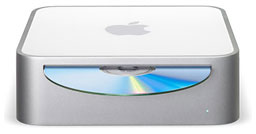
The Mac mini
The Mac mini sells for $607 with 256 MB of
RAM, an 80 GB hard drive, OS X 10.3, and Apple's keyboard/mouse
kit. It runs at 1.25 GHz, which is even faster than the 1.2 GHz upgrade
being considered, and it has a 167 MHz system bus (vs. 100 MHz in the
older G4). The graphics subsystem probably outperforms anything he's
going to find for the AGP 2X bus in the Power Mac.
What he gains is a brand new computer with a warranty, a slightly faster CPU, a faster system bus, and better graphics in a very small, very portable package.
What he loses is 1.25 GB of RAM (the mini tops out at 1 GB, and that adds over $200 with third-party RAM), an internal 120 GB hard drive (Apple offers nothing larger than 80 GB with the mini) that's probably faster than the mini's internal laptop drive, three PCI slots, and extra internal drive bays.
Decisions, Decisions
Probably the biggest factor in this particular case is the software that his brother is leaving on the hard drive - it's worth more than he's asking for the computer. Legal? Probably not, but who's going to know?
With that consideration, I'd pick the Power Mac G4/450 in a heartbeat. It's got the software, RAM that will cost over $200 to match in the mini, and a lot more expansion options: hard drives, CPU upgrades, video cards, and RAM can be boosted to 2 GB if the 1.25 GB installed ever becomes insufficient.
If I were comparing a used G4/450 in a more typical configuration without "leftover" software, it would be a different story. Looking at our best buys from last week's Best Used Power Mac G4 Deals, we find:
- 350, 256/10/DVD, $349.99
- 450, 256/20/DVD, Zip 100, $399.99
- 450 dual, 256/30/DVD, $485
- 533, 256/40/DVD, $495
- 533 dual, 256/40/DVD, $639
- 733, 256/60/CD-RW, $629
- 867, 512/40/CD-RW, $899.99
- 1.25 GHz dual, 512/80/Combo, $1,199.99
Cost to boost RAM to 1.25 GHz is about $150. Cost of a 7200 rpm 80-120 GB hard drive is about $80. Cost of a CPU upgrade, $200-300. Cost of a better AGP video card, $120 (Radeon 9000 Pro). Total upgrades: $550-650, assuming the buyer doesn't want to add a Combo drive.
We're looking at a rock bottom price of $900 before shipping, but your needs are probably a bit different. You might not need that much RAM. You might be happy with the standard video card. You might find the computer fast enough.
Those are all things to weigh in configuring your low-end G4 system. Determine how much speed you'll need and the best way to get there - buy a slower Mac and upgrade or just buy a faster computer, for instance. Live with a slower Mac today, and upgrade the CPU when you can afford it.
There are lots of options, but the three numbers you want are the cost of buying a used Power Mac G4 and configuring it for immediate use, the cost of that plus planned upgrades, and the cost of a similarly configured Mac mini.
The $499 Mac mini matches the speed of a Power Mac G4/1.25 at about half the price. You lose expansion slots and fast, high capacity internal hard drives, but $500 pays for a lot of peripherals - or a second Mac mini! The mini is definitely going to impact the prices of used G4 Power Macs, which will also drive G3 prices down.
Here's how I'd configure a Mac mini:
- G4/1.25 GHz model, 80 GB hard drive, 256 MB RAM, $549
- 1 GB of RAM, $225
- Wireless mouse and keyboard, probably Logitech, $80
Total cost is just over $850, and performance matches my 1.25 GHz eMac, so I know I'd be happy with it, although it would be nice if Apple offered a faster, higher capacity hard drive.
That's about the same price as the G4/867 listed above, which has half the RAM, half the drive capacity, CD-RW instead of a Combo drive, and about 70% as much computing power as the Mac mini.
Like I said, this is really going to impact the value of used Power Macs. Now you can get the power, forfeit the internal expansion, save a bundle, and have a brand new computer. The used Power Mac G3 and G4 market will have to adjust.
Yes, some people need those slots and drive bays, but most Mac
buyers never add a PCI card or second hard drive. For them, the Mac
mini is a dream come true - everything they want at an unheard of
price.
Not sure if you should upgrade your old Mac or replace it? Check the Mac Daniel index to see if we've already addressed your problem.
Recent Mac Daniel columns
- WiFi Hardware Compatible with Desktop Macs Running OS X, MetaPhyzx, 03.11. USB, ethernet, PCI, and other wireless hardware compatible with Mac OS X.
- WiFi CardBus Adapters Compatible with PowerBooks, MetaPhyzx, 03.11. CardBus hardware and drivers compatible with PowerBooks running Mac OS X.
- WiFi PC Cards Compatible with PowerBooks Running OS X, MetaPhyzx, 03.11. PCMCIA/PC Card hardware and drivers compatible with PowerBooks running Mac OS X.
- WiFi PC Cards for PowerBooks Running Mac OS 9, MetaPhyzx, 03.10. PCMCIA cards and drivers reported to be compatible with PowerBook running the Classic Mac OS.
- More in the Mac Daniel index.
Links for the Day
- Mac of the Day: 17" iMac G4/800 MHz, July 2002 - The iMac 'grows up' with a 17" 1440 x 900 display.
- Group of the Day: LisaList supports Lisa users.
- November 8 in LEM history: 99: OS 9: I think I like it - 01: The simplified Mac life - Soured on Windows - Flea market Mac - 02: Little room for improvement in new 'Books - Combo drive upgrade for iceBooks - 04: Re-Porter - 05: Fix the old iMac or buy a Mac mini? - Apple's Copland project - 06: MacBook Core 2 - MacBook value equation - Cheap is as cheap does - 07: Problems with Classic mode in Tiger - The G4 Power Mac that won't run Leopard
- Support Low End Mac
Recent Content on Low End Mac
- Quad-Core CPU Makes Sense in MacBook Pro, OS X 10.6 Causing Overheating, Overseas Power, and More, The 'Book Review, 11.06. Also Late 2009 MacBook reviewed, how to add RAM to new MacBook, 18.4in Acer notebook used Intel i7, and SanDisk SSD chosen for Sony VAIO X.
- Dumping Macs for Google Apps, SSD in iMac, Late 2009 iMac Performance Problems, and More, Mac News Review, 11.06. /newsrev/09mnr/1106.html
- WiFi Paranoia, iMac-O-Lantern, Magic Mouse Does Click, Free Clipboard Managers, and More, Charles W. Moore, Miscellaneous Ramblings, 11.05. Also strange time stamps, problem with ColorIt on Intel Mac, and the story behind OS X 10.5.4 install discs.
- IDE Is Dead; Long Live SATA!, Dan Knight, Mac Musings, 11.04. SATA has displaced parallel ATA. While IDE hard drives haven't disappeared, the best deals are in SATA hard drives.
- QuickTime X in Snow Leopard Imports, Trims, and Publishes Video Quickly and Easily, Alan Zisman, Zis Mac, 11.04. The long, slow process of importing video into iMovie to edit it, then render it to another format, is history as QuickTime X does that much more quickly.
- More links in our archive.
Recent Deals
- Best Mac Pro Deals, 11.03. Used 2.66 GHz 4-core, $1,300; 3.0 8-core. $2,299; refurb 2.66 4-core Nehalem, $2,149; 2.93, $2,549; 2.26 8-core, $2,799; 2.93, $4,999.
- Best iPhone Deals, 11.03. New 8 GB iPhone 3G, $$99; refurb 16 GB 3GS, $149; new, $199; 32 GB, $299.
- Best 12" PowerBook G4 Deals, 11.03. Used 867 MHz SperDrive, $348; 1 GHz, $499; 1.33 Combo, $298; SD, $559; 1.5 Combo, $448; SuperDrive, $589.
- Best Power Mac G3 and PCI Video Card Deals, 11.02. Used beige 300 MHz, $25; G4/366, $49; blue & white 350, $80; 400, $90; 450, $105; PCI video cards from $15; shipping additional.
- Best Power Mac G4 and AGP Video Card Deals, 11.02. Used 400 MHz, $50; 733 MHz, $69; 933 MHz, $209; 1.25 GHz dual, $299.
- Best 15" MacBook Pro Deals, 11.02. Used 2.0 GHz, $800; 2.2, $900; 2.4, $1,000; refurb 2.53, $1,449; 2.66, $1,699; 2.8, $1,949; 3.06, $2,169; new 2.53, $1,579; 2.66, $1,799; more.
- Best Mac mini Deals, 10.30. Used 1.33 GHz G4 mini, $379; 1.42, $389; 1.5, $419; 1.83 GHz Core Duo, $350; Core 2, $439; new 2.26 GHz nVidia, $580; 2.53 GHz, $770; Server, $990.
- Best G4 iBook Deals, 10.30. Used 12" 1.07 GHz Combo, $225; 1.33 GHz, $298; 14" 1 GHz, $349; 1.33 GHz, $398; 1.42 GHz SuperDrive, $498.
- Best Classic Mac OS Deals, 10.30. System 6.0.8 floppies, $10; 7.1, $12; 7.5, $20; 7.5 CD, $4; 7.6 $13; 8.1, $11; 8.5, $20; 8.6, $90; 9.0, $20; 9.2.2, $30.
- More deals in our archive.
About LEM | Support | Usage | Privacy | Contacts
Navigation
Used Mac Dealers
Apple History
Video Cards
Email Lists
Favorite Sites
MacSurfer
MacMinute
MacInTouch
MyAppleMenu
InfoMac
Macs Only!
The Mac Observer
Accelerate Your Mac
RetroMacCast
PB Central
MacWindows
The Vintage Mac
Museum
DealMac
DealsOnTheWeb
Mac2Sell
ramseeker
Mac Driver Museum
JAG's House
System
6 Heaven
System 7 Today
the pickle's Low-End
Mac FAQ
Abandonware
Petition
Mac vs. PC Info
Affiliates
The Apple
Store
Mac
Connection
B&H
MacMall
TechRestore
ExperCom
Crucial
Memory
batteries.com
Advertise
MacMinute
MacInTouch
MyAppleMenu
InfoMac
Macs Only!
The Mac Observer
Accelerate Your Mac
RetroMacCast
PB Central
MacWindows
The Vintage Mac
Museum
DealMac
DealsOnTheWeb
Mac2Sell
ramseeker
Mac Driver Museum
JAG's House
System 6 Heaven
System 7 Today
the pickle's Low-End
Mac FAQ
Abandonware
Petition
Mac vs. PC Info
Mac Connection
B&H
MacMall
TechRestore
ExperCom
Crucial Memory
batteries.com