USB and Wireless Networking
In response to More on wireless
networking, Ed Hurtley writes:
I have to agree that USB is a non-optimal solution for networking a
computer. But for an older iMac, where you aren't going for speed
anyway (like with mine, which is used as a 'recipe and email' computer
in the kitchen), I've found that a USB 802.11b adapter works just fine.
The two times I have wanted to transfer large files (actually, lots of
files: my iTunes and iPhoto collections), I just took the iMac out of
the kitchen and put it next to my Power Mac, then transferred them via
wired Ethernet. After that large transfer was done, the small updates
to keep my iPhoto libraries synced (I have the screen saver on the iMac
using my photos) are plenty fast over the slow USB/AirPort
connection.
My main concern was the expense of a .11b (or .11g) to Ethernet
bridge is more than is really justified for getting an older iMac
online. And putting the base station near the 'remote' computer means
moving the Internet connection, too. I know that I don't have a cable
outlet near my kitchen iMac, nor a phone jack, so any Internet
connection would require serious rewiring anyway.
Now, at some point in the future, I'd love to have a diskless Cube
in my bedroom, with a 15" LCD. I think a dead-silent computer (using
NetBoot) would be wonderful in the bedroom. For that, I'll have to
string some wire, or get an Ethernet/AirPort bridge, but that seems to
justify the cost to me. (Because I'll already be spending lots of money
on the Cube and LCD, plus having to get OS X Server for my
server.)
At $75, the Belkin F5D6050 is a good $50 cheaper than the 802.11g
access points I mentioned. And if you've got one Mac that already
supports AirPort or AirPort Extreme, you could use it as a base station
and avoid the expense of a wireless hub.
Setting up an AirPort base station via software - now there's an
article just waiting to be written by someone who has two AirPort
equipped Macs.
Can You Update a Rev. A B&W G3?
After reading about the differences
between the Rev. A and Rev. B b&w G3, Sandy Mitchell asks:
...given what you've said about the much better quality of a Rev. B
Blue & White, would changing the card in my Rev. A bring it up to
that quality? Or do I need to get a whole different machine?
The CMD646 IDE controller is soldered to the motherboard (see
photo
on Accelerate Your Mac!), so the only way to upgrade to a Rev. B would
be to replace the motherboard or pick up whole Rev. B computer.
As best as I can reconstruct these issues from early 1999, the Rev. A
seemed just fine with a single device per IDE bus, although even then
data corruption could be an issue. The problem was especially prevalent
with slave drives and high speed hard drives - and least likely to
impact the original drive Apple installed at the factory.
The problem could be addressed with drivers, and Accelerate
Your Mac! notes remarkable success with Intech's Hard Disk
SpeedTools.
If you are considering replacing the stock drive or adding a second
hard drive to a Rev. A Yosemite, I urge you to read the above link to
Accelerate Your Mac! and make an informed decision. As of this morning,
I have begun noting "Rev. 2" on our Power Mac G3 Price Tracker
when the dealer notes which model is for sale.
Anyone buying a b&w G3 with the intention of upgrading the hard
drive should avoid the Rev. A model.
.mac Restrictions
Alvin wonders:
Thank you for your time. I haven't used really some parts of
.mac like homepage since 2nd
quarter of last year. I really just use the email and Norton, not even
Virex, don't use it that much. It's really a waste we can't control,
sort of.
Though I'd like to ask if .mac's Homepage, email and everything can
be used for business. I'm planning to make the homepage display the
pictures and description then they can reply on my .mac email? I'm in
real estate by the way. If this is legal and moral, that would be good
news now I can really use it.
If ever it's not legal to do that (but I think it's moral), can you
recommend a the best but not necessarily the cheapest for domain name
registration and Web hosting with email where they can send their
replies.
Do you need a company to have a .com domain or you can use that even
if you're a freelancer but would be for business - to display the
houses and listing, sort of ads for real estate (I will design, program
if needed as I'm in IT)?
I use .mac primarily for email. Instead of routing email about Low
End Mac through my spam-laden lowendmac.com mailbox, I now link all my
articles to my mac.com email address. This way Apple's spam filters can
clear out a lot of the spam before I ever get the chance to see it.
That alone might be worth $50/year.
I haven't used the homepage feature, but during the iTools era a lot of
shareware and freeware authors used it to distribute their software. I
don't see any restrictions on the site limiting it to personal use, and
I know that a lot of small businesses do use .mac for emai, online
slide shows, etc.
If you want to register your own domain, I've had very good luck with
AITDomains.com, where I can
usually register or renew my domains for under US$10 per year. I'm not
affiliated with them; just a very satisfied customer. They made it easy
to consolidate all the domains I had signed up for through 3 or 4
different registrars.
If you're running a business, having your own domain helps reinforce
your brand. For instance, if your business was called Alvin For Real
Estates, you might try to register alvin4realestate.com. Some
businesses have gone so far as to rename themselves to match their
domain name - right down the the dot-com - which I think is a bit
excessive.
We are preparing our own ala carte alternative to .mac at lowendmac.net. We haven't quite
hammered out all of the details yet, but we will be offering low-cost
email accounts, online server space (for Web pages, FTP, backup, and
accessible just like iDisk), and may also offer PHP, MySQL, and iCal
services. We'll
More on Beige G3 Memory
Adding to the discussion of memory possibilities in Maximum RAM in a beige G3 , Ric Davis
notes:
AFAIK, electronically all beige G3 Macs are indeed compatible with
256 MB DIMMs. The problem is that the desktop and the tower case have
differing amounts of space over the DIMM slots, so RAM that fits fine
in the tower, may not fit in the desktop. I think the height limit is
1.15" for the desktop. <http://www.xlr8yourmac.com/G3-ZONE/G3_RAM.html>
mentions this in the 'before you buy' section.
Thanks for the note. I'll update the profiles to reflect this.
Memory Upgrades: Your Mileage May Vary
Also responding to Maximum RAM in a
beige G3, Torsten Enn says:
It's the good old YMMV thing - and you wrote it yourself: We also
note that what works for one may not work for all, something we've seen
in two seemingly identical iMacs - one accepts a 256 MB upgrade, the
other doesn't.
I have a beige G3 (Rev.
B) and my wife a 350
MHz iMac, both equipped with 100 MHz SDRAMs. The iMac came with 64
MB installed, which I had ugraded with a 256 MB module. The beige G3
has the 32 MB module it came with back in 1998 and a 64 MB and a 128 MB
module I upgraded it with over the years.
Last year I wanted to use the beige G3 as a "home server," so I
exchanged the 128 MB module with the 256 MB module from the iMac. But
what a surprise - the G3 accepted it as a 128 MB module! No matter what
slot or combination of modules I used, it just wanted to use half of
the 256 MB, while the iMac still can see all of its 256 megabytes.
So while I know that Apple's 192 MB limit is not true, I also know
that there might be another ceiling, depending on the luck you have.
Right now the G3 is equipped with 256 MB (128+64+64) and the iMac with
288 MB (256+32).
That's the odd thing. One user after another after another may be
able to use 256 MB DIMMs in an iMac or G3, but for some reason unknown
to quantum physics or voodoo, it just won't work in some other machines
that seem exactly the same.
I suppose I could open up both iMacs to find out whether the low
profile DIMMs are identical. In fact, I do have to open up the one with
the 256 MB module to determine whether the CD-ROM is dead or only
improperly reconnected after the memory upgrade. I still wish this was
all a bit more predictable, a bit less subject to Murphy's Law.
More on the Sawtooth AGP Slot
Adding to the discussion in Which AGP
cards for Sawtooth?, Andrew Prosnik writes:
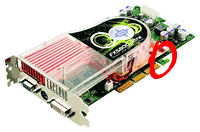 I think he means this extra "tooth"
(reduced image at right - click link for larger view):
I think he means this extra "tooth"
(reduced image at right - click link for larger view):
http://www.aceshardware.com/files/news/images/gffx.jpg
I believe it's just for an AGP Pro/AGP Pro150 slot. I think you
already know this and drew a conclusion re: ADC power. Still, though,
this might be a handy reference:
http://www17.tomshardware.com/graphic/20000922/agppro-01.html
p.s. I hate Tom's Hardware more than anything in the universe
. . . it pains me that it has handy articles from time to
time!
You'll hate it even more if you use Safari. What an abominable
mess!
Yes, Tom's has some great stuff, but also a tragic reputation for
mistreating people who write for the site. Van's Hardware was one of the
great sites to spring up by someone so mistreated. One of my favorite
PC tech sites, along with ars
technica. And Van's even has a Mac related article now and
then.
As for the extra "tooth" on some AGP cards, I was unaware of it until
this week. Since it seems to exist on cards that provide monitor power,
I guessed that it prevents installing the card in machines that can't
provide sufficient power to drive Apple's monitors.
Apple in Trouble over Unix in OS X?
Just got my eWeek today.
SCO, which owns the intellectual property rights to Unix™ is
suing
IBM for $1 Billion. Why? Because IBM has been making parts of
AIX, based on their software, available to the open source
community.
Why is this article of interest?
A note later down: "SCO has employed high-profile attorney David
Boies and his law firm to investigate whether Windows, Mac
OS X, Linux, and versions of BSD infringed on the Unix
intellectual property it owned."
I believe BSD wasn't covered by that, and given that
OS X drew from NetBSD (or FreeBSD, one of those) I'd think it
should be safe, or distant enough not to go after... but I'm (a) not a
"high profile attorney" (and we know what they can do, and (b)
not all that clear on *nix history anyway...
Eric McCann
I'm not terribly clear on Unix
history, either. In broad outline, Unix was developed at Bell
Labs by Ken Thompson, who later taught at UC-Berkeley, where BSD was
developed by a grad student in 1977 - one year before SCO was created.
Where BSD began by taking ideas from Unix, soon things were going the
other way, and a lot of work on BSD found its way into Unix as
well.
BSD was perhaps the first large scale open source project, in many ways
an ancestor of Linux. Unix remained a proprietary commercial product.
Due to lawsuits by Unix, BSD development began to lag in the early
1990s, at the same time that Linux was emerging.
As far as I know, and I am neither a *nix guru nor a lawyer, BSD is
considered a legally free alternative version of Unix, although because
of trademark law, the term Unix should only be applied to the
commercial OS now owned by SCO. This is the reason you'll often see the
word "*nix" used to encompass both Unix and the Unix-variants, such as
Linux and BSD.
I have no idea whether SCO has a legal leg to stand on because of the
parallel history of Unix and BSD, but you can bet dollars to donuts
that the lawyers will earn their money regardless of the outcome.
Dan Knight has been publishing Low
End Mac since April 1997. Mailbag columns come from email responses to his Mac Musings, Mac Daniel, Online Tech Journal, and other columns on the site.




