With today's mailbag, we seem to have positive reports
of Mac OS X 10.5 running on all unsupported Power Macs with AGP,
G4 iMacs, eMacs, G4 PowerBooks, and the lone unsupported G4 iBook. So
far o report of Leopard running on a PCI Power
Mac G4 or any G3 Mac with a G4 upgrade. We also have a reminder
that some people are still very happy running G3 Macs with earlier
versions of the Mac OS. dk - Tip Jar
Happy with My G3 Macs in the Age of Leopard
From Donald Scheer:
Greetings Low End Mac!
I have never written before, however I do read Low End Mac daily.
Lately I have noticed the users have become a little upset that Leopard
doesn't support older hardware; I do agree. It saddens me that Apple
has cut out so many older Macs, some of which are less than 5 years
old. However, I have no intention of running out to my local Apple
Store to pick up a new Mac anytime soon just to run Leopard.
I have owned a 600 MHz iMac G3
since late 2001, and it has been a powerful workhorse over the past 6
years and continues to be today. Recently I noticed that with all the
newer videos on websites, my iMac has been struggling to play the
videos without dropping one or two frames here and there, so I realized
I needed something more powerful. I own an iBook G3 900 MHz, which I use to bring
presentations and reports to my classes at the local college where I am
a student. However, a year ago my iBook (for the fourth time since I
owned) it had a logic board failure so it essentially became a huge
Apple branded paperweight - but I couldn't bring myself to get rid of
it.
I realized since that was no longer working I would have to get a
new Mac. I only use my Mac for light video and photo editing, typing
reports and presentations, surfing the Web, and sending email - oh and
of course playing Jedi Knight. I figured the G3 was fine for all these
things, so I bought a used Rev. 2 450 MHZ B
& W G3, which was the Mac that got me to switch. When I first
encountered it with OS 8.6 in Biology, I immediately fell in love with
Mac OS and was hooked. I have always wanted a B&W and was even
happier to realize the one I bought was actually a G3 Server with SCSI.
Over the last few weeks I have upgraded the video card to a 64 MB
Radeon 7000, the processor to a 1.1 GHz G3, replaced the ancient SCSI
hard drive with a 120 GB 7200 RPM Seagate Barracuda, and added the
original 40 GB Maxtor 5400 RPM hard drive, although I will be adding a
newer SCSI drive as a boot drive because the SCSI drive booted quicker
into 10.4 even at close to 8 years old.
This Mac is my most powerful and upgraded Mac. With the Quartz Extreme hack I
enabled Quartz Extreme acceleration, and the 1.1 GHZ G3 is fantastic. I
would recommend it to any normal computer user that doesn't need
Altivec.
I just finally upgraded from 10.3 to 10.4 right before Leopard came
out, and I don't think I will be leaving Tiger for a while; it's a
wonderful OS. The G3 has been and still is a wonderful processor for
the rest of us, and I still consider it relevant today. I recently
found out about the shim
fix for my iBook, and it worked; I now have my iBook back and
running 10.4.
And as for my iMac, it has always run OS X wonderfully without
complaint, but I have always loved OS 9 and have tons of classic
software, so I have turned my iMac into a dedicated classic Mac to run
all my programs. I have to say it's nice to have my iMac smiling at me
again. Your site was a wonderful resource in helping me get the most
out of my G3s. I appreciate all of your hard work, and so do my
Macs.
Computing away into the next decade with three G3s and loving every
minute of it.
Donald Scheer
Donald,
Thanks for writing. Part of the reason I wrote the
"Age of Leopard" articles was to remind people that (1) Leopard may not
be the best OS for older Macs and (2) Mac OS X 10.3 still has legs and
10.4 is going to have fully modern apps for quite a while yet.
One of our fundamental beliefs is that no Mac will
ever be less capable than the day it was made. New software and newer
operating systems may give it more capabilities, and upgrades can
improve performance, but as long as it works it will never be able to
do less than the day you bought it whether it can run the latest Mac OS
or not.
Dan
700 MHz eMac Running 10.5
From Pete LeDoux:
Hi, I successfully got Leopard running on an upgraded eMac G4 700
MHz
Specs:
- 640 MB PC133
- 700 MHz Stock G4 (7450?)
- 32 MB Geforce2 MX Stock video card. AGP 2x
I used the hacked DVD install (I bought a family pack of Leopard and
made the image from the disc using my MacBook, and then replacing the
OSInstall.mpkg File using the hack described on Mac Rumors). I used the
internal DVD/CD-RW (8x DVD, 16x CD-RW (I think))
As far as Time Machine, it's a no go. Doesn't work. Front Row works
fine. I am having a problem with it connecting to an iTunes Mac. Not
sure if it's a bad install. Will investigate and check back. Haven't
tried VLC yet. I also, in order to get WiFi, Installed a Lucent WaveLAN
Silver (which I flashed to gold some time ago) into the front slot. It
sticks the DVD drive tray down a bit, but that's fine. Might pull an
AirPort from an iMac G3.
I will get back on the bench. The system can be a bit sluggish at
times (some times spaces works instantly, under a more substantial
load, it will hiccup and not do it, then all of a sudden switch
(like 10 seconds later). Will be getting more RAM for it soon, I
hope....
I have upgraded the RAM from 128 (stock) to 640 by adding a 512 MB
DIMM (PC133) The hard drive has been upgraded with an 80 GB ATA/100 HDD
It runs at 7200 RPM and has 8 MB Cache. Hard drive is older, but
even under Tiger, it did make a definite improvement.
Everything works, and despite people having problems with the
GeForce cards, I have had no problem. It supports Core Image in
software, but it does Quartz Extreme in hardware. I have turned off
dashboard and Spotlight. That frees up quite a bit of RAM, and gave it
more breathing room. DVD Player works fine.
Anyways, will report back. need to open the eMac right now and
switch out the DVD drive to a SuperDrive that arrived today. RAM is on
it's way :)
Pete,
Congratulations, you're the first to report success
installing Leopard on an unsupported eMac. I'll be sure to note the
issues with the GeForce2 video.
Keep us posted.
Dan
Running Leopard on 3 eMacs
From Alberto Crespo:
I also have it running on a 800 MHz with 768 MB, both of them
installed through firewire mode. They all run smooth. All 3 eMacs run
great.
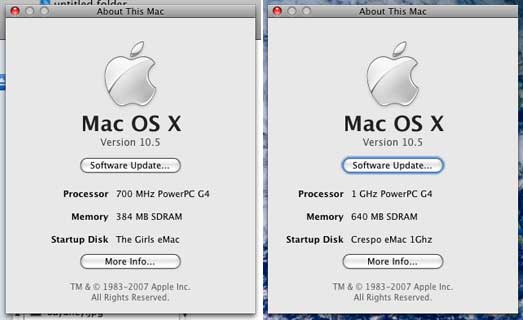
Leopard running successfully on 700 MHz and 1 GHz eMacs.
Alberto,
Thanks for your report. You're the first I've heard
from who has installed it on different eMac models. How well does the
700 MHz eMac handle Leopard with only 384 MB of RAM?
Dan
Leopard on 17" 800 MHz iMac G4
From Michael Davis:
- What unsupported Mac(s) have you installed it on? iMac G4 (Lampshade)
- How much RAM? 1 GB
- How fast a CPU? 800 MHz G4
- What video card does your Mac have? GeForce 4 MX, AGP, 32 MB of
RAM
- Which installation method did you use, a modified installer or
installing from a supported Mac? Installed from a supported Mac.
- If so, what Mac did you use to run the installer? PPC Mac
mini
- Did you install to a second internal hard drive, an external
FireWire hard drive, or using FireWire Target Disk Mode? Target Disk
Mode
Michael,
Thanks - yours is the first unsupported G4 iMac report
I've received.
Dan
Leopard on a 667 MHz VGA PowerBook
From Michael Rocus:
Leopard runs fine on my 667 MHz
PowerBook with 512 MB RAM. DVD Player runs fine with no choppy
video. No Core Image in hardware but it reports Core Image: Software.
Whatever that means.
I installed via an external hard drive I backed up the internal
drive to. I used my G4 MMD, dual
1.25MHz, to install Leopard. Then tested that it worked on the MMD.
Then booted the PowerBook from the external FireWire drive just to make
sure. After doing all that, I used Carbon Copy Cloner to copy the
external drive to the internal drive.
I'm still testing on the MMD. I installed on an otherwise blank hard
drive and not on my main drive.
I bought the Family License, so I'm legally installing on multiple
Macintoshes.
Mike Rocus
Mike,
Thanks for your report. I plan on buying the family
pack as well, as I have at least 3 Mac I'll want to install Leopard
on.
Which 667 MHz PowerBook G4 do you have, the one with
VGA video, 4x Mobility Radeon graphics, and an 1152 x 768 display or
the newer model with DVI video, Mobility 7500 graphics, and a 1280 x
854 screen?
Dan
Dan,
It's the older 667 MHz VGA model. BTW, I still have the CC Cloned
Tiger version of the PowerBook's hard drive just in case something goes
wrong later.
I put the new Parental Controls to good use right away.
Mike
Leopard on a 700 MHz iMac G4
From Ben Barsh:
I have installed Leopard on a fresh partition on my iMac G4/700 with
a 4200 rpm hard drive, 320 mb of RAM. I am impressed, to say the least.
Leopard runs about as fast on that machine as my upgrade install of
Leopard on my powerbook G4/1.33 GHz with 512 MB RAM and 5400 rpm
harddrive. Even Front Row works. I don't have the fancy transparancy,
but wow, it runs great. Front Row and Time Machine both work, and it
feels about the same as Tiger.
I'll be trying this on my tibook next!
-ben
Ben,
Thanks for the report. You're the second with a 700
MHz iMac to report success.
Dan
Leopard on an 800 MHz iBook G4
 From Ryan or Theresa Johnk:
I just read your article on running Leopard on unsupported
machines.
I just wanted to let you know that I am currently running Leopard on
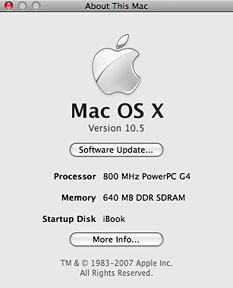
an 800 Mhz iBook G4 with 640 MB RAM. I
used the "hack the installer" method, using an iPod instead of a burned
CD.
Ryan or Theresa,
Thanks, you're the first to report Leopard running on
an 800 MHz G4 iBook. We were pretty confident that would work well.
Dan
Leopard Installed on G4/450
From Henry Harrison:
Hi Dan
Report on my unsupported install, as first mentioned on
MacInTouch
What unsupported Mac(s) have you installed it on? G4 450 Power
Macintosh
- How much RAM? 512 MB
- How fast a CPU, and what brand, if it's an upgrade? stock
450
- What video card does your Mac have? stock
- Which installation method did you use, a modified installer or
installing from a supported Mac? Installing from a supported
Mac
I installed Leopard to my PowerBook G4 1.5 GHz after backing my
Tiger install up to an external FireWire disk. I booted the 450 from
the external FireWire disk, put the PowerBook into FireWire disk mode,
and used SuperDuper (running off the Tiger install on the FireWire
drive) to clone the Leopard install from the PowerBook to the G4
450
- What doesn't work? Especially check out Time Machine (which
requires a second hard drive at least as big as your main one), DVD
Player, Front Row, and VLC.
I set the 450 up as the network backup drive (a 200 GB RAID) for the
laptop, it seems to work well as the recipient of Time Machine. I
haven't tried it as the source of a Time Machine backup. The 450 is
headless, and ShareScreen works very well to access the Finder, etc.
Quite useable. I have not tested the DVD capability, etc., as that is
not the use I have for the machine, and running that through
ShareScreen is unlikely to produce a great deal of useful
information.
- How does performance compare with Tiger subjectively and
objectively?
Subjectively not much different in its intended use as a backup
machine. The networking improvements in Leopard certainly provide
subjective improvements in terms of things like server
disconnection.
- Have you made any changes to your Mac since installing Leopard -
more RAM, a better video card, a faster hard drive? How has that
improved things? Nope
Cheers
Henry
Henry,
Thanks for the data on your install. Except for some
issues with older graphics cards, it looks like every G4 Mac can
successfuly run Leopard.
Dan
Leopard Performance on 867 MHz PowerBook
From Richard:
Dear Dan,
I have a question about Leopard performance and graphics chips. I
can't seem to find any information searching Google. Basically I have a
12" Powerbook G4 867Mhz. It meets all the requirements for Leopard
except one. It has the GeForce 4 420 Go chipset. I've read that this is
the one before the earliest supported by Core Animation. How badly will
this affect performance in Leopard? Would I be better off just sticking
with Tiger?
Thank you for any infomation you can give me.
Regards,
Richard
Richard,
At this point I haven't heard from anyone running
Leopard on a 12" 867 MHz PowerBook G4, but I have heard from people
with 700 MHz eMacs, which have the older GeForce2 graphics chip. They
report being happy with performance and consider it an overall
improvement over Tiger.
Considering that people with 400 MHz G4 Power Macs and
stock video are content with Leopard on their hardware, I think you'll
find it a good overall experience on your newer, faster PowerBook.
Dan
Dan Knight has been publishing Low
End Mac since April 1997. Mailbag columns come from email responses to his Mac Musings, Mac Daniel, Online Tech Journal, and other columns on the site.



