Leopard on a G4-upgraded G3 iMac
From Matt:
Dan,
I see you are taking submissions about who has Leopard running on
what hardware, I would like to give you mine, because I don't see
another one like it on the list.
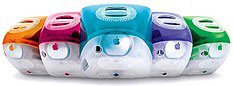
I have Leopard 10.5.1 running on an iMac
G3, of the tangerine-flavor slot-load variety. This iMac originally
shipped with a 400 MHz G3, but I have it upgraded to a 550 MHz G4.
Also, I'm running it with 1 GB of RAM and an 80 GB 7200 RPM hard
drive.
It does tend to drag a little - not quite as fast as Tiger is/was on
it. The faster hard drive and lots of memory help it out a lot though;
I don't think I would have tried it otherwise.
I installed it using Target Disk Mode, from an iBook G4 mid-2005 model. I didn't think it
would work, but after I got done loading Leopard on the iBook on launch
day, I thought I would try booting the iMac from the iBook, and it
worked! So I just used Disk Utility to copy the installation over and
it has been working ever since. This may or may not have something to
do with it, but when I installed Leopard on my iBook, I did a fresh
install, not an upgrade, so there was nothing left from Tiger that
could mess it up. Also, I know that Leopard's updates won't muck with
it, because I cloned over the 10.5.0 and updated to 10.5.1 from the
iMac, no iBook needed.
Anyways, I hope this sheds just a little more light on how good and
useful those older fruity iMacs still are.
Matt
Matt,
Thanks for your report. It's the first I've heard of a
G4-upgraded G3 iMac running Leopard, and it's nice to know it's
possible, even if a bit slower than Tiger.
Dan
Leopard on Sawtooth: Video Card a Big Deal
From Chris Kilner:
Hi Dan:
I wanted to share my brief experience with Leopard on an unsupported
AGP 450 (stock - 512 MB/DVD/Rage 128
Pro) that I recently picked up to replace an aging G3 iMac.
I installed Leopard (fresh install on empty 30 GB HFS+ volume) on an
external FireWire drive from a supported Quicksilver 867 (via a FireWire DVD drive,
since the QS only has a CD-RW drive) and updated to 10.5.1. I then
tried to boot the AGP 450 from the FireWire drive but got kernel panics
(regular and safe-boot), so I booted the AGP 450 into OS 9 and
updated the firmware (to 4.2.8?). Booting with the Leopard FireWire
drive then worked (I'm not sure how long it takes to boot
. . . I kept getting called away from the computer, but is
seems a bit slower than 10.3).
- Cover Flow was (unusably) ssslllooowww, but other views in Finder
seemed just as responsive as 10.3. I forgot to check QuickView and
Stacks.
- Mail seemed to work fine and launched 2x faster than Mail in
10.3.
- Safari launched faster and seemed fine, but QT content (like
Apple's ads) only displayed an audio bar. YouTube was choppier than in
10.3.9.
- iTunes seemed fine, but Cover Flow seemed slower than in 10.3.9
(where it was already slow).
- DVD player would not boot ("hardware not found" despite the
presence of the Hitachi DVD drive - must be referring to a supported
video card), and DVD Player from 10.3 was not supported by the OS. My
older version of VLC (that works well in 10.3) crashed on launch.
- Front Row launches to a black screen.
- I never checked operation of the screen saver.
I'm really interested in finding out whether an upgrade to a
Leopard/Core Animation video card (or even a lesser card like a
GeForce 2) resolves the other issues (DVD player, QT, etc.) - this is a
computer for an 8-year-old who is already happy with the performance of
iTunes and Safari in 10.3 (and thus does not necessarily need a
1 GHz+ processor, although I may pick up a dual 450 MHz CPU from a
Mystic), but I'd love to be able to use the Parental Controls from
Leopard (and standardize all the computers in the house using the same
OS).
Regards,
Chris Kilner
Chris,
I read this morning that an Leopard-compatible version
of VLC
is out, and I suspect that moving to a better video card (even an older
AGP Radeon) will provide a substantial improvement over the practically
obsolete (at least for Leopard) Rage 128 Pro card in your 450 MHz
Sawtooth.
I haven't used Leopard yet myself, but our reader
reports indicate that a better video card makes a huge difference for
these older G4 Power Macs.
Dan
Hi Dan:
I sent the report [above] to you a few days ago and wanted to follow
up with more of my experience.
I installed a 32 MB GeForce 2 MX video card from my Quicksilver into
the Sawtooth (i.e., a minimum Quartz Extreme card) and was absolutely
shocked at how well Leopard performed on this 8-year-old Mac. Finder
and Safari were noticeably faster than in Panther. DVD Player worked
fine, QuickTime movies looked fantastic, Front Row (and the movie
trailers) amazed my 8-year-old daughter, who has been regularly using
the Sawtooth under OS X 10.3 (although DVDs wouldn't play from
Front Row), Cover Flow was better than usable, Time Machine (with
reduced eye candy) worked fine. Even Flash movies (i.e., YouTube)
worked better. It seems unbelievable that Apple doesn't support Leopard
on any G4 with 512 MB of RAM and a video card that supports Quartz
Extreme.
I will now be looking for an AGP Radeon or GeForce card to put in
the Sawtooth (or possibly a Core Animation accelerated card for the
Quicksilver so the GeForce 2 MX can stay in the Sawtooth), and I'm
considering picking up a Cube with a
Quartz Extreme video card for myself to replace my G3 iBook 800 that can't run Leopard.
Keep up the great work!
Chris
Chris,
Thanks for the follow-up. The biggest complaint we're
seeing from the first two generations of G4 Power Macs have to do with
video: The older video cards just don't do Leopard justice, but even
ones with just enough for Quartz Extreme make a world of
difference.
Keep us posted if you upgrade to an even better video
card.
Dan
Unsupported Leopard Success
From Danny:
Dan,
I don't know if you're still collecting unsupported Leopard
installation reports, but I have one I can toss into the mix: an
AGP G4 450. I got it off of Craigslist
for $45 with no RAM, graphics card, or hard drive - and a broken handle
on the top rear, which I replaced with a spare from a spare I salvaged
from a dead B&W G3. But for $45, since it chimed when memory was
added, I had to take a chance, and it paid off. I had my own PC100 RAM,
a flashed (from PC) GeForce FX 5200 PCI card, and a couple of spare
hard drives (one 30 GB, one 10 GB).
I followed, for the most part, the directions posted on
MacRumors.com's forums. I did a few things differently, though. Since I
had two hard drives, I used Disk Utility to image the Leopard DVD to
the 10 GB hard drive and added the new OSInstall.mpkg rather than burn
it to a DVD. I had that as the slave and my 30 GB as the installation
target. The first time I booted from the 10 GB hard drive I thought I'd
done something wrong, though. I got a kernel panic. So I dug out my OS
9.1 CD and booted from that. I initialized the larger drive with two
partitions and went ahead and installed OS 9 on the first one,
just to see what could be wrong. Well, it was running firmware version
3.3.x (if I recall correctly), so I updated to 4.2.8f. Once I had that
done, I rebooted from the 10 GB drive, and because I had the modified
installer, it installed just peachy.
Once I rebooted into Leopard and let it index my drive, it seemed
really slow. I went to the Apple System Profiler and found that
the firmware update had disabled 512 of my 768 MB of memory! Darn you,
Apple! So I replaced the two 256 MB sticks with two 64 MB ones so I'd
have at least 384 MB (which still isn't enough, mind you), and it runs
a little better.
Performance on graphical tasks is abysmal. I think it's a
combination of the GeForce FX being less than it should have been in
the first place and the fact that it's a PCI card rather than an AGP
one. I have a Radeon 7500 AGP that I tried flashing with a Mac ROM, but
it resulted in a garbled mess (the ROM on themacelite.wikidot.com only supports 32 MB,
where this is a retail ATI card with 64 VRAM). Maybe I'll take a chance
on one of the PC flashed (and presumably tested) GeForce 6200 cards on
eBay. Since I don't turn off or sleep my Macs (because of running
SETI@Home all the time), the long startup doesn't bother me. DVD Player
works for movie discs; I haven't tried VLC or Front Row though. Time
Machine backs up/restores with my FireWire hard drive.
Sorry for all the parentheses, it's just the way I type.
:)
Take care,
Danny
Danny,
Yes, we're still collecting unsupported Leopard
reports. The more data we have, the better we'll understand the
benefits and bottlenecks with older hardware - video cards in
particular. Bumping RAM should also help quite a bit. Let us know if
you upgrade the system and how that impacts performance.
Dan
Flashed Video Card Problem with Dock
From David Evans:
Love the site! I bought a flashed card on eBay, had the same problem
under Tiger, and seller
'macgeniuses' suggested I use System Preferences to move the Dock
to the left. I did that and was able to get access to the Dock.
Glad this year has been so good for you, and hope it is the
beginning for you. Word of the day: hypergamy.
David Evans
David,
Sounds like the flashed card may have been working at
a resolution that put the Dock off the bottom of the screen, a new
problem to me. Have you been able to adjust things so you can put the
Dock on the bottom if you want to?
Dan
I had to go into system preferences to tell the system that I only
had one monitor, and once I did that, yes, I could.
God bless,
David Evans
The Cheapest Way to Get Into a G4 Mac
From Vy Tri Truong:
Hi Dan,
I read Russell's question on getting the cheapest G4 Mac, and I had to
chime in. I have to recommend a Sawtooth
over all other G4s for the following reasons:
- Power supply failure. The older the machine, the more likely it's
power supply will fail. In a Sawtooth, it's an easy fix: just take a
regular PC ATX power supply, solder two wires, and you're done. I was
hesitant myself, but after doing it once, it's really quite trivial.
All other G4s require quite a bit more work and would be much more
costly because of the proprietary PSUs Apple used at the time.
- Abundance of PC100 and PC133 RAM. There are lots and lots of old
Pentium IIIs out there that people throw away which use the same RAM
that Sawtooths do. Sawtooths have 4 RAM slots, so upgrading to 512 MB
or 1 GB RAM shouldn't cost very much, if anything.
- Video card upgrades do not need "taping." These Macs have a regular
2x AGP slots and aren't affected by the need to tape up the extra
connectors on PC-flashed video cards as other G4s do.
The only downsides are no gigabit ethernet and issues with dual
processor cards. But from the sounds of it, Russell won't be needing
either of those features.
Thanks for sharing your thoughts. In my experience,
power supply failures are pretty rare, and your second point assumes
you have access to obsolete Pentium III computers with more than a
rudimentary amount of RAM, something a lot of us can't count on.
Overall, I still think Quicksilver takes the value prize, as you can
buy new RAM under warranty cheaply, you have a faster system bus and
faster AGP video bus, you have gigabit ethernet, and it may work with
"large" hard drives, which are the value leader nowadays, without a
special controller or driver.
Dan
Dan Knight has been publishing Low
End Mac since April 1997. Mailbag columns come from email responses to his Mac Musings, Mac Daniel, Online Tech Journal, and other columns on the site.



